Jenkins 获取开发版本:

在 Discord 上与我们交流!
获取开发版本和快速支持:
FabioZumbi12 制作的视频教程(葡萄牙语):
描述:
葡萄牙语描述:点击这里!
PixelVip 是一个用于管理服务器 VIP 的插件,具有简单的命令、易于配置和丰富的功能:
- 为同一类密钥生成带有使用次数的密钥;
- 为命令生成密钥,以给予物品或权限,或执行任何类型的命令;
- 允许激活多个不同的 VIP,并允许玩家选择使用哪一个;
- Spigot Bungee 网络之间的完全同步;
- 时间从激活的那一刻开始计算,而不是从当天的 00:00 开始。你的玩家将使用 100% 的 VIP 时间 ;)
- 可配置命令,用于更改 VIP、移除 VIP 以及 VIP 结束时执行操作;
- 当玩家使用密钥时,基于百分比给予额外物品的命令;
- 存储玩家之前的组别,以便在 VIP 结束后恢复到原始的权限组;
- 与 Vault 挂钩以自动更改玩家组别;
- 字符串 100% 可翻译;
- 组别的 TAB 补全;
- 时间计数器基于毫秒,无需每次都将 VIP 时间保存到文件中;
查看 Spigot 版本:
命令和权限:
[] = 必需
{} = 可选
权限 pixelvip.cmd.player 默认赋予给玩家,其他权限仅赋予给 OP。
玩家命令:
命令:/usekey [key]
别名:/usarkey
权限:pixelvip.cmd.player
描述:使用生成的密钥来激活 VIP;

命令:/viptime
别名:/tempovip
权限:pixelvip.cmd.player
描述:如果玩家是 VIP,使用此命令查看剩余的天数;

命令:/setactive [group] {player}
别名:/changevip, /trocarvip
权限:pixelvip.cmd.player (使用 {player} 时需要 pixelvip.setactive)
描述:切换至其他 VIP,如果玩家已激活了多个密钥;

管理员命令:
命令:/newkey [group] [days] {uses}
别名:/gerarkey
权限:pixelvip.cmd.newkey
描述:根据配置的长度和现有的 VIP 组生成新密钥,并可选择指定该密钥的使用次数;

命令:/newitemkey [cmd1, cmd2, ...]
别名:/newikey, /gerarikey
权限:pixelvip.cmd.newitemkey
描述:生成新的物品密钥,在使用密钥时基于命令给予物品;

命令:/additemkey [键名] [cmd1, cmd2, ...]
别名:/addikey
权限:pixelvip.cmd.additemkey
描述: 将物品(或命令)添加到现有的 VIP 钥匙和物品钥匙中;

命令:/delkey [键]
别名:无
权限:pixelvip.cmd.delkey
描述: 移除任意类型的生成密钥;

命令:/listkeys
权限:pixelvip.cmd.listkeys
描述:列出所有可用的密钥;

命令:/removevip [player vip] {group}
别名:/delvip
权限:pixelvip.cmd.removevip
描述:移除玩家的 VIP,或移除玩家的所有 VIP(如果激活了多个密钥且未指定 {group}),并将玩家恢复到之前的组别;
命令:/addvip [player] [group] [days]
别名:/givevip, /darvip
权限:pixelvip.cmd.addvip
描述:为玩家添加无需密钥的 VIP,并在激活时发放物品。如果在现有的 VIP 计划上使用,天数将累加;
命令:/setvip [player] [group] [days]
权限:pixelvip.cmd.setvip
描述:为玩家添加无需密钥的 VIP,且不发送激活物品。此命令类似于静默激活。如果在现有的 VIP 计划上使用,天数将累加;
命令:/pixelvip reload
权限:pixelvip.cmd.pixelvip
描述:从配置文件重新加载配置;
待办事项:
Bungee 同步(测试版):
PixelVip 已准备就绪(测试版),可在 BungeeCoord 中运行,以同步所有 Bungee 服务器之间的 VIP 计划。
安装方法:
- 下载 PixelVipBungeeBridge 并将其放入你的 BungeeCoord 插件文件夹中;
- 下载最新版本的插件(版本 1.0.2+)并放置在你的 Spigot 服务器上,进入 /plugin/PixelVip 目录,在 config.yml 文件中修改以下选项:
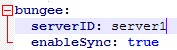
- 在 serverID 处填写你在 BungeeCooord config.yml 配置中使用的服务器名称。你需要为所有服务器分配相同的 ID,以避免在执行每个命令/同步时产生循环;
- 你需要在权限插件的所有服务器上添加相同的用户组;
- 完成更改后使用 /pixelvip reload 命令;
同步工作原理:
当某人在开启了同步功能的任一服务器上使用 PixelVip 命令时,参数将被发送到其他所有启用了 Bungee 同步的服务器。
此同步不使用调度器!该同步仅在玩家执行以下操作时发送参数:
- 激活密钥;
- 生成密钥;
- 更改 VIP 等级(如果同时激活了多个 VIP);
- VIP 到期时;
- VIP 被移除时;
关于 BungeeCoord 的注意事项:
BungeeCoord 至少需要一名玩家在 Bungee 服务器上在线才能接收参数。因此,如果某个同步服务器上没有玩家在线,该操作将处于待处理状态,直到有玩家加入该服务器为止。
此功能尚未经过 100% 测试(但已达到 90%),正等待在我的服务器和离线服务器上的更多环境和场景中进行进一步测试。
PagSeguro API:
葡萄牙语:现在 PixelVip 已支持 PagSeguro API。请参阅 Wiki 了解如何配置并下载 PagSeguro API 的 jar 文件:
源代码:
源代码托管在 GitHub 上:
你觉得为你的服务器制作类似 PixelVip 的插件怎么样?
Get dev builds on Jenkins:
Chat with us on Discord!
Get dev buils and fast support:
Video Tutorial by FabioZumbi12 (in PTBR):
Description:
Descrição em português: Clique aqui!
PixelVip is a plugin to manage vip on your server with easy commands, easy configuration and a lot of features:
- Generate Keys with quantity of usage for same Keys;
- Generate keys for commands, to give itens or permissions, or any type os commands;
- Allow more than one diferent Vip to be activated, and allow player to choose what use;
- Full syncronization between Spigot Bungee network;
- The time is counted on exact moment of activation and not at 00:00 of day. Your players will use 100% of your vip time ;)
- Configurable commands to run on change vip, remove vip and on vip finish;
- Commands to give extra itens based on % when the player use a key;
- The previous group of a player is stored, to on the end of vip, get back to your origin permission group;
- Hook with Vault to change the player group automatic;
- Strings 100% translatable;
- TAB completion for groups;
- The time counter is based on millis not needing the plugin to save the vip time every time to file;
See the Spigot version:
Commands and Permissions:
[] = Needed
{} = Optional
The permission pixelvip.cmd.player is given by default for players, and other perms only for OPs.
Player commands:
Command: /usekey [key]
Aliases: /usarkey
Permission: pixelvip.cmd.player
Description: To use a generated key to activate a vip;
Command: /viptime
Aliases: /tempovip
Permission: pixelvip.cmd.player
Description: If the player is vip, use to see the days left to end your vip;
Command: /setactive [group] {player}
Aliases: /changevip, /trocarvip
Permission: pixelvip.cmd.player (pixelvip.setactive for use with {player})
Description: To change to other vip, if the player has activated more than one key;
Admin commands:
Command: /newkey [group] [days] {uses}
Aliases: /gerarkey
Permission: pixelvip.cmd.newkey
Description: To generate a new key based on configuration lentgh and existing Vip groups, and optional amount of uses of same key;
Command: /newitemkey [cmd1, cmd2, ...]
Aliases: /newikey, /gerarikey
Permission: pixelvip.cmd.newitemkey
Description: To generate a new ITEM key to give itens based on commands on use the key;
Command: /additemkey [key] [cmd1, cmd2, ...]
Aliases: /addikey
Permission: pixelvip.cmd.additemkey
Description: To add items(commands) to existing VIPs keys and ITEM keys;
Command: /delkey [key]
Aliases: none
Permission: pixelvip.cmd.delkey
Description: To remove any type of generated key;
Command: /listkeys
Permission: pixelvip.cmd.listkeys
Description: To list all available Keys;
Command: /removevip [player vip] {group}
Aliases: /delvip
Permission: pixelvip.cmd.removevip
Description: To remove a vip of a player, or remove all vips of player (if more than one key activated and if {group} is not specified), and put the player back on previous group;
Command: /addvip [player] [group] [days]
Aliases: /givevip, /darvip
Permission: pixelvip.cmd.addvip
Description: To add a vip for player without key, giving the itens on activation. If used in an existing vip plan, the days will be added;
Command: /setvip [player] [group] [days]
Permission: pixelvip.cmd.setvip
Description: To add a vip for player without key and without send activation itens. This command is like a silent activation. If used in an existing vip plan, the days will be added;
Command: /pixelvip reload
Permission: pixelvip.cmd.pixelvip
Description: To reload the configuration from file;
To-Do:
- Add mysql system;
- Suggestions?
Bungee Syncronization(beta):
PixelVip is ready(beta) to work in bungeecoord, to sync all Vip plans between all your Bungee servers.
How to install:
- Download the PixelVipBungeeBrige and put in your BungeeCoord plug-ins folder;
- Download the latest version of plugin (version 1.0.2+) and on your Spigot servers, go to /plugin/PixelVip and change this options on config.yml:
- On serverID put the name of your server like you used on BungeeCooord config.yml. You need to give the same ID to do not make the sync loop on every command/syncronization;
- You need to add the same groups on all servers in your permissions plugin;
- Use /pixelvip reload after finish the changes;
How this sync works:
When someone use a PixelVip command in one of the server with sync enabled, the argumments will be sent to all other server with bungee sync enabled.
The sync DONT use schedulers! This sync will only send argumments when a player:
- Activate a key;
- Generate a key;
- Change the vip to other (if more than one is activated);
- On vip finish;
- On Vip removed;
Notes about BungeeCoord:
BungeeCoord need at least one player online on Bungee server to receive the argumments. Then if theres no player online in one of the Sync servers, the action will be pendente until a player join on server.
This feature is not 100% tested (but is 90%) waiting to be tested on more ambients and situations i can test on my server and on my off-line server.
PagSeguro API:
Portuguese: Agora o PixelVip já funciona com a API do pagseguro. Veja como configurar e baixe a API jar do pagseguro na WIKI:
Source:
The source is hosted on GitHub:
What you think to make plugins for your server like PixelVip?


 插件

 插件
 插件
 插件
 插件
 插件
评论 0
登录后参与评分
还没有评论,来抢沙发吧