⚔️ PlayerDummies
本插件依赖于 Citizens。
⚠️ 早期开发通知
PlayerDummies 目前处于早期开发阶段。
虽然功能完整,但您可能会遇到错误或缺失的功能。
如果您遇到此类问题:
- 在 GitHub 上提交 Issue,或
- 加入 Discord 服务器
您的反馈有助于改进该插件 <3
概述
PlayerDummies 是一款轻量级插件,为您的 Minecraft 服务器添加逼真的战斗训练假人。
适用于:
- PvP 服务器
- 练习竞技场
- 伤害测试区
- 战斗教程
- 小游戏大厅
PlayerDummies 创建完全交互式的 Citizens NPC,它们能够:
- 准确模拟真实玩家受到的伤害(包括护甲和附魔减伤)
- 支持所有武器、护甲等级、附魔和药水
- 在行动栏中提供实时战斗反馈
- 永远不会死亡或被击退
更智能地训练。更快地测试。提升你的战斗技巧。
主要功能
逼真的战斗假人
- Citizens NPC 模拟真实的玩家伤害行为
- 支持所有武器、护甲等级(皮革 → 下界合金)、附魔和药水
- 准确检测暴击、战锤坠落伤害加成以及力量药水效果
- 投射物支持 - 箭矢、三叉戟、雪球等均可命中并记录
实时伤害追踪
- 行动栏(或聊天框,如果已配置)中的实时显示:
Damage: 7.5 (3.8 ❤)
- 同时显示原始伤害数值 以及 经过护甲/附魔减伤后的实际心数损失
- 反映你对一个全副武装的玩家实际能造成的伤害
通过 GUI 全面自定义
- Shift + 右键点击假人以打开 假人管理器 GUI
- 使用自定义颜色代码重命名假人
- 更改皮肤为任何 Minecraft 用户名(集成 Citizens)
- 通过专用的 护甲编辑器 装备任意护甲套装 - 头盔、胸甲、护腿、靴子
- 在同一 GUI 中拾取假人
持久化与所有者保护
- 假人在服务器重启后依然存在(按 UUID 保存在
plugins/PlayerDummies/data/ 目录下)
- 默认情况下,只有放置者可以管理自己的假人(可配置)
- 放置时自动调整朝向 - 假人面向你
要求
必需:
- Minecraft 1.18.2+
- Spigot 或 Paper
- Java 17+
- Citizens(必需 - 缺少此插件将无法加载)
可选:
工作原理
对于服务器管理员
安装
- 将 JAR 文件放入
plugins/ 文件夹
- 安装 Citizens(必需)
- 重启服务器
- 在
plugins/PlayerDummies/config.yml 中配置设置
配置
配置文件位于 /plugins/PlayerDummies。
权限
所有权限默认授予 op。
| 权限 |
描述 |
playerdummies.give |
使用 /dummies give |
playerdummies.reload |
重新加载插件配置和消息 |
playerdummies.admin |
访问管理命令:list, remove, info |
对于玩家
步骤 1 - 获取假人
/dummies give <player> <amount>
你将在物品栏中获得一个 玩家假人 物品(一个玩家头颅)。
步骤 2 - 放置它
- 手持假人物品并 右键点击方块
- 假人生成在该方块上方,自动面向你
- 每次放置消耗一个假人物品
步骤 3 - 通过 GUI 管理
Shift + 右键点击 假人以打开 假人管理器:
| 按钮 |
操作 |
| ?️ 设置显示名称 |
点击,然后在聊天中输入名称(支持 & 颜色代码) |
| ? 设置皮肤 |
点击,然后在聊天中输入 Minecraft 用户名 |
| ?️ 护甲编辑器 |
打开 GUI 以装备头盔、胸甲、护腿和靴子 |
| ? 拾取假人 |
移除假人并将物品返回到你的物品栏 |
| ↩️ 返回 |
关闭菜单 |
在护甲编辑器内部:
- 将护甲部件拖入四个护甲槽位
- Shift+点击物品栏中的护甲以自动填充正确的槽位
- 点击 保存护甲 以应用更改到假人
- 不保存直接关闭会将你放置的任何物品退回物品栏
步骤 4 - 测试伤害
- 正常攻击假人
- 行动栏显示:
Damage: X.X (X.X ❤) - 考虑假人的护甲和附魔后的实际造成伤害
- 测试任何武器、附魔、药水、暴击或投射物组合
- 假人 永远不会死亡或移动
命令
| 命令 |
权限 |
描述 |
/dummies give <player> <amount> |
playerdummies.give |
向玩家发放假人物品 |
/dummies reload |
playerdummies.reload |
重新加载配置和消息 |
/dummies list |
playerdummies.admin |
列出所有已保存的假人 |
/dummies remove <uuid> |
playerdummies.admin |
强制通过 UUID 移除假人 |
/dummies info <uuid> |
playerdummies.admin |
显示假人的详细信息(所有者、位置、类型) |
别名: /dummy 和 /dummies 均有效。
使用场景
⚔️ PvP 练习竞技场
在进入竞技区域之前,与全副武装的假人进行训练。
? 伤害测试实验室
通过准确的反馈优化装备、附魔和药水组合。
? 小游戏大厅
在游戏开始等待期间保持玩家的参与度。
? 战斗教程
在安全、受控的环境中教导新玩家机制。
开发者 API
官方 API 目前正在开发中。
敬请期待集成功能。
为什么选择 PlayerDummies?
- ✅ 轻量且优化良好
- ✅ 精确的护甲与附魔伤害模拟
- ✅ 基于图形界面的假人管理
- ✅ 专为现代 Minecraft 打造
- ✅ 持久化存储
- ✅ 简单直观
支持与更新
发现 Bug?
在此报告:
想要新功能?
在 Discord 服务器 中提出建议
截图
动作条伤害显示

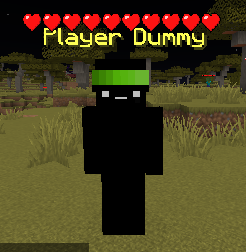
自定义皮肤(Citizens 集成)
感谢您使用 PlayerDummies!⚔️
⚔️ PlayerDummies
This plugin depends on Citizens.
⚠️ Early Development Notice
PlayerDummies is currently in early development.
While fully functional, you may encounter bugs or missing features.
If you do:
- Open an issue on GitHub or
- Join the Discord Server
Your feedback helps improve the plugin <3
Overview
PlayerDummies is a lightweight plugin that adds realistic combat training dummies to your Minecraft server.
Perfect for:
- PvP servers
- Practice arenas
- Damage testing zones
- Combat tutorials
- Minigame lobbies
PlayerDummies creates fully interactive Citizens NPCs that:
- Accurately simulate real player damage (including armor and enchantment reduction)
- Support all weapons, armor tiers, enchantments, and potions
- Provide real-time combat feedback in your action bar
- Never die or get knocked back
Train smarter. Test faster. Improve your combat.
Key Features
Realistic Combat Dummies
- Citizens NPCs simulate real player damage behaviour
- Supports all weapons, armor tiers (Leather → Netherite), enchantments, and potions
- Accurate critical hit detection, mace fall-damage bonus, and Strength potion tracking
- Projectile support - arrows, tridents, snowballs and more all register hits
Real-Time Damage Tracking
- Live display in your action bar (or chat, if configured):
Damage: 7.5 (3.8 ❤)
- Shows both raw damage dealt and hearts lost after armor/enchantment reduction
- Reflects what you would actually deal to a fully-geared player
Full Customisation via GUI
- Shift + Right-click a dummy to open the Dummy Manager GUI
- Rename your dummy with custom colour codes
- Change the skin to any Minecraft username (Citizens integration)
- Equip any armor set through the dedicated Armor Editor - helmet, chestplate, leggings, boots
- Pick up your dummy from the same GUI
Persistent & Owner-Protected
- Dummies survive server restarts (saved per-UUID under
plugins/PlayerDummies/data/)
- Only the placer can manage their dummy by default (configurable)
- Automatic orientation on placement - dummy faces you
Requirements
Required:
- Minecraft 1.18.2+
- Spigot or Paper
- Java 17+
- Citizens (required - plugin will not load without it)
Optional:
- PlaceholderAPI (for placeholder support)
How It Works
For Server Owners
Installation
- Place the JAR into your
plugins/ folder
- Install Citizens (required)
- Restart your server
- Configure settings in
plugins/PlayerDummies/config.yml
Configuration
Config files are in /plugins/PlayerDummies.
Permissions
All permissions default to op.
| Permission |
Description |
playerdummies.give |
Use /dummies give |
playerdummies.reload |
Reload the plugin config and messages |
playerdummies.admin |
Access admin commands: list, remove, info |
For Players
Step 1 - Get a Dummy
/dummies give <player> <amount>
You will receive a Player Dummy item (a player head) in your inventory.
Step 2 - Place It
- Hold the dummy item and right-click a block
- The dummy spawns on top of the block, automatically facing you
- One dummy item is consumed per placement
Step 3 - Manage via GUI
Shift + Right-click the dummy to open the Dummy Manager:
| Button |
Action |
| ?️ Set Display Name |
Click, then type a name in chat (supports & colour codes) |
| ? Set Skin |
Click, then type a Minecraft username in chat |
| ?️ Armor Editor |
Opens a GUI to equip helmet, chestplate, leggings, and boots |
| ? Pick Up Dummy |
Removes the dummy and returns the item to your inventory |
| ↩️ Back |
Close the menu |
Inside the Armor Editor:
- Drag armor pieces into the four armor slots
- Shift-click armor from your inventory to auto-fill the correct slot
- Click Save Armor to apply changes to the dummy
- Closing without saving returns any items you placed back to your inventory
Step 4 - Test Damage
- Attack the dummy normally
- Your action bar shows:
Damage: X.X (X.X ❤) - actual damage dealt after accounting for the dummy's armor and enchantments
- Test any weapon, enchantment, potion, critical hit, or projectile combination
- The dummy never dies or moves
Commands
| Command |
Permission |
Description |
/dummies give <player> <amount> |
playerdummies.give |
Give dummy items to a player |
/dummies reload |
playerdummies.reload |
Reload config and messages |
/dummies list |
playerdummies.admin |
List all saved dummies |
/dummies remove <uuid> |
playerdummies.admin |
Force-remove a dummy by its UUID |
/dummies info <uuid> |
playerdummies.admin |
Show details about a dummy (owner, location, type) |
Aliases: /dummy and /dummies both work.
Use Cases
⚔️ PvP Practice Arenas
Train against a fully-geared dummy before entering competitive zones.
? Damage Testing Labs
Optimise builds, enchantments, and potion combos with accurate feedback.
? Minigame Lobbies
Keep players engaged while waiting for a game to start.
? Combat Tutorials
Teach new players mechanics in a safe, controlled environment.
API for Developers
An official API is currently in development.
Stay tuned for integration features.
Why Choose PlayerDummies?
- ✅ Lightweight & optimized
- ✅ Accurate armor & enchantment damage simulation
- ✅ GUI-based dummy management
- ✅ Built for modern Minecraft
- ✅ Persistent storage
- ✅ Simple and intuitive
Support & Updates
Found a bug?
Report it here:
Want a feature?
Suggest it in the Discord Server
Screenshots
Action Bar Damage Display
Custom Skins (Citizens Integration)
Thank you for using PlayerDummies! ⚔️


 插件

 插件
 插件
 插件
 插件
 插件
评论 0
登录后参与评分
还没有评论,来抢沙发吧