
简介
PlayerStats 是一款 Minecraft 服务器插件,提供了一条命令来以排行榜前 10 名或单独查看的方式展示玩家统计数据。目前支持在以下平台上运行版本 1.16.5 至 1.21.8:
- Bukkit
- Spigot
- Paper
- Purpur
(PlayerStats 也可能在其他平台上正常工作,但以上是我明确测试过的平台。)
功能
易于使用
- 一个中心命令即可实现以下功能:
- 通过 /statistic 命令解释如何使用本插件
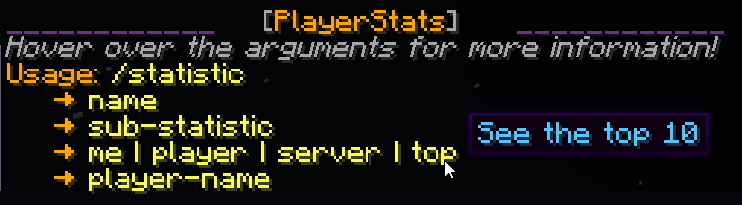
- 通过 /statistic ... top 命令展示服务器上所有可能统计项的 前 10 名

- 通过 /statistic ... player 命令查看任何单个玩家的相同统计数据

- 或者查看服务器上所有人的 合计总数

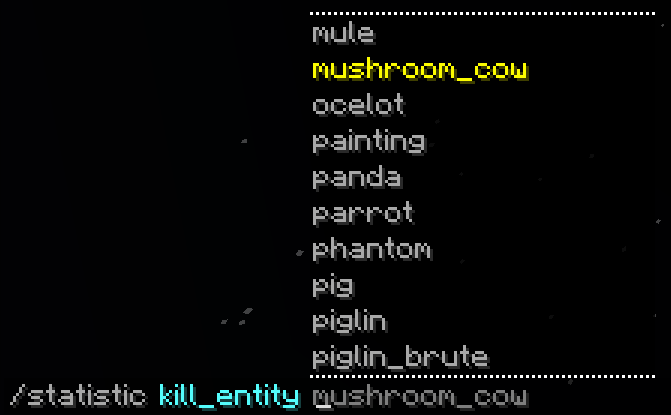
- 输入时通过强大的自动补全功能引导你了解可用选项
- 以符合 Minecraft 世界观且易于阅读的格式输出结果,并在悬停文本中显示更多信息:

- 分享你在聊天中查询到的统计数据给其他玩家:

无需设置
- 无论你的服务器已经存在多久,PlayerStats 都能正常工作——它不需要在你创建新世界时就已安装
- 数据直接从现有的玩家文件中获取,因此你无需设置数据库、记分板或其他类似组件
PlaceholderAPI 支持
- 占位符包含在一个独立的扩展中,你可以在这里找到:GitHub,PlaceholderAPI eCloud,或通过在游戏中执行 /papi ecloud download PlayerStats进行下载
- 有关占位符的更多信息,请参阅该扩展的 GitHub!

安全
- PlayerStats 使用多线程技术,确保服务器性能不受影响,并且玩家无法通过频繁使用该命令导致服务器崩溃
- 这也意味着统计数据的计算将非常快速
可定制
- 你可以自定义以下内容(以及更多):
- 选择你想要显示的基于时间、伤害和距离的统计数据的单位范围:

- 自动翻译统计数据以匹配查看它们的客户端语言,或通过language.yml文件自定义统计名称
- 随时使用节日风格格式化,或启用彩虹模式!

- 仅显示白名单内玩家的统计数据
- 从被封禁 玩家中排除统计数据
- 使用 /statexclude 命令从特定玩家中排除统计数据
- 根据玩家的 最后加入时间限制统计数据。如果你服务器过去有很多玩家加入,而他们的统计数据对你当前的玩家群体没有太大意义,这个选项会特别有用。此外,限制排行榜前10名显示的玩家数量可以大幅提升性能。
- 你希望输出结果显示的颜色
- 你可以选择默认的 Minecraft 聊天颜色,或使用十六进制颜色
- 你是否希望输出结果具有额外的 样式,例如斜体
- 你可以配置以下权限:
- playerstats.stat 用于使用通用命令(默认情况下对所有人开启)
- playerstats.share 用于在聊天中分享统计数据(默认情况下对所有人开启)
- playerstats.reload 用于重新加载配置文件(默认情况下仅限 OP 玩家)
- playerstats.exclude 用于将玩家从排行榜和服务器统计中排除(默认情况下仅限 OP 玩家)
作者信息
我是一名相对较新的程序员,这是我的早期项目之一。我非常享受制作它的过程,并尽力使其尽可能高效。如果你有任何问题、意见或建议,请随时告诉我!你可以在 GitHub 上的这里找到我。
About
PlayerStats is a Minecraft server plugin that adds a command to view player statistics in top-10 format or individually. Currently supports version 1.16.5 to 1.21.8 on platforms:
- Bukkit
- Spigot
- Paper
- Purpur
(It's possible PlayerStats works on other platforms too, but these are the ones I have explicitly tested.)
Features
Easy to use
- One central command that can:
- Explain how to use the plugin with /statistic
- Show you the top 10 on your server for all possible statistics with /statistic ... top
- See those same statistics for any individual player with /statistic ... player
- Or look up the combined total of everyone on your server
- Guide you through the available options while you type with an extensive tab-complete feature
- See the output in a readable format that makes sense in the Minecraft world, with more information in hover-text:
- Share statistics that you look up with the other players in chat:
No set-up required
- PlayerStats will work correctly regardless of how long your server has already existed - it doesn't have to be present when you start a new world
- Data is retrieved directly from already existing playerfiles, so you don't have to set up a database, use scoreboards, or anything of the sort
PlaceholderAPI support
- Placeholders are added in a separate expansion, which can be found here on GitHub, in the PlaceholderAPI eCloud, or downloaded in-game with /papi ecloud download PlayerStats
- For more information about the placeholders, see the expansion's GitHub!
Safe
- PlayerStats uses multi-threading to ensure server performance does not suffer and players cannot crash the server by spamming its commands
- This also means that calculating statistics will be very fast
Customizable
- You can customize the following (and more):
- Choose which range of units you want to display your time-, damage- and distance-based statistics in:
- Automatically translate statistics to the language of the client that views them, or customize the statistic-names through the language.yml file
- Use festive formatting, or enable rainbow mode whenever!
- Only show statistics for whitelisted players
- Exclude statistics from banned players
- Exclude statistics from specific players with /statexclude
- Limit statistics based on when a player last joined. This option can be particularly useful if you have had a lot of players join your server in the past whose statistics aren't of particular interest to your current player-base. On top of that, limiting the amount of players shown in the top 10 can greatly increase performance speed.
- The colors you want the output to be
- You can go for default Minecraft chat colors, or use hex colors
- Whether you want the output to have additional style, such as italics
- You can configure the following permissions:
- playerstats.stat for using the general command (true for everyone by default)
- playerstats.share for sharing statistics in chat (true for everyone by default)
- playerstats.reload for reloading the config (only for OP players by default)
- playerstats.exclude to exclude players from top- and server-statistics (only for OP players by default)
Author Info
I am a relatively new programmer, and this is one of my first projects. I greatly enjoyed making it, and I tried to make it as efficient as I could. If you have any questions, remarks, or suggestions, please let me know! You can find me here on GitHub.

下载 Player Statistics | 玩家状态
下载 Player Statistics | 玩家状态
下载 Player Statistics | 玩家状态
下载 Player Statistics | 玩家状态
下载 Player Statistics | 玩家状态
下载 Player Statistics | 玩家状态
下载 Player Statistics | 玩家状态
下载 Player Statistics | 玩家状态
下载 Player Statistics | 玩家状态
下载 Player Statistics | 玩家状态
更新内容
- 支持 1.21.6、7 和 8:PlayerStat 的库已再次更新,以修复最新 Minecraft 版本中的分享按钮和悬停文本问题
关于这个资源的讨论、问题反馈与使用心得
还没有讨论,来发第一帖吧
你是这个资源的作者?登录后可认领此资源。
相似资源
 插件

PacketEvents 是一款专为 Minecraft Java 版打造的协议库,旨在简化数据包的处理与传输。
 插件
ExyliaPlugins 的库。
 插件
通过对话框或铁砧界面帮助你的 Anthme
 插件
自定义你的Minecraft头像!
 插件
重新定义服务器上的生物运输方式。使用高度可定制的口袋道具,安全地捕获、存储和释放任何实体。
 插件
为基于 Spigot/Paper/Folia 的服务器添加对 Vivecraft 的支持
评论 0
登录后参与评分
还没有评论,来抢沙发吧