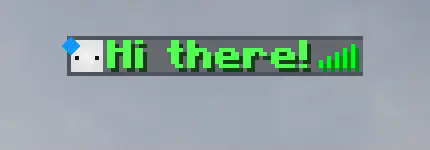
此插件允许服务器管理员将任何在线或离线玩家的名称牌设置为他们喜欢的任何内容!它就像你用名牌右键点击玩家一样工作!遗憾的是,该插件不允许玩家加入原版队伍(/team),因为要隐藏实际的玩家名称牌,所有玩家都必须在一个 nametagVisibility 选项设置为 never 的队伍中。你可以通过将新队伍的 nametagVisibility 也设置为 never 来绕过这个问题。
在使用 /nametag set 命令时,你可以使用 & 字符而不是通常的 § 字符来为名称着色或格式化。如果你仍然想使用 & 字符,只需在它前面加上反斜杠 \ 即可。更多信息请参阅 格式化代码。
所有命令的语法和配置文件参数都在下方列出。
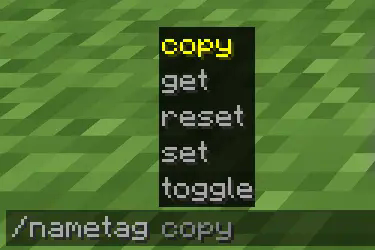
你可以使用 /nametag 命令设置玩家的名称:

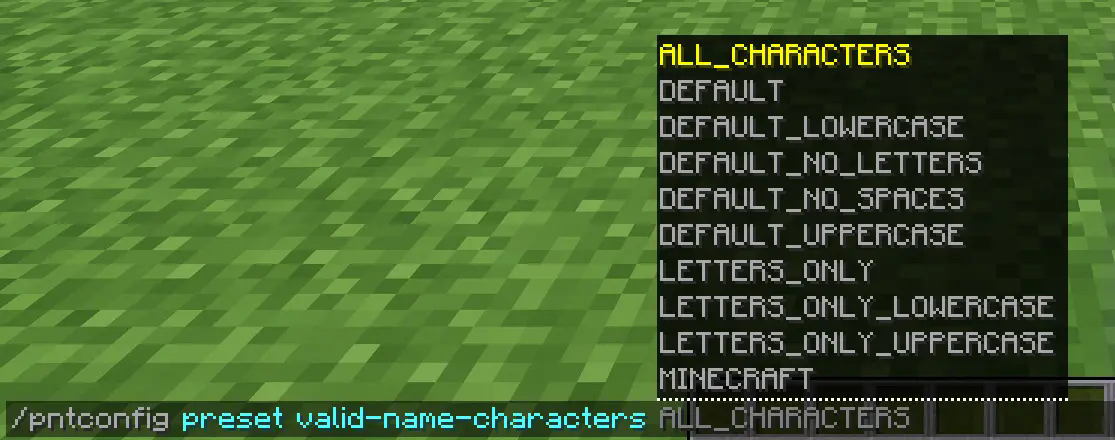
你还可以使用 pntconfig 命令在运行时更改插件的配置:

注意事项:
- 用
<> 括起来的参数是必需的命令参数
- 用
[] 括起来的参数是可选的命令参数
| 表示“或”。因此,<get|set> 意味着你可以输入 get 或 set。
Nametag 命令语法:
/nametag <copy|get|reset|set|toggle> 是子命令
/nametag copy <name|prefix|suffix> <source_player> <target_player> 会将 source_player 的名称、前缀或后缀复制到 target_player 上。
/nametag get <name|prefix|suffix> [player] 会将执行命令的人发送 player 的名称、前缀或后缀。如果此命令在没有 player 参数的情况下执行,它将假定 player 参数为执行命令的人。
/nametag reset <name|prefix|suffix> [player] 将重置 player 的名称、前缀或后缀。这意味着前缀和后缀将被移除,名称将重置为玩家的 IGN。
/nametag set <name|prefix|suffix> <player> <text> 将把 player 的名称、前缀或后缀设置为 text。默认情况下,空格是有效字符,这意味着 <text> 之后的所有内容都将被视为其一部分(包括空格)。
/nametag toggle [player] 将开启/关闭 player 的名称牌。蹲下或变得不可见不会影响名称牌的状态,直到重新开启为止。
Config 命令语法:
/pntconfig <get|preset|reset|set> 是子命令
/pntconfig get <config_option> 会将执行命令的人发送配置文件中存储的 config_option 的值。配置文件位于 plugin 文件夹中的 PlayerNameTags。
/pntconfig preset <config_option> <preset> 将把 config_option 的值设置为所选的 preset。
/pntconfig reset <config_option> 将把 config_option 的值重置为其默认值。
/pntconfig set <config_option> <value> 将把 config_option 的值设置为给定的 value。
配置选项(括号内是你可分配给它的值的类型):
enable-colors 允许名称牌着色!(布尔值)
enable-formatting 允许名称牌加粗、斜体、下划线、混淆或删除线!(布尔值)
enable-plugin 设置插件是否启用。即使此设置为 false,你也可以使用 /pntconfig 命令启用插件。(布尔值)
max-name-length 确定玩家的名称可以有多长。不是整个名称牌,只是他们的名称。(数字)
max-prefix-length 确定玩家的前缀可以有多长。(数字)
max-suffix-length 确定玩家的后缀可以有多长。(数字)
valid-name-characters 确定名称、前缀和后缀可以由哪些字符组成。(字符)
在未来,我计划为玩家添加“标题”,位于他们名称牌的上方或下方,功能类似于前缀或后缀。在此之前,我需要彻底改造插件,这可能需要一些时间。
请随意在任何服务器上使用此插件。
This plugin allows a server admin to set any online or offline player's nameplate to whatever they like! It works as if you right clicked a player with a nametag! Unfortunately the plugin does not allow players to be on vanilla teams (/team) since in order to hide the actual player nameplate all players must be in a team with the nametagVisibility option set to never. You can work around this by setting the new team's nametagVisibility to never as well.
You can color or format names using the & character instead of the usual § when using the /nametag set command. You can still use the & character by adding a backslash \ before it. See more at Formatting Codes.
All of the commands' syntaxes and the config's parameters are at the bottom.
You can set a player's name using the /nametag command:

And you can change the plugin's config during runtime using the pntconfig command:

Notes:
- Parameters surrounded by
<> are mandatory command arguments
- Parameters surrounded by
[] are optional command arguments
| means "or". So, <get|set> means you can input get or set.
Nametag command syntax:
/nametag <copy|get|reset|set|toggle> are the sub-commands
/nametag copy <name|prefix|suffix> <source_player> <target_player> will copy source_player's name, prefix, or suffix onto target_player.
/nametag get <name|prefix|suffix> [player] will send the person who executed the command the player's name, prefix, or suffix. If this command is executed without the player argument it will assume the player argument as the one who executed the command.
/nametag reset <name|prefix|suffix> [player] will reset the player's name, prefix, or suffix. Meaning the prefix and the suffix will be removed and the name will be reset to the player's IGN.
/nametag set <name|prefix|suffix> <player> <text> will set the player's name, prefix, or suffix to text. By default, spaces are valid characters, which means anything after <text> will be treated as part of it (including the spaces).
/nametag toggle [player] will turn the nametag of player on/off. Crouching or going invisible will not affect the nametag's state until toggled back on.
Config command syntax:
/pntconfig <get|preset|reset|set> are the sub-commands
/pntconfig get <config_option> will send the person who executed the command the value stored for config_option in the config file. The config file can be found in the plugin folder PlayerNameTags.
/pntconfig preset <config_option> <preset> will set the config_option's value to the preset chosen.
/pntconfig reset <config_option> will set the config_option's value to its default one.
/pntconfig set <config_option> <value> will set the config_option's value to the value given.
Config options (in parenthesis are the types of values you can assign to it):
enable-colors allows nameplates to be colored! (Boolean)
enable-formatting allows nameplates to be bold, italic, underlined, obfuscated or strokethrough! (Boolean)
enable-plugin sets the plugin as enabled or not. You can enable the plugin using the /pntconfig command even if this is set to false. (Boolean)
max-name-length determines how long a player's name can be. Not the entire nametag, just their name. (Number)
max-prefix-length determines how long a player's prefix can be. (Number)
max-suffix-length determines how long a player's suffix can be. (Number)
valid-name-characters determines which characters names, prefixes, and suffixes can be made of. (Characters)
In the future, I plan on adding "titles" to players above or below their nametags, functioning similarly to a prefix or suffix. Before that, however, I'd have to revamp the plugin which should take some time.
Feel free to use this plugin on any server.
评论 0
登录后参与评分
还没有评论,来抢沙发吧