PlayerServers PluginSelector 是 PlayerServers 的附加插件(AddOn)!它无法在脱离 PlayerServers 的情况下单独使用。

PlayerServers 附加组件 » PSPluginSelector
PluginSelector 是 PlayerServers 的一个附加插件,允许服务器创建者根据需要启用或禁用指定的插件,而不仅仅是选择整个模板。PluginSelector 附加组件应安装在 PlayerServer 模板中,并允许该服务器的创建者在漂亮的图形用户界面(GUI)中选择和启用或禁用插件——这些插件已在配置文件中指定——无需学习任何新命令!
PSPluginSelector 是 PlayerServers 的附加插件!它无法在脱离 PlayerServers 的情况下单独使用!
功能 »
自动读取配置目录中的可用插件,并填充配置文件以便轻松编辑。
自定义图标名称、多行描述、材质、耐久度等。
指定插件依赖项,以便在需要时安装它们。
从列表中隐藏插件,使其只能作为依赖项安装。
在配置文件中启用/禁用某些插件。
自定义消息。
挂钩现有的 /myserver 命令,因此玩家无需额外步骤即可使用。
截图 »
将 PluginSelector 图标添加到 PlayerServers /myserver » 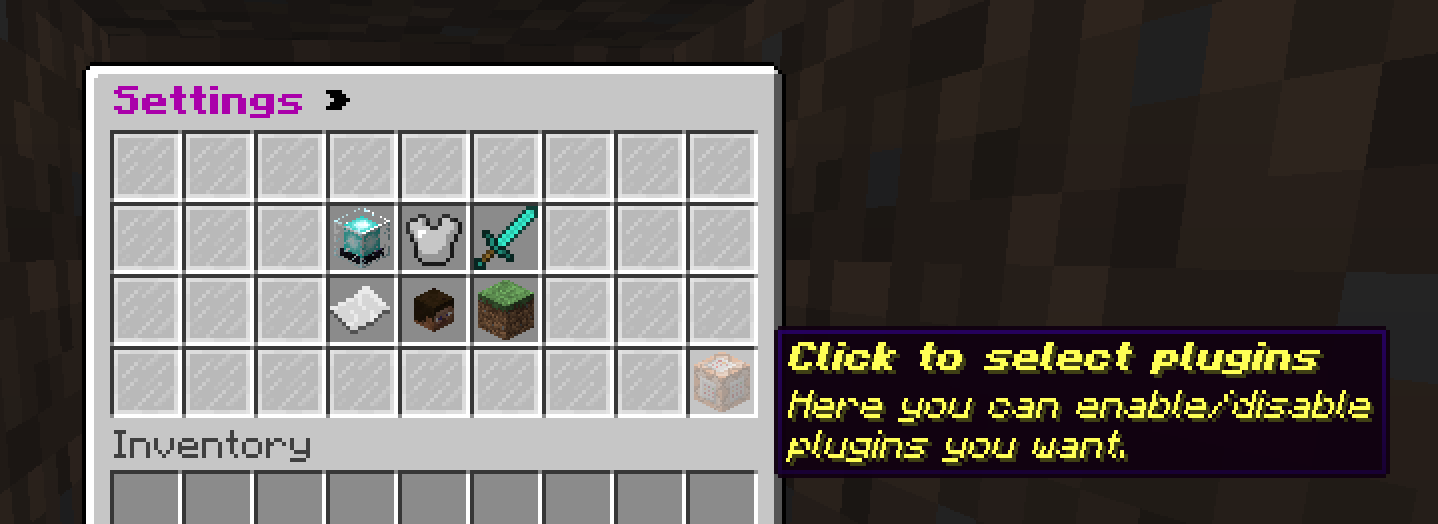 PluginSelector 菜单 »
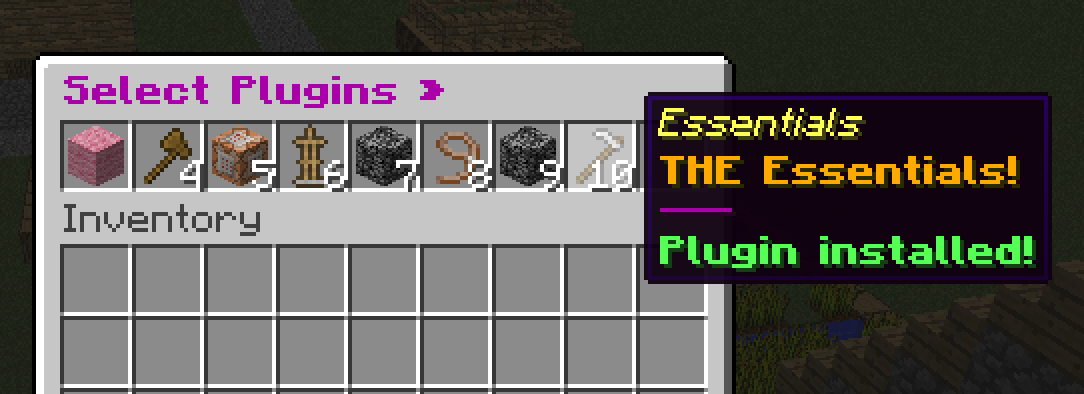
要求 »
PlayerServers (1.7+)
安装 »
PSPluginSelector 是一个 bukkit 插件,应该放置在玩家服务器(由 PlayerServers 生成)上,因此它需要包含在一个 PlayerServers 模板中(并且完全设置好)。你想要包含在 PSPluginSelector GUI 中的插件需要放在各自的独立目录中以存储可用插件。
因为你需要在模板中设置它(模板被复制以创建服务器,但它本身通常不是一个运行中的服务器),所以不像直接加载插件并编辑配置文件那样简单。有两种方法可以设置配置文件,请逐步跟随它们,应该就能正常工作。默认 config.yml 可以在插件页面上找到,你可以阅读配置文件注释,或者将其复制到模板中以供选项 2 使用。当插件正确设置后,它将出现在 GUI 中。
选项 1 » 自动生成插件列表:
这有点迂回,但让你自动加载一个插件列表进行编辑,而不是手动输入所有插件。
将 PSPluginSelector.jar 放入 PlayerServers 模板中。
使用该模板创建一个玩家服务器,以在你的玩家服务器中生成插件文件夹和配置文件。
导航到你的玩家服务器插件文件夹 (/playerservers/configured/folder/servers/YOUR-UUID-HERE/plugins)
编辑 "plugins-folder" 配置设置,然后重新加载或重启服务器以自动扫描插件文件夹。
plugins-folder 设置不应指向服务器或模板的插件文件夹。
将生成的 PSPluginSelector 文件夹复制/移动回模板文件夹(或多个模板文件夹),并在 config.yml 中编辑插件名称、描述、启用/禁用状态等。
每个模板可以有不同的启用/禁用/隐藏的插件,但每个模板必须列出所有插件或将 auto-scan-plugins 设置为 false,否则可能会从插件文件夹中添加插件并在不需要时使用。
完成!
选项 2 » 手动指定插件列表:
这将需要你手动创建插件文件夹并复制 config.yml,但不需要创建服务器来生成配置文件。
将 PSPluginSelector.jar 放入 PlayerServers 模板中。
在模板的插件文件夹中创建一个名为 'PSPluginSelector' 的文件夹。
在 'PSPluginSelector' 文件夹中创建一个名为 config.yml 的文件,并将默认 config.yml(见下文)复制进去。
根据你的需求修改 config.yml。为每个要添加的插件复制示例插件配置,并确保如果你不希望插件文件夹中的所有/新添加的插件被自动添加,则将 auto-scan-plugins 设置为 false。
plugins-folder 设置不应指向服务器或模板的插件文件夹。
完成!
设置建议 »
将此插件的 config.yml 或配置文件符号链接到模板的插件文件夹,这样你可以编辑一个文件并更新所有服务器,而不是将其复制到每个服务器并需要单独更新新插件。
命令 »
只有服务器创建者和 OPs 可以使用这些命令。
/plugin » 不带参数时,只会打开插件安装 GUI。
/plugin list » 列出所有可用且可见的插件及其安装状态。
/plugin install [plugin] » 打开安装 GUI 或切换指定插件的安装状态。
PlayerServers PluginSelector is an AddOn plugin for PlayerServers! It cannot be used without PlayerServers!
PlayerServers AddOn » PSPluginSelector
PluginSelector is an add on plugin for PlayerServers that allows servers creators to enable and disable specified plugins as they desire, instead of just selecting whole templates. The PluginSelector add-on should be installed in a PlayerServer template, and will allow the creator of that server to select plugins— that you have specified in the config— to enable or disable on their server, in a nice GUI, without any new commands to learn!
PSPluginSelector is an AddOn plugin for PlayerServers! It cannot be used without PlayerServers!
Features »
Reads available plugins in the configured directory automatically and populates the config for easy editing.
Customizable icon name, multi-line lore, material, durability, and more.
Specify plugin dependencies to have them install when needed.
Hide plugins from list so they only can be installed as dependencies.
Enable/disable certain plugins in the config.
Customizable messages.
Hooks existing /myserver command, so no extra steps for players to learn.
Screenshot »
Added PluginSelector icon to PlayerServers /myserver »
PluginSelector Menu »
Requirements »
PlayerServers (1.7+)
Installation »
PSPluginSelector is a bukkit plugin that should go on players' servers (generated by PlayerServers), thus it needs to be included (and be fully setup) in a PlayerServers template. The plugin's that you want to be included in the PSPluginSelector GUI need to be in their own separate directory for storing available plugins.
Because you need to set it up in a template (which is copied to MAKE a server, but is not ITESELF normally a server that runs), it's not as straightforward as just loading the plugin and editing the config. There are two paths you can go down to get the config setup, follow them step by step and it should work. The default config.yml can be found on the plugin page for you to read the config comments, or to copy into the template for option 2. When the plugin is properly setup, it will appear in the GUI.
Option 1 » Auto-generate plugins list:
This is a little roundabout, but lets you auto-load a plugin list to edit, instead of manually entering all plugins.
Put PSPluginSelector.jar in a PlayerServers template.
Create a player server from that template to generate the plugin folder and config in your player server.
Navigate to your player server plugins folder (/playerservers/configured/folder/servers/YOUR-UUID-HERE/plugins)
Edit the "plugins-folder" config setting and reload or restart the server to auto-scan the plugins folder.
The plugins-folder setting should NOT be a server OR template plugins folder.
Copy/move the generated PSPluginSelector folder back to the template folder (or multiple template folders), and edit plugin names, descriptions, enabled/disabled status, etc in the config.yml.
Each template can have different plugins enabled/disabled/hidden, but each template must have ALL plugins listed OR auto-scan-plugins set to false, or else plugins may be added from the plugins folder & usable when not wanted.
Done!
Option 2 » Manually Specify plugin list:
This will require you to create a plugin folder and copy the config.yml manually, but doesn't require creating a server to generate the config.
Put PSPluginSelector.jar in a PlayerServers template.
Create folder named 'PSPluginSelector' in the templates plugin folder.
Create a file in the 'PSPluginSelector' folder named config.yml, and copy the default config.yml (found below) into it.
Modify the config.yml to your needs. Duplicate the example plugin config for each plugin you want to add, and be sure to set auto-scan-plugins to false if you don't want all/newly added plugins in the plugins-folder to be automatically added.
The plugins-folder setting should NOT be a server OR template plugins folder.
Done!
Setup Suggestions »
Symlink this plugin's config.yml or config folder to templates' plugins folder, so you can edit one file and update all servers, instead of having it be copied to each server and require individual updating with new plugins.
Commands »
Only the server creator and OPs can use these commands.
/plugin » With no args, will just open the plugin install GUI.
/plugin list » Lists all available & visible plugins and their install status.
/plugin install [plugin] » Opens the install GUI or toggles the install status of the specified plugin.
 插件
 插件
 插件
 插件

 插件
 插件
评论 0
登录后参与评分
还没有评论,来抢沙发吧