
PlayMoreSounds 是一个非常全面的插件,你可以为各种场合分配音效。该插件的主要目标是:每当玩家触发某个事件(即执行某项操作)时播放一段音效。除了为玩家事件播放音效外,最实用的功能还包括:当玩家发送特定命令时播放音效;当玩家处于你用魔杖工具创建的音效区域内时循环播放音效;当玩家在聊天中输入特定词汇时播放音效;同时播放多个音效而非仅一个;播放音符盒的音符而非普通音效;等待一段时间后再播放音效,等等。请在下方列表中查看 PlayMoreSounds 最酷的功能。
警告: 如果 config.yml 中的 "CheckForUpdates" 布尔值启用,插件将在服务器启动时尝试连接 以检查更新。如果你不希望 PlayMoreSounds 连接到外部网站,请将 config.yml 中的 "CheckForUpdates" 布尔值从 'true' 改为 'false'。
→功能特性←
使用 PlayMoreSounds 的优势:
- 附加组件 (Addons): PlayMoreSounds 支持 自定义内容 (附加组件),因此你可以下载这些附加组件,使 PlayMoreSounds 与服务器上的每个插件兼容。目前可用的附加组件都包含在 jar 包内,但未来我计划建立一个论坛供社区分享他们自己的附加组件;
- 创建 音效区域 ,无需其他插件即可选择和存储这些区域;
- 测试(播放)或列出 使用命令查看 Minecraft 中可用的声音;
点击下方链接或在你的 Minecraft 版本中使用 /pms list 命令来查看可用的声音:
→支持的事件←
哪些事件会触发音效?
1- 蓝色 - 兼容性依赖音效。
2- 绿色 - 在配置中启用。
3- 红色 - 在配置中禁用。
4- 黄色 - 支持其他插件。
- Achievement(成就)
- Advancement Done(进度完成)
- Arrow Hit(箭矢命中)
- BedEnter(进入床铺)
- BedLeave(离开床铺)
- Change Afk Status - 取决于 Essentials away
- Change EXP level(经验等级变化)
- Change Hotbar(快捷栏变化)
- Chat(聊天)- 支持 Legendchat 和 UltimateChat
- Command(命令)
- Death(死亡)
- Fly(飞行)
- First Join(首次加入)
- Furnace Extract(熔炉提取)
- Gamemode Change(游戏模式切换)
- Hand Hit(徒手命中)
- Inventory Click(物品栏点击)
- Item Drop(掉落物品)
- JobsJoin - 取决于 JobsReborn
- JobsLeave - 取决于 JobsReborn
- Join(加入)
- Leave(离开)
- Region Enter(进入区域)- 支持 RedProtect 和 WorldGuard
- Region Leave(离开区域)- 支持 RedProtect 和 WorldGuard
- Stop Flying(停止飞行)
- Sword Hit(剑命中)
- Teleport(传送)- 支持 VanishNoPacket 和 EssentialsVanish
如果您不希望事件发生时播放音效,请将其更改为 NONE
→Commands(命令)←
点击 此处 查看完整且详细的命令列表。
/playmoresounds - 显示插件描述。
/playmoresounds confirm - 确认某项操作。
/playmoresounds edit - 编辑配置文件中的内容。
/playmoresounds help - 显示命令帮助信息。
/playmoresounds list - 列出所有可用的 Bukkit 音效或音符盒乐器。
/playmoresounds play - 播放一个 Bukkit 音效或 sounds.yml 中某个事件的音效。
/playmoresounds region - 区域相关主命令。
/playmoresounds reload - 重新加载所有配置。
/playmoresounds restore - 恢复所有配置。
/playmoresounds sounds - 检查音效是开启还是关闭状态。
/playmoresounds toggle - 切换音效的开启或关闭状态。
/playmoresounds update - 检查更新。
→Configuration(配置)←
您可以更改玩家在每种事件中触发的音效、音调和音量。
Config.yml:
# Checks for updates.
CheckForUpdates: true
Auto-Update the plugin when you check for updates on command "/playmoresounds update".
CommandAutoUpdate: true
If you have an outdated configuration, the plugin will ask you to restore it.
(If is disabled, the plugin automatically restore your outdated configs.)
ConfirmOutdatedFileRestoration: true
Shows debug messages to console.
(如果你将其设置为“developer”,这将记录并向控制台发送所有调试测试的日志。)
DebugOutput: false
根据插件运行的日期更改声音。
EnableEasterEggs: true
如果玩家禁用了声音并重新登录,声音将再次启用。
EnableSoundsAfterRelog: false
将语言文件提取到插件文件夹中。
ExtractLanguageFiles: true
根据玩家的权限显示帮助页面。
HelpBasedOnPermissions: true
对于满足以下条件之一的玩家,隐藏半径范围内的声音:
HideRadiusSoundsTo:
InvisibilityEffect: # 隐身效果
Enabled: true
#Permission: playmoresounds.sounds.radius.hide.invisible
OnlyWithPermission: true
Gamemode: # 游戏模式
Adventure: false
Creative: false
Spectator: true
Survival: false
对无法看到发声者的玩家隐藏声音。(常用于隐身插件的代码)
IfCanNotSee: true
'/pms list' 命令的设置。
ListCommand:
每页应显示的声音/乐器数量。
Amount: 12
列表中显示的每个声音/乐器的颜色。
Color: '&6'
列表中显示的每个声音/乐器的次要颜色。
Color2: '&e'
列表中每个声音/乐器之间的分隔符。
Separator: '&7, '
插件的语言 [en, br, es]。
Localization: en
当玩家触发事件时生成的粒子效果。
Particles:
Teleport: # 传送
Enabled: true
HideOn: # 在此条件下隐藏
Gamemode: # 游戏模式
Adventure: false
Creative: false
Spectator: true
Survival: false
InvisibilityEffect: # 隐身效果
Enabled: true
#Permission: playmoresounds.particles.hide.invisible
OnlyWithPermission: true
# 对无法看到粒子生成者的玩家隐藏粒子。(常用于隐身插件的代码)
IfCanNotSee: true
启用 "commands.yml" 配置文件以在每条命令播放不同的声音。
PerCommandSounds:
Enabled: true
启用 "gamemodes.yml" 配置文件以在每个游戏模式下播放不同的声音。
PerGamemodeSounds:
Enabled: true
如果玩家在发送 "/pms play" 命令时未指定,则设置的音量和音调。
PlayCommandDefaultPitch: 1
PlayCommandDefaultVolume: 10
配置重载时将播放的声音。
ReloadCommand:
Sound:
- 'Sound=BLOCK_NOTE_PLING;Interval=0;Volume=10;Pitch=1'
你可以创建区域,以便在进入/离开时播放声音。
SoundRegions:
WandTool: # 魔杖工具
Glowing: true
Material: STICK
Name: '&6&l&nSound Region Selector'
当玩家切换声音开关状态时将播放的声音。
ToggleCommand:
等待再次切换声音的时间(秒)。
Cooldown: 35s #h = 小时, m = 分钟, s = 秒。
ToggleSounds: # 切换声音
ToggleEnabled: # 开启切换
Sound:
- 'Sound=BLOCK_NOTE_PLING;Interval=0;Volume=10;Pitch=2'
ToggleDisabled: # 关闭切换
Sound:
- 'Sound=BLOCK_NOTE_BASS;Interval=0;Volume=10;Pitch=1'
每隔 X 分钟检查更新。
如果你禁用 "LogToConsole",插件仅在有可用更新时通知你。
UpdateScheduler:
Enabled: true
插件再次检查更新的时间间隔(分钟)。
Interval: 1h #h = 小时, m = 分钟, s = 秒。
LogToConsole: false
使用高内存消耗的方法来自动重载插件配置。
(无需使用 /playmoresounds reload)。
UseHardMethods: false
不会播放任何声音的世界列表。
要使用它,只需移除 "#" 哈希符号即可。
#World-BlackList:
#- 'example1'
#- 'example2'
你的配置文件版本。(用于恢复旧配置)
ConfigVersion: 2.4.0
Sounds.yml:
你可以为每个事件添加一个声音,或者如果你想的话,添加一个音符盒音符。
这些声音是默认存在的,你可以通过阅读以下教程来更改它们:
多个声音教程:
ChangeHotbar: = 事件名称。
Cancellable: true = 如果其他插件取消了该事件,则不会播放声音。
Radius: -1 = 半径范围。(更多信息见下文)
Sound:
- 'Sound=SOUND_HERE;Interval=INTERVAL_HERE;Volume=VOLUME_HERE;Pitch=PITCH_HERE'
将 SOUND_HERE 替换为你想要播放的声音,INTERVAL_HERE 替换为声音播放前等待的时间(刻),VOLUME_HERE 替换为音量,PITCH_HERE 替换为音调。
你不能在多行中放置多个声音来在一个事件中播放多个声音。
示例:
PlayerDeath:
Radius 10
Sound:
- 'Sound=ENTITY_EVOCATION_FANGS_ATTACK;Interval=0;Volume=2;Pitch=1'
- 'Sound=ENTITY_ENDERDRAGON_GROWL;Interval=10;Volume=2;Pitch=1'
- 'Sound=ENTITY_WITHER_SPAWN;Interval=13;Volume=2;Pitch=1'
半径范围教程:
如果你设置了 'Radius' 配置,插件将向在此距离内的玩家播放声音。例如:
PlayerDeath:
Radius: -1 = 只有事件的发起者能听到声音。
PlayerChat:
Radius: 0 = 服务器上所有允许听到 PlayerChat 的玩家都能听到声音。
PlayerTeleport:
Radius: 10 = 在事件发起者此距离范围内,所有允许听到 PlayerTeleport 的玩家都能听到声音。
音符盒音符教程:
如果你想使用音符盒,请将 SOUND_HERE 替换为 Note.INSTRUMENT:NOTE
#INSTRUMENT 是你想要的音符盒乐器,NOTE 是音符盒的音符。
出于某些原因,在大于 1.8.9 的版本中,只有当玩家“声音设置”中的“音乐”开启时,才能听到音符盒音符。
示例:
JoinServer:
Radius: 0
Sound:
- 'Sound=Note.PIANO:12;Interval=0;Volume=0;Pitch=0'
- 'Sound=Note.PIANO:24;Interval=10;Volume=0;Pitch=0'
- 'Sound=Note.PIANO:24;Interval=20;Volume=0;Pitch=0'
- 要查看兼容的音符盒乐器,请使用命令 "/pms list -instruments"。
#当生物被箭矢击中时。
ArrowHit:
Cancellable: true
Radius: -1
Sound:
- 'Sound=ENTITY_EXPERIENCE_ORB_PICKUP;Interval=0;Volume=10;Pitch=1'
- 'Sound=ENTITY_EXPERIENCE_ORB_PICKUP;Interval=1;Volume=10;Pitch=1'
#当玩家躺在床上时。
BedEnter:
Cancellable: true
Radius: 10
Sound:
- 'Sound=ENTITY_VILLAGER_AMBIENT;Interval=0;Volume=1;Pitch=0.6'
#当玩家离开床时。
BedLeave:
Radius: -1
Sound: NONE
#当玩家切换手中的物品时。
ChangeHotbar:
Cancellable: false
Radius: -1
Sound:
- 'Sound=BLOCK_NOTE_HAT;Interval=0;Volume=10;Pitch=2'
#当玩家获得新的经验等级时。
ChangeLevel:
Radius: -1
Sound:
- 'Sound=ENTITY_PLAYER_LEVELUP;Interval=0;Volume=0.6;Pitch=2'
#当玩家从工作台取出物品时。
CraftingExtract:
Radius: -1
Sound:
- 'Sound=ENTITY_PLAYER_LEVELUP;Interval=0;Volume=10;Pitch=1'
#当玩家首次加入服务器时。
FirstJoin:
Radius: 0
Sound:
- 'Sound=BLOCK_NOTE_PLING;Interval=0;Volume=10;Pitch=1'
- 'Sound=BLOCK_NOTE_PLING;Interval=1;Volume=10;Pitch=1'
- 'Sound=BLOCK_NOTE_PLING;Interval=6;Volume=10;Pitch=2'
#当玩家从熔炉取出物品时。
FurnaceExtract:
Radius: 15
Sound:
- 'Sound=ENTITY_GENERIC_EXTINGUISH_FIRE;Interval=0;Volume=1;Pitch=1'
- 'Sound=ENTITY_GENERIC_EXTINGUISH_FIRE;Interval=1;Volume=1;Pitch=2'
#当玩家更改游戏模式时。
GamemodeChange:
Cancellable: false
Radius: -1
Sound:
- 'Sound=BLOCK_ANVIL_PLACE;Interval=0;Volume=10;Pitch=1'
#当玩家用手攻击生物时。
HandHit:
Cancellable: true
Radius: 12
Sound:
- 'Sound=ENTITY_PLAYER_HURT;Interval=0;Volume=1;Pitch=2'
#当玩家点击背包时。
InventoryClick:
Cancellable: false
Radius: -1
Sound:
- 'Sound=UI_BUTTON_CLICK;Interval=0;Volume=0.4;Pitch=1'
#当玩家加入服务器时
JoinServer:
Radius: 0
Sound:
- 'Sound=BLOCK_NOTE_PLING;Interval=0;Volume=10;Pitch=1'
#当玩家退出服务器时。
LeaveServer:
Radius: 0
Sound:
- 'Sound=BLOCK_NOTE_BASS;Interval=0;Volume=10;Pitch=1'
- 'Sound=BLOCK_NOTE_BASS;Interval=0;Volume=10;Pitch=1'
- 'Sound=BLOCK_NOTE_BASS;Interval=0;Volume=10;Pitch=1'
#当玩家获得新成就时。
PlayerAchievement:
Cancellable: true
Radius: -1
Sound:
- 'Sound=ENTITY_PLAYER_LEVELUP;Interval=0;Volume=10;Pitch=1'
#当玩家完成进度时。
PlayerAdvancementDone:
Radius: -1
Sound:
- 'Sound=ENTITY_PLAYER_LEVELUP;Interval=0;Volume=10;Pitch=1'
#当玩家在聊天中发言时。
PlayerChat:
可取消:true
半径:0
音效:
- 'Sound=ENTITY_ITEM_PICKUP;Interval=0;Volume=0.5;Pitch=1'
#当玩家发送命令时。
PlayerCommand:
可取消:true
半径:-1
音效:
- 'Sound=ENTITY_ITEM_PICKUP;Interval=0;Volume=10;Pitch=1'
#当玩家死亡时。
PlayerDeath:
半径:-1
音效:
- 'Sound=ENTITY_WITHER_SPAWN;Interval=0;Volume=10;Pitch=1'
#当玩家丢弃物品时。
PlayerDrop:
可取消:true
半径:12
音效:
- 'Sound=ENTITY_EGG_THROW;Interval=0;Volume=0.5;Pitch=1'
#当玩家开始飞行时。
PlayerFlight:
可取消:true
半径:8
音效:
- 'Sound=BLOCK_PISTON_EXTEND;Interval=0;Volume=0.6;Pitch=1'
#当玩家停止飞行时。
PlayerFlightStop:
可取消:true
半径:8
音效:
- 'Sound=BLOCK_PISTON_CONTRACT;Interval=0;Volume=0.6;Pitch=1'
#当玩家传送至其他地点时。
PlayerTeleport:
可取消:true
半径:16
音效:
- 'Sound=ENTITY_ENDERMEN_TELEPORT;Interval=0;Volume=1;Pitch=1'
#当玩家进入区域时。
RegionEnter:
可取消:true
半径:-1
音效:
- 'Sound=ENTITY_EXPERIENCE_ORB_PICKUP;Interval=0;Volume=10;Pitch=1'
#当玩家离开区域时。
RegionLeave:
可取消:true
半径:-1
音效:
- 'Sound=ENTITY_EXPERIENCE_ORB_PICKUP;Interval=0;Volume=10;Pitch=1'
#当玩家用剑击中生物时。
SwordHit:
可取消:true
半径:12
音效:
- 'Sound=ENTITY_PLAYER_HURT;Interval=0;Volume=1;Pitch=1'
#如果你不想恢复你的配置,请不要触碰此部分。
SoundsConfigVersion: 2.4.0
Commands.yml:
为特定命令分配音效。
#你可以向该文件添加命令,并设置当玩家向服务器发送该命令时播放的音效。
#如果你想使用 sounds.yml 中 PlayerCommand 的默认音效,只需不将该命令添加到此文件中即可。
#示例:
/help:
Radius: -1
Sound: NONE #如果玩家将游戏模式切换为生存模式,将不会播放任何音效。
/warp:
Radius: -1
Sound:
- 'Sound=BLOCK_NOTE_PLING;Interval=0;Volume=10;Pitch=1' #如果玩家向服务器发送此命令,将播放 Note_Pling 音效,而不是 sounds.yml 中的默认音效。
Regions.yml:
在进入/退出本文件中指定的区域时播放不同的音效。
#你可以向该文件添加区域名称,并设置进入/离开区域时播放的音效。
声音区域可以使用 /pms region create <name> 命令创建,并且与其他插件的区域(如 WorldGuard、RedProtect)兼容。
#示例:
PlayMoreSounds:区域插件。
当玩家进入此 PlayMoreSounds “NotePlingRegion” 区域时,将播放音量 10、音高 1 的 BLOCK_NOTE_PLING 声音。
当玩家离开此 PlayMoreSounds “NotePlingRegion” 区域时,将播放音量 0.5、音高 2 的 BLOCK_NOTE_PLING 声音。
NotePlingRegion:区域的名称。
Enter:事件。
Radius: -1 = 声音半径。
Sound:
- 'Sound=BLOCK_NOTE_PLING;Interval=0;Volume=10;Pitch=1' = 玩家进入该区域时将播放的声音。
Leave:事件。
Radius: -1 = 声音半径。
Sound:
- 'Sound=BLOCK_NOTE_PLING;Interval=0;Volume=10;Pitch=1' = 玩家离开该区域时将播放的声音。
当玩家进入此 PlayMoreSounds “WitherSpawnSound” 区域时,将播放音量 10、音高 1 的 ENTITY_WITHER_SPAWN 声音。
当玩家离开此 PlayMoreSounds “WitherSpawnSound” 区域时,将播放音量 1、音高 0 的 ENTITY_WITHER_DEATH 声音。
WitherSpawnSound:
Enter:
Radius: -1
Sound:
- 'Sound=ENTITY_WITHER_SPAWN;Interval=0;Volume=10;Pitch=1'
Leave:
Radius: -1
Sound:
- 'Sound=ENTITY_WITHER_DEATH;Interval=0;Volume=10;Pitch=0'
当玩家进入此 WorldGuard “spawn” 区域时,将播放音量 10、音高 1 的 ENTITY_EXPERIENCE_ORB_PICKUP 声音。
当玩家离开此 WorldGuard “spawn” 区域时,将播放音量 10、音高 2 的 BLOCK_NOTE_BASS 声音。
WorldGuard:
spawn:
Enter:
Radius: -1
Sound:
- 'Sound=ENTITY_EXPERIENCE_ORB_PICKUP;Interval=0;Volume=10;Pitch=1'
Volume: 10
Pitch: 1
Leave:
Radius: -1
Sound:
- 'Sound=BLOCK_NOTE_BASS;Interval=0;Volume=10;Pitch=2'
Gamemodes.yml:
设置切换到特定游戏模式时应播放的声音。
#您可以在此文件中添加游戏模式,并设置当玩家更改为对应游戏模式时播放的声音。
#如果您希望在 sounds.yml 中播放 GamemodeChangeEvent 的默认声音,只需不在此文件中添加新的游戏模式即可。
#示例:
SURVIVAL:
Radius: -1
Sound: NONE #如果玩家将游戏模式更改为生存模式,则不会播放任何声音。
CREATIVE:
Radius: -1
Sound:
- 'Sound=BLOCK_NOTE_PLING;Interval=0;Volume=10;Pitch=1' #如果玩家将游戏模式更改为创造模式,它将播放 Note_Pling 声音,而不是 sounds.yml 中的默认声音。
→权限←
点击 此处 查看完整且详细的权限列表.
快速权限:
- playmoresounds.* - 授予访问所有 PlayMoreSounds 命令、声音和功能。(默认授予拥有 OP 权限的玩家)。
- playmoresounds.admin – 管理员推荐的 PlayMoreSounds 权限。
- playmoresounds.commands – 授予访问所有 PlayMoreSounds 命令。
- playmoresounds.op - 操作员推荐的 PlayMoreSounds 权限。
- playmoresounds.particle.* - 授予访问所有 PlayMoreSounds 粒子效果。
- playmoresounds.particles - 授予访问所有 PlayMoreSounds 粒子效果。
- playmoresounds.player – 授予访问所有 PlayMoreSounds 声音和切换命令。(默认授予)
- playmoresounds.sound.* - 授予访问所有 PlayMoreSounds 声音。
- playmoresounds.sounds - 授予访问所有 PlayMoreSounds 声音。
→兼容性←
这些兼容性仅在 2.4.0 以下版本中可用。未来我打算重新实现它们。
AFKToggle:
如果玩家更改其离线状态,插件将播放 AFKToggle 声音。
PlayerTeleportParticles:
如果隐身玩家传送到某人身边,该人将看不到隐身玩家的传送粒子效果。
Vanish:
如果隐身玩家触发了一个半径大于 0 的声音事件,该声音将被取消,且不会播放任何声音。
JobsJoin:
当玩家加入一个职业时,将播放 JobsJoin 音效。
JobsLeave:
当玩家退出一个职业时,将播放 JobsLeave 音效。
PlayerChat Event(玩家聊天事件):
如果玩家在距离大于 0 的频道发送消息,则“PlayerChat”事件的音效仅会在该距离范围内的玩家处播放。如果玩家发送消息的频道距离为 0,则该音效会向所有在线玩家播放。
RegionEnter(进入区域):
当玩家进入 RedProtect 区域时,插件将播放 RegionEnter 音效。
RegionLeave(离开区域):
当玩家离开 RedProtect 区域时,插件将播放 RegionLeave 音效。
PlayerChat Event(玩家聊天事件):
如果玩家在距离大于 0 的频道发送消息,则“PlayerChat”事件的音效仅会在该距离范围内的玩家处播放。如果玩家发送消息的频道距离为 0,则该音效会向所有在线玩家播放。
PlayerTeleportParticles(玩家传送粒子):
如果一名处于隐身状态的玩家传送到某人面前,该目标玩家将看不到隐身玩家的传送粒子效果。
Vanish(隐身):
如果一名处于隐身状态的玩家触发了半径大于 0 的带有音效的事件,该音效将被取消,不会播放任何声音。
RegionEnter(进入区域):
当玩家进入 WorldGuard 区域时,插件将播放 RegionEnter 音效。
RegionLeave(离开区域):
当玩家离开 WorldGuard 区域时,插件将播放 RegionLeave 音效。
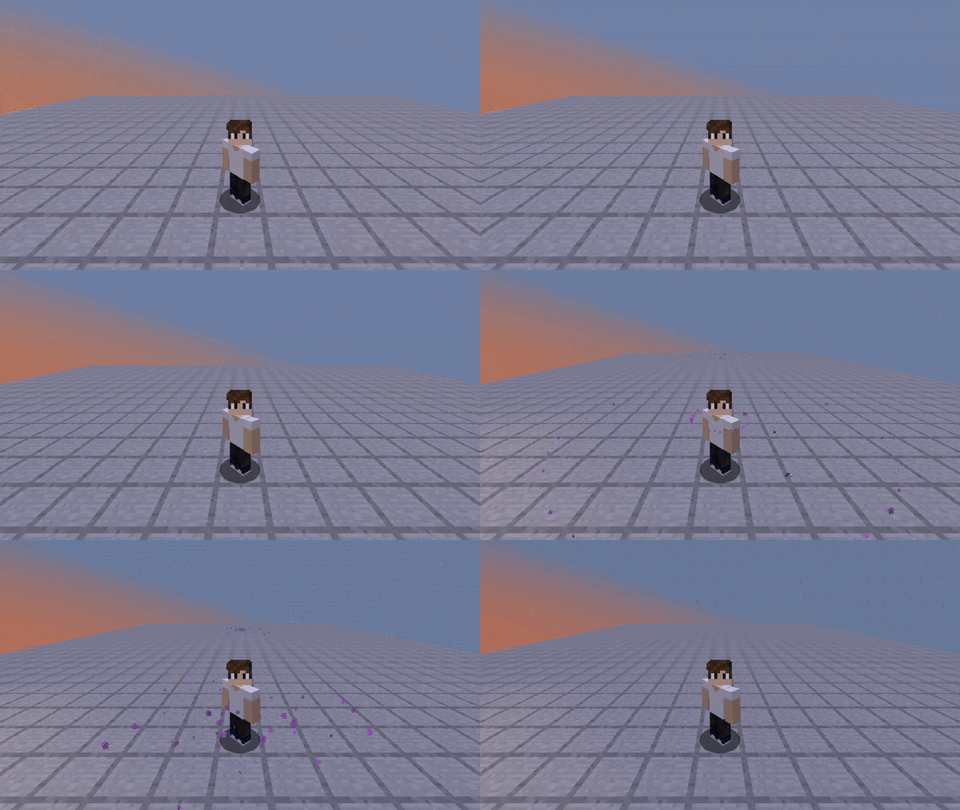
→传送粒子←
插件拥有一套在玩家传送时发送粒子效果的系统
此功能可通过 teleport particles(传送粒子)布尔选项启用。
当你处于以下状态时,传送粒子效果将被忽略:隐身状态、拥有隐形药水效果(需要权限)、或在指定的游戏模式中。(可配置)
→也请查看 Spigot 页面!←
PlayMoreSounds is a very complete plugin where you can assign sounds for various occasions. The main goal of the plugin is to play a sound whenever a player triggers an event (an action), the most useful features besides playing sounds in a player event are: Play sounds when a player sends a specific command; play loop sounds when a player is inside a sound region that you can create with the wand tool; play a sound when a player says a specific word in chat; play multiple sounds instead of just one; play noteblock notes instead of just sounds; wait an interval instead of playing the sound immediately, etc. Check out the coolest PlayMoreSounds features in the list below.
Warning: When "CheckForUpdates" boolean in config.yml is enabled, the plugin will try to establish connection with at the server startup to check for updates. If you don't want PlayMoreSounds to connect to external sites, toggle the "CheckForUpdates" boolean located in config.yml from 'true' to 'false'.
→Features←
Advantages you have while using PlayMoreSounds:
- Addons: PlayMoreSounds supports custom content (Add-ons), so you can download the addons and make PlayMoreSounds compatible with every plugin in your server. Currently the only addons available are inside the jar, but in the future I intend to make a forum to the community share their own addons;
- Assign sounds to specific commands;
- Assign sounds to specific words in chat; (Not in the plugin yet)
- Compatibility: Compatible with versions greater than MC1.7.9;
- Create sound regions without requiring any other plugins to select and store those regions;
- Test(Play) or list the sounds available in minecraft using commands;
- Toggle the sounds to ON or OFF using commands;
Check the sounds available in your minecraft version on the links below (or just use the command /pms list):
→Supported events←
Which events will trigger the sounds?
1- Blue - Compatibility dependent sounds.
2- Green - Enabled in configuration.
3- Red - Disabled in configuration.
4- Yellow - Supports other plugins.
- Achievement
- Advancement Done
- Arrow Hit
- BedEnter
- BedLeave
- Change Afk Status - Depends on Essentials away
- Change EXP level
- Change Hotbar
- Chat - Supports Legendchat and UltimateChat
- Command
- Death
- Fly
- First Join
- Furnace Extract
- Gamemode Change
- Hand Hit
- Inventory Click
- Item Drop
- JobsJoin - Depends on JobsReborn
- JobsLeave - Depends on JobsReborn
- Join
- Leave
- Region Enter - Supports RedProtect and WorldGuard
- Region Leave- Supports RedProtect and WorldGuard
- Stop Flying
- Sword Hit
- Teleport - Supports VanishNoPacket and EssentialsVanish
If you do not want the sound of the event to play, change it to NONE
→Commands←
Click here to see the full and detailed command list.
/playmoresounds - Shows the plugin description.
/playmoresounds confirm - Confirms something.
/playmoresounds edit - Edits something in configuration.
/playmoresounds help - Shows the command help.
/playmoresounds list - Lists all available bukkit sounds or noteblock intruments.
/playmoresounds play - Plays a bukkit sound or a sound from an event of sounds.yml.
/playmoresounds region - Regions main command.
/playmoresounds reload - Reloads all configurations.
/playmoresounds restore - Restores all configurations.
/playmoresounds sounds - Checks if sounds are toggled on or off.
/playmoresounds toggle - Toggle the sounds to on or off.
/playmoresounds update - Checks for updates.
→Configuration←
You can change the sounds, pitch and volume that the player makes to each event.
Config.yml:
# Checks for updates.
CheckForUpdates: true
Auto-Update the plugin when you check for updates on command "/playmoresounds update".
CommandAutoUpdate: true
If you have an outdated configuration, the plugin will ask you to restore it.
(If is disabled, the plugin automatically restore your outdated configs.)
ConfirmOutdatedFileRestoration: true
Shows debug messages to console.
(If you set as "developer", this will log and spam your console with all debugging tests.)
DebugOutput: false
Change the sounds depending on the date that the plugin runs.
EnableEasterEggs: true
If a player has disabled his sounds and relogged, the sounds will be enabled.
EnableSoundsAfterRelog: false
Extracts the language files into the plugin folder.
ExtractLanguageFiles: true
Shows the help page based on player's permissions.
HelpBasedOnPermissions: true
This will hide radius sounds for players who have the following conditions:
HideRadiusSoundsTo:
InvisibilityEffect:
Enabled: true
#Permission: playmoresounds.sounds.radius.hide.invisible
OnlyWithPermission: true
Gamemode:
Adventure: false
Creative: false
Spectator: true
Survival: false
Hide the sound to players that can not see the sound maker. (Most used code for vanish plugins.)
IfCanNotSee: true
Settings of the '/pms list' command.
ListCommand:
The amount of sounds/instruments that should appear per page.
Amount: 12
The color of each sound/instrument that is shown in the list.
Color: '&6'
The secondary color of each sound/instrument that is shown in the list.
Color2: '&e'
The separator that will be between each sound/instrument that is in the list.
Separator: '&7, '
The language of the plugin [en, br, es].
Localization: en
Particles that will spawn when a player makes an event.
Particles:
Teleport:
Enabled: true
HideOn:
Gamemode:
Adventure: false
Creative: false
Spectator: true
Survival: false
InvisibilityEffect:
Enabled: true
#Permission: playmoresounds.particles.hide.invisible
OnlyWithPermission: true
# Hide the particles to players that can not see the particle maker. (Most used code for vanish plugins.)
IfCanNotSee: true
Enable the configuration "commands.yml" to play a different sound to each command.
PerCommandSounds:
Enabled: true
Enable the configuration "gamemodes.yml" to play a different sound to each gamemode.
PerGamemodeSounds:
Enabled: true
The volume and pitch that will be set if the player don't specify when
the command "/pms play" is sent.
PlayCommandDefaultPitch: 1
PlayCommandDefaultVolume: 10
The sound that will play when the config is reloaded.
ReloadCommand:
Sound:
- 'Sound=BLOCK_NOTE_PLING;Interval=0;Volume=10;Pitch=1'
The regions that you can create to play a sound when you enter/exit it.
SoundRegions:
WandTool:
Glowing: true
Material: STICK
Name: '&6&l&nSound Region Selector'
The sounds that will play when a player change his toggle-sounds status.
ToggleCommand:
Time in seconds of how long you should wait to toggle sounds again.
Cooldown: 35s #h = hour, m = minute, s = seconds.
ToggleSounds:
ToggleEnabled:
Sound:
- 'Sound=BLOCK_NOTE_PLING;Interval=0;Volume=10;Pitch=2'
ToggleDisabled:
Sound:
- 'Sound=BLOCK_NOTE_BASS;Interval=0;Volume=10;Pitch=1'
Check for updates every X minutes.
If you disable "LogToConsole" the plugin will just inform you when an update is available.
UpdateScheduler:
Enabled: true
Time in minutes of how long the plugin will check for updates again.
Interval: 1h #h = hour, m = minute, s = seconds.
LogToConsole: false
Uses hard memory-consuming methods to automatic reload the plugin configuration.
(/playmoresounds reload not needed).
UseHardMethods: false
The worlds that will not play any sounds.
To use it, just remove the "#" hashtags.
#World-BlackList:
#- 'example1'
#- 'example2'
The version of your configuration. (To restore the old configurations)
ConfigVersion: 2.4.0
Sounds.yml:
You can add a sound to every event, or if you want, a noteblock note.
These sounds are here by default, you can change them reading the following tutorials:
Multiple sounds tutorial:
ChangeHotbar: = The event.
Cancellable: true = If another plugin has cancelled the event, the sound will not play.
Radius: -1 = The radius. (More info below)
Sound:
- 'Sound=SOUND_HERE;Interval=INTERVAL_HERE;Volume=VOLUME_HERE;Pitch=PITCH_HERE'
Replace SOUND_HERE to the sound that you want, INTERVAL_HERE to the time (ticks) that the sound
#will wait before playing, VOLUME_HERE to the sound volume, PITCH_HERE to the sound pitch.
You cant put multiple lines to play multiple sounds in one event.
Example:
PlayerDeath:
Radius 10
Sound:
- 'Sound=ENTITY_EVOCATION_FANGS_ATTACK;Interval=0;Volume=2;Pitch=1'
- 'Sound=ENTITY_ENDERDRAGON_GROWL;Interval=10;Volume=2;Pitch=1'
- 'Sound=ENTITY_WITHER_SPAWN;Interval=13;Volume=2;Pitch=1'
Radius tutorial:
If you set the 'Radius' configuration, the plugin will play the sounds to the players that are in
#this distance. For example:
PlayerDeath:
Radius: -1 = Only the event maker will listen to the sound.
PlayerChat:
Radius: 0 = All players allowed to hear PlayerChat in the server will listen to the sound.
PlayerTeleport:
Radius: 10 = All players allowed to hear PlayerTeleport in this distance from event maker will
#listen to the sound.
Noteblock notes tutorial:
If you want noteblocks, replace SOUND_HERE to Note.INTRUMENT:NOTE
#INSTRUMENT is the noteblock instrument that you want, NOTE is the note of the noteblock.
For some reason, in versions greater than 1.8.9, noteblocks notes can only be listen if 'Music' from player 'Sound Settings' is on.
Example:
JoinServer:
Radius: 0
Sound:
- 'Sound=Note.PIANO:12;Interval=0;Volume=0;Pitch=0'
- 'Sound=Note.PIANO:24;Interval=10;Volume=0;Pitch=0'
- 'Sound=Note.PIANO:24;Interval=20;Volume=0;Pitch=0'
- To see the compatible noteblock instruments use the command "/pms list -instruments".
#When a mob gets hitten by an arrow.
ArrowHit:
Cancellable: true
Radius: -1
Sound:
- 'Sound=ENTITY_EXPERIENCE_ORB_PICKUP;Interval=0;Volume=10;Pitch=1'
- 'Sound=ENTITY_EXPERIENCE_ORB_PICKUP;Interval=1;Volume=10;Pitch=1'
#When a player lies in bed.
BedEnter:
Cancellable: true
Radius: 10
Sound:
- 'Sound=ENTITY_VILLAGER_AMBIENT;Interval=0;Volume=1;Pitch=0.6'
#When a player gets out of bed.
BedLeave:
Radius: -1
Sound: NONE
#When a player change his item in hand.
ChangeHotbar:
Cancellable: false
Radius: -1
Sound:
- 'Sound=BLOCK_NOTE_HAT;Interval=0;Volume=10;Pitch=2'
#When a player reaches a new level of experience.
ChangeLevel:
Radius: -1
Sound:
- 'Sound=ENTITY_PLAYER_LEVELUP;Interval=0;Volume=0.6;Pitch=2'
#when a player extracts something from the workbench.
CraftingExtract:
Radius: -1
Sound:
- 'Sound=ENTITY_PLAYER_LEVELUP;Interval=0;Volume=10;Pitch=1'
#When a player joins to the server for the first time.
FirstJoin:
Radius: 0
Sound:
- 'Sound=BLOCK_NOTE_PLING;Interval=0;Volume=10;Pitch=1'
- 'Sound=BLOCK_NOTE_PLING;Interval=1;Volume=10;Pitch=1'
- 'Sound=BLOCK_NOTE_PLING;Interval=6;Volume=10;Pitch=2'
#When a player extracts something from the furnace.
FurnaceExtract:
Radius: 15
Sound:
- 'Sound=ENTITY_GENERIC_EXTINGUISH_FIRE;Interval=0;Volume=1;Pitch=1'
- 'Sound=ENTITY_GENERIC_EXTINGUISH_FIRE;Interval=1;Volume=1;Pitch=2'
#When a player changes his game mode.
GamemodeChange:
Cancellable: false
Radius: -1
Sound:
- 'Sound=BLOCK_ANVIL_PLACE;Interval=0;Volume=10;Pitch=1'
#When a player hits a mob with his hand.
HandHit:
Cancellable: true
Radius: 12
Sound:
- 'Sound=ENTITY_PLAYER_HURT;Interval=0;Volume=1;Pitch=2'
#When a player clicks on his inventory.
InventoryClick:
Cancellable: false
Radius: -1
Sound:
- 'Sound=UI_BUTTON_CLICK;Interval=0;Volume=0.4;Pitch=1'
#When a player joins the server
JoinServer:
Radius: 0
Sound:
- 'Sound=BLOCK_NOTE_PLING;Interval=0;Volume=10;Pitch=1'
#When a player quits the server.
LeaveServer:
Radius: 0
Sound:
- 'Sound=BLOCK_NOTE_BASS;Interval=0;Volume=10;Pitch=1'
- 'Sound=BLOCK_NOTE_BASS;Interval=0;Volume=10;Pitch=1'
- 'Sound=BLOCK_NOTE_BASS;Interval=0;Volume=10;Pitch=1'
#When a player gets a new achievement.
PlayerAchievement:
Cancellable: true
Radius: -1
Sound:
- 'Sound=ENTITY_PLAYER_LEVELUP;Interval=0;Volume=10;Pitch=1'
#When a player completes an advancement.
PlayerAdvancementDone:
Radius: -1
Sound:
- 'Sound=ENTITY_PLAYER_LEVELUP;Interval=0;Volume=10;Pitch=1'
#When a player says something on the chat.
PlayerChat:
Cancellable: true
Radius: 0
Sound:
- 'Sound=ENTITY_ITEM_PICKUP;Interval=0;Volume=0.5;Pitch=1'
#When a player sends a command.
PlayerCommand:
Cancellable: true
Radius: -1
Sound:
- 'Sound=ENTITY_ITEM_PICKUP;Interval=0;Volume=10;Pitch=1'
#When a player dies.
PlayerDeath:
Radius: -1
Sound:
- 'Sound=ENTITY_WITHER_SPAWN;Interval=0;Volume=10;Pitch=1'
#When a player drops an item.
PlayerDrop:
Cancellable: true
Radius: 12
Sound:
- 'Sound=ENTITY_EGG_THROW;Interval=0;Volume=0.5;Pitch=1'
#When a player starts flying.
PlayerFlight:
Cancellable: true
Radius: 8
Sound:
- 'Sound=BLOCK_PISTON_EXTEND;Interval=0;Volume=0.6;Pitch=1'
#When a player stops flying.
PlayerFlightStop:
Cancellable: true
Radius: 8
Sound:
- 'Sound=BLOCK_PISTON_CONTRACT;Interval=0;Volume=0.6;Pitch=1'
#When a player teleports to another place.
PlayerTeleport:
Cancellable: true
Radius: 16
Sound:
- 'Sound=ENTITY_ENDERMEN_TELEPORT;Interval=0;Volume=1;Pitch=1'
#When a player enters on a region.
RegionEnter:
Cancellable: true
Radius: -1
Sound:
- 'Sound=ENTITY_EXPERIENCE_ORB_PICKUP;Interval=0;Volume=10;Pitch=1'
#When a player leaves a region.
RegionLeave:
Cancellable: true
Radius: -1
Sound:
- 'Sound=ENTITY_EXPERIENCE_ORB_PICKUP;Interval=0;Volume=10;Pitch=1'
#When a player hits a mob with a sword.
SwordHit:
Cancellable: true
Radius: 12
Sound:
- 'Sound=ENTITY_PLAYER_HURT;Interval=0;Volume=1;Pitch=1'
#Do not touch this if you do not want your configuration to be restored.
SoundsConfigVersion: 2.4.0
Commands.yml:
Assign sounds for specific commands.
#You can add commands to this file and set the sound that will play when a player sends this commands to server.
#If you want to play the default sound of PlayerCommand on sounds.yml, just don't add the command to this file.
#Examples:
/help:
Radius: -1
Sound: NONE #If a player change his gamemode to survival, it will not play any sound.
/warp:
Radius: -1
Sound:
- 'Sound=BLOCK_NOTE_PLING;Interval=0;Volume=10;Pitch=1' #If a player sends this command to the server, it will play Note_Pling sound instead of the default sound on sounds.yml.
Regions.yml:
Play different sounds when you enter/exit the regions specified in this file.
#You can add name of regions to this file and set a sound to play when you enter/exit the region.
#Sound Regions can be created with /pms region create <name> and this is also compatible with other plugin's regions (WorldGuard, RedProtect).
#Examples:
PlayMoreSounds: = The region plugin.
When a player enter on this PlayMoreSounds "NotePlingRegion" region, the sound BLOCK_NOTE_PLING with volume 10 and pitch 1 will be played.
When a player exit this PlayMoreSounds "NotePlingRegion" region, the sound BLOCK_NOTE_PLING with volume 0.5 and pitch 2 will be played.
NotePlingRegion: = The name of the region.
Enter: = The event.
Radius: -1 = Radius of the sound.
Sound:
- 'Sound=BLOCK_NOTE_PLING;Interval=0;Volume=10;Pitch=1' = The sound that will play when a player enter on this region.
Leave: = The event.
Radius: -1 = Radius of the sound.
Sound:
- 'Sound=BLOCK_NOTE_PLING;Interval=0;Volume=10;Pitch=1' = The sound that will play when a player exit this region.
When a player enter on this PlayMoreSounds "WitherSpawnSound" region, the sound ENTITY_WITHER_SPAWN with volume 10 and pitch 1 will be played.
When a player exit this PlayMoreSounds "WitherSpawnSound" region, the sound ENTITY_WITHER_DEATH with volume 1 and pitch 0 will be played.
WitherSpawnSound:
Enter:
Radius: -1
Sound:
- 'Sound=ENTITY_WITHER_SPAWN;Interval=0;Volume=10;Pitch=1'
Leave:
Radius: -1
Sound:
- 'Sound=ENTITY_WITHER_DEATH;Interval=0;Volume=10;Pitch=0'
When a player enter on this WorldGuard "spawn" region, the sound ENTITY_EXPERIENCE_ORB_PICKUP with volume 10 and pitch 1 will be played.
When a player exit this WorldGuard "spawn" region, the sound BLOCK_NOTE_BASS with volume 10 and pitch 2 will be played.
WorldGuard:
spawn:
Enter:
Radius: -1
Sound:
- 'Sound=ENTITY_EXPERIENCE_ORB_PICKUP;Interval=0;Volume=10;Pitch=1'
Volume: 10
Pitch: 1
Leave:
Radius: -1
Sound:
- 'Sound=BLOCK_NOTE_BASS;Interval=0;Volume=10;Pitch=2'
Gamemodes.yml:
Set which sounds should play when you switch to a specific gamemode.
#You can add gamemodes to this file and set the sound thatwill play when a player changes their game mode to it.
#If you want to play the default sound of GamemodeChangeEvent on sounds.yml, just don't add the new gamemode to this file.
#Examples:
SURVIVAL:
Radius: -1
Sound: NONE #If a player change his gamemode to survival, it will not play any sound.
CREATIVE:
Radius: -1
Sound:
- 'Sound=BLOCK_NOTE_PLING;Interval=0;Volume=10;Pitch=1' #If a player change his gamemode to creative, it will play Note_Pling sound instead of the default sound on sounds.yml.
→Permissions←
Click here to see the full and detailed permissions list.
Quick permissions:
- playmoresounds.* - Gives access to all PlayMoreSounds. commands, sounds and features. (Given by default to players with OP).
- playmoresounds.admin – PlayMoreSounds recommended permissions for admins.
- playmoresounds.commands – Gives access to all PlayMoreSounds commands.
- playmoresounds.op - PlayMoreSounds recommended permissions for operators.
- playmoresounds.particle.* - Gives access to all PlayMoreSounds particles.
- playmoresounds.particles - Gives access to all PlayMoreSounds particles.
- playmoresounds.player – Gives access to all PlayMoreSounds sounds and toggle command. (Given by default)
- playmoresounds.sound.* - Gives access to all PlayMoreSounds sounds.
- playmoresounds.sounds - Gives access to all PlayMoreSounds sounds.
→Compatibility←
These compatibilities are only available in versions below 2.4.0. In the future, I intend to implement them again.
AFKToggle:
If a player change his away status, the plugin will play AFKToggle sound.
PlayerTeleportParticles:
If a vanished player teleports to someone, this someone will not see the vanished player's teleport particles.
Vanish:
If a vanished player triggers an event with a sound with radius greater than 0, the sound will be cancelled and no sound will be played.
JobsJoin:
If a player join a job, the sound JobsJoin will play.
JobsLeave:
If a player quit a job, the sound JobsLeave will play.
PlayerChat Event:
If a player sends a message on a channel with a distance greater than 0, the sound of the "PlayerChat" event will only be played to players who are at this distance. If the channel distance that the player sends the message is 0, the sound is played to all players online.
RegionEnter:
If a player enter on a RedProtect region, the plugin will play RegionEnter sound.
RegionLeave:
If a player exit a RedProtect region, the plugin will play RegionLeave sound.
PlayerChat Event:
If a player sends a message on a channel with a distance greater than 0, the sound of the "PlayerChat" event will only be played to players who are at this distance. If the channel distance that the player sends the message is 0, the sound is played to all players online.
PlayerTeleportParticles:
If a vanished player teleports to someone, this someone will not see the vanished player's teleport particles.
Vanish:
If a vanished player triggers an event with a sound with radius greater than 0, the sound will be cancelled and no sound will be played.
RegionEnter:
If a player enter on a WorldGuard region, the plugin will play RegionEnter sound.
RegionLeave:
If a player exit a WorldGuard region, the plugin will play RegionLeave sound.
→Teleportation Particles←
The plugin has a system that sends particles when the player teleports
This can be enabled on teleport particles boolean.
Teleportation particles are ignored when you are: Vanished, with invisibility effect (Permission required), in a specified gamemode. (Configurable)
→Check out the spigot page too!←

 插件
 插件
 插件

 插件
 插件

 插件
评论 0
登录后参与评分
还没有评论,来抢沙发吧