PlexVariables
无需编写 Java 即可创建强大的自定义 PlaceholderAPI 变量。
PlexVariables 允许你使用简单的 YAML 文件定义可复用的占位符。你可以创建静态值、动态条件、数学表达式以及持久化的玩家或服务器级变量——这一切都不需要开发自定义插件。
适用于自定义记分板(Scoreboards)、DeluxeMenus、TAB 栏、进度系统、服务器信息展示等场景。
功能特性
- 静态变量 - 在服务器范围内定义可复用的文本和数值。
- 条件变量 - 根据权限、世界、玩家统计数据或其他条件改变占位符的输出。
- 表达式变量 - 使用数学运算符和 PlaceholderAPI 变量执行计算。
- 持久化存储 - 使用 SQLite 保存玩家专属和全局数值。
- 嵌套变量 - 引用其他 PlexVariables 和外部 PlaceholderAPI 占位符。
- 自动文件发现 - 跨多个 YAML 文件和文件夹组织变量。
- 内置调试工具 - 测试变量解析并检查详细的评估结果。
- 安全重载 - 无效配置的重载会保留你之前的有效设置。
- 性能优先 - 内存缓存、异步存储以及解析安全限制。
- 高度可配置 - 支持自定义格式、条件和表达式,且无强制品牌植入。
配置
在 plugins/PlexVariables/variables/ 目录下创建变量。
示例 - 静态变量
variables:
  server_name:
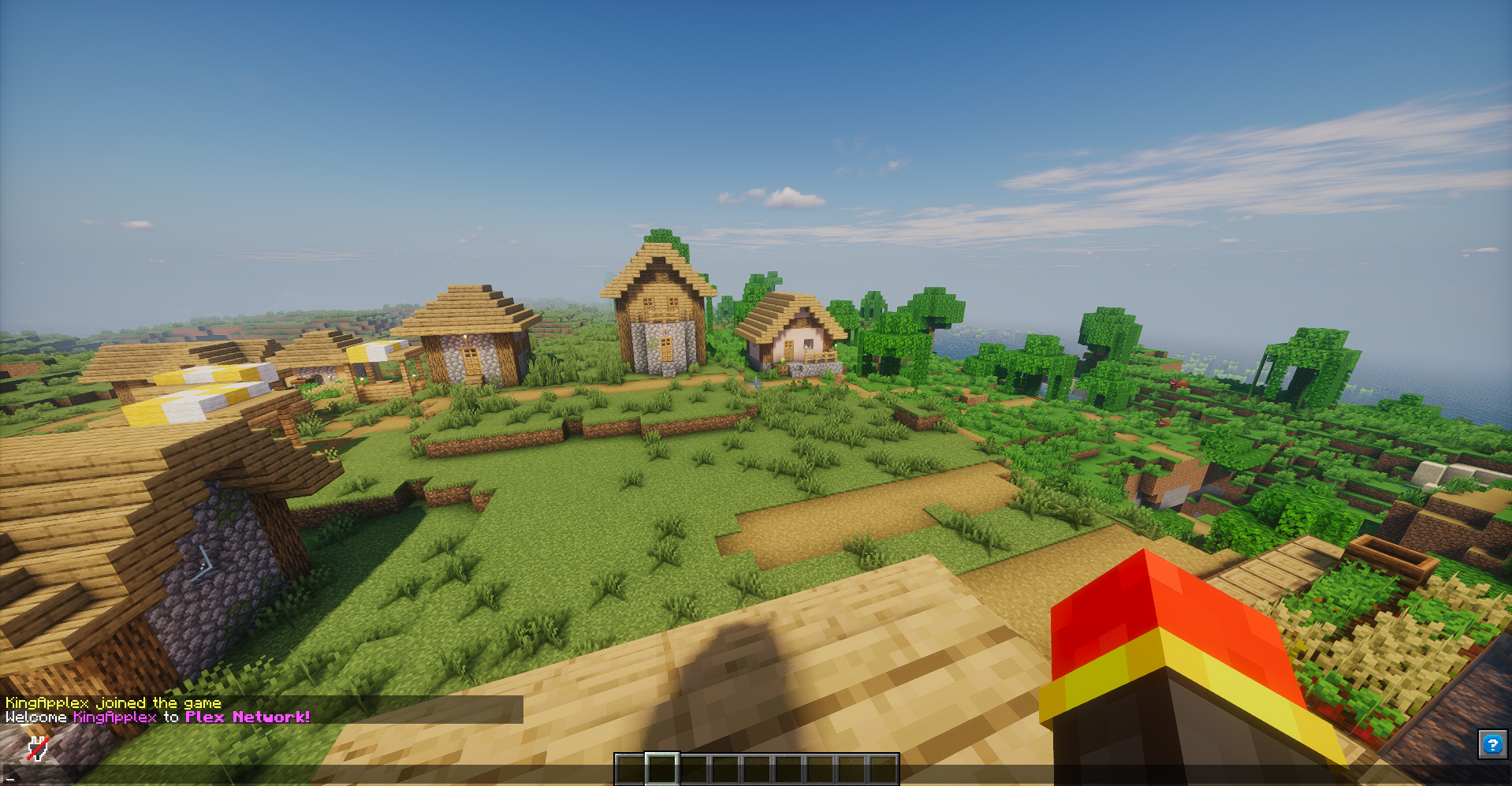
    value: "&d&lPlex Network"

  welcome:
    value: "&fWelcome %player_name% to %plexvar_server_name%!"
现在你可以在任何支持 PlaceholderAPI 的地方使用:
%plexvar_server_name%
%plexvar_welcome%
示例 - 条件变量
variables:
  health_status:
    conditions:
      - condition: "%player_health% <= 5"
        value: "&cCritical"
      - condition: "%player_health% <= 10"
        value: "&eLow"
    default: "&aHealthy"
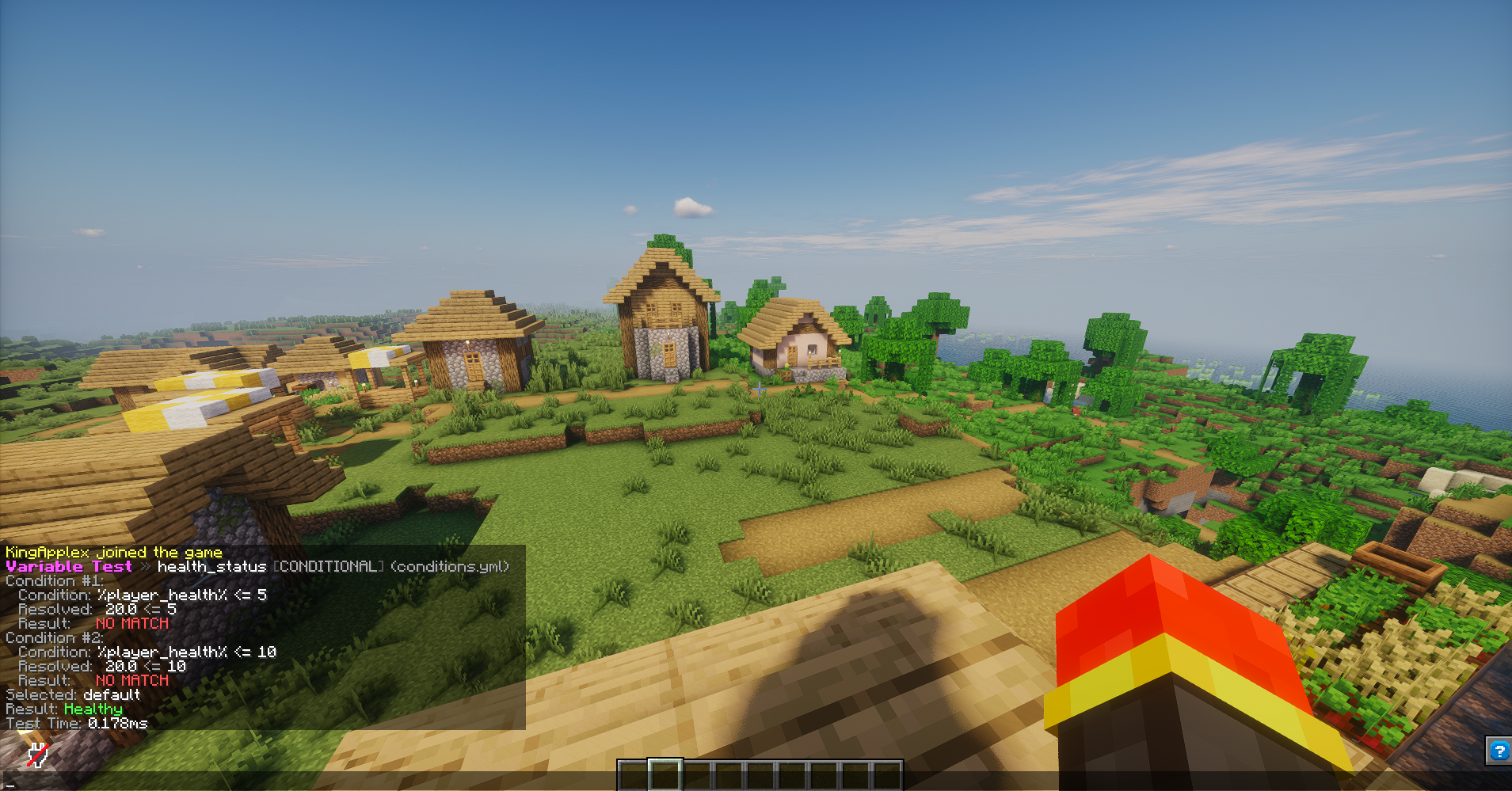
占位符 %plexvar_health_status% 会根据玩家的生命值自动变化。
PlexVariables 还支持数学表达式、持久化玩家数值、全局变量以及混合不同类型的变量。

如需完整的配置示例和高级功能说明,请参阅 文档。
命令与权限
| 命令 |
描述 |
/pv help |
显示可用命令 |
/pv list [page] |
列出已加载的变量 |
/pv parse <player|--null> <text> |
解析占位符 |
/pv test <player|--null> <variable> |
调试变量解析 |
/pv get <variable> [player|global] |
获取存储的值 |
/pv set <variable> <player|global> <value> |
设置存储的值 |
/pv add <variable> <player|global> <amount> |
向存储的值添加数值 |
/pv reset <variable> <player|global> |
重置存储的值 |
/pv reload |
重载配置和变量 |
别名: /plexvariables, /plexvar, /pvar, /pv
命令拥有独立的权限节点 plexvariables.*。plexvariables.admin 权限授予管理访问权。
详细命令语法和权限说明请参阅 README。
兼容性
- 服务端软件: Paper
- Minecraft: 已在 1.21.1, 1.21.4, 1.21.11, 26.1.1, 26.1.2, 26.2 和 26.3 上测试
- Java: 测试过的 Paper 1.21.x 版本需 Java 21;Paper 26.x 需 Java 25
- 必需依赖: PlaceholderAPI
如果你的变量中使用了外部占位符,可能需要安装额外的 PlaceholderAPI 扩展。
有关兼容性详情,请参阅各个版本的更新日志。
安装
- 安装 PlaceholderAPI。
- 下载 PlexVariables 并将 JAR 文件放入服务器的
plugins 文件夹中。
- 启动或重启你的 Paper 服务器。
- 在
plugins/PlexVariables/variables/ 内部创建或编辑 YAML 文件。
- 运行
/pv reload 以应用更改。
正在更新? 请备份插件目录并替换旧的 JAR 文件。现有的变量、配置和存储数据保持兼容。
文档与支持
关于高级用法、示例、集成指南和故障排除:
PlexVariables 遵循其 GitHub 仓库中包含的许可协议提供源代码可用服务。
由 Applex | Plex Studios 开发
网站 · GitHub
PlexVariables
Create powerful custom PlaceholderAPI variables without writing Java.
PlexVariables lets you define reusable placeholders using simple YAML files. Create static values, dynamic conditions, mathematical expressions, and persistent player or server-wide variables — all without developing a custom plugin.
Perfect for custom scoreboards, DeluxeMenus, TAB, progression systems, server information, and more.
Features
- Static Variables - Define reusable text and values across your server.
- Conditional Variables - Change placeholder outputs based on permissions, worlds, player statistics, or other conditions.
- Expression Variables - Perform calculations using mathematical operators and PlaceholderAPI values.
- Persistent Storage - Save player-specific and global values using SQLite.
- Nested Variables - Reference other PlexVariables and external PlaceholderAPI placeholders.
- Automatic File Discovery- Organize variables across multiple YAML files and folders.
- Built-In Debugging - Test variable resolution and inspect detailed evaluation results.
- Safe Reloading - Invalid configuration reloads preserve your previous working setup.
- Performance-Focused - In-memory caching, asynchronous storage, and resolution safety limits.
- Highly Configurable - Custom formatting, conditions, expressions, and no forced branding.
Configuration
Create variables inside plugins/PlexVariables/variables/.
Example - Static Variables
variables:
  server_name:
    value: "&d&lPlex Network"

  welcome:
    value: "&fWelcome %player_name% to %plexvar_server_name%!"
You can now use:
%plexvar_server_name%
%plexvar_welcome%
Anywhere supported by PlaceholderAPI.
Example — Conditional Variables
variables:
  health_status:
    conditions:
      - condition: "%player_health% <= 5"
        value: "&cCritical"
      - condition: "%player_health% <= 10"
        value: "&eLow"
    default: "&aHealthy"
The placeholder %plexvar_health_status% automatically changes depending on the player's health.
PlexVariables also supports mathematical expressions, persistent player values, global variables, and combining different variable types.
For complete configuration examples and advanced features, see the documentation.
Commands & Permissions
| Command |
Description |
/pv help |
Show available commands |
/pv list [page] |
List loaded variables |
/pv parse <player|--null> <text> |
Parse placeholders |
/pv test <player|--null> <variable> |
Debug variable resolution |
/pv get <variable> [player|global] |
Retrieve a stored value |
/pv set <variable> <player|global> <value> |
Set a stored value |
/pv add <variable> <player|global> <amount> |
Add to a stored value |
/pv reset <variable> <player|global> |
Reset a stored value |
/pv reload |
Reload configuration and variables |
Aliases: /plexvariables, /plexvar, /pvar, /pv
Commands have individual permissions under plexvariables.*. The plexvariables.admin permission grants administrative access.
See the README for detailed command syntax and permissions.
Compatibility
- Server Software: Paper
- Minecraft: Tested on 1.21.1, 1.21.4, 1.21.11, 26.1.1, 26.1.2, 26.2, and 26.3
- Java: Java 21 for tested Paper 1.21.x builds; Java 25 for Paper 26.x
- Required Dependency: PlaceholderAPI
Additional PlaceholderAPI expansions may be required for external placeholders used in your variables.
See the individual version changelogs for compatibility details.
Installation
- Install PlaceholderAPI.
- Download PlexVariables and place the JAR in your server's
plugins folder.
- Start or restart your Paper server.
- Create or edit YAML files inside
plugins/PlexVariables/variables/.
- Run
/pv reload to apply your changes.
Updating? Back up your plugin directory and replace the previous JAR. Existing variables, configurations, and stored data remain compatible.
Documentation & Support
For advanced usage, examples, integration guidance, and troubleshooting:
PlexVariables is source-available under the license included in its GitHub repository.
Developed by Applex | Plex Studios
Website · GitHub


 插件

 插件
 插件
 插件
 插件
 插件
评论 0
登录后参与评分
还没有评论,来抢沙发吧