Plugin Portal 是一款利用 Polymart、SpigotMC、Modrinth 和 Hangar 市场进行游戏内插件下载与更新的工具。无需离开舒适的 Minecraft 聊天栏,即可查看资源数据、安装及更新插件。
功能特性
- 直接安装: 只需一条命令,即可直接从游戏内从 Polymart、Spigot、Modrinth 和 Hangar 安装插件!
- 插件列表: 我们扫描了来自三个市场的超过 100,000 款插件供你下载!只需开始输入关键字,即可在这庞大的列表中搜索。
- 插件预览: 确认插件是否是你需要的。使用
/pp view 命令,你可以在游戏内查看资源的图标、描述、统计数据和评分,确保无误后再安装。
- 跨版本兼容: 我们兼容所有 1.8+ 的版本,并支持所有主流服务端核心,包括 Folia!
- 无失效插件: 我们已自动过滤掉所有非活跃/已弃用/被遗弃的插件,防止你不小心下载到不再可用的内容。(别担心——如果你确实需要,仍可手动操作)
- 自我更新: 当然,Plugin Portal 能够自行更新自身!依然无需离开那个舒适的聊天栏。
……还有更多功能!想要更多内容?请向下滚动查看 Premium 提供的服务。
截图展示
以下是从我们超过 100,000 个资源的目录中安装插件的效果:
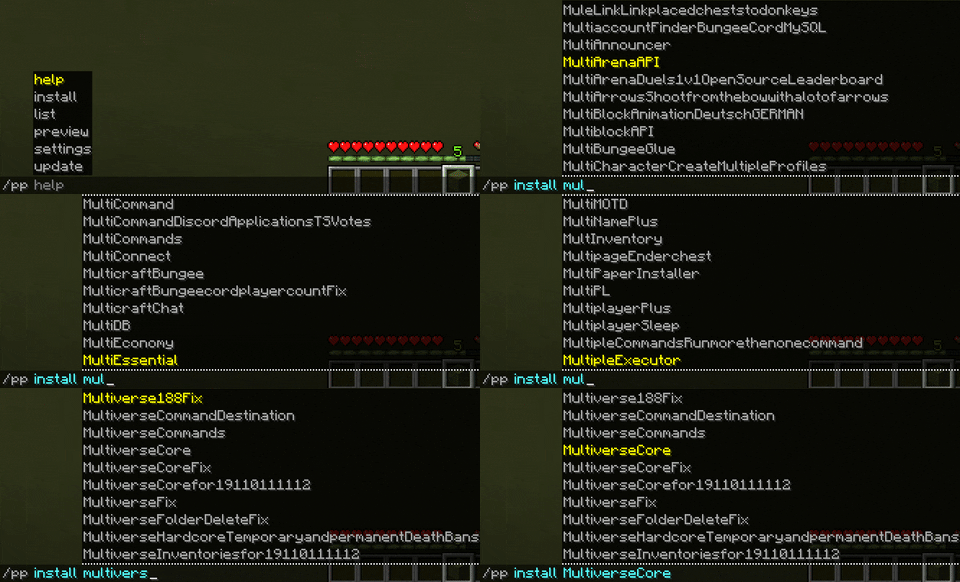
以下是在游戏内查看插件的效果:
想在不打开浏览器的情况下更新你的插件吗?
命令与权限
/pp view <name|id> [platform] [-byId] - pluginportal.view
显示所选市场中扫描到的插件预览(如上所示)。将包含资源图片、描述、统计数据和评分,以便你安装正确的插件。
/pp install <name|id> [platform] [-byId] - pluginportal.manage.install
Plugin Portal 的核心功能:从市场安装插件。指定你要下载的插件名称或 ID,Plugin Portal 会将对应的 jar 文件传输到你的服务器。随后可对其进行更新或删除。
/pp update <name|id> [-byId] - pluginportal.maintain.update
从插件最初安装的来源更新插件。例如,如果你安装了 WorldEdit 且该插件有新版本,你可以运行此命令将最新版本下载到服务器。
/pp uninstall/delete <name|id> [-byId] - pluginportal.manage.uninstall
从服务器删除一个插件。
/pp list - pluginportal.view
列出由 Plugin Portal 安装的所有插件。注意:如果你希望识别未通过 Plugin Portal 安装的插件,我们的 Premium 版本提供此功能(见下文)。
/pp help - pluginportal.view
显示包含上述命令列表的帮助信息。
/pp dump - pluginportal.dump
将 Plugin Portal 日志导出至 mclo.gs
Premium 版
想从一开始就为你的服务器加速?获取一份 Plugin Portal Premium。
功能包括:
- 插件识别: 添加了 Plugin Portal 之外的插件?在已有数十个 jar 文件的服务器上添加 Plugin Portal?它们将被自动识别、可更新和可删除(如果在支持的市场中有提供)。
- 恶意软件检测: 我们会对每个下载执行专为 Minecraft 插件设计的恶意软件检测。
- 自动更新: 再也不用看到插件过期的提示。Plugin Portal 会自动更新你的插件!
- 自定义适配器: 当作者使用 GitHub 或 Jenkins 等外部 URL 时,我们有自定义适配器来为你提供他们的 jar 文件。
- 安装特定版本: 需要某个特定版本的插件?使用版本标志来查看和下载相应版本。
- 备份: 搞坏了什么?将插件回滚到保存点。
- 优先版本发布
- 优先支持
支持
如果你需要关于该插件的支持,请加入我们的 Discord 服务器:
我们拥有充满爱心的开发者社区,他们非常乐意协助解决你的问题并接受你的建议。❤️
贡献代码
由于我们已开源代码,欢迎为 Plugin Portal 做出贡献。请访问我们的 GitHub 仓库:
如果你是开发者,欢迎创建 PR,我们将定期审核。如果不是,请创建一个 Issue。
如果你不熟悉 GitHub,欢迎加入我们的 Discord 服务器 (),在那里你可以提交建议并由社区投票表决。
谢谢,并享受我们的项目。❤️
Plugin Portal is an in-game plugin downloader and updater using the Polymart, SpigotMC, Modrinth & Hangar marketplaces. View resource data, install and update plugins all from the comfort of your Minecraft chatbar.
FEATURES
- Direct Install: You can install your plugins from Polymart, Spigot, Modrinth and Hangar directly from in-game with a single command!
- Plugin List: We scanned over 100,000 plugins to download from three marketplaces! You can just start typing and search among this huge list.
- Plugin Previewing: Check if the plugin is the correct one. With /pp view command you can view the resource icon, description, stats and ratings in-game so you can be sure.
- Cross Version Compatibility: We are compatible with every version from 1.8+ and supported on all major server jars, including Folia!
- No Inactive Plugins: We've automatically filtered out all inactive/deprecated/abandoned plugins for you so you don't accidently download something that doesn't work anymore. (Don't worry - you can still do this if you must)
- Self Updating: Of course Plugin Portal is able to update itself within itself! Still no need to leave that comfortable chatbar.
...and many more! After something more? Scroll down to see what Premium offers.
SCREENSHOTS
Here's how it looks to install a plugin from our 100,000+ directory:
Here's how it looks to view a plugin in-game:
Want to update your plugins without even opening your browser?
COMMANDS & PERMISSIONS
/pp view <name|id> [platform] [-byId] - pluginportal.view
Shows a preview of the plugin (as shown above) using all data we scanned from the chosen marketplace. Will include the resource image, description, stats and ratings so you can install the correct plugin.
/pp install <name|id> [platform] [-byId] - pluginportal.manage.install
The heart of Plugin Portal: install a plugin from a marketplace. Specify the plugin name or ID that you wish to download and Plugin Portal will beam that jar onto your server. It can then be updated or deleted.
/pp update <name|id> [-byId] - pluginportal.maintain.update
Update a plugin from the same source that it was installed from. For example, if you installed WorldEdit, and WorldEdit has been updated, you can run this command to download the newest version onto your server.
/pp uninstall/delete <name|id> [-byId] - pluginportal.manage.uninstall
Delete a plugin from your server.
/pp list - pluginportal.view
List all plugins installed by Plugin Portal. Note: If you are trying to have plugins recognized which weren't installed with Plugin Portal, our Premium version offers this feature (scroll down).
/pp help - pluginportal.view
Display the help message with the above list of commands.
/pp dump - pluginportal.dump
Dump the plugin portal log to mclo.gs
PREMIUM
Want to supercharge your server right from the start? Grab a copy of Plugin Portal Premium.
Features include:
- Plugin Recognition: Added a plugin from outside of Plugin Portal? Adding Plugin Portal to your server with dozens of jars already on it? They'll be automatically identified, updatable and deletable (if available on a supported marketplace).
- Malware Detection: We'll run every download through malware detection designed for Minecraft plugins.
- Automatic Updates: Never see a plugin outdated message again. Plugin Portal will automatically update your plugins!
- Custom Adapters: For when authors use external URLs like GitHub or Jenkins, we have custom adapters to serve you their jars.
- Install Specific Versions: Need a specific version of a plugin? Use the version flag to view and download versions.
- Backups: Broke something? Rollback your plugins to a save point.
- Priority Version Release
- Priority Support
SUPPORT
If you need support with the plugin, please come and join our Discord over at:
We have a loving community of developers who are more than happy to assist in your issues and take your suggestions. ❤️
CONTRIBUTE
You are welcome to contribute to Plugin Portal as we have open sourced the code. Head over to our GitHub repository here:
If you are a developer, you are welcome to create PRs which we will review periodically. If not, please create an issue.
If you have no GitHub knowledge, then you are welcome to join our Discord server () where you can create suggestions to be voted on by the community.
Thank you, and enjoy our project. ❤️


 插件

 插件

 插件
 插件
 插件
 插件
评论 0
登录后参与评分
还没有评论,来抢沙发吧