它是什么?
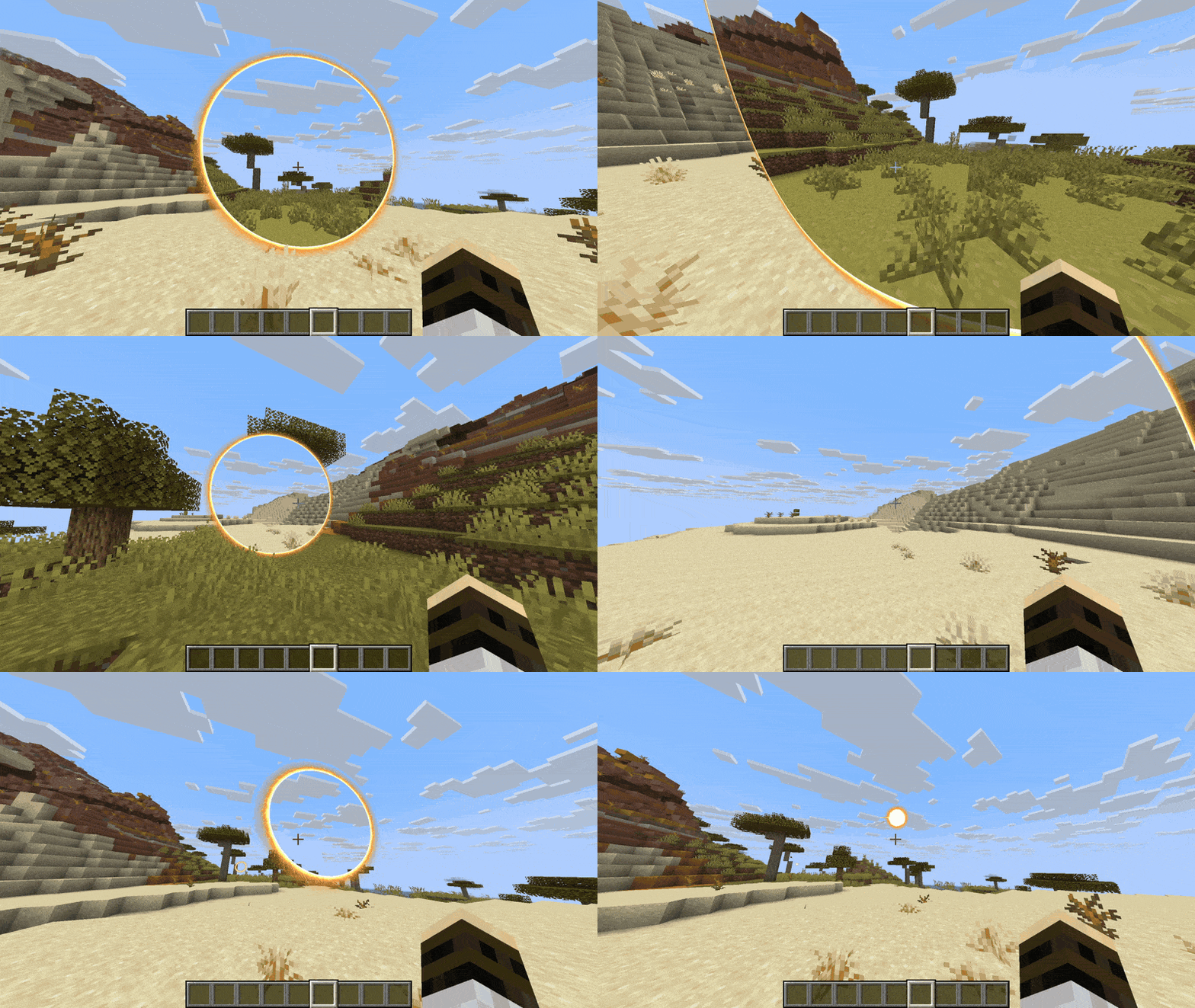
一个你可以透过的传送门。一圈火花在你面前绽放,透过它可以看见它所通向的地方:那里的方块、天空、云朵和光照,无论你在何处站立。走进它,你便会从另一端的圆环中出现,并保持原有的移动惯性。
它是 RP Engine 的插件:将其与引擎放置在同一目录下,它便会自带内容。圆环、音效以及绘制窗口的着色器会在首次启动时自动安装。无需构建资源包,也无需客户端模组。
放置传送门
- 站在传送门应通向的位置,运行
/portals mark。
- 前往其他任何地方(同一世界或另一个世界),运行
/portals place。一个圆环会出现在你面前,另一个则位于你的标记处。
- 穿过即可。
- ✔ 开合自如:右键点击传送门可将其关闭为一个小发光球体,再次右键可重新打开。潜行状态下右键点击可将其收回。
- ✔ 每玩家一对:放置另一对传送门将移除你最旧的一对(由配置文件中的
pairs-per-player 决定)。
- ✔ 任意大小:管理员可使用
/portals place <size> 放置直径从 2 到 12 格不等的圆环。
透过传送门能看到什么
远处景象的真实面貌:在完整细节下,视野横跨 128 格,纵深 63 格,包含真实的方块纹理、植物、水体、每个生物群系的草和树叶颜色、光照以及游戏自带的环境光遮蔽。在此之外,地形继续延伸数百格,包括树冠在内,呈现游戏自带的天空颜色和远处的真实云层。若通往下界的传送门,你能看到其雾气与辉光。
它会显示方块:但远处视口中的玩家、生物和掉落物不可见。
安装
- 如果尚未安装,请安装 RP Engine 0.2.11 或更高版本(免费)。
- 将
RPE-portals.jar 放入 plugins/ 目录中与 RPEngine.jar 并列,然后启动服务器。
- 其内容将安装至
plugins/RPEngine/content/portals/,引擎会重新加载一次以识别它。
Portals 可在 Spigot 或 Paper 26.2 上运行,玩家需使用 Java 26.2。基岩版玩家无法看到传送门。
命令与权限
| 命令 |
功能 |
权限节点 |
默认值 |
| /portals mark |
设定此处为传送门目的地 |
portals.mark |
所有人 |
| /portals place |
在你面前开启一对传送门 |
portals.place |
所有人 |
| /portals place [size] |
选择圆环的大小 |
portals.place.size |
操作员 |
| /portals toggle |
开启或关闭你正注视的传送门 |
portals.toggle |
所有人 |
| /portals remove [all] |
移除该传送门,或移除你所有的传送门 |
portals.remove |
所有人 |
| /portals list |
查看你的传送门对及其目的地 |
portals.list |
所有人 |
| (穿过传送门) |
通过传送门进行旅行 |
portals.travel |
所有人 |
| /portals open |
在指定坐标放置一对传送门(用于命令方块) |
portals.open |
操作员 |
| /portals closeall |
移除所有传送门 |
portals.closeall |
操作员 |
| /portals reload |
重新加载配置文件 |
portals.reload |
操作员 |
其他人的传送门拥有独立的权限节点(portals.toggle.others、portals.remove.others),额外的传送门对(portals.place.unlimited)以及在其他世界中设定的标记(portals.place.otherworld)也是如此。portals.player 和 portals.admin 可用于批量分配这些权限。
面向开发者
可从你自己的插件中在任何位置、以任何尺寸开启传送门,关闭或开启它们,并通过四个事件取消或重定向任何开启、切换、移除或穿越操作。详见 文档的 API 部分。
连接依赖
- Mojang,仅此一次。 窗口使用游戏自带的方块纹理,而服务器端并不具备这些纹理,因此在首次启动时,Portals 会从 Mojang 官方服务器下载对应服务器版本的 Minecraft 客户端 jar 包,存入
plugins/RPEPortals/cache/。设置 textures.download: false 可跳过此步骤;此时方块将以纯色绘制。
- 无其他依赖。 它没有自己的遥测数据。其名称包含在 RP Engine 的匿名使用计数中,可通过 RP Engine 的
telemetry: enabled: false 关闭。
须知事项
- 窗口由游戏自带的文本着色器绘制,资源包只能替换一次,因此它不能与其他试图替换该着色器的内容(例如 RP Engine 的 HUD 着色器对象)共用同一个服务器。
- 近距离观察传送门会消耗一定的帧率。关闭状态的传送门,或从背后观察的传送门,不会渲染任何内容。
完整指南:resourcepack.ai/docs/rp-engine/portals
支持
请在 Discord 提问,或在 GitHub 提交问题。请勿在评论中发布错误报告;我们无法在那里回复,且我们更倾向于直接修复问题。
由 ResourcePack AI 制作
Portals 是遵循 GPL-3.0 许可的自由软件。源代码托管于 GitHub,欢迎贡献。它基于 RP Engine 的公开 API 构建,这也是任何插件均可使用的接口。RP Engine 源自 resourcepack.ai,一个用于编辑资源包的网页编辑器。
What is it?
A portal you can see through. A ring of sparks opens in front of you, and through it is the place it leads to: its own blocks, its sky, its clouds and its light, from wherever you stand. Walk into it and you come out of the other ring, still moving the way you were.
It is an addon for RP Engine: drop it in beside the engine and it brings its own content with it. The ring, its sounds and the shaders that draw the window install themselves on first boot. No resource pack to build and no client mods.
Placing portals
- Stand where your portals should lead and run
/portals mark.
- Go anywhere else, in the same world or another, and run
/portals place. One ring opens in front of you, the other at your mark.
- Walk through.
- ✔ Open and shut: right-click a portal to shut it down to a small glowing ball, and again to open it. Sneak and right-click to take it away.
- ✔ One pair each: placing another pair takes your oldest away (
pairs-per-player in the config).
- ✔ Any size: staff can place rings from 2 to 12 blocks across with
/portals place <size>.
What you see through one
The far side, as it really is: 128 blocks across and 63 deep in full detail, with the real block textures, plants, water, each biome's grass and leaf colours, its light and the game's own ambient occlusion. Past that the land carries on for a few hundred blocks, treetops and all, under the game's own sky colours and the very clouds the far side has. Through a portal to the Nether, you see its fog and its glow.
It shows blocks: players, mobs and dropped items on the far side are not in the window.
Installing
- Install RP Engine 0.2.11 or newer (free) if you have not already.
- Drop
RPE-portals.jar into plugins/ beside RPEngine.jar and start the server.
- Its content installs into
plugins/RPEngine/content/portals/ and the engine reloads once to pick it up.
Portals runs on Spigot or Paper 26.2 with players on Java 26.2. Bedrock players do not see portals.
Commands and permissions
| Command |
What it does |
Permission |
Default |
| /portals mark |
Your portals lead here |
portals.mark |
Everyone |
| /portals place |
Open a pair in front of you |
portals.place |
Everyone |
| /portals place [size] |
Choose the ring's size |
portals.place.size |
Operators |
| /portals toggle |
Open or shut the portal you are looking at |
portals.toggle |
Everyone |
| /portals remove [all] |
Take that portal away, or all of yours |
portals.remove |
Everyone |
| /portals list |
Your pairs and where they lead |
portals.list |
Everyone |
| (walk through) |
Travel through a portal |
portals.travel |
Everyone |
| /portals open |
A pair at set coordinates, for command blocks |
portals.open |
Operators |
| /portals closeall |
Take away every portal |
portals.closeall |
Operators |
| /portals reload |
Reload the config |
portals.reload |
Operators |
Other people's portals have their own nodes (portals.toggle.others, portals.remove.others), and so do extra pairs (portals.place.unlimited) and marks in another world (portals.place.otherworld). portals.player and portals.admin hand them out in bulk.
For developers
Open pairs anywhere at any size from your own plugin, shut and open them, and cancel or redirect any open, toggle, removal or crossing with the four events. See the API section of the docs.
What it connects to
- Mojang, once. The window uses the game's own block textures, which a server does not have, so on first start Portals downloads the Minecraft client jar for your server's version from Mojang's own servers, into
plugins/RPEPortals/cache/. Set textures.download: false to skip it; blocks are then drawn in flat colours.
- Nothing else. It has no telemetry of its own. Its name is included in RP Engine's anonymous usage count, which RP Engine's
telemetry: enabled: false turns off.
Worth knowing
- The window is drawn by the game's text shader, which a resource pack can replace only once, so it cannot share a server with other things that replace it too (RP Engine's HUD shader objects, for one).
- A portal costs some frame rate up close. A shut one, or one seen from behind, draws nothing.
Full guide: resourcepack.ai/docs/rp-engine/portals
Support
Ask on Discord or open an issue on GitHub. Please don't post bugs in the reviews; we can't reply there, and we would rather fix it.
Made by ResourcePack AI
Portals is free software under the GPL-3.0 licence. The source is on GitHub, and contributions are welcome. It is built on RP Engine's public API, the same one any plugin can use. RP Engine comes from resourcepack.ai, a web editor for resource packs.


 插件

 插件
 插件
 插件

 插件

 插件
评论 0
登录后参与评分
还没有评论,来抢沙发吧