
简体中文 | English
PostSpawner
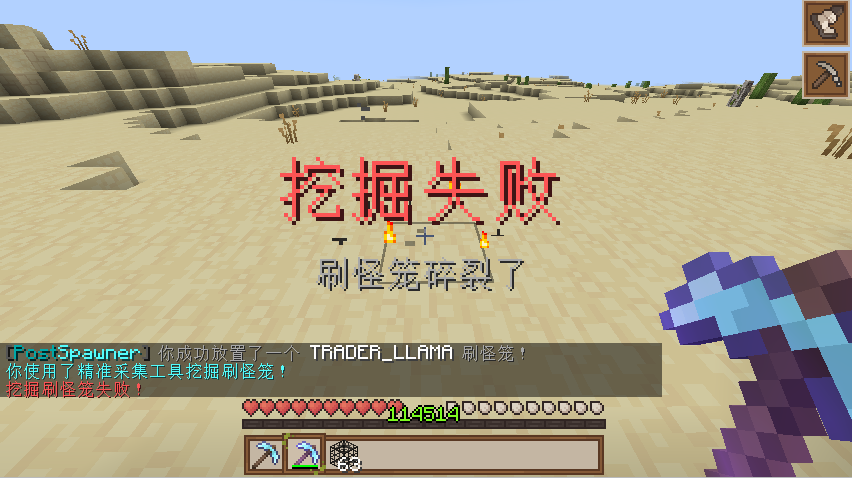
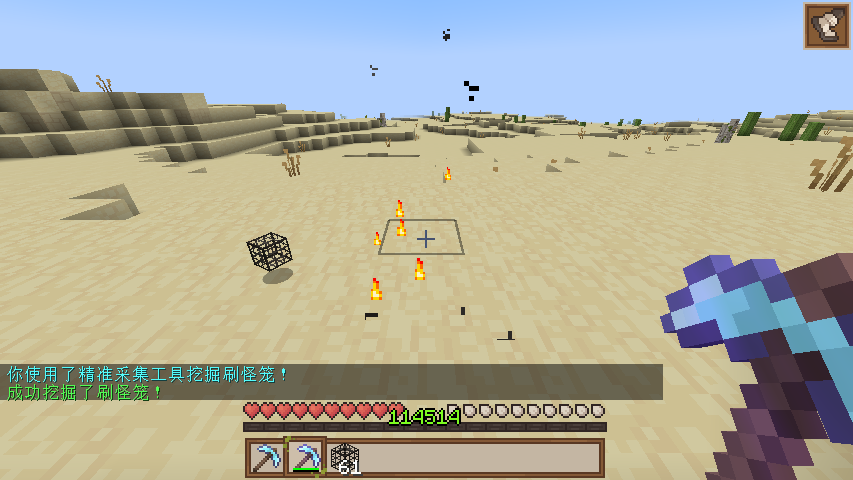
PostSpawner 是一款轻量级的 Minecraft 插件,用于管理怪物刷怪笼,提供对刷怪笼挖掘和放置的控制。
? Features
- ✅ 刷怪笼管理:支持使用精准采集和普通工具挖掘刷怪笼
- ✅ 多语言支持:内置中文和英文语言文件,易于扩展
- ✅ 丰富的动作系统:支持命令执行、物品掉落、音效等多种动作
- ✅ 挂钩系统:兼容 PlaceholderAPI、ItemsAdder、MythicMobs、NeigeItems、Oraxen 等
- ✅ 灵活的配置:完全可自定义的配置和消息系统
- ✅ 更新检查:可选的更新检查功能
? Installation
- 下载最新的 PostSpawner.jar
- 将插件放入服务器的 plugins 文件夹中
- 启动/重启服务器
- 编辑
plugins/PostSpawner/config.yml进行自定义设置 - 使用
/ps reload重新加载插件配置
? Commands
| Command | Description | Permission |
|---|---|---|
/ps reload |
重新加载插件配置和语言文件 | postspawner.command.reload |
/ps version |
显示版本信息 | postspawner.command.version |
/ps help |
显示帮助信息 | postspawner.command.help |
/ps update |
检查更新 | postspawner.command.update |
? Permissions
| Permission | Description | Default |
|---|---|---|
postspawner.use.place |
放置刷怪笼 | 所有玩家 |
postspawner.use.break |
破坏刷怪笼 | 所有玩家 |
postspawner.command.reload |
重载命令 | OP |
postspawner.command.version |
版本命令 | 所有玩家 |
postspawner.command.help |
帮助命令 | 所有玩家 |
postspawner.command.update |
更新命令 | OP |
postspawner.admin |
包含所有权限 | OP |
?️ Actions
PostSpawner 提供了丰富的动作系统。在配置中使用以下动作格式:
格式:[] 表示必需参数,() 表示可选参数
| Action Syntax | Description | Example |
|---|---|---|
[command] [command] |
让玩家执行命令 | [command] spawn |
[op] [command] |
临时赋予玩家 OP 以执行命令 | [op] gamemode creative |
[console] [command] |
从控制台执行命令 | [console] broadcast Someone mined a spawner! |
[sound] [sound] (volume) (pitch) |
为玩家播放音效 | [sound] BLOCK_ANVIL_LAND 1.0 1.5 |
[message] [text] |
向玩家发送消息 | [message] &aYou successfully mined a spawner! |
[title] [title] (subtitle) |
向玩家显示标题 | [title] &aMining Success &7Got a spawner |
[drop_monster_spawner] |
掉落被破坏的刷怪笼 | [drop_monster_spawner] |
[drop] [itemID] (amount) |
在位置处掉落物品 | [drop] DIAMOND 5 |
[give] [itemID] (amount) |
给予玩家物品 | [give] DIAMOND_SWORD 1 |
[buff] [potion] (duration) (level) |
给予玩家药水效果 | [buff] SPEED 30 2 |
[money] [action] [amount] |
控制玩家经济 | [money] give 100, [money] take 200, [money] set 50 |
[points] [action] [amount] |
控制玩家积分 | [points] give 100, [points] take 200, [points] set 50 |
注意:在创造模式下破坏刷怪笼不会触发任何动作。
? Item Library Support
在使用 [drop] 和 [give] 动作时,支持以下物品库:
| Library | Format | Example |
|---|---|---|
| Minecraft | minecraft:itemID [amount] |
minecraft:diamond_sword, diamond:5 |
| ItemsAdder | itemsadder:itemID [amount] |
itemsadder:ruby_sword |
| MMOItems | mmoitems:type:ID [amount] |
mmoitems:SWORD:EXCALIBUR |
| NeigeItems | neigeitems:itemID [amount] |
neigeitems:test_item |
| Oraxen | oraxen:itemID [amount] |
oraxen:amethyst_helmet |
| MythicMobs | mythicmobs:itemID [amount] |
mythicmobs:special_bow |
| SX-Item | sxitem:itemID [arg1:arg2...] [amount] |
sxitem:magic_wand:arg1:arg2 |
| Zaphkiel | zaphkiel:itemID [amount] |
zaphkiel:legendary_axe |
| CraftEngine | craftengine:itemID [amount] |
craftengine:magic_staff |
| AzureFlow | azureflow:itemID [amount] |
azureflow:wizard_robe |
简化格式:
- 默认来源为 minecraft(可省略),例如
diamond:5等于minecraft:diamond:5 - 如果数量为 1,可以省略,例如
itemsadder:ruby_sword等于itemsadder:ruby_sword 1
? Variables
你可以在动作中使用这些内置变量:
%player%- 玩家名称%block_x%- 方块 X 坐标%block_y%- 方块 Y 坐标%block_z%- 方块 Z 坐标%block_world%- 方块所在世界%entity_type%- 实体类型
此外,如果安装了 PlaceholderAPI,你还可以使用 PlaceholderAPI 变量。
? Contact
-
<-点击加入
-
<-点击加入
-
<- 主页
? 许可证
本插件遵循 GNU General Public License v2.0 许可协议。
你是这个资源的作者?登录后可认领此资源。
相似资源
 插件
ExyliaLib
ExyliaServices
ExyliaPlugins 的库。
前置实用
26
 插件
Vessel
muhdfdeen
重新定义服务器上的生物运输方式。使用高度可定制的口袋道具,安全地捕获、存储和释放任何实体。
生物存储
13
 插件
WorldEdit
me4502
一个在游戏内运行的 Minecraft 地图编辑器! 支持选区、蓝图、复制粘贴、笔刷和脚本。 可在创造模式中使用,也可在生存模式中临时使用。
前置管理
10
 插件

LobbyAPI
Zombie_Striker_Dev
创建用户友好的菜单以前往不同的世界
管理交通
9
 插件
tkChat
tkkr
专为 Velocity 打造的自制聊天插件,功能丰富——支持跨服群组/全局/私聊消息,并集成 LibertyBans 的禁言功能。
管理社交
9
 插件
Yeth's TPA
yethdev
一个高度兼容、功能完善且稳定的 TPA 模组
社交交通
9
评论 0
登录后参与评分
还没有评论,来抢沙发吧