PrivateDimension
适用于 Paper 1.21.5+ 的私人维度插件
关于此插件
本插件是基于 Chuzume 创作的 Private_Dimension 开发的衍生作品。
PrivateDimension 是原版数据包在 Paper/Spigot 平台上的插件化重制实现。原版概念及相关资产的所有版权和其他权利均归属于 Chuzume。
开发者及分发者不对因安装或使用本插件而导致的任何问题、损害或损失承担责任。
原作与参考
概览
使用 瓶中之界 (Dimension in a Bottle) 即可进入玩家专属的私人维度。
每个维度都包含一个专属于其所有者的 48×48 地块,且仅为其生成。
本插件为 Paper 服务器重现了原版 Private_Dimension 数据包的功能。
特性
| 特性 |
说明 |
| ? 维度旅行 |
在瓶中维度上右键点击,进入你的私人维度 |
| ? 返回系统 |
在维度内再次使用该物品,返回到之前的位置 |
| ? 实体运输 |
潜行+使用,可将半径3格内的友好实体带入维度 |
| ? 48×48 私人地块 |
自动为每位玩家分配一个专属的 48×48 空间 |
| ☠️ 死亡处理 |
在维度内死亡后,玩家将在主世界重生 |
| ? Geyser 支持 |
通过 Geyser 兼容 Java 版和基岩版 |
| ? 安全出生点搜索 |
从计算出的出生点向外扫描,寻找安全地面,因此即使自定义结构具有不同楼层高度,也能正确生成玩家 |
| ? 推回强制执行 |
离开你的地块会将你推回地块的出生点,而不是将你弹射到主世界(与模组行为一致)。推回时给予3秒坠落伤害免疫,避免落地受伤 |
| ?️ 绕过标签 |
拥有 pd_free 记分板标签的玩家(可配置)以及 OP 可以跳过地块边界限制 |
| ?️ 自定义 NBT 结构 |
将你自己的 .nbt 结构文件放入 plugins/PrivateDimension/structures/ 目录,以替换默认的地块布局 |
| ⌨️ Tab 补全 |
/pd 子命令和在线玩家名称(用于 /pd give)支持游戏内自动补全 |
| ? 多语言支持 |
聊天消息、命令输出以及物品的名称/描述均来源于 lang/en.yml / lang/ja.yml;添加自己的语言文件即可实现完整自定义翻译 |
| ? 自动配方解锁 |
玩家加入服务器时,“瓶中维度”的配方会自动解锁并显示在配方书中 |
| ✨ 附魔光泽 |
该物品具有纯装饰性的附魔光泽效果(无实际附魔效果) |
合成配方
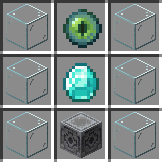
该物品可以通过普通合成台进行合成。
Dimension in a Bottle
依赖项
- Paper (或 Spigot) 1.21.5+ — 目标版本范围与配套模组相同(1.21.5–26.1.2);多版本兼容性测试正在进行中
- Java 21+
- Geyser(可选,用于支持基岩版)
安装
- 将
PrivateDimension-*.jar 放入你的 plugins/ 文件夹中。
- 重启服务器。
- 启动时会自动生成
private_dimension 世界。
命令
| 命令 |
描述 |
权限 |
/pd give [玩家] |
给予一个维度之瓶 |
privatedimension.admin |
/pd info |
显示你地块的相关信息 |
所有人 |
/pd reload |
重新加载配置 |
privatedimension.admin |
/pd debug |
显示地块边界调试状态 |
privatedimension.debug |
所有子命令和玩家名称(对于 /pd give)均支持 Tab 补全。
权限
| 权限节点 |
默认值 |
描述 |
privatedimension.use |
true |
允许使用该物品 |
privatedimension.admin |
op |
管理员命令 |
privatedimension.debug |
op |
忽略领地边界 |
领地边界绕过
默认情况下,离开你的地块会将你推回地块内部。有两种方法可以绕过此限制:
使用 /tag <player> remove pd_free 移除它。
示例:/tag Steve add pd_free 允许玩家史蒂夫自由离开任何地块。
配置 (config.yml)
language: "en"                    # 显示语言:"en" 或 "ja"(或自定义,见下方的“语言”部分)
world-name: "private_dimension"   # 维度世界名称
plot-size: 48                     # 地块大小
plot-spacing: 128                 # 地块间距
plot-floor-y: 64                  # 地块地板 Y 坐标(出生点 Y = floor-y + 5 = 69,通过安全出生点搜索优化)
plot-height: 47                   # 结构高度(Y 轴尺寸),用于地块边界检查和安全出生点搜索
structure-file: "plot48x48.nbt"   # 结构文件名;见下方的“自定义结构”部分
safe-spawn-search-radius: 8       # 安全出生点搜索的水平搜索半径(方块)
safe-spawn-search-height: 12      # 安全出生点搜索的垂直搜索范围(方块,上下方向)
plot-bypass-tag: "pd_free"        # 拥有此记分板标签的玩家可跳过地块边界限制
debug-logging: false              # 安全出生点搜索/边界检查的详细控制台日志(用于故障排除)
pull-entity-limit: 10             # 最大可传输实体数量
pull-entity-radius: 3.0           # 实体传输半径
enable-border-enforcement: true   # 当玩家离开其地块边界时将其推回地块内
config.yml 随附双语(日语/英语)注释,适用于每一项设置,无论 language 的值为何——这些注释仅为文档说明,不受显示语言设置的影响。
语言
所有聊天消息、命令输出以及物品的显示名称/描述均来自 plugins/PrivateDimension/lang/<language>.yml,与 config.yml 中设置的 language 相匹配。
en 和 ja 会在首次运行时自动捆绑并提取。- 若要添加自定义语言:将
plugins/PrivateDimension/lang/en.yml 复制为新文件,使用你的语言代码命名(例如 fr.yml),进行翻译后,在 config.yml 中设置 language: "fr" 并运行 /pd reload(或重启服务器)。
- 如果找不到语言文件(既未捆绑也不存在于
lang 文件夹中),插件会记录警告并回退到 en。
- 自定义语言文件中缺失的任何键会自动回退到英文文本,因此部分翻译仍可正常工作。
plugins/PrivateDimension/structures/README.txt 始终同时以日语和英语编写,不受 language 设置影响(它仅在首次启动时生成一次,若希望重新生成请删除该文件)。
自定义结构(自定义 NBT)
默认情况下,插件内置了 plot48x48.nbt。若要使用自定义布局:
- 将你的结构保存为原版结构方块文件格式(
.nbt),例如通过游戏内设置为 Save 模式的结构方块完成。
- 启动服务器一次,以便创建
plugins/PrivateDimension/structures/ 目录(其中会生成包含说明的 README.txt)。
- 将你的
.nbt 文件复制到该文件夹中,文件名需与 config.yml 中的 structure-file 一致(或更新 structure-file 以匹配你的文件名)。
- 如果你的结构的占地面积或高度不同于 48×48×47,请相应更新
plot-size / plot-height。
- 运行
/pd reload 或重启服务器。
由于插件执行安全出生点搜索(从计算出的出生点向外扫描,寻找上方有足够空间的坚实地面),即使地板高度与默认值不同,玩家也能在自定义结构上正确出生——通常无需手动调整出生点 Y 偏移量。此搜索同样用于玩家在跨越边界后被推回其地块内的场景。
致谢
PrivateDimension 基于 Chuzume 创作的原始 Private_Dimension 数据包,并根据原始许可证条款分发。
PrivateDimension
A private dimension plugin for Paper 1.21.5+
About This Plugin
This plugin is a derivative work of Private_Dimension created by Chuzume.
PrivateDimension is a Paper/Spigot plugin reimplementation of the original data pack. All copyrights and other rights related to the original concept and assets belong to Chuzume.
Neither the developer nor the distributor of this plugin shall be held responsible for any issues, damages, or losses resulting from its installation or use.
Original Work & References
Overview
Using a Dimension in a Bottle allows players to enter their own private dimension.
Each dimension contains a dedicated 48×48 plot generated exclusively for its owner.
This plugin recreates the functionality of the original Private_Dimension data pack for Paper servers.
Features
| Feature |
Description |
| ? Dimension Travel |
Right-click a Dimension in a Bottle to enter your private dimension |
| ? Return System |
Use the item again inside the dimension to return to your previous location |
| ? Entity Transport |
Sneak + use to bring nearby friendly entities within a 3-block radius |
| ? 48×48 Private Plot |
Automatically assigns a dedicated 48×48 space to each player |
| ☠️ Death Handling |
Dying inside the dimension respawns the player in the main world |
| ? Geyser Support |
Compatible with both Java Edition and Bedrock Edition via Geyser |
| ? Safe Spawn Search |
Scans outward from the calculated spawn point to find safe ground, so custom structures with different floor heights still spawn players correctly |
| ? Push-Back Enforcement |
Leaving your plot pushes you back to your plot's spawn point instead of ejecting you to the main world (matches the mod). A 3-second fall-damage immunity is granted on push-back so you don't take damage landing after a fall |
| ?️ Bypass Tag |
Players with the pd_free scoreboard tag (configurable) skip plot boundary enforcement, in addition to OPs |
| ?️ Custom NBT Structures |
Drop your own .nbt structure file into plugins/PrivateDimension/structures/ to replace the default plot layout |
| ⌨️ Tab Completion |
/pd subcommands and online player names (for /pd give) autocomplete in-game |
| ? Multi-language Support |
Chat messages, command output, and the item's name/lore are all sourced from lang/en.yml / lang/ja.yml; add your own language file for full custom translation |
| ? Auto Recipe Unlock |
The Dimension in a Bottle recipe is automatically discovered for every player on join, so it always shows up in the recipe book |
| ✨ Enchant Glint |
The item has a purely cosmetic enchantment glint (no actual enchantment effect) |
Crafting Recipe
The item can be crafted using a normal crafting table.
Dimension in a Bottle
Requirements
- Paper (or Spigot) 1.21.5+ — targeting the same version range as the companion mod (1.21.5–26.1.2); multi-version compatibility testing is ongoing
- Java 21+
- Geyser (optional, for Bedrock Edition support)
Installation
- Place
PrivateDimension-*.jar into your plugins/ folder.
- Restart the server.
- The
private_dimension world will be generated automatically on startup.
Commands
| Command |
Description |
Permission |
/pd give [player] |
Give a Dimension in a Bottle |
privatedimension.admin |
/pd info |
Show information about your plot |
Everyone |
/pd reload |
Reload the configuration |
privatedimension.admin |
/pd debug |
Show plot-boundary debug status |
privatedimension.debug |
All subcommands and player names (for /pd give) support tab completion.
Permissions
| Permission Node |
Default |
Description |
privatedimension.use |
true |
Allows use of the item |
privatedimension.admin |
op |
Administrative commands |
privatedimension.debug |
op |
Ignore plot boundaries |
Plot Boundary Bypass
By default, leaving your plot pushes you back inside it. There are two ways to bypass this:
-
Operators (permission level 2+) always bypass the boundary check.
-
Tagged players can bypass it too. Grant the bypass tag (default: pd_free, configurable via plotBypassTag in the config) using the vanilla /tag command:
/tag <player> add pd_free
Remove it with /tag <player> remove pd_free.
Example: /tag Steve add pd_free lets the player Steve freely leave any plot.
Configuration (config.yml)
language: "en"                    # Display language: "en" or "ja" (or your own, see "Language" below)
world-name: "private_dimension"   # Dimension world name
plot-size: 48                     # Plot size
plot-spacing: 128                 # Distance between plots
plot-floor-y: 64                  # Plot floor Y level (spawn Y = floor-y + 5 = 69, refined by safe-spawn search)
plot-height: 47                   # Structure height (Y size), used for plot boundary checks and safe-spawn search
structure-file: "plot48x48.nbt"   # Structure filename; see "Custom Structures" below
safe-spawn-search-radius: 8       # Horizontal search radius (blocks) for the safe-spawn search
safe-spawn-search-height: 12      # Vertical search range (blocks, up and down) for the safe-spawn search
plot-bypass-tag: "pd_free"        # Players with this scoreboard tag skip plot boundary enforcement
debug-logging: false              # Verbose console logs for the safe-spawn search / boundary checks (troubleshooting)
pull-entity-limit: 10             # Maximum entities that can be transported
pull-entity-radius: 3.0           # Entity transport radius
enable-border-enforcement: true   # Push players back into their plot when they leave its boundary
config.yml ships with bilingual (Japanese/English) comments for every setting, regardless of the language value — the comments themselves are just documentation and aren't affected by the display-language setting.
Language
All chat messages, command output, and the item's display name/lore come from plugins/PrivateDimension/lang/<language>.yml, matching whatever language is set to in config.yml.
en and ja are bundled and extracted automatically on first run.- To add your own language: copy
plugins/PrivateDimension/lang/en.yml to a new file with your language code (e.g. fr.yml), translate it, then set language: "fr" in config.yml and run /pd reload (or restart).
- If a language file can't be found (neither bundled nor present in the
lang folder), the plugin logs a warning and falls back to en.
- Any keys missing from a custom language file automatically fall back to the English text, so a partial translation still works.
plugins/PrivateDimension/structures/README.txt is always written in both Japanese and English, regardless of the language setting (it's generated once, on first startup, so delete it if you want it regenerated).
Custom Structures (Custom NBT)
By default the plugin bundles plot48x48.nbt. To use your own layout:
- Save your structure as a Vanilla Structure Block file (
.nbt), e.g. via a Structure Block set to Save mode in-game.
- Start the server once so
plugins/PrivateDimension/structures/ is created (a README.txt with instructions is generated there).
- Copy your
.nbt file into that folder using the same name as structure-file in config.yml (or update structure-file to match your filename).
- If your structure's footprint or height differs from 48×48×47, update
plot-size / plot-height accordingly.
- Run
/pd reload or restart the server.
Because the plugin performs a safe-spawn search (scanning outward from the calculated spawn point for solid ground with clear space above), players will spawn correctly on custom structures even if the floor height differs from the default — you generally don't need to hand-tune the spawn Y offset. This same search is also used when a player is pushed back into their plot after crossing the boundary.
Credits
PrivateDimension is based on the original Private_Dimension data pack created by Chuzume and is distributed in accordance with the terms of the original license.


 插件

 插件

 插件

 插件

 插件
评论 0
登录后参与评分
还没有评论,来抢沙发吧