最简单的插件与命令隐藏工具!
决定你的玩家应该看到哪些插件和命令!^^
支持 placeholderapi - 免费 - 无需任何依赖
概述
ProAntiTab 是一个功能强大的插件隐藏器,拥有众多特性且系统极易理解。它能防止服务器被黑客客户端使用的插件伪造手段欺骗,操纵补全提示,阻止不需要的建议,以及更多!
实例展示
自定义服务器品牌 (F3)
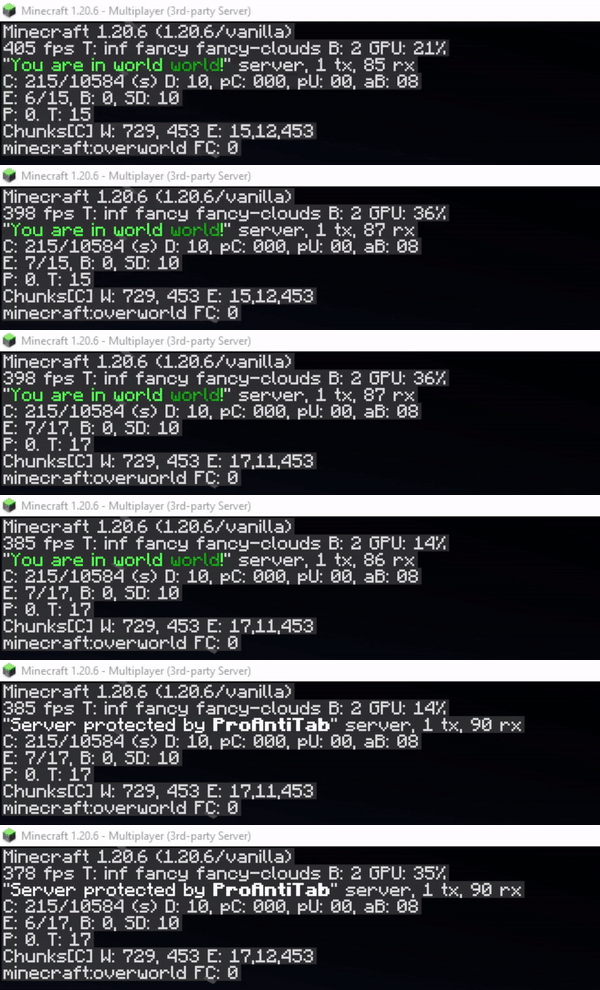
在你的 Spigot、Bungeecord 和 Velocity 服务器上创建你自己的自定义动画服务器品牌!
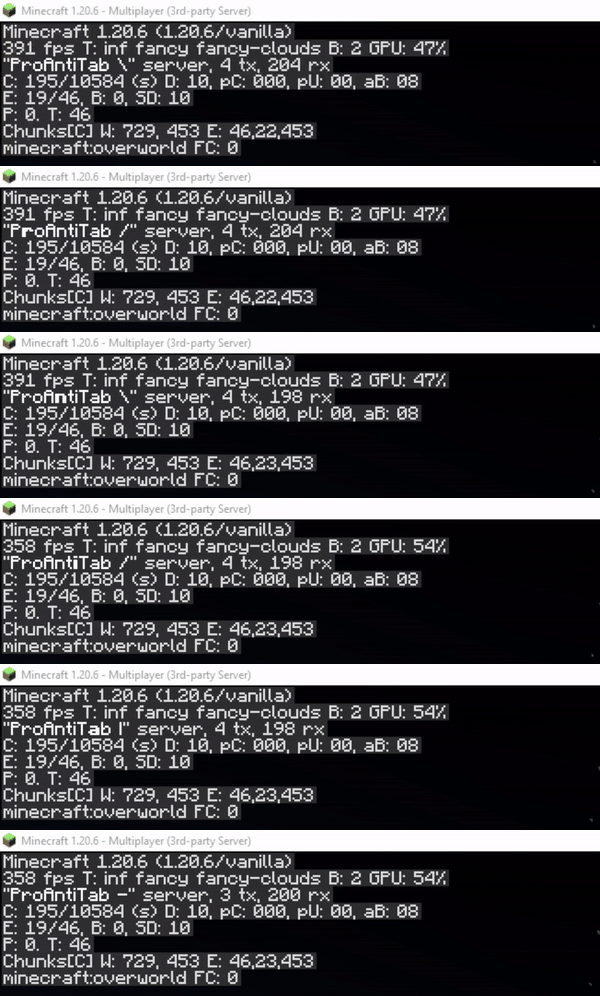
打开 config.yml 相关部分
# 此功能允许你自定义按下 F3 时看到的服务器品牌。
# 通常这里会显示类似 'Purpur' 或 'Spigot' 的字样。
# 使用此功能,你可以更改甚至使其产生动画效果!^^
custom-server-brand:
enabled: false
# 决定动画播放的速度
repeat-delay: 3
# 以下是动画列表
# 可用的占位符:
# %player% - 玩家名称
# %displayname% - 玩家显示名称
# %world% - 玩家所在世界的名称
# 以及 PlaceholderAPI 的其他占位符
brands:
- '&f&lP&froAntiTab |'
- '&fP&lr&foAntiTab /'
- '&fPr&lo&fAntiTab -'
- '&fPro&lA&fntiTab |'
- '&fProA&ln&ftiTab \'
- '&fProAn<&fiTab |'
- '&fProAnt&li&fTab /'
- '&fProAnti&lT&fab -'
- '&fProAnti&lT&fab \'
- '&fProAntiT&la&fb |'
- '&fProAntiTa&lb&f /'
- '&fProAntiTab -'
- '&fProAntiTab \'
将黑名单用作白名单
需要屏蔽的命令太多?别担心。
在 config.yml 中有一个位置靠上的部分,允许你将黑名单切换为白名单模式。这将屏蔽服务器上的所有命令,除了列表中列出的那些。
config.yml 中的相关部分
# 如果你需要屏蔽的命令太多,而选择只白名单特定命令,这是一个非常必要的功能。
# 启用此项将禁用除(组-)列表中指定的命令之外的所有命令。
turn-blacklist-to-whitelist: false
防止插件伪造
ProAntiTab 能够检测并阻止黑客客户端使用的插件伪造尝试。

屏蔽子参数
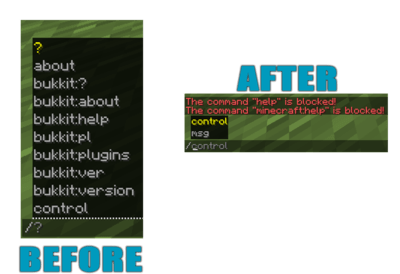
我们都知道这个问题:当希望玩家能够使用某些命令,但不希望他们看到命令中的每一个子参数时。好吧,那就把它们隐藏起来?ProAntiTab 可以为你做到这一点,而且设置也非常简单!(见下方示例)

示例
# 假设你只想允许 "/help Minecraft",而不允许 "/help apple"。
# 它也会自动允许 "/help Minecraft ..." 之后的所有内容
- help Minecraft

# [CMD] = 允许执行该命令
# [TAB] = 允许该命令的 Tab 补全
- "[CMD]cmi tpa" # 仅可执行,不可 Tab 补全
- tpa            # 可执行 & 可 Tab 补全

# %hidden_online_players% = 在线玩家(从 Tab 补全中移除)
# %online_players%        = 在线玩家
# %hidden_players%        = 已注册玩家(从 Tab 补全中移除)
# %players%               = 已注册玩家
# %numbers%               = 数字,例如 1000 或 1.000
# _-                      = 阻止其后的所有内容
- "tpa %online_players%"
- "sell %numbers%"

# 在末尾使用操作符 _- 会取消并阻止此后所有的参数。
# 这将允许玩家使用 "/help Minecraft",但不允许 "/help Minecraft xyz"
- help Minecraft _-
屏蔽冒号命令
手动屏蔽每个冒号命令(如 essentials:spawn)并不是一件容易的事。但通过这个简单的功能,你可以轻松自动屏蔽所有冒号命令!只有拥有 proantitab.namespace 权限的人才能再次查看和使用这些命令。
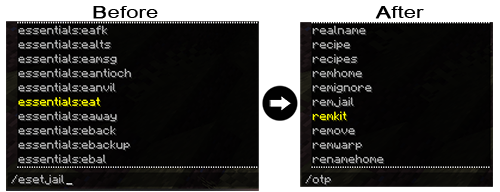
打开 config.yml 相关部分
#>> HTP (已覆盖)
# 在这里你可以禁用所有命名空间命令。
# 命名空间命令是指像 plugin:command 这样的命令(例如:essentials:warp)
# 你可以使用 proantitab.namespace 权限来绕过此限制。
block-namespace-commands:
enabled: false
自定义插件列表
仅仅屏蔽 /plugins 命令未免太无聊了。这个功能让你可以通过显示例如虚假插件来增加趣味性。

打开 config.yml 相关部分
#>> HTP (已覆盖)
# 在这里你可以自定义自己的虚假 '/plugins' 命令。
custom-plugins:
enabled: true
commands:
- pl
- plugins
- bukkit:pl
- bukkit:plugins
message:
- '&fPlugins (0):'
自定义版本命令
谁不想假装拥有一个自定义服务器核心呢?尽情自定义你自己的 /version 命令,以满足个人喜好。

打开 config.yml 部分
#>> HTP (已覆盖)
# 在这里你可以自定义自己的虚假 '/version' 命令。
custom-version:
enabled: true
commands:
- version
- ver
- icanhasbukkit
- bukkit:ver
- bukkit:version
message:
- '&f此服务器正在运行 CraftBukkit 版本 git-NasaSpigot-294 (MC: X)'
CUSTOM UNKNOWN COMMAND MESSAGE
ProAntiTab 的 Bukkit/Spigot 版本让你有机会创建自己的未知命令消息,以便与拦截的命令消息保持一致,例如。

打开 config.yml 部分
# 现在我们来到有趣的部分!^^
# 如果 ProAntiTab 加载在 Spigot 服务器上,你会在这里看到这个选项。
# 通过它,你还可以自定义自己的“未知命令”消息。
custom-unknown-command:
  enabled: true
  message:
    - '&c该命令不存在!'
CUSTOM PROTOCOL PING
你是否知道当你使用错误的版本 ping 服务器时,玩家数量处显示的那条红色文本信息?正是这条信息透露了你的代理服务器运行的是哪种类型的服务器。此功能用自定义内容隐藏代理服务器的版本信息。默认情况下启用此功能,但不会显示该文本。只有当有人使用错误版本 ping 服务器或使用解析器时,才能看到这段文本。这张图片展示了使用错误版本的玩家会看到的内容,除非启用了“始终显示”。如果启用此选项,这段文本将始终出现。

打开 config.yml 部分
# 更改被 ping 时用于版本名称的协议
# (!) 警告:必须使用 Paper 或 Purpur 才能使用此功能!
# (!) 支持的服务器版本:1.12.2 - 最新版本
custom-protocol-ping:
  enabled: false

  # 通常仅在有人使用错误版本 ping 服务器时显示。
  # 启用此项将始终显示协议,并用其替换正常的玩家数量。
  always-show: false

  # 这里的数字决定了 %online_extended% 占位符的结果。
  # 它是当前在线人数加上这个数字后的结果。
  # 例如:5/20 变为 6/20
  extend-online-count: 1
  # true: 使用新计算的在线人数 (%online_extended%) 作为最大玩家数。
  # false: 使用默认的最大玩家数。
  use-as-maxplayers: false

  # 启用此选项会在你悬停在玩家数量上时隐藏服务器上的玩家列表。
  hide-players: true

  # 显示的协议消息
  # 可用占位符:
  # %online%            - 当前在线玩家数
  # %online_extended%   - 修改后的在线玩家数
  # %max%               - 最大玩家数
  protocol: '&f&lProAntiTab &7(&a%online%&7/&c%max%&7)'
CUSTOM RESPONSE ACTIONS
对某些人来说,确定响应消息的形式或发生什么是很重要的。你可以根据自己的喜好定制这一因素,并使用不同的操作来完全控制被拦截的命令。


Bukkit/Spigot 示例
#      ____             ___          __  _ ______      __
#     / __ \_________  /   |  ____  / /_(_)_  __/___ _/ /_
#    / /_/ / ___/ __ \/ /| | / __ \/ __/ / / / / __ `/ __ \
#   / ____/ /  / /_/ / ___ |/ / / / /_/ / / / / /_/ / /_/ /
#  /_/   /_/   \____/_/  |_/_/ /_/\__/_/ /_/  \__,_/_.___/
#  custom-responses.yml
#
# 在这里你可以进一步配置一些被拦截的命令。
# 但这里到底是什么呢?每个通常会响应典型“命令被拦截”消息的命令,都可以在这里进行配置!
# 它是如何工作的?很简单。你只需提供会被正常拦截的命令触发器。
# 那些本来可以正常工作的命令不会发送你在上面设置的这些消息。
# 这样 PAT 可以让你完全控制某些命令及其正常响应。
# 每个块中的动作部分是什么?
# 这是一个额外的功能,让你的响应更加生动。
# 可使用的示例动作如下:
#   执行控制台命令:
#        语法:console::command
#        示例:console::say %player% is an evil player
#   执行玩家命令:
#        语法:execute::command
#        示例:execute::help
#   发送动作栏文本:
#        语法:actionbar::text
#        示例:actionbar::&cThis is not cool %player%!
#   发送标题:
#        语法:title::title::subtitle::5::20::5
#        示例:title::&aTest title::&cHello %player%!
#   播放声音:
#        语法:sound::soundName::volume::pitch
#        示例:sound::ENTITY_ENDER_DRAGON_GROWL::1.0::1.0
#   给予药水效果:
#        语法:effect::potionEffect::duration::amplifier
#        示例:effect::BLINDNESS::45::1

# 以下是一些示例:
使用预设的示例。
在此处,仅当玩家输入 "/kit ..." 时才会触发给定的消息。
如果该命令通过子参数生效,那么玩家只能执行分配了所列子参数的命令。其他任何情况都将显示此处设置的提示消息。
--
#example-with-kits:
triggers:
- "kit *"
message:
- "&c该预设不存在!"
actions:
- "actionbar::&c抱歉 %player%,但该预设不存在!"
这里是另一个关于拍卖行插件的示例。
在此处,仅当玩家输入 "/ah plugin" 时才会触发给定的消息。
通常情况下,它会打印出“命令被阻止”的消息,因为在这种情况下 PAT 会拦截它。
因此,我们也可以为其指定自定义响应消息。
---
#example-with-auctionhouse:
triggers:
- "ah plugin"
message:
- "&c该子命令不存在。请输入:&e/ah help"
actions:
- "console::say That's not nice %player%!"
- "effect::BLINDNESS::45::1"
- "sound::ENTITY_ENDER_DRAGON_GROWL::1.0::1.0"
- "title::&c嘿!::&c你不能那样做 %player%!::5::20::5"
- "actionbar::&c不,抱歉 %player%"
</details>

<details>
<summary>代理(Proxy)示例</summary>

```yaml
#      ____             ___          __  _ ______      __
#     / __ \_________  /   |  ____  / /_(_)_  __/___ _/ /_
#    / /_/ / ___/ __ \/ /| | / __ \/ __/ / / / / __ `/ __ \
#   / ____/ /  / /_/ / ___ |/ / / / /_/ / / / / /_/ / /_/ /
#  /_/   /_/   \____/_/  |_/_/ /_/\__/_/ /_/  \__,_/_.___/
#  custom-responses.yml
#
# 在这里你可以进一步配置一些被阻止的命令。
#  但这里具体是什么?每个通常会返回典型“命令被阻止”消息的命令,都可以在这里进行配置!
#  它是如何工作的?很简单。你只需提供通常会被阻止的命令触发器即可。
#  通常能正常工作的命令不会发送你在此处设置的消息。
#  这样 PAT 可以为你提供对特定命令及其默认响应的完全控制权。
# 这些块中的动作(actions)部分是什么?
#  这是一个额外的功能,让你的响应更加生动。
#  可使用的动作示例如下:
#   执行控制台命令:
#        语法: console::command
#        示例: console::send %player% fallback
#   执行玩家命令:
#        语法: execute::command
#        示例: execute::help
#   发送操作栏文本:
#        语法: actionbar::text
#        示例: actionbar::&c这可不酷哦 %player%!
#   发送标题:
#        语法: title::title::subtitle::5::20::5
#        示例: title::&a测试标题::&c你好 %player%!

# 以下是一些示例:
使用指令别名(kits)的示例。
在此处,仅当玩家输入 "/kit ..." 时才会触发指定的消息。
如果该命令通过子参数执行,那么玩家将只能执行分配给它的列出的子参数。其他任何情况都会显示此处设置的提示信息。
--
#example-with-kits:
triggers:
- "kit *"
message:
- "&c该指令别名不存在!"
actions:
- "actionbar::&c抱歉 %player%,但该指令别名不存在!"
这里是另一个关于拍卖行插件的示例。
在此处,仅当玩家输入 "/ah plugin" 时才会触发指定的消息。
通常情况下,它会打印出“命令被阻止”的消息,因为在我们的案例中 PAT 会阻止它。
因此,我们可以为其分配一个自定义的响应消息。
---
#example-with-auctionhouse:
triggers:
- "ah plugin"
message:
- "&c该子命令不存在。请输入:&e/ah help"
actions:
- "console::say That's not nice %player%!"
- "title::Hey!::You can't do that %player%!::30::3000::30"
- "actionbar::Nop, sorry %player%"
</details>
#####
# **否定** 命令
并非必须手动编写每一个可能的子参数。对于通用命令也是如此。
你可以借助否定运算符(``!``)来对它们进行取反。
*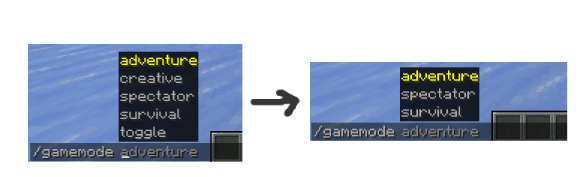*
<details>
<summary>示例</summary>
```yaml
# 允许 /gamemode 及其所有子参数
# 除了 "/gamemode creative"
- "gamemode"
- "!gamemode creative"
- '!gamemode toggle'
# 允许所有命令,除了 /anvil
- "*"
- "!anvil"
自动添加所有插件命令
有时手动添加来自某个插件的所有命令非常烦人。这就是为什么 ProAntiTab 提供了一个简单的快捷方式,只需一个操作即可添加来自特定插件的所有命令。
只需添加 plugin=<插件名称> 即可自动添加该插件的所有命令。
仅适用于独立的 Spigot(及其分支)服务器
示例
# 允许除 /anvil 之外的所有 Essentials 命令。
# /gamemode 仅限两个子参数
- "plugin=essentials"
- "!anvil"
- "gamemode creative"
- "gamemode survival"
BLOCK ON SPECIFIC SERVERS
如果你在网络上使用 ProAntiTab,你可以非常轻松地管理哪些服务器上应该存在哪些命令。所有操作都可以通过代理处理,无需在后端服务器上进行额外的维护。
为此,只需按照官方 设置 和 使用指南 操作,两者均可在 GitHub Wiki 中找到。
GROUP SYSYTEM
PAT 的分组系统允许你为特定的人群开放某些命令。PAT 的分组命令主要用于白名单命令,可以与其他组合并等等。
它们还可以用于通过否定其中的命令来将命令列入黑名单。但要使此功能生效,需要在 config.yml 中启用 allow-group-overruling 选项。
关于 PAT 组系统的常规使用方法,请参阅 Github 维基。
PLACEHOLDERAPI & PAPIPROXYBRIDGE 支持
自定义化和独特性对于许多服务器管理员来说是一个重要因素。因此,PAT 提供了让您使用广泛使用的插件 PlaceholderAPI 编辑和使用其众多占位符的可能性。在代理服务器上访问这些占位符也不是问题。借助额外插件 PAPIProxyBridge 的支持,即使在您的代理服务器上也可以访问 PAT 的占位符。
可用占位符
# 一些通用的占位符:
#   %pat_general_user%                      = 获取接收此消息的用户名。
#   %pat_general_version_current%           = 获取 PAT 的当前版本号。
#   %pat_general_version_newest%            = 获取 PAT 的最新版本号。

# config.yml 中部分消息的占位符:
#   %pat_message_unknowncommand%            = 获取 PAT config.yml 中的“未知命令”消息。[cancel-blocked-command]
#   %pat_message_blocked%                   = 获取 PAT config.yml 中的“命令被阻止”消息。[custom-unknown-command]

# 列出所有命令的占位符:
#   %pat_list_size_commands%                = 获取所有已列出的命令数量。
#   %pat_list_commands%                     = 获取所有已列出的命令。
#   %pat_list_sorted_commands%              = 按字母顺序(A-Z)获取所有已列出的命令。
#   %pat_list_reversed_groups%              = 按反向字母顺序(Z-A)获取所有已列出的命令。

# 列出特定组内所有命令的占位符:(将 'xxx' 替换为组名)
#   %pat_list_size_commands_group_xxx%      = 获取该组内所有命令的数量。
#   %pat_list_commands_group_xxx%           = 获取该组内的所有命令。
#   %pat_list_sorted_commands_group_xxx%    = 按字母顺序(A-Z)获取该组内的所有命令。
#   %pat_list_reversed_commands_group_xxx%  = 按反向字母顺序(Z-A)获取该组内的所有命令。

# 列出所有组的占位符:
#   %pat_list_size_groups%                  = 获取所有可用组的数量。
#   %pat_list_groups%                       = 获取所有组。
#   %pat_list_sorted_groups%                = 按字母顺序(A-Z)获取所有组。
#   %pat_list_reversed_groups%              = 按反向字母顺序(Z-A)获取所有组。
MINIMESSAGE 支持

想要设计更独特的消息?我们为您准备好了!(适用于 1.17 及以上版本的服务器)
(点击此处查看格式文档)
请看以下示例,了解等待您的各种可能性:
示例 1
cancel-blocked-commands:
  enabled: true
  message: '<hover:show_text:"&cBlocked command: &4&o%command%">&cThis command is &4&lBLOCKED&c!'

示例 2
cancel-blocked-commands:
  enabled: true
  message: '&cThis command is blocked! <click:suggest_command:/help>&7Click here to get a view of all available commands instead.'

HOW TO SETUP?
尽管 ProAntiTab 的使用非常简单,但每种服务器引擎的设置略有不同。
通常只需将 ProAntiTab 加载到您想使用的特定服务器上即可,但为了使用 ProAntiTab 的所有功能,建议遵循 Github 维基上的官方设置指南。
如果说明不清楚或过于复杂,请随时加入 Discord 服务器寻求帮助。^^
HOW TO ALLOW COMMANDS?
请查看维基以了解 PAT 的工作原理及使用方法。
如果您想绕过所有被阻止的命令,只需赋予自己以下权限:proantitab.bypass
执行特定组内所有已列出的命令需要以下权限:proantitab.group.<group>
COMMANDS & PERMISSIONS
所有命令及其权限均列在 文档 页面的最底部。
CONFIGURATION FILE
Bukkit/Spigot
config.yml
storage.yml
Proxy (Bungeecord/Velocity)
config.yml
storage.yml
bStats

One of the simplest plugin & command hider!
Decide what plugins and commands your players should see! ^^
placeholderapi support - free - no dependencies required
ABOUT
ProAntiTab is an advanced plugin hider with many features and a very simple to understand system. It prevents your server from plugin spoofers used by hack clients, manipulates the tab-completion, blocks unwanted suggestions and much more!
IN ACTION
CUSTOM SERVER BRAND (F3)
Create your own animated custom server brand on your Spigot, Bungeecord and Velocity server!
open config.yml section
# This feature allows you to customize your server-brand you see when you press F3.
# Normally there stands something like 'Purpur', or 'Spigot'.
# With this feature you are able to change and even animate it! ^^
custom-server-brand:
enabled: false
# Determines the speed in that the animation goes
repeat-delay: 3
# This here is the list of the animation
# Possible placeholders:
# %player% - name of the player
# %displayname% - displayname of the player
# %world% - name of world where the player is
# and the other placeholders from PlaceholderAPI
brands:
- '&f&lP&froAntiTab |'
- '&fP&lr&foAntiTab /'
- '&fPr&lo&fAntiTab -'
- '&fPro&lA&fntiTab |'
- '&fProA&ln&ftiTab \'
- '&fProAn<&fiTab |'
- '&fProAnt&li&fTab /'
- '&fProAnti&lT&fab -'
- '&fProAnti&lT&fab \'
- '&fProAntiT&la&fb |'
- '&fProAntiTa&lb&f /'
- '&fProAntiTab -'
- '&fProAntiTab \'
USE BLACKLIST AS WHITELIST
You have way too many commands to block? Don't worry.
There's a section in the config.yml located pretty much high that allows you to turn the blacklist into a whitelist instead. This will block every command on your server except for those that are listed.
section in config.yml
# This is a very necessary feature if you have way too many commands to block and instead decide
# to whitelist specific commands.
# Enabling this will disable ALL commands except for those that are in the (group-)list.
turn-blacklist-to-whitelist: false
ANTI PLUGIN SPOOFING
ProAntiTab is able to detect and block plugin spoofing attempts used by hack clients.
BLOCK SUB ARGUMENTS
We all know the problem when players should be able to use some of the commands but should not see literally EVERY sub-argument in a command. Well, then just blend them out? ProAntiTab can do this for you and it's very easy to setup as well! (See some examples below)
example
# Let's say you just want to allow "/help Minecraft" only and not "/help apple".
# It will also automatically allow everything after "/help Minecraft ..."
- help Minecraft

# [CMD] = Allow the execution of the command
# [TAB] = Allow the tab-completion of the command
- "[CMD]cmi tpa" # Only executable. Not tab-completable
- tpa            # Executable & Tab-Completable

# %hidden_online_players% = Online players (Removed from tab-completion)
# %online_players%        = Online players
# %hidden_players%        = Registered players (Removed from tab-completion)
# %players%               = Registered players
# %numbers%               = Numbers, such as 1000 or 1.000
# _-                      = Block everything after
- "tpa %online_players%"
- "sell %numbers%"

# Using the operator _- at the end cancels every argument afterwards and blocks it.
# This will allow the player to use "/help Minecraft" but not "/help Minecraft xyz"
- help Minecraft _-
BLOCK COLON COMMANDS
Blocking each and every colon command like essentials:spawn by hand is not an easy task. But with this simple feature, you can easily block all colon commands automatically! Only people with the proantitab.namespace permission can see and use these commands again.
open config.yml section
#>> HTP (Overwritten)
# Here you can disable all namespace commands.
# Namespace commands are commands like plugin:command (e.g: essentials:warp)
# You can bypass this restriction with the proantitab.namespace permission.
block-namespace-commands:
enabled: false
CUSTOM PLUGINS LIST
Just blocking the /plugins command is pretty boring. This feature here allows you to make it more interesting by displaying for example fake plugins.
open config.yml section
#>> HTP (Overwritten)
# Here you can customize your own fake '/plugins' command.
custom-plugins:
enabled: true
commands:
- pl
- plugins
- bukkit:pl
- bukkit:plugins
message:
- '&fPlugins (0):'
CUSTOM VERSION COMMAND
Who wouldn't like to pretend to own a custom server-jar? Have fun customizing your very own /version command to your personal liking.
open config.yml section
#>> HTP (Overwritten)
# Here you can customize your own fake '/version' command.
custom-version:
enabled: true
commands:
- version
- ver
- icanhasbukkit
- bukkit:ver
- bukkit:version
message:
- '&fThis server is running CraftBukkit version git-NasaSpigot-294 (MC: X)'
CUSTOM UNKNOWN COMMAND MESSAGE
The Bukkit/Spigot version of ProAntiTab gives your the possibility to create your own unknown-command message to align it with the blocked-command message for example.
open config.yml section
# Now there we come to the good stuff! ^^
# If ProAntiTab is loaded on a Spigot server, you will see this option right here.
# With that you can also customize your own "Unknown Command"-message.
custom-unknown-command:
  enabled: true
  message:
    - '&cThis command does not exist!'
CUSTOM PROTOCOL PING
Do you know the red text message at the players count when you ping a server with the wrong version? Exactly this holds the information of what kind of server your proxy server is running at. This feature hides the version of the proxy with a custom made one. It's enabled by default but doesn't show the text. The text can be seen when someone pings the server with the wrong version or uses a resolver. This picture shows you what someone with the wrong version would see, unless the "always-show" is enabled. If this option is enabled, this text will always appear.
open config.yml section
# Change the protocol for the version name when the server is being pinged
# (!) Warning: It's required to use Paper or Purpur to use this feature!
# (!) Supported server versions: 1.12.2 - latest
custom-protocol-ping:
  enabled: false

  # Normally it would only display when someone pings the server with the wrong version.
  # Enabling this will always display the protocol and replace it with the normal player count.
  always-show: false

  # This number here determines the outcome for the %online_extended% placeholder.
  # It's the current amount of players increased by this number.
  # For example: 5/20 becomes 6/20
  extend-online-count: 1
  # true: Use new calculated online-count (%online_extended%) as max-players count.
  # false: Use the default max-players count.
  use-as-maxplayers: false

  # Enabling this option hides the list of players on your server,
  # when you hover over the player count.
  hide-players: true

  # The displayed protocol message
  # Available placeholders:
  # %online%            - current online player count
  # %online_extended%   - manipulated online player count
  # %max%               - max player count
  protocol: '&f&lProAntiTab &7(&a%online%&7/&c%max%&7)'
CUSTOM RESPONSE ACTIONS
For some, it's important to determine how the response message should be or what should happen. You can customize that factor to your personal liking and use different actions to have full control over your blocked commands.
Bukkit/Spigot examples
#      ____             ___          __  _ ______      __
#     / __ \_________  /   |  ____  / /_(_)_  __/___ _/ /_
#    / /_/ / ___/ __ \/ /| | / __ \/ __/ / / / / __ `/ __ \
#   / ____/ /  / /_/ / ___ |/ / / / /_/ / / / / /_/ / /_/ /
#  /_/   /_/   \____/_/  |_/_/ /_/\__/_/ /_/  \__,_/_.___/
#  custom-responses.yml
#
# Here you can configure a few of the blocked commands a bit further.
#  But what exactly is this here? Every command that would normally respond with the typical "command is blocked" message, can be configured in here!
#  And how does it work? It's simple. You just provide the a trigger of the command that would be normally blocked.
#  Commands that would normally work won't send the messages you have set here.
#  This way PAT can offer you full control over certain commands and their normal responses.
# What are these action section at each block?
#  This is an additional feature to make your responses much more alive.
#  Example actions that can be used are the following:
#   Execute console command:
#        Syntax:  console::command
#        Example: console::say %player% is an evil player
#   Execute player command:
#        Syntax:  execute::command
#        Example: execute::help
#   Send actionbar:
#        Syntax:  actionbar::text
#        Example: actionbar::&cThis is not cool %player%!
#   Send title:
#        Syntax:  title::title::subtitle::5::20::5
#        Example: title::&aTest title::&cHello %player%!
#   Play sound:
#        Syntax:  sound::soundName::volume::pitch
#        Example: sound::ENTITY_ENDER_DRAGON_GROWL::1.0::1.0
#   Give potion effect:
#        Syntax:  effect::potionEffect::duration::amplifier
#        Example: effect::BLINDNESS::45::1

# Here are a few examples:

# Example with kits.
# In here we only trigger the given message, if the player would type "/kit ...".
# If this command would work through sub-arguments, then the player would only able to execute the command with the
# listed sub-arguments assigned to it. Everything else will result with the set message in there.
# --
#example-with-kits:
#  triggers:
#    - "kit *"
#  message:
#    - "&cThis kit does not exist!"
#  actions:
#    - "actionbar::&cSorry %player%, but this kit does not exist!"

# Here another example with an auctionhouse plugin.
# In here we only trigger the given message, if the player would type "/ah plugin".
# Normally it would print out the "command is blocked" message, because PAT would have blocked it in our case.
# Therefore, we can also assign a custom response message to it.
# ---
#example-with-auctionhouse:
#  triggers:
#    - "ah plugin"
#  message:
#    - "&cThis sub-command does not exist. Please type: &e/ah help"
#  actions:
#    - "console::say That's not nice %player%!"
#    - "effect::BLINDNESS::45::1"
#    - "sound::ENTITY_ENDER_DRAGON_GROWL::1.0::1.0"
#    - "title::&cHey!::&cYou can't do that %player%!::5::20::5"
#    - "actionbar::&cNop, sorry %player%"
Proxy examples
#      ____             ___          __  _ ______      __
#     / __ \_________  /   |  ____  / /_(_)_  __/___ _/ /_
#    / /_/ / ___/ __ \/ /| | / __ \/ __/ / / / / __ `/ __ \
#   / ____/ /  / /_/ / ___ |/ / / / /_/ / / / / /_/ / /_/ /
#  /_/   /_/   \____/_/  |_/_/ /_/\__/_/ /_/  \__,_/_.___/
#  custom-responses.yml
#
# Here you can configure a few of the blocked commands a bit further.
#  But what exactly is this here? Every command that would normally respond with the typical "command is blocked" message, can be configured in here!
#  And how does it work? It's simple. You just provide the a trigger of the command that would be normally blocked.
#  Commands that would normally work won't send the messages you have set here.
#  This way PAT can offer you full control over certain commands and their normal responses.
# What are these action section at each block?
#  This is an additional feature to make your responses much more alive.
#  Example actions that can be used are the following:
#   Execute console command:
#        Syntax:  console::command
#        Example: console::send %player% fallback
#   Execute player command:
#        Syntax:  execute::command
#        Example: execute::help
#   Send actionbar:
#        Syntax:  actionbar::text
#        Example: actionbar::&cThis is not cool %player%!
#   Send title:
#        Syntax:  title::title::subtitle::5::20::5
#        Example: title::&aTest title::&cHello %player%!

# Here are a few examples:

# Example with kits.
# In here we only trigger the given message, if the player would type "/kit ...".
# If this command would work through sub-arguments, then the player would only able to execute the command with the
# listed sub-arguments assigned to it. Everything else will result with the set message in there.
# --
#example-with-kits:
#  triggers:
#    - "kit *"
#  message:
#    - "&cThis kit does not exist!"
#  actions:
#    - "actionbar::&cSorry %player%, but this kit does not exist!"

# Here another example with an auctionhouse plugin.
# In here we only trigger the given message, if the player would type "/ah plugin".
# Normally it would print out the "command is blocked" message, because PAT would have blocked it in our case.
# Therefore, we can also assign a custom response message to it.
# ---
#example-with-auctionhouse:
#  triggers:
#    - "ah plugin"
#  message:
#    - "&cThis sub-command does not exist. Please type: &e/ah help"
#  actions:
#    - "console::say That's not nice %player%!"
#    - "title::Hey!::You can't do that %player%!::30::3000::30"
#    - "actionbar::Nop, sorry %player%"
NEGATE COMMANDS
It's not a must to write each and every possible sub-argument by hand. The same goes for commands in general.
You can negate them with the help of the negation operator (!).

example
# Allows /gamemode and all of its sub-arguments
# except "/gamemode creative"
- "gamemode"
- "!gamemode creative"
- '!gamemode toggle'
# Allows all commands, except /anvil
- "*"
- "!anvil"
AUTO-ADD ALL PLUGIN COMMANDS
Sometimes it's so annoying to add all commands from a certain plugin by hand. That's why ProAntiTab offers the possebility to simply add all commands from a certain plugin with a simple shortcut.
You can simply add plugin=<plugin-name> to add all commands from a plugin automatically.
Only works for standalone Spigot (+Forks) servers
example
# Allows all Essentials commands except /anvil.
# /gamemode is limited to only two sub-arguments
- "plugin=essentials"
- "!anvil"
- "gamemode creative"
- "gamemode survival"
BLOCK ON SPECIFIC SERVERS
If you use ProAntiTab on a network, you can pretty easily manage on what servers what commands should exist. Everything can be handled via the proxy and does not require additional maintenance on the backend servers.
For this, just follow the official setup and how-to guide, which can be both found on the Github wiki.
GROUP SYSYTEM
The PAT group system allows you to allow certain commands only for a certain group of people. PAT group commands are mainly for whitelisting commands, can merge with other groups, and so on.
They can also be used to blacklist commands by negating the commands inside there. But for this to work, the option allow-group-overruling inside the config.yml needs to be enabled.
How to use the PAT group system in general can be seen on the Github wiki.
PLACEHOLDERAPI & PAPIPROXYBRIDGE SUPPORT
Customization and uniqueness is an important factor for many server owners. That's why PAT offers you the possebility to edit and use many of its placeholders with the widely spreaded plugin PlaceholderAPI. Accessing those placeholders on the proxy isn't a problem either. With the support of the addtional plugin PAPIProxyBridge, PAT's placeholders are even accessable on your proxy server.
Available placeholders
# Some general Placeholders to work with:
#   %pat_general_user%                      = Get the name of the user who receives this message.
#   %pat_general_version_current%           = Get current version name of PAT.
#   %pat_general_version_newest%            = Get newest version name of PAT.

# Placeholders of some of the messages in the config.yml:
#   %pat_message_unknowncommand%            = Get the "unknown command"-message from the config.yml of PAT. [cancel-blocked-command]
#   %pat_message_blocked%                   = Get the "command blocked"-message from the config.yml of PAT. [custom-unknown-command]

# Placeholders to list all commands:
#   %pat_list_size_commands%                = Get the amount of all listed commands.
#   %pat_list_commands%                     = Get all listed commands.
#   %pat_list_sorted_commands%              = Get all listed commands in alphabetic order. (A-Z)
#   %pat_list_reversed_groups%              = Get all listed commands in reversed alphabetic order. (Z-A)

# Placeholders to list all commands of a group: (replace 'xxx' with the group-name)
#   %pat_list_size_commands_group_xxx%      = Get the amount of all commands of a group.
#   %pat_list_commands_group_xxx%           = Get all commands of a group.
#   %pat_list_sorted_commands_group_xxx%    = Get all commands of a group in alphabetic order. (A-Z)
#   %pat_list_reversed_commands_group_xxx%  = Get all commands of a group in reversed alphabetic order. (Z-A)

# Placeholders to list all groups:
#   %pat_list_size_groups%                  = Get the amount of all available groups.
#   %pat_list_groups%                       = Get all groups.
#   %pat_list_sorted_groups%                = Get all groups in alphabetic order. (A-Z)
#   %pat_list_reversed_groups%              = Get all groups in reversed alphabetic order. (Z-A)
MINIMESSAGE SUPPORT
You want to design your messages more unique? We got you covered! (works on 1.17 server and above)
(Click here to see the documentation for the format)
Look at those few examples to see what kind of possibilities awaits you:
example 1
cancel-blocked-commands:
  enabled: true
  message: '<hover:show_text:"&cBlocked command: &4&o%command%">&cThis command is &4&lBLOCKED&c!'
example 2
cancel-blocked-commands:
  enabled: true
  message: '&cThis command is blocked! <click:suggest_command:/help>&7Click here to get a view of all available commands instead.'
HOW TO SETUP?
Despite of the fact that ProAntiTab is pretty easy to use, the setup is slidely different for each server engine.
It normally is already enough to simply load ProAntiTab on the certain server you wanna use it, but in order to use ProAntiTab with all its features, its recommended to follow the official setup guide on the Github wiki.
Please feel free to join the Discord server to request for help if the instruction is unclear or too complicated. ^^
HOW TO ALLOW COMMANDS?
Please check out the wiki to get an idea on how PAT works and can be used.
If you want to bypass all blocked commands, simply give yourself the following permission: proantitab.bypass
Following permission is required to execute all listed commands within a certain group: proantitab.group.<group>
COMMANDS & PERMISSIONS
All commands and their permissions are listed on the documentation page at the very buttom.
CONFIGURATION FILE
Bukkit/Spigot
config.yml
storage.yml
Proxy (Bungeecord/Velocity)
config.yml
storage.yml
bStats

 插件

 插件
 插件
 插件
 插件
 插件
评论 0
登录后参与评分
还没有评论,来抢沙发吧