PTM173 1.7.3 地形生成
通知
我将暂时放下 Minecraft,并且可能不再维护这个项目。我会将源代码移交他人,并在这个网站上发布一个精简版,以便其他人选择继续开发。也许有一天我会回归 Minecraft,特别是当有不错的插件支持时。在此期间,我建议大家都弃用并迁移出你们现有的 1.7.3 世界。如果有人制作了类似性质的插件,我会在本页顶部提供链接。
在我看来,如果你真的想保留这个世界,最简单的方法是生成大量的地形,然后锁定边界,以防止生成任何新地形。
如果你有疑问或担忧,欢迎私信我。我会尽力回复。请记住,如果你感到沮丧,最能与你沟通的人是 Jeb 以及 Moyang 团队的其他成员,特别是关于代码去混淆、包含合理的许可证以及将插件支持作为优先事项。我们都热爱 Minecraft 所代表的开放、可修改、多人在线、无限世界的理念,但它发展成为一款社区乐于改进和游玩的坚实游戏的过程实在太慢了。我将继续为 CB 1.1-R1 及之后版本维护 PTM1.7.3v3.x,此后将不再创建制品。
摘要
本质上,这是对 Phoenix Terrain Mod 的重构,旨在接入 1.7.3 的地形生成机制,以便未来版本的 CraftBukkit 服务器中的旧世界能够为新区块生成正确的地形,而无需通过“平滑”处理来修复 1.7.3 与 1.0 地形之间的差异。
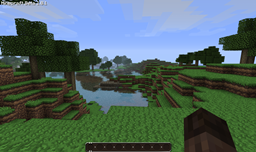
以下是最初在 1.7.3 中创建的世界的地形生成对比,我已经走到了正在生成新区块的边界处:地形对比(图片显示的是 1.8.1,但与 1.1 看起来相同……我只是比较懒)
- 第一张图片(上方):启用 PTM173 的 1.8.1
- 第二张图片(中间):1.8.1
- 第三张图片(下方):1.7.3
状态
PTM173 已经通过了多次对比测试,分别在测试世界和实时服务器上对 1.0 PTM173 和 1.7.3 原版进行了比较。它目前已在实时服务器上运行。最新版本可能存在已知问题,我仍在继续测试。请在遇到问题时提交工单。
安装
设置
- 下载最新版本的 PTM173.jar:PTM173v3.1
- 如果你想自己开始工作,截断版的源代码在这里:PTM173v3.1_src
- 将 PTM173.jar 放入你的 Bukkit Craft 安装目录下的 plugins 文件夹中
- 如果未运行 Multiverse:修改 bukkit.yml,通过在文件底部添加以下内容,将世界生成器设置为 "PTM173":
     worlds:
          world:
              generator: PTM173
警告:手动输入时要小心,“generator:” 和 “PTM173” 之间的空格非常重要。如果你在启动服务器时发现 “generator:PTM173” 被移到了与 “world:” 同一行,那么你很可能是漏掉了空格,并没有生成 PTM173 地形。
- 如果运行 Multiverse:将 plugins/Multiverse-Core/worlds.yml 文件中的生成器更改为 “PTM173”,在你想要生成 1.7.3 地形的世界的 yml 块中添加以下内容。例如,这里有一个 worlds.yml 中的测试世界配置:
     worlds:
         test_world:
             gamemode: SURVIVAL
             keepspawninmemory: true
             scale: 1.0
             animals:
                 spawn: true
             pvp: true
             entryfee:
                 amount: 0.0
                 currency: -1
             alias:
                 color: WHITE
                 name: ''
             allowweather: true
             monsters:
                 spawn: true
             hunger: true
             spawn:
                 yaw: 0.0
                 pitch: 0.0
                 z: 0.0
                 y: 64.0
                 x: 0.0
             environment: NORMAL
             respawnworld: ''
             tempspawn: ''
             generator: PTM173
             seed: ''
运行
在运行 CraftBukkit 服务器以运行 PTM173 时没有特殊步骤;但是,了解需要注意的事项以确保其正确启动是很重要的:
- 这表明 PTM173 已被识别并加载正常:“[INFO] PTM173 v2.2 is now enabled”
- 这表明 PTM173 运行的世界:“[INFO] PTM173: enabled for 'world'”
注意:默认情况下,CraftBukkit 运行在名为 'world' 的世界中
升级
PTM173 不会生成文件,因此升级只需替换现有的 PTM173.jar 即可。
常见问题解答
问:我遇到了 XXXX 问题,我很困惑,你能帮我吗?
答:我很乐意帮助你,但我需要一些信息。在发表评论、私信我或创建工单之前,请确保你准备好以下信息并根据需要提供(添加工单并无妨,请不要犹豫这样做):
- CraftBukkit 服务器和 PTM173 的版本
- 你是运行原版 CraftBukkit 还是安装了 Multiverse?
- bukkit.yml 或 worlds.yml(如果运行 Multiverse)文件
- 控制台日志,特别是错误或异常信息
- 当前已安装的插件列表
- 截图和/或问题的简要描述,以便我能复现它
- 你的设置中有什么特别之处是我可能没预料到的
问:XXXX 插件与 PTM173 存在冲突;我无法同时使用两者,或者它们无法按预期共同工作。你能帮忙解决吗?
答:我很乐意帮助解决这些冲突。除了我在之前的问答中提到的关于报告问题的信息外,还请提供以下信息,以便我们跟踪该问题:
- 务必创建一个工单(因为可能会有多次交互,有一个地方来跟踪进度是很好的)
- 发生冲突的插件及其版本
- 复现冲突行为的步骤描述
- 预期行为的描述
问:这个模组是否与 Phoenix Terrain Mod 冲突?
答:不冲突。我更改了包名以允许两者共存,移除了“ptm”命令,并将所有相关的地形生成源代码添加到一个不与 PTM、craft bukkit 或 minecraft 冲突的包下。
问:这个插件在多大程度上使用了 Phoenix Terrain Mod、Minecraft 1.7.3 和 craft bukkit?
答:这是我的第一个插件,因此我是基于 Phoenix Terrain Mod 的代码构建的,但它并没有真正利用那些功能;只是有了现成的框架可以了解如何处理对象和区块的生成。Minecraft 1.7.3 的类文件用于生成区块和对象。Craft Bukkit 是这一切得以运行的基础框架。在此向这些社区致以崇高的敬意。
问:这个模组是否支持下界?或者将来会支持吗?
答:目前它不支持下界区块的生成。目前没有对此的需求。将来我可能会进一步研究它,但目前还没有足够的问题值得为此花费时间。
问:这个模组是否会为未来的 Minecraft 和 craft bukkit 版本进行更新?
答:不会。我将很快移交源代码,以便其他人可以选择继续这项工作。我打算暂时搁置 Minecraft 模组开发。
已知问题
生物群系,特别是沼泽生物群系,现在会出现草、树木等颜色异常的情况,这通常是不预期的且看起来很糟糕。
这个问题是在 MC 1.0.0 中新出现的,并且不幸地特定于客户端代码。这基本上只是一个视觉瑕疵。解决此方法的唯一途径是使用类似这样的工具对客户端进行修改:
这个问题似乎也会影响降雨/降雪。影响的不是实际积累的量,而是客户端渲染的部分。据我所知,这不是服务器端的问题,但我会看看能否绕过它。
我一直无法找到从服务器端欺骗客户端的方法。我不认为这些问题会在近期得到修复,甚至可能根本无法修复。
PTM173 1.7.3 Terrain Generation
Notice
I'll be putting minecraft down for a while and will likely not be maintaining this project. I'll be passing the source on to others and putting up a stripped down version on this site so that others may continue if they chose to. I may come back to minecraft one day particularly when there is decent plugin support. In the mean time I recommend that everyone deprecate and move away from their existing 1.7.3 worlds. If someone produces a plugin of a similar nature I will provide a link at the top of this page.
In my opinion, the simplest thing to do if you really want to keep the world is to generate a ton of terrain then lock the borders so that no terrain can be generated.
If you have questions or concerns you are welcome to pm me. I'll get to them when I can. Remember if you have frustrations the best people to communicate those to are Jeb and the rest of Moyang team particularly about deobfuscating the code, including a reasonable license, and making plugin support a priority. We all love what minecraft represents as an open, modifiable, multiplayer, infinite world but it's just been slow to develop into a solid game that the community enjoys improving upon as much as playing. I'll be maintaining PTM1.7.3v3.x for CB 1.1-R1 and after that will no longer be creating artifacts.
Summary
Essentially this is a rework of Phoenix Terrain Mod to plug into the terrain generation from 1.7.3 so that future versions of craft bukkit servers can have older worlds that continue to generate proper terrain for new chunks without having to "fix" the terrain by smoothing between 1.7.3 and 1.0 terrain.
Here is a comparison of the terrain generation of a world originally created in 1.7.3 where I've gone to the border where new chunks are being generated: Terrain Comparison (the image shows 1.8.1 but looks the same with 1.1 .. I'm just lazy)
- 1rst image (top): 1.8.1 with PTM173 enabled
- 2nd image (middle): 1.8.1
- 3rd image (bottom): 1.7.3
Status
PTM173 has been through several comparison tests between 1.0 PTM173 and 1.7.3 itself on both a test world and on a live server. It is currently running on a live server. There may be known issues with the latest release and I am continuing to test. Please create tickets as you run into issues.
Installation
Setup
- download the latest version of PTM173.jar: PTM173v3.1
- source to start working on this yourself is here in truncated form: PTM173v3.1_src
- put PTM173.jar in your plugins dir for your bukkit craft installation
- if not running multiverse: change bukkit.yml so that the world generator is set to "PTM173" by adding this to the bottom of the file:
     worlds:
          world:
              generator: PTM173
WARNING: be careful when typing this out by hand the space between
"generator:" and "PTM173" is important. If you notice when starting
up your server that "generator:PTM173" has been moved to be on
the same line as "world:" then you are likely missing a space and
are NOT generating PTM173 terrain.
- if running multiverse: change your generator in the plugins/Multiverse-Core/worlds.yml file to "PTM173" by adding this to the yml block for the world you want to generate 1.7.3 terrain. For example here's a test world config in worlds.yml:
     worlds:
         test_world:
             gamemode: SURVIVAL
             keepspawninmemory: true
             scale: 1.0
             animals:
                 spawn: true
             pvp: true
             entryfee:
                 amount: 0.0
                 currency: -1
             alias:
                 color: WHITE
                 name: ''
             allowweather: true
             monsters:
                 spawn: true
             hunger: true
             spawn:
                 yaw: 0.0
                 pitch: 0.0
                 z: 0.0
                 y: 64.0
                 x: 0.0
             environment: NORMAL
             respawnworld: ''
             tempspawn: ''
             generator: PTM173
             seed: ''
Running
There are no special steps when running craft bukkit server to run PTM173; however, it's good to know what to look for to ensure that it has started up appropriately:
- This indicates PTM173 is recognized and has loaded properly: "[INFO] PTM173 v2.2 is now enabled"
- This indicates the world that PTM173 is running on : "[INFO] PTM173: enabled for 'world'"
Note by default craft bukkit runs on the world named 'world'
Upgrading
PTM173 does not generate files and therefore upgrading simply requires replacing the existing PTM173.jar
FAQ
Q: I'm having issue XXXX, and I'm stumped can you help me out?
A: I'd be more than happy to help you, but I do need some information. Before leaving comments, pming me, or creating a ticket please make sure you have following information ready and provide it as appropriate (it doesn't hurt to add tickets so please don't hesitate to do so):
- version of the craft bukkit server and PTM173
- are you running vanilla craft bukkit or do you have multiverse installed?
- bukkit.yml or worlds.yml (if running multiverse) file
- console logs specifically errors or exceptions
- a list of your currently installed plugins
- screenshots and/or a brief description of the problem so I can reproduce it
- anything special about your setup that I might not otherwise expect
Q: XXXX plugin conflicts with PTM173; I can't use one or the other or they just don't work together as expected. Can you help?
A: I'd be happy to help resolve these conflicts. In addition to the information I mentioned in the previous QA related to reporting an issue please also provide the following information so that we can track the issue:
- definitely create a ticket (because there will probably be several interactions it's nice to have some place to track the progress)
- the conflicting plugin and it's version
- a description of how to reproduce the conflicting behavior
- a description of the expected behavior
Q: Does this mod conflict with Phoenix Terrain Mod?
A: No, I changed the package names to allow for both to coexist, removed the "ptm" commands, and have added all relevant terrain generation source under a package that does not conflict with PTM, craft bukkit, or minecraft.
Q: How much of this plugin uses Phoenix Terrain Mod, Minecraft 1.7.3, and craft bukkit?
A: This is my first plugin so I based it around the Phoenix Terrain Mod code, but it doesn't really utilize any of that functionality; it was just nice to have the framework in place to see how to handle object and chunk generation. Minecraft 1.7.3 class files are used to generate chunks and objects. Craft Bukkit is the framework on which all of this is allowed to function. Major props go to each of these communities.
Q: Does this mod support the Nether and/or will it in the future?
A: It currently does not support Nether chunk generation. Currently there is no demand for this. In the future I may investigate it further, but for now there isn't enough of a problem to warrant spending time on this.
Q: Will this mod be updated for future versions of minecraft and craft bukkit?
A: No, I'll be passing off the source shortly so that others may continue the work if they chose. I'm putting minecraft mod development down for awhile.
Known Issues
Biomes, particularly swamp biomes now have discolored grass, trees, etc, which often times is unexpected and just looks bad.
This issue is new in MC 1.0.0 and specific, unfortunately, to the client side code. It's basically just a visual artifact. The only way around this is to mod the client side using something like this:
This issue also seems to affect rainfall/snow. Not what actually accumulates so much as what gets rendered on the client side. From what I can tell this is not a server side issue but again I'll see if I can work around it.
I've been unable to figure out a way to trick the client side from the server. I don't believe these issues will be fixed any time soon and likely not at all.

 插件

 插件

 插件

 插件

 插件

评论 0
登录后参与评分
还没有评论,来抢沙发吧