描述

QuickSell 是一款流行的商店插件,通常用于监狱服务器。
它允许玩家以多种方式将物品出售给服务器
同时还提供了一个非常轻量的增益系统,不仅允许你创建
出售倍率加成,还可以创建经验值增益、mcMMO 增益等等!
重要提示:我(mrCookieSlime/TheBusyBiscuit)已停止开发此插件,转而开发电子游戏(更多详情请访问我的YouTube 频道)。但这并不意味着 QuickSell 已经死亡。该插件已在GitHub上开源,如果你或你认识的技术娴熟的插件开发者,请考虑通过提交 Pull Request 来为该项目做出贡献,使其保持活力。
QuickSell v2.0 by mrCookieSlime [English]
QuickSell v1.10.10 by Koz4Christ [English]
更多视频...
功能特性
- 简单的商店创建
- 使用游戏内编辑器轻松管理商店
- 增益的创建与管理,包括用于 PrisonGems 的宝石增益或 mcMMO 增益!
- 复古风格的出售告示牌,配有轻量级 GUI(出售、估价、取消)
- 全部出售告示牌和命令!
- Citizens 集成 - 设置商人 NPC
- 清晰的价值概览
- 以及更多,非常多!
出售(基础)
可以通过执行 /sell 命令(可在配置文件中禁用)
或使用 [Sell] 告示牌来访问出售工具,此工具会打开如下 GUI:
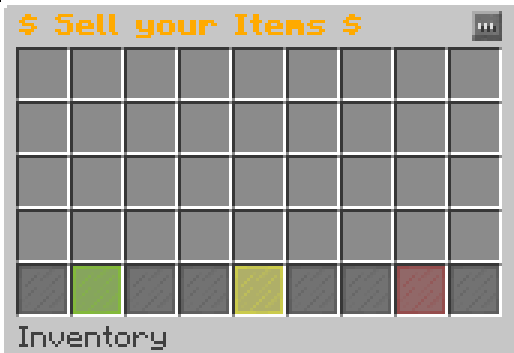
- 绿色染色玻璃:确认交易并出售该 GUI 内的所有物品
- 黄色染色玻璃:提供你将因这些物品获得的预估价值
- 红色染色玻璃:取消交易,你将收回所有物品
只需将所有想要出售的物品放入 GUI 即可完成操作 - 就是这么简单!
全部出售(基础)
可以通过执行 /sellall 命令(可在配置文件中禁用)
或使用 [Sell All] 告示牌来访问全部出售工具,此工具不会打开任何 GUI,而是
扫描你的背包中任何可以出售给你当前所在商店的物品
并出售这些物品
如果你使用了 PrisonUtils,你的背包也会被扫描!
自动出售(中等)
注意:此功能需要安装 PrisonUtils!
可以通过执行 /autosell 来切换自动出售工具
此工具基本上会自动出售(或至少尝试出售)你挖掘的所有方块!
为了防止聊天窗口被刷屏,你不会收到发生此操作的提示消息。
但是每经过 X 个方块,它会给你一个关于最近出售方块的简要总结。
价值信息(中等)
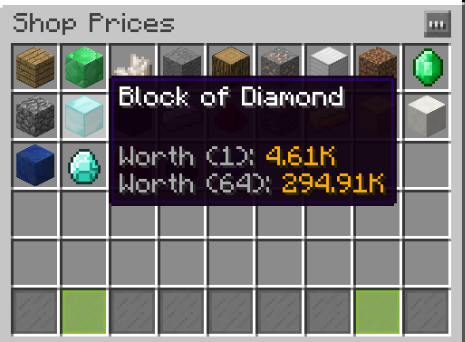
你可以通过执行 /prices <Shop>
或左键点击
出售告示牌、
全部出售告示牌、
或 NPC 商人
此工具为你提供了可以将哪些物品出售给特定商店的清晰概览
更重要的是,还有出售价格 ;)
NPC 商人(高级)
注意:此功能需要安装 Citizens!
你可以使用以下命令将任何 Citizens NPC 链接到商店:
/quicksell linknpc <Shop> <sell/sellall>
这将使当你右键点击该 NPC 时,它表现得像是一个出售或全部出售告示牌。
附加组件与扩展
命令/权限
| |
命令 |
|
描述 |
|
权限 |
|
| |
/sell [商店名称] |
|
打开库存界面以出售物品 |
|
该命令本身没有权限限制,但商店有!请查看配置部分 |
|
| |
/sellall [商店名称] |
|
允许你将库存中的所有物品出售给指定商店 |
|
该命令本身没有权限限制,但商店有!请查看配置部分 |
|
| |
/booster <类型/all> <玩家名称> <倍数> <持续时间(分钟)> |
|
示例:/booster mrCookieSlime 2 1 -> 现在整个服务器在所有交易中拥有 2 倍加成。你可以将其与 Buycraft 挂钩,从而在不违反 EULA 的情况下赚取金钱! |
|
QuickSell.booster |
|
| |
/pbooster <类型/all> <玩家名称> <倍数> <持续时间(分钟)> |
|
示例:/booster mrCookieSlime 2 1 -> 现在 ONLY mrCookieSlime 在所有交易中拥有 2 倍加成。你可以将其与 Votifier 或其他插件挂钩! |
|
QuickSell.booster |
|
| |
/boosters |
|
列出所有活跃的加成器 |
|
无需权限。 |
|
| |
/quicksell |
|
显示帮助信息 |
|
QuickSell.manage |
|
| |
/quicksell reload |
|
允许重载配置文件 |
|
QuickSell.manage |
|
| |
/quicksell editor |
|
打开游戏内商店编辑器 |
|
QuickSell.manage |
|
| |
/quicksell stopboosters [玩家] |
|
停止所有全局加成器;添加玩家参数可停止指定玩家的所有私人加成器 |
|
quicksell.manage |
|
| |
/prices <商店名称> |
|
允许你查看指定商店中可以出售的物品 |
|
QuickSell.prices |
|
要创建告示牌,你还需要权限 QuickSell.sign.create !
告示牌
注意:所有空行都可以替换为你选择的文本。例如:“$32.5/ea” / “点击打开” / ...


这将打开商店 GUI,效果等同于执行 /sell


这将打开指定的商店。


这将尝试将你所有的物品出售给指定商店。


这将把指定类型的所有物品出售给指定商店。
如果你将配置选项 "open-only-shop-with-permission" 设置为 true,你也可以单独写 "Sell All",无论其他行是什么内容。这将打开你有权访问的最高层级商店。
配置
options:
auto-update: true ## 指定插件是否应自动更新
sell-gui-rows: 3 ## 指定出售 GUI 的行数
locked-item: STAINED_GLASS_PANE-14 ## 当商店无法访问时使用的物品。
sign-prefix: '&7[&eSell&7]' ## 出售告示牌的前缀。如果将其更改为例如 "Sell Me",则需要在创建出售告示牌时将第一行也设置为 "Sell Me"。
sellall-sign-prefix: '&a&oSell All' ## 批量出售告示牌遵循相同的规则
pregenerate-all-item-prices: false ## 开启此选项将在配置文件中预生成所有物品的价值
enable-menu-line: false ## 启用菜单行将在 GUI 中添加 3 个便捷的按钮:出售、估价和取消
enable-commands: true ## 您可以切换 /sell 和 /sellall 命令是否可用。
boosters:
extension-mode: false ## 启用此选项后,如果在另一个 2x 加速剂已激活的情况下激活 2x 加速剂,它将增加当前激活加速剂的时间,而不是叠加时间
refresh-every: 10 ## 检查加速剂是否过期的间隔(秒)
commands-on-sell: ## 在出售物品时执行的命令。支持变量 {PLAYER} 和 {MONEY}
- say {PLAYER} just sold something and got ${MONEY}
- title {PLAYER} title {text:"+ ",color:green,bold:true,underlined:false,italic:false,strikethrough:false,obfuscated:false,extra:[{text:"${MONEY}",color:gold,bold:true,underlined:false,italic:false,strikethrough:false,obfuscated:false}]}
sound:
enabled: true ## 是否在出售物品时播放声音
sound: ORB_PICKUP ## 将播放的声音
- 不要修改以下内容,这些已过时!请使用 /quicksell editor 代替!
list:
- A ## 将所有新商店添加到此列表,它将生成如下所示的部分
- '' ## 如果要创建空位以分隔商店,只需添加 ''
shops:
A: ## 商店的配置部分
name: '&aA - Shop' ## 商店的名称
itemtype: CHEST ## 商店显示的物品类型
amount: 64 ## 此商店中的所有价格都将除以这个数字。(示例:如果您以 $64 的价格出售 1 个圆石,您只会得到 $1)
lore:
- ''
- '&aYou can also add a little description to your Shop here' ## 支持颜色代码!
permission: QuickSell.shop.A ## 使用此商店所需的权限,将其设置为 '' 以使该商店不再需要权限。
price: ## 此商店的价格
STONE: 0.0 ## 0.0 表示不可出售。
GRASS: 10.2 ## 您可以指定玩家出售具有该材质的物品时获得的金额
STAINED_CLAY-2: 3.5 ## 通过附加 -{META-ID},可以为具有特定元 ID 的物品设置价格。
DIAMOND_SWORD-&cSoulbound Sword: 100.32 ## 您还可以指定支持颜色代码的显示名称
C: ## 另一个商店
name: '&aC is awesome' ## 一些上面解释过的随机设置
itemtype: SPONGE
amount: 1
lore: []
permission: ''
price:
SPONGE: 10.0
inheritance: ## 这将导入以下列出的商店中的所有价格。注意:随着列表向下,这些价格的优先级会降低
- A ## 优先级低于 C
- B ## 优先级低于 A
源代码

如果你想让这个项目保持活力,不妨查看 QuickSell 的源代码,甚至可以通过提交 Pull Request 来贡献代码!
开发者 API
QuickSell 提供了一个轻量级的 API,供开发者用于为 QuickSell 创建自定义插件。
QuickSell 提供了许多方法,但在此仅介绍其中部分:
API 文档
插件统计

自动更新与指标收集
我的所有插件都使用了自动更新功能,以确保您始终
使用最新且 hopefully 最稳定的版本。
如果您不希望此插件自动更新,可以在配置文件中将其关闭,
路径为 "options -> auto-update: true/false"
此外,这些插件还使用了一套指标系统,收集以下信息:
唯一标识符
服务器的 Java 版本
服务器是离线模式还是在线模式
插件的版本
服务器的版本
操作系统版本/名称及架构
CPU 核心数
当前在线玩家数量
指标系统的版本
您可以通过编辑
plugins/Plugin Metrics/config.yml 并将 opt-out 设置为 true 来退出此服务。
Description
QuickSell is a popular Shop Plugin, which is commonly used on Prison Servers.
It allows various Possibilities for your Players to sell Items to your Server
as well as a very lightweight Booster System which not only allows you to create
Sell Multipliers but also XP Boosters, mcMMO Boosters and much more!
IMPORTANT: I (mrCookieSlime/TheBusyBiscuit) have stopped working on this Plugin and now develop Video Games instead (more on my Youtube Channel). But this doesn't mean QuickSell is dead. This Plugin is available on GitHub, so if you are or know a talented Plugin Developer, consider contributing to it by making a Pull Request to keep this Project alive.
QuickSell v2.0 by mrCookieSlime [English]
QuickSell v1.10.10 by Koz4Christ [English]
More Videos...
Features
- Easy Shop Creation
- Easy Shop Management with the Ingame Editor
- Booster Creation and Management including Gem Boosters for PrisonGems or mcMMO Boosters!
- Old-Fashioned Sell-Signs with a lightweight GUI (Sell, Estimate, Cancel)
- Sell-All Signs and Command!
- Citizens Integration - Setup Merchants
- Nice Worth Overview
- and much, much more!
Sell (Basic)
The Sell-Utility can be accessed by doing /sell (Can be disabled in the Config)
or by using [Sell] Signs, this Utility opens up a GUI like this:
- Green Stained Glass: Confirms the Transaction and sells all Items inside that GUI
- Yellow Stained Glass: Gives you an estimated Worth of what you will be getting in return for these Items
- Red Stained Glass: Cancels the Transaction, you will be given back all Items
Just put all Items you want to sell into the GUI and you are done - simple as that!
Sell-All (Basic)
The Sell-All-Utility can be accessed by doing /sellall (Can be disabled in the Config)
or by using [Sell All] Signs, this Utility does not open any GUIs, instead it
scans your Inventory for any Items that could be sold to the Shop you are selling to
and sells those Items
If you are using PrisonUtils your Backpacks will also be scanned through!
Auto-Selling (Moderate)
Note that this Feature requires PrisonUtils to be installed!
The Auto-Selling-Utility can be toggled by doing /autosell
This Utility basically sells or at least attempts to sell all Blocks you mine!
You will not get a Message that this occured to prevent a spammed Chat Window.
However every X Blocks it will give you a little Summary of all recently sold Blocks.
Worth Info (Moderate)
You can access this Utility by doing /prices <Shop>
or by Left-Clicking
Sell-Signs,
Sell-All-Signs,
or NPC-Merchants
This Utility gives you a nice Overview of what Items can be sold to a certain Shop
and more importantly, for how much ;)
NPC-Merchants (Advanced)
Note that this Feature requires Citizens to be installed!
You can link any Citizens NPC to a Shop using
/quicksell linknpc <Shop> <sell/sellall>
This will make this NPC act like a Sell or a Sell-All Sign when you Right-Click him.
Addons and Extensions
- PrisonUtils by mrCookieSlime - Allows you to use Backpacks for SELL-ALL Signs and Command as well as the ability to sell as you mine
- PrisonGems by mrCookieSlime - Allows you to make Gem Boosters
- mcMMO by drtshock, t00thpick1, TfT_02 - Allows you to make mcMMO XP Boosters
- Citizens by fullwall - Allows you to setup NPC Merchants
- PickaxeSell by TOX1C - Allows you to sell all your Items upon Right-Clicking your Pickaxe
- QS Permission Boosters by MrEminent42 - Allows you to give a QuickSell Booster to Players based on their Permissions (Rank)
- QS Sell-Command Permissions by MrEminent42 - Adds a Permission to be required for /sell and /sellall
Commands/Permissions
| |
Command |
|
Description |
|
Permission |
|
| |
/sell [Shopname] |
|
Opens up the Inventory to sell Items |
|
The Command itself has no permission but Shops do! Check the Config Section |
|
| |
/sellall [Shopname] |
|
Allows you to sell all your Items in your Inventory to that Shop |
|
The Command itself has no permission but Shops do! Check the Config Section |
|
| |
/booster <Type/all> <Name of the Player> <Multiplier> <Duration in Minutes> |
|
Example: /booster mrCookieSlime 2 1 -> Now the whole Server has got a 2x Multiplier on every Transaction they make. You can hook it up to Buycraft in order to earn Money without violating the EULA! |
|
QuickSell.booster |
|
| |
/pbooster <Type/all> <Name of the Player> <Multiplier> <Duration in Minutes> |
|
Example: /booster mrCookieSlime 2 1 -> Now ONLY mrCookieSlime has got a 2x Multiplier on every Transaction. You can hook it up to Votifier or something.! |
|
QuickSell.booster |
|
| |
/boosters |
|
Lists all active Boosters |
|
No Permission required. |
|
| |
/quicksell |
|
Displays a Help Message |
|
QuickSell.manage |
|
| |
/quicksell reload |
|
Allows you to reload the Config |
|
QuickSell.manage |
|
| |
/quicksell editor |
|
Opens up the Ingame Shop Editor |
|
QuickSell.manage |
|
| |
/quicksell stopboosters [Player] |
|
Stops all global Boosters, add a Player argument to make it stop all private Boosters of the specified Player |
|
quicksell.manage |
|
| |
/prices <Shopname> |
|
Allows you to see which Items can be sold in the specified Shop |
|
QuickSell.prices |
|
To create Signs you also need the Permission QuickSell.sign.create !
Signs
Note: All empty lines can be replaced with a text of your Choice. Example: "$32.5/ea" / "Click to open" / ...
This one will open up the Shop GUI as if you were doing /sell
This one will open the specified Shop.
This one will try to sell all your items to the specified Shop.
This one will sell all Items of the specified Type to the specified Shop.
If you have the config option "open-only-shop-with-permission" set to true, you can also just write Sell All on its own, no matter what is on the other lines. This will then open the highest Tier shop you have access to.
Configuration
options:
  auto-update: true ## Specify whether the Plugin should Auto-Update
  sell-gui-rows: 3 ## Specify how many rows the Sell-GUI has
  locked-item: STAINED_GLASS_PANE-14 ## The Item which will be used if the Shop is unaccessable.
  sign-prefix: '&7[&eSell&7]' ## The Prefix which Sell Signs will have. Changing it to e.g. "Sell Me" requires you to make the first line "Sell Me" as well in order to create a Sell Sign.
  sellall-sign-prefix: '&a&oSell All' ## Same rules apply for the Sell all Signs
  pregenerate-all-item-prices: false ## Turning this on will pregenerate all Item Values in the Config
  enable-menu-line: false ## Enabling the Menu line will add 3 nifty Buttons to the GUI: Sell, Estimate and Cancel
  enable-commands: true ## You can toggle whether /sell and /sellall can be used.
boosters:
  extension-mode: false ## Enabling this means if you activate a 2x Booster while another 2x Booster is already active it will increase the active Booster's time instead of stacking it
  refresh-every: 10 ## The Interval in Seconds when it checks whether a Booster wore off
commands-on-sell: ## Commands which will be executed on selling something. Supports the Variables {PLAYER} and {MONEY}
- say {PLAYER} just sold something and got ${MONEY}
- title {PLAYER} title {text:"+ ",color:green,bold:true,underlined:false,italic:false,strikethrough:false,obfuscated:false,extra:[{text:"${MONEY}",color:gold,bold:true,underlined:false,italic:false,strikethrough:false,obfuscated:false}]}
sound:
  enabled: true ## Whether it should play a Sound when you sell something
  sound: ORB_PICKUP ## The Sound which will be played
- Don't Mess with the stuff below, this is deprecated! Use /quicksell editor instead!
list:
- A ## Add all new Shops to this List, it will then generate a Section like the one below
- '' ## Just add '' if you want to create an empty Space in the GUI to seperate your Shops
shops:
A: ## The Config Section of a Shop
name: '&aA - Shop' ## The Name of a Shop
itemtype: CHEST ## What Item will be displayed for the Shop
amount: 64 ## All Prices in this Shop will be divided by this number. (Example: If you sell 1 Cobblestone for a price of $64, you will only get $1)
lore:
- ''
- '&aYou can also add a little description to your Shop here' ## Color Codes supported!
permission: QuickSell.shop.A ## The Permission required to use this Shop, set it to '' to make this shop no longer require a permission.
price: ## The Prices for this Shop
STONE: 0.0 ## 0.0 means its unsellable.
GRASS: 10.2 ## You can specify the Amount of Money people will get per Item they sell if it has this Material
STAINED_CLAY-2: 3.5 ## By attaching -{META-ID} you can set a price for items with a specific Meta-ID.
DIAMOND_SWORD-&cSoulbound Sword: 100.32 ## You can also specify a Display Name with support for Color Codes
C: ## Another Shop
name: '&aC is awesome' ## Just some random Settings which have been explained above
itemtype: SPONGE
amount: 1
lore: []
permission: ''
price:
SPONGE: 10.0
inheritance: ## This will import all Prices from the below listed Shops. Note here: The priority of these Prices will decrease as this List goes down
- A ## Has a lower priority than C
- B ## Has a lower priority than A
Source Code
Check out QuickSell's Source Code, if you want to keep this Project alive, maybe even consider contributing to it by making a Pull Request!
Developer API
QuickSell allows a lightweight API for Developers to be used in order to create custom Addons for QuickSell.
QuickSell does offer a lot of Methods, however I am only going to explain some of them right here:
API Documentation
Plugin statistics
Auto-Updater and Metrics
All my Plugins are using an Auto-Updater to make sure, you're always
using the latest and hopefully most bug free version of my Plugin.
If you don't want this Plugin to be auto-updated, you can turn it off
in the config file at "options -> auto-update: true/false"
They also use a Metrics-System which collects the following Informations:
A unique identifier
The server's version of Java
Whether the server is in offline or online mode
The plugin's version
The server's version
The OS version/name and architecture
The core count for the CPU
The number of players online
The Metrics version
Opting out of this service can be done by editing
plugins/Plugin Metrics/config.yml and changing opt-out to true.

 插件

 插件
 插件

 插件
 插件
 插件

评论 0
登录后参与评分
还没有评论,来抢沙发吧