
目前本网站的所有文件均由自动脚本上传,但更新日志仅发布在 spigotmc.org。
硬性依赖:Vault,以及任何支持 Vault 经济系统的插件。
彩色告示牌更新
感谢 Timtower、Netherfoam 和 KaiNoMood 在 此处 制作了旧版兼容版本。
如果您使用的是旧版服务器,可以尝试使用它。
截图预览:
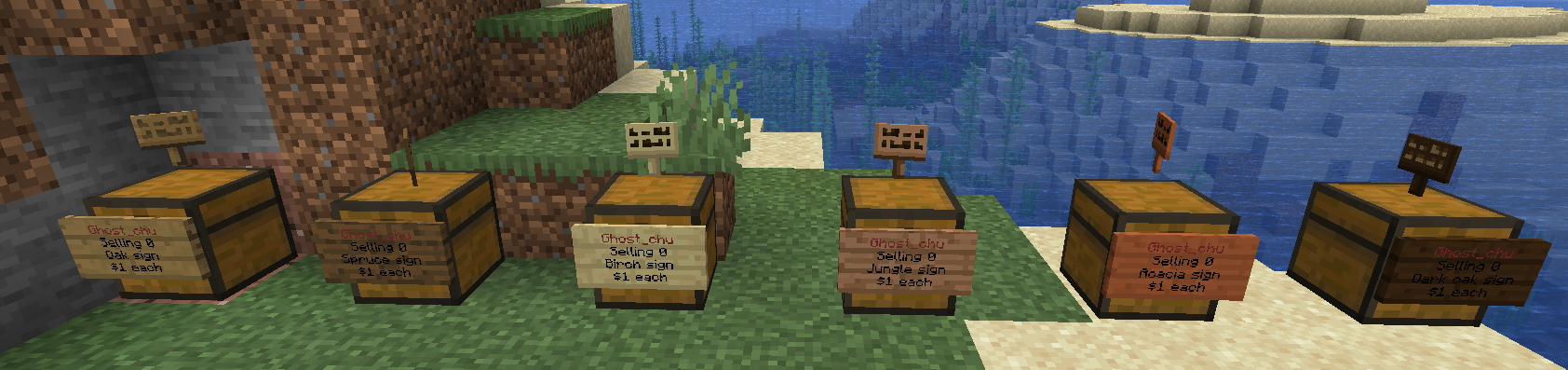


(本应有更多截图,但因资源被删除而全部丢失。我稍后会补上……)
 尽情享受吧!
功能特性
- 易于使用
- 可在箱子上方切换显示物品
- 支持 NBT 数据、附魔、工具耐久度、药水及怪物蛋
- 支持无限数量的箱子
- 支持黑名单及绕过权限设置
- 可实现同时收购和出售物品的商店(通过双箱实现)
视频
- LilAcron 制作的 QSRR 使用方法(英文):此处
- EnderChest 功能演示1 在这里
- EnderChest 功能演示2 在此
旧版本视频:
- 安装指南(英文)(旧版)by Netherfoam 在这里
- 使用方法(英文)by Carbonawk 在这里
- 使用方法(西班牙文)by maxmar628 在这里
- 使用方法(英文)by VariationVault 在这里
- 使用方法(英文)by UltiByte 在这里
欢迎提供新的视频!
如何创建商店
- 在地面上放置一个箱子
- 用你想交易的物品右键点击箱子
- 在聊天栏中输入物品的价格(根据提示操作)
- 将你想出售的物品放入箱子中
高级
在 1.3.0.4 及更高版本中,您可以右键点击告示牌以使用控制面板更简便地进行编辑。
- 面对箱子
- 输入 /qs sell 或 /qs buy 来创建商店(支持购买/出售功能)(可选:使用 /shop 代替 /qs)
- 根据需要为商店配置库存。
如何向商店购买/出售物品
- 找到一个商店
- 点击/左键点击商店
- 在聊天栏中输入您想要交易的数量
截图:
如何使用商店的 Staff(员工)功能:
员工可以帮助您在游戏内管理您的商店,他们可以打开您的箱子、设置价格、切换出售和购买状态。
但是员工无法移除您的商店,也无法从您的商店交易中获取资金。
添加员工:
/qs staff add <Player>
移除员工:
/qs staff del <Player>
移除所有员工:
/qs staff clear
查看商店的所有员工:
/qs staff list
命令
- /qs unlimited - 使您当前查看的商店变为无限。
- /qs setowner <player> - 将商店的所有者更改为 <player>。
- /qs buy - 将您正在查看的商店更改为收购物品的商店
- /qs sell - 将你当前查看的商店更改为出售物品的商店
- /qs price <price> - 更改你当前查看的商店的价格
- /qs clean - 移除任何库存为 0 的现有商店。
- /qs find <item> - 用于查找以 <item> 开头的最近的商店。例如:'/qs find dia' 会找到最近的钻石商店。
- /qs fetchmessage - 从数据库中手动获取商店消息。
- /qs info - 显示 QuickShop 信息。
- /qs debug - 切换到调试模式并切换回来。
- /qs paste - 将服务器数据上传到 Pastebin,帮助开发者和工作人员更轻松地修复漏洞。
- /shop - /qs 的别名(可选)
- /qshop - /qs 的别名(可选)
- /qsshop - /qs 的别名(可选)
- /quickshop - /qs 的别名(可选)
玩家节点
- quickshop.use - 用于使用任何快速商店所需的权限
- quickshop.create.sell - 需要此权限才能创建QuickShop(任何类型)。
- quickshop.create.buy - 需要使用 /qs buy 命令所需(将商店类型从出售改为购买)。
- quickshop.create.changeprice - 允许玩家修改自己商店的价格。
- quickshop.create.double - 需要此权限才能创建双箱商店。
- quickshop.find - 需要使用 /qs find <item> 命令所需。
- quickshop.fetchmessage - 需要使用 /qs fetchmessage 命令所需。
管理员节点
- quickshop.unlimited - 需要使用 /quickshop unlimited 命令所需。
- quickshop.setowner - 允许使用 /qs setowner 命令。
- quickshop.other.destroy - 允许破坏他人由本插件锁定的 QuickShop
- quickshop.other.open - 允许打开(以及窃取/补货)其他玩家的 QuickShop 商店
- quickshop.other.price - 允许修改他人商店的价格
- quickshop.refill - 能够通过命令刷新箱子物品(=无限物品)
- quickshop.empty - 能够清空箱子中的所有物品
- quickshop.clean - 有权清除所有库存为 0 的商店。
- quickshop.bypass.ItemID >- 出售被拉黑物品(例如基岩)所必需的权限
- quickshop.alerts - 接收作弊警报、插件警告和更新通知。
- quickshop.info - 使用 /qs info 命令所必需的权限
- quickshop.debug - 使用 /qs debug 命令所必需的权限
- quickshop.paste - 使用 /qs paste 命令所必需的权限
已知不兼容插件:
- BungeeCord 聊天插件(MutilChat 除外)
翻译为您的语言:
如果您决定开始翻译,请加入 Discord 服务器,以便我们与您联系,谢谢!
1.3.7 版本之后,QuickShop 将检测您的计算机系统语言以选择显示语言,您可以修改 config.yml 中的 language 部分来切换语言。
您必须删除 messages.yml 才能使更改生效。
如果您喜欢这个资源,请给我五星好评,谢谢!
在 Discord 上找到我:
统计数据:
Now this site files all upload by Auto-Script, But changelog only post on spigotmc.org.
Hard depend: Vault , Any support Vault economy plugin.
COLORFUL SIGN UPDATE
Thanks Timtower, Netherfoam and KaiNoMood make legacy version in here.
If you're use old version server, try it.
Screenshot preview:
(There should more screenshot, but all missing by resource deleted. I will add back...)
Enjoy it!Features
- Easy to use
- Togglable Display Item on top of chest
- NBT Data, Enchants, Tool Damage, Potion and Mob Egg support
- Unlimited chest support
- Blacklist support & bypass permissions
- Shops that buy items and sell items at the same time are possible (Using double chests)
- OpenInv support
- Checks a player can open a chest before letting them create a shop!
- UUID support
- Item Preview
- i18n for Item, Potion and Enchantment
- Find command support i18n item(If you set bedrock name to "Hello", you can use /qs find Hello to find shops)
- More Bug fixes
- Chat Control Panel
- EnderChest Shop support(Require depend OpenInv)
- 1.14 multi sign type support
Videos
- How to use QSRR (English) by LilAcron here
- EnderChest feature demo1 here
- EnderChest feature demo2 here
Legacy Version Video:
- Installation guide (English)(Old) by Netherfoam here
- How to use (English) by Carbonawk here
- How to use (Spanish) by maxmar628 here
- How to use (English) by VariationVault here
- How to use (English) by UltiByte here
A new video is welcome!
How to Create a Shop
- Place a chest on the ground
- Hit the chest with the item you want to trade
- Type in price for the item (As prompted) in chat
- Fill the chest with the items you wish to sell
Advanced
In 1.3.0.4 and after version, you can right-click the sign to use Control Panel to edit it more simply.
- Face the chest
- Type either /qs sell or /qs buy to make the shop buy/sell instead (Optional: use /shop instead of /qs)
- Stock the shop accordingly, if necessary.
How to Buy/Sell to a Shop
- Find a shop
- Hit / Left click the shop
- Enter the amount you wish to trade in chat
Screenshot:
How to use Staff feature for your shop:
Staff can help you manage your shop in game, they can open your chest, set price, toggle selling and buying.
But staff can't remove your shop, get money from your shop trades.
Add staff:
/qs staff add <Player>
Remove staff:
/qs staff del <Player>
Remove all staffs:
/qs staff clear
Look all staffs for shop:
/qs staff list
Commands
- /qs unlimited - Makes the shop you're looking at become unlimited.
- /qs setowner <player> - Changes shop owner to <player>.
- /qs buy - Changes your shop you're looking at to one that buys items
- /qs sell - Changes your shop you're looking at to one that sells items
- /qs price <price> - Change the price of your shop that you're looking at
- /qs clean - Removes any existing shop that has 0 stock.
- /qs find <item> - Use to find the nearest shop that begins with <item> - E.g. '/qs find dia' will find the nearest diamond shop.
- /qs fetchmessage - Fetch shop message manually from database.
- /qs info - Show QuickShop infomation.
- /qs debug - Switch to debug and switch back.
- /qs paste - Upload server data to Pastebin to help developer, staff more easily fix bugs.
- /shop - Alias (Optional) of /qs
- /qshop - Alias (Optional) of /qs
- /qsshop - Alias (Optional) of /qs
- /quickshop - Alias (Optional) of /qs
Player Nodes
- quickshop.use - Required to use ANY quickshop
- quickshop.create.sell - Required to make a QuickShop (At all)
- quickshop.create.buy - Required to use /qs buy (Change the shop type from Sell -> Buy)
- quickshop.create.changeprice - Allow players change their self shop's price
- quickshop.create.double - Required to make doublechest shops.
- quickshop.find - Required to use /qs find <item>
- quickshop.fetchmessage - Required to use /qs fetchmessage
Admin Nodes
- quickshop.unlimited - Required to use /quickshop unlimited
- quickshop.setowner - Allows use of /qs setowner
- quickshop.other.destroy - Allow breaking other peoples QuickShops if they're locked by this plugin
- quickshop.other.open - Allow opening (And stealing/Stocking) other players QuickShops
- quickshop.other.price - Allow changing price of other people's shops
- quickshop.refill - Ability to refill chests using a command (=Unlimited items)
- quickshop.empty - Ability to empty chests of all items
- quickshop.clean - Permission to purge any shops that have 0 stock.
- quickshop.bypass.ItemID - Required to sell blacklisted items (E.g. bedrock)
- quickshop.alerts - Recive cheat alert, plugin warnings and update notify.
- quickshop.info - Required to use /qs info
- quickshop.debug - Required to use /qs debug
- quickshop.paste - Required to use /qs paste
Known Incompatible Plugin:
- BungeeCord chat plugin (Except MutilChat)
Translate to your language:
If you decide start to translate, please join discord server, let us can contact with you, thanks!
After 1.3.7, QuickShop will detect your computer system language to choose view-language, you can modify config.yml language section to switch language.
You must delete messages.yml to effect changes.
If you like this resource,Please give me 5 star thx!
Found me in discord at:
Stats:
版本游戏版本平台发布时间本站下载
正式版
QuickShop.jar
1.19.31.19.2 3 年前 ·
0
1.19.3
1.19.2
1.19.1
1.19, 1.18.2, 1.18.1, 1.18, 1.17, 1.16, 1.15, 1.14, 1.13

下载 QuickShop-Reremake
版本:QuickShop.jar
游戏版本:1.19.3、1.19.2、1.19.1 等
需要联机服务器吗?
稳定流畅、一键部署,几分钟即可和朋友联机开服
最低仅需 8 元/月 即可畅快联机
正式版
QuickShop.jar
1.19.31.19.2 3 年前 ·
0
1.19.3
1.19.2
1.19.1
1.19, 1.18.2, 1.18.1, 1.18, 1.17, 1.16, 1.15, 1.14, 1.13
下载 QuickShop-Reremake
版本:QuickShop.jar
游戏版本:1.19.3、1.19.2、1.19.1 等
需要联机服务器吗?
稳定流畅、一键部署,几分钟即可和朋友联机开服
最低仅需 8 元/月 即可畅快联机
正式版
QuickShop.jar
1.19.31.19.2 3 年前 ·
0
1.19.3
1.19.2
1.19.1
1.19, 1.18.2, 1.18.1, 1.18, 1.17, 1.16, 1.15, 1.14, 1.13
下载 QuickShop-Reremake
版本:QuickShop.jar
游戏版本:1.19.3、1.19.2、1.19.1 等
需要联机服务器吗?
稳定流畅、一键部署,几分钟即可和朋友联机开服
最低仅需 8 元/月 即可畅快联机
正式版
QuickShop.jar
1.19.31.19.2 3 年前 ·
0
1.19.3
1.19.2
1.19.1
1.19, 1.18.2, 1.18.1, 1.18, 1.17, 1.16, 1.15, 1.14, 1.13
下载 QuickShop-Reremake
版本:QuickShop.jar
游戏版本:1.19.3、1.19.2、1.19.1 等
需要联机服务器吗?
稳定流畅、一键部署,几分钟即可和朋友联机开服
最低仅需 8 元/月 即可畅快联机
正式版
QuickShop.jar
1.19.31.19.2 3 年前 ·
0
1.19.3
1.19.2
1.19.1
1.19, 1.18.2, 1.18.1, 1.18, 1.17, 1.16, 1.15, 1.14, 1.13
下载 QuickShop-Reremake
版本:QuickShop.jar
游戏版本:1.19.3、1.19.2、1.19.1 等
需要联机服务器吗?
稳定流畅、一键部署,几分钟即可和朋友联机开服
最低仅需 8 元/月 即可畅快联机
正式版
QuickShop.jar
1.19.31.19.2 3 年前 ·
0
1.19.3
1.19.2
1.19.1
1.19, 1.18.2, 1.18.1, 1.18, 1.17, 1.16, 1.15, 1.14, 1.13
下载 QuickShop-Reremake
版本:QuickShop.jar
游戏版本:1.19.3、1.19.2、1.19.1 等
需要联机服务器吗?
稳定流畅、一键部署,几分钟即可和朋友联机开服
最低仅需 8 元/月 即可畅快联机
正式版
QuickShop.jar
1.19.31.19.2 3 年前 ·
0
1.19.3
1.19.2
1.19.1
1.19, 1.18.2, 1.18.1, 1.18, 1.17, 1.16, 1.15, 1.14, 1.13
下载 QuickShop-Reremake
版本:QuickShop.jar
游戏版本:1.19.3、1.19.2、1.19.1 等
需要联机服务器吗?
稳定流畅、一键部署,几分钟即可和朋友联机开服
最低仅需 8 元/月 即可畅快联机
正式版
QuickShop.jar
1.19.31.19.2 3 年前 ·
0
1.19.3
1.19.2
1.19.1
1.19, 1.18.2, 1.18.1, 1.18, 1.17, 1.16, 1.15, 1.14, 1.13
下载 QuickShop-Reremake
版本:QuickShop.jar
游戏版本:1.19.3、1.19.2、1.19.1 等
需要联机服务器吗?
稳定流畅、一键部署,几分钟即可和朋友联机开服
最低仅需 8 元/月 即可畅快联机
正式版
QuickShop.jar
1.161.15 4 年前 ·
0
1.16
1.15
1.14
1.13
下载 QuickShop-Reremake
正式版
QuickShop.jar
1.161.15 4 年前 ·
0
1.16
1.15
1.14
1.13
下载 QuickShop-Reremake
QuickShop.jar
正式版
2023-10-03
由 Jenkins CI 自动上传,更新详情请参见
关于这个资源的讨论、问题反馈与使用心得
还没有讨论,来发第一帖吧
你是这个资源的作者?登录后可认领此资源。
相似资源
 插件
EssentialZ
KartoffelChipss
一个现代且高度可配置的 Essentials 插件,类似于 EssentialsX
经济管理
6
 插件
Multiverse-Inventories
dumptruckman
一款旨在与 Multiverse-Core 紧密结合的库存管理插件
管理存储
6
 插件

Vault 2.0 economy plugins
Aerials
Vault2.0 是什么? Vault2.0 是一个经济插件,它注册了一个兼容 Vault API 的 Bukkit Economy 服务,允许其他插件(商店、等级等)使用货币而无需依赖原始的 Vault.jar。它包含菜单、支付/收费流程
经济社交
6
 插件

Townships
_ForgeUser6567617
城镇现在可以要求建造具有特定功能的建筑
经济冒险
6
 插件
VaultCrates
itsLarss_
一个功能丰富、完全动画化的箱子插件,适用于 Paper 1.21.x,支持 IA、Vault、PlaceholderAPI 和 Citizens
经济小游戏
6
插件
PressureWarp
_ForgeUser10663429
PressureWarp - 当你与压力板或按钮交互时,将你传送至指定位置
管理交通
5
评论 0
登录后参与评分
还没有评论,来抢沙发吧