
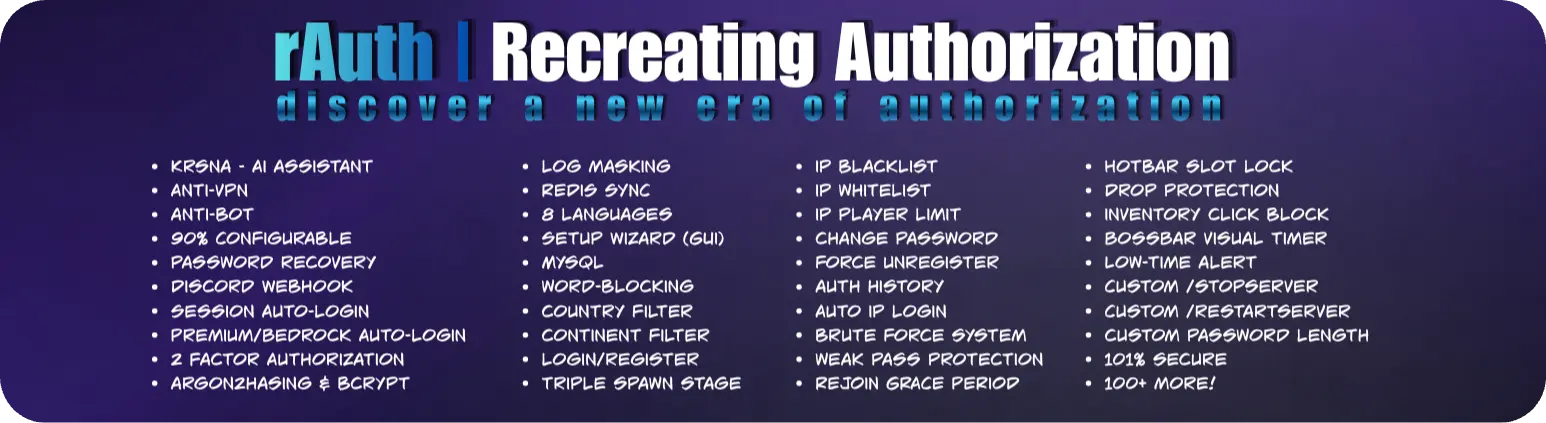
提供高级授权和安全功能的 Minecraft 插件,包含超过 120 项功能和 30 多条命令。
主要功能
- AntiVPN(防 VPN)
- AntiBot(防机器人)
- 登录/注册
- 90% 可配置
- 三重出生点阶段
- 登录/注册界面
- 邮箱恢复
- Discord 恢复
- 密保问题恢复
- 暴力破解保护
- 地理(国家与大陆)过滤
- 重新连接宽限期
- IP 检测
- 正版与 Bedrock/PE 自动登录
- 双重认证 (2FA)
- Discord Webhooks
- 多数据库支持
- AI 助手
- 更多!
命令与权限
管理员命令
| 命令 | 描述 |
|---|---|
/setauthspawn |
设置认证和登录的出生点。 |
/setmainspawn |
设置主服务器出生点。 |
/setbotprotectionspawn |
设置防机器人保护的出生点。 |
/blockedips |
查看被屏蔽的 IP 地址列表。 |
/unblockip <IP> |
解除之前被屏蔽的 IP 地址。 |
/auth <page> |
查看认证历史。 |
/clearloginattempts <player/IP> |
清除玩家或 IP 地址的登录尝试记录。 |
/rauth setup |
打开 rAuth 设置向导 GUI。 |
/rauth reload |
在游戏中重载 rAuth 配置。 |
/krnsa |
与内置 AI 助手 Krsna AI 进行聊天。 |
/model |
查看或更改 Krsna AI 助手的模型。 |
/language |
更改 rAuth 使用的语言。 |
/stopserver |
使用 rAuth 的自定义关闭功能停止服务器。 |
/restartserver |
使用 rAuth 的自定义重启功能重启服务器。 |
/unregister <player> |
注销玩家的账户。 |
玩家命令
| 命令 | 描述 |
|---|---|
/register <password> <confirmPassword> |
创建并保护您的账户。 |
/login <password> |
验证身份并解锁您的账户。 |
/changepass <oldPass> <newPass> <confirmPass> |
安全地更改现有密码。 |
/forgotpass |
如果忘记密码,请恢复对账户的访问权限。 |
/2fa |
设置和管理双重认证。 |
安装
安装 rAuth 快速且简单。
- 下载最新版本的 rAuth。
- 下载下面列出的推荐依赖项。
- 将插件及其依赖项放入服务器的
plugins文件夹中。 - 重启服务器。
- 使用可用的管理员命令配置您的认证和主出生点。
- 使用生成的配置文件自定义插件。
- 享受吧!
依赖项
以下依赖项是可选的,但推荐安装。根据您的服务器设置,它们可以提供额外的兼容性和功能。
可选但推荐的依赖项,可以增强兼容性并启用额外功能。
支持与错误报告
发现错误或遇到问题?
加入我们的 Discord 服务器并报告问题。您还可以获得支持、请求定制插件,并了解最新的 rAuth 新闻和版本更新。
访问 RadheeVan
探索 RadheeVan 生态系统
发现更多来自 RadheeVan 的 Minecraft 插件、工具、更新和项目。
rAuth
为 Minecraft 服务器提供快速、安全且可靠的身份验证。
常见问题
为什么我需要身份验证插件?
身份验证插件保护离线模式和盗版服务器上的玩家账户。如果没有身份验证,任何人都可以使用其他玩家的用户名加入,并可能访问其物品栏、位置、权限和其他数据。
rAuth 提供了一个安全且可定制的身份验证系统,以保护您的玩家及其账户。
支持哪些 Minecraft 版本?
rAuth 支持从 1.8 到最新受支持版本 的 Minecraft,并兼容 Paper、Spigot、Bukkit 和 Purpur。
如果玩家未登录会发生什么?
未能成功验证身份的玩家将无法正常进行游戏。根据您的配置,rAuth 可以在玩家登录前阻止移动、交互、使用命令、使用物品以及其他活动。
玩家在登录前可以移动或丢弃物品吗?
不可以。rAuth 可以限制未经身份验证的玩家执行移动、交互、丢弃物品、拾取物品等游戏行为。
这些限制可以通过配置文件进行自定义。
如果玩家忘记密码怎么办?
rAuth 提供了账户恢复选项,可以帮助玩家重新获得账户访问权限,而无需管理员手动更改密码。
可用的恢复方法取决于您服务器的配置。
玩家如何注册和登录?
新玩家可以使用配置的注册命令进行注册,并为账户创建密码。
注册后,玩家每次加入服务器时都可以使用登录命令进行身份验证。
如何在游戏内修改密码?
玩家可以使用 rAuth 的密码管理命令来更改密码。
密码是如何存储的?
rAuth 不会以明文形式存储玩家密码。密码在存入数据库之前会经过安全哈希处理。
这有助于即使认证数据库被访问,也能保护玩家的凭据安全。
rAuth 支持哪些数据库?
rAuth 支持多种数据库管理系统,允许您选择最适合服务器的存储方案。
支持的选项包括 SQLite、MySQL 以及其他受支持的数据库配置。
我可以在多个服务器上使用 rAuth 吗?
可以。rAuth 可用于服务器网络,并支持基于数据库的同步。
通过共享数据库和适当的配置,玩家的身份验证数据可以在多个服务器之间共享。
认证插件会导致服务器卡顿吗?
rAuth 旨在最大限度地减少对服务器性能的影响。数据库操作和与身份验证相关的任务均以性能为考量进行处理,因此正确配置下,身份验证不应明显影响正常游戏体验。
对于较大的网络,可以使用基于数据库的存储,而不是依赖本地数据库。
什么是“会话登录”?
会话登录允许玩家在配置的一段时间内保持已认证状态。
成功登录后,根据会话配置,玩家可能能够在不每次输入密码的情况下再次加入服务器。
这使得加入服务器更快,同时仍提供可配置的安全控制。
如何报告错误或建议功能?
您可以通过我们的 Discord 社区报告错误、建议新功能并分享反馈。
rAuth 是否支持基岩版玩家?
是的。rAuth 通过 Geyser 和 Floodgate 支持基岩版玩家。
rAuth 是免费的吗?
是的。rAuth 完全免费,并包含大量高级认证和安全功能。
rAuth 的安全性如何?
rAuth 提供了多项安全功能,如安全的密码哈希、暴力破解防护、IP 保护、会话管理以及其他身份验证安全措施。
Minecraft plugins that offer advanced authorization and security capabilities, providing over 120 features and more than 30 commands.
Major Features
- AntiVPN
- AntiBot
- Login/Register
- 90% Configurable
- Triple Spawn Stage
- Login/Register UI
- Email-Recovery
- Discord Recovery
- Question Recovery
- Brute Force Protection
- Geographic (Country & Continent) Filter
- Rejoin Grace Period
- IP Detection
- Premium & Bedrock/PE Auto-Login
- 2FA
- Discord Webhooks
- Multi Database Support
- AI Assistant
- More!
Commands & Permissions
Admin Commands
| Command | Description |
|---|---|
/setauthspawn |
Set the authentication and login spawn. |
/setmainspawn |
Set the main server spawn. |
/setbotprotectionspawn |
Set the bot protection spawn. |
/blockedips |
View the list of blocked IP addresses. |
/unblockip <IP> |
Unblock a previously blocked IP address. |
/auth <page> |
View authentication history. |
/clearloginattempts <player/IP> |
Clear login attempts for a player or IP address. |
/rauth setup |
Open the rAuth setup wizard GUI. |
/rauth reload |
Reload the rAuth configuration in-game. |
/krnsa |
Chat with Krsna AI, the built-in AI assistant. |
/model |
View or change the Krsna AI assistant model. |
/language |
Change the language used by rAuth. |
/stopserver |
Stop the server using rAuth's custom shutdown features. |
/restartserver |
Restart the server using rAuth's custom restart features. |
/unregister <player> |
Unregister a player's account. |
Player Commands
| Command | Description |
|---|---|
/register <password> <confirmPassword> |
Create and secure your account. |
/login <password> |
Authenticate and unlock your account. |
/changepass <oldPass> <newPass> <confirmPass> |
Securely change your existing password. |
/forgotpass |
Recover access to your account if you forget your password. |
/2fa |
Set up and manage two factor authentication. |
Installation
Installing rAuth is quick and straightforward.
- Download the latest version of rAuth.
- Download the recommended dependencies listed below.
- Place the plugin and its dependencies inside your server's
pluginsfolder. - Restart your server.
- Configure your authentication and main spawns using the available admin commands.
- Customize the plugin using the generated configuration files.
- Enjoy!
Dependencies
The following dependencies are optional but recommended. Depending on your server setup, they can provide additional compatibility and functionality.
Optional but recommended dependencies that can enhance compatibility and enable additional functionality.
Support and Bug Reports
Found a bug or experiencing an issue?
Join our Discord server and report the problem. You can also get support, request custom plugins, and stay updated with the latest rAuth news and releases.
Visit RadheeVan
Explore the RadheeVan ecosystem
Discover more Minecraft plugins, tools, updates, and projects from RadheeVan.
rAuth
Fast, secure, and reliable authentication for Minecraft servers.
FAQ
Why do I need an auth plugin?
An authentication plugin protects player accounts on offline-mode and cracked servers. Without authentication, anyone can join using another player's username and potentially access their inventory, location, permissions, and other data.
rAuth provides a secure and customizable authentication system to protect your players and their accounts.
Which Minecraft versions are supported?
rAuth supports Minecraft versions from 1.8 up to the latest supported versions and works with Paper, Spigot, Bukkit and Purpur.
What happens if a player does not log in?
Players who have not successfully authenticated are restricted from normal gameplay. Depending on your configuration, rAuth can prevent actions such as movement, interaction, commands, item usage, and other activities until the player logs in.
Can players move or drop items before logging in?
No. rAuth can restrict unauthenticated players from performing gameplay actions such as moving, interacting, dropping items, picking up items, and more.
These restrictions can be customized through the configuration.
What if a player forgets their password?
rAuth provides account recovery options that can help players regain access to their accounts without requiring an administrator to manually change their password.
The available recovery methods depend on your server's configuration.
How do players register and log in?
New players can register using the configured registration command and create a password for their account.
After registering, players can authenticate using the login command whenever they join the server.
How do I change my password in-game?
Players can change their password using rAuth's password management commands.
How are passwords stored?
rAuth does not store player passwords as plain text. Passwords are securely hashed before being stored in the database.
This helps protect player credentials even if the authentication database is accessed.
Which databases does rAuth support?
rAuth supports multiple database management systems, allowing you to choose the storage solution that best fits your server.
Supported options include SQLite, MySQL, and other supported database configurations.
Can I use rAuth with multiple servers?
Yes. rAuth can be used in server networks and supports database-based synchronization.
With a shared database and the appropriate configuration, player authentication data can be shared between multiple servers.
Do auth plugins lag the server?
rAuth is designed to minimize its impact on server performance. Database operations and authentication-related tasks are handled with performance in mind, so authentication should not noticeably affect normal gameplay when properly configured.
For larger networks, database-based storage can be used instead of relying on a local database.
What is "Session Login"?
Session Login allows a player to remain authenticated for a configured period of time.
After successfully logging in, the player may be able to join again without entering their password every time, depending on the session configuration.
This makes joining the server faster while still providing configurable security controls.
How can we report bugs or suggest features?
You can report bugs, suggest new features, and share feedback through our Discord community.
Does rAuth support Bedrock players?
Yes. rAuth supports Bedrock players through Geyser and Floodgate.
Is rAuth free?
Yes. rAuth is completely free and includes a large collection of advanced authentication and security features.
How secure is rAuth?
rAuth provides multiple security features such as secure password hashing, brute-force protection, IP protection, session management, and other authentication safeguards.

下载 rAuth
需要联机服务器吗?
稳定流畅、一键部署,几分钟即可和朋友联机开服
最低仅需 8 元/月 即可畅快联机
下载 rAuth
需要联机服务器吗?
稳定流畅、一键部署,几分钟即可和朋友联机开服
最低仅需 8 元/月 即可畅快联机
下载 rAuth
需要联机服务器吗?
稳定流畅、一键部署,几分钟即可和朋友联机开服
最低仅需 8 元/月 即可畅快联机
下载 rAuth
需要联机服务器吗?
稳定流畅、一键部署,几分钟即可和朋友联机开服
最低仅需 8 元/月 即可畅快联机
下载 rAuth
需要联机服务器吗?
稳定流畅、一键部署,几分钟即可和朋友联机开服
最低仅需 8 元/月 即可畅快联机
下载 rAuth
需要联机服务器吗?
稳定流畅、一键部署,几分钟即可和朋友联机开服
最低仅需 8 元/月 即可畅快联机
下载 rAuth
需要联机服务器吗?
稳定流畅、一键部署,几分钟即可和朋友联机开服
最低仅需 8 元/月 即可畅快联机
下载 rAuth
需要联机服务器吗?
稳定流畅、一键部署,几分钟即可和朋友联机开服
最低仅需 8 元/月 即可畅快联机
下载 rAuth
需要联机服务器吗?
稳定流畅、一键部署,几分钟即可和朋友联机开服
最低仅需 8 元/月 即可畅快联机
下载 rAuth
需要联机服务器吗?
稳定流畅、一键部署,几分钟即可和朋友联机开服
最低仅需 8 元/月 即可畅快联机
rAuth - 3.0.2
- 已修复的 Bug
加入我们的 Discord 以报告 Bug、请求功能或获取支持。
rAuth - 3.0.1
- 已修复的漏洞
加入我们的 Discord 以报告漏洞、请求新功能或获取支持。
关于这个资源的讨论、问题反馈与使用心得
还没有讨论,来发第一帖吧
你是这个资源的作者?登录后可认领此资源。
相似资源
 插件

PacketEvents 是一款专为 Minecraft Java 版打造的协议库,旨在简化数据包的处理与传输。
 插件
ExyliaPlugins 的库。
 插件
通过对话框或铁砧界面帮助你的 Anthme
 插件
重新定义服务器上的生物运输方式。使用高度可定制的口袋道具,安全地捕获、存储和释放任何实体。
 插件
为基于 Spigot/Paper/Folia 的服务器添加对 Vivecraft 的支持
 插件
用于绘制游戏内地图或在浏览器中随探索实时进行地图绘制的实时地图。
评论 0
登录后参与评分
还没有评论,来抢沙发吧