
描述
使用 RazSignShop 你可以创建自定义的告示牌商店。

创建商店
在告示牌上写下:
- [Flag] - 操作类型。
- 物品 ID - 物品的 ID。
- 数量 - 用户将购买的数量。
- 价格 - 物品的价格。
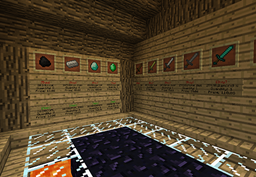
然后你会得到这个:
购买或出售
要购买或出售物品,你需要点击告示牌
并打开对话框:
黄色羊毛代表该物品。
金粒 - 货币
绿色黏土 - 确认。
红色黏土 - 取消。
权限
- RazSignShop.Admin.Create.Sell - 允许创建出售商店。
- RazSignShop.Admin.Create.Buy - 允许创建购买商店。
- RazSignShop.Users.Sell - 允许在出售商店中出售物品。
- RazSignShop.Users.Buy - 允许购买物品!
- RazSignShop.Admin.Remove.Buy - 允许移除购买商店!
- RazSignShop.Admin.Remove.Sell - 允许移除出售商店!
命令
无命令。
标识符 (Flags)
- Buy
- Sell
在 Twitter 上关注我以获取更新:
@RazdomBukkit
捐赠
捐赠以帮助我开发此插件:
Description
With RazSignShop you can create custom sign shops.
Create Shop
Write that on sign:
- [Flag] - The action.
- Item id - the id of the Item.
- Amount - the number of items that the user will buy.
- Price - the price of the items.
And you get this:
Buy Or Sell
To by or sell items you need to click on the sign
and open dialogue:
The yellow wool is the item.
The Gold Nugget - the money
Green clay - Agree.
Red clay - Cancel.
Permissions
- RazSignShop.Admin.Create.Sell - Allow to create sell shops.
- RazSignShop.Admin.Create.Buy - Allow to create buy shops.
- RazSignShop.Users.Sell - Allow to sell is sell shops.
- RazSignShop.Users.Buy - Allow to buy items!
- RazSignShop.Admin.Remove.Buy - Allow to remove buy shops!
- RazSignShop.Admin.Remove.Sell- Allow to remove sellshops!
Commands
Without commands.
Flags
- Buy
- Sell
Follow me on Twitter to get updates:
@RazdomBukkit
Donate
Donate to help me to develop the plugin:
下载 RazSignShop
下载 RazSignShop
下载 RazSignShop
下载 RazSignShop
下载 RazSignShop
下载 RazSignShop
下载 RazSignShop
关于这个资源的讨论、问题反馈与使用心得
还没有讨论,来发第一帖吧
你是这个资源的作者?登录后可认领此资源。
相似资源
 插件
ExyliaPlugins 的库。
 插件
重新定义服务器上的生物运输方式。使用高度可定制的口袋道具,安全地捕获、存储和释放任何实体。
 插件
一个在游戏内运行的 Minecraft 地图编辑器! 支持选区、蓝图、复制粘贴、笔刷和脚本。 可在创造模式中使用,也可在生存模式中临时使用。
 插件

创建用户友好的菜单以前往不同的世界
 插件
专为 Velocity 打造的自制聊天插件,功能丰富——支持跨服群组/全局/私聊消息,并集成 LibertyBans 的禁言功能。
 插件
一个高度兼容、功能完善且稳定的 TPA 模组
评论 0
登录后参与评分
还没有评论,来抢沙发吧