是否曾忘记过某个物品的合成配方?
现在,借助 Recipe Finder,你只需一条命令即可轻松查找物品的配方!
当前功能:
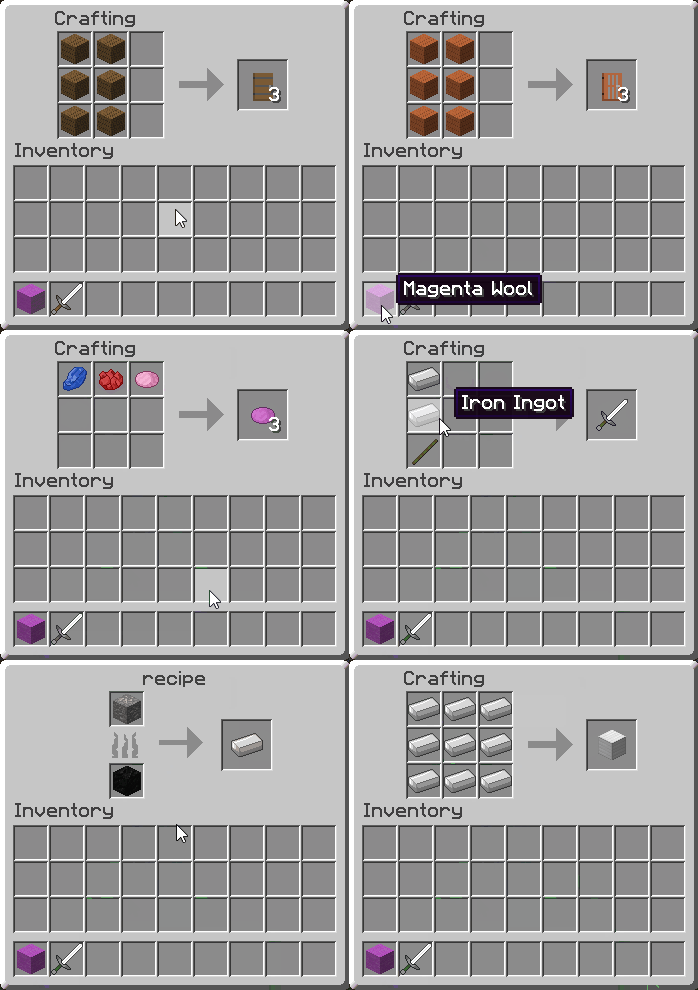
/recipe <item name> 将显示所有匹配给定物品名称的物品的配方。- 单独输入
/recipe 将显示你手中物品的配方。
- 多个配方将逐个滚动显示。
- 点击配方中的物品,将显示该物品的配方。
- 支持熔炼配方。
- 采用模糊匹配方式命名,例如输入
/recipe chestplate 将显示所有类型胸甲的配方。
- 插件基于 Bukkit/Spigot API 开发,因此轻量、快速且具备可扩展性。
- 通过 API 在服务器上注册的任何配方都应能被插件识别并显示。
- 多线程机制确保多个用户可以同时访问配方列表。
- 支持彩色羊毛和染料的颜色配方!
- 完全支持多语言及物品重命名功能!
- 提供内存优化选项(以牺牲名称熟悉度为代价)
命令:
| 命令 |
描述 |
/recipe <item name> |
显示与指定名称物品相关的配方。 |
/recipe |
显示与你手中物品相关的配方。 |
/recipereload |
从配置文件重新加载插件。 |
权限:
recipe.lookup:授予使用 /recipe 的权限。recipe.reload:授予使用 /recipereload 的权限。
配置:
当你在已安装该插件的服务器上首次启动时,会在你的 'plugins' 目录中生成一个名为 'RecipeFinder' 的新文件夹。在该文件夹内,你会找到一个名为 'config.yml' 的文件。此文件用于配置 Recipe Finder 插件。文件中包含以下选项:
| 选项 |
含义 |
默认值 |
languages enabled: |
此选项仅适用于对内存/性能有严格要求的服务器管理员。 启用此项将禁用物品重命名以及更改插件语言的功能。查找结果中的物品名称将默认为 API 提供的原始名称,这些名称有时可能晦涩难懂,例如 'lightstone' 或 'cloth leggings'。但设置为此项后,插件将不再花费时间解析语言文件或存储翻译数据到内存中。将此选项设为 false 更加节省时间和内存,但以牺牲可用性为代价。 |
true |
language file: |
指位于 'RecipeFinder/lang' 目录内的语言文件,你希望使用该文件进行翻译或重命名查找结果中的物品名称。 |
en_US.default.lang |
如果你想更改插件的语言,或者仅仅重命名某个物品,请在 'RecipeFinder/lang' 目录中复制名为 'en_US.default.lang' 的文件(或直接粘贴你自己的文件),并将物品名称修改为你想要的值。请注意,lang 文件中的许多选项是冗余的,你只需关注以 tile. 或 item. 开头的条目。完成上述操作后,进入 'RecipeFinder/config.yml' 并将 language file: 选项更改为你的新语言文件的名称。
如果你在更改语言文件时服务器仍在运行,可以使用 /recipereload 命令重新加载配置,使插件反映你所做的更改。
重要提示
默认的 en_US.default.lang 文件由插件维护并保持更新。这意味着如果发现默认语言文件有更新,插件将会替换 en_US.default.lang 文件,导致你对该文件所做的任何更改丢失。因此,在更改物品名称或完全更换语言时,请务必使用不同于 en_US.default.lang 的语言文件名!
如果在配置文件或默认语言文件方面遇到任何问题,只需删除它们并运行 /recipereload,插件将为你生成默认文件。
兼容性
虽然未经过旧版 Craftbukkit/Spigot 的测试,但最新版本的插件应与任何版本的 Craftbukkit/Spigot 兼容,包括 1.7*、1.8.* 以及 1.9.*。如果你有任何兼容性问题,请告诉我,我可以为你解决。
未来有望实现的功能:
源代码:
也可以看看我的服务器:lostboys.game-host.org!
The lightweight recipe lookup and display plugin.
Ever forgotten the recipe for an item?
Now, with Recipe Finder, you can find the recipe of an item with as little effort as a single command!
Current Features:
/recipe <item name> will display the recipes for all items that match the given item name./recipe on its own will display the recipes of the item in your hand.- Multiple recipes will be scrolled through one by one.
- Clicking an item in a recipe will display the recipes of said item.
- Smelting recipes are also supported.
- Names are matched in such a way that commands such as
/recipe chestplate will display the recipes for all types of chestplate.
- The plugin hooks into the Bukkit/Spigot API, and hence is lightweight, fast and scalable.
- Any recipe registered on the server through the API should be visible to the plugin.
- Threading ensures that multiple users can access the recipe list simultaneously.
- Recipes for coloured wool and dyes also supported!
- Multiple languages and renaming of items is now fully supported!
- Memory efficient option available at the expense of name-familiarity
The interface starting from the command /recipe door
Commands:
| Command |
Description |
/recipe <item name> |
Displays the recipes associated with the item with the given name. |
/recipe |
Displays the recipes associated with the item in your hand. |
/recipereload |
Reloads the plugin from config. |
Permissions:
recipe.lookup: gives access to /recipe.recipe.reload: gives access to /recipereload.
Configuration:
When you first start up the server with the plugin installed, a new folder will be generated in your 'plugins' directory that is called 'RecipeFinder'. Inside this folder you will find a file called 'config.yml'. This file is used to configure the Recipe Finder plugin. Inside the file you will see the following options:
| Option |
Meaning |
Default Value |
languages enabled: |
This option should only be used for server admins who have critical memory/performance requirements. This will disable the ability to rename items as well as change the language of the plugin. The name of the items in the lookup will default to the given API names, which can sometimes be obscure such as 'lightstone' and 'cloth leggings', however the plugin will not spend time parsing language files or store translations in memory. This option when set to false is more time and memory efficient therefore, at the cost of usability. |
true |
language file: |
This refers to the language file, located inside the 'RecipeFinder/lang' directory, that you wish to use for translations or renaming of lookup names |
en_US.default.lang |
If you wish to change the language of the plugin, or simply rename an item, create a copy of the file called 'en_US.default.lang' inside the 'RecipeFinder/lang' directory (or paste in your own) and change the names of the items to whatever values you see fit. Note that many of the options contained in the lang file are redundant, you are looking for entries only beginning in tile. or item.. Once you have done this, go into 'RecipeFinder/config.yml and change the language file: option to be the name of your new language file.
If your server is still running whilst you change the language file, you can use the /recipereload command to reload the config and update the plugin to reflect the changes that you just made.
important
The default en_US.default.lang file is maintained by the plugin and kept up to date, this means that if an update for the default language file is found the plugin will replace the en_US.default.lang file, meaning any changes you made to that file will be removed. It is therefore important that when changing the names of items, or changing the language entirely, that you use a language file name other than en_US.default.lang!
If you run into any issues with your config file or default language file, simply delete them and run /recipereload and the plugin will generate the default files for you.
Compatibility
Although not tested with older versions of Craftbukkit/Spigot, newest versions of the plugin should be compatible with any version of Craftbukkit/Spigot, including 1.7*, 1.8.* as well as 1.9.* If you have any compatibility issues please let me know, and I can rectify this for you.
Features to hopefully be implemented in the future:
- Potion recipes.
- Firework recipes.
Source code:
- The source code for the project is available here for anyone interested.
Also check out my server, at lostboys.game-host.org!




 插件

 插件
 插件
 插件
 插件
 插件
评论 0
登录后参与评分
还没有评论,来抢沙发吧