ResourceSpawner 的作用
简短说明
ResourceSpawner 会在随机位置生成物体,并可选择在一段时间后使其消散。
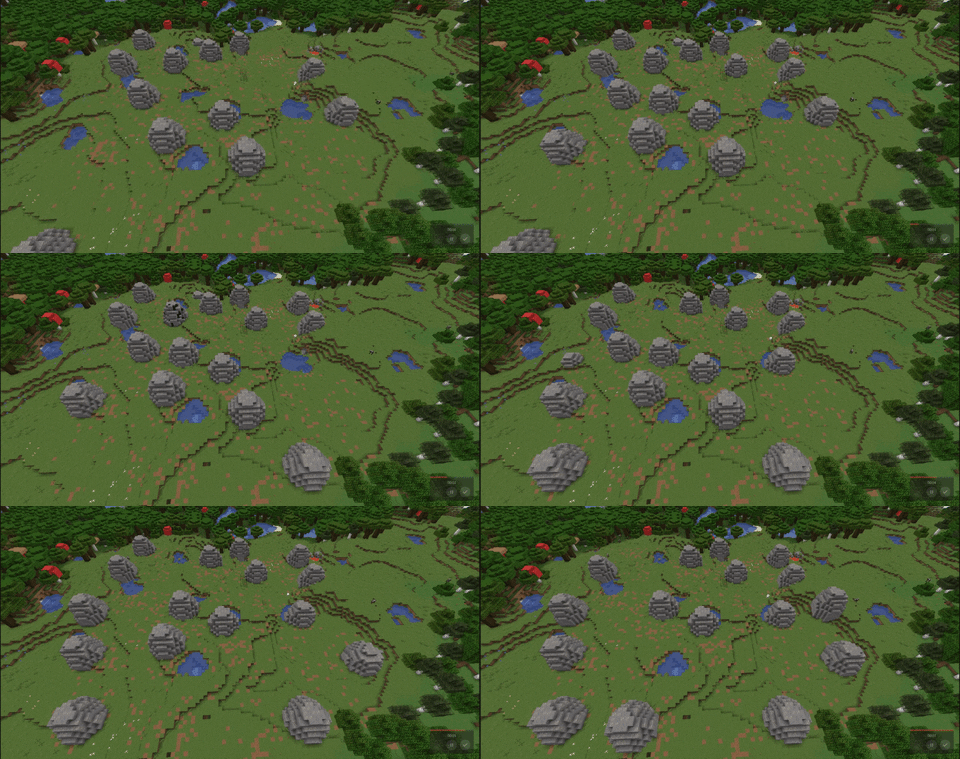 一个资源场示例,其中资源节点以极不合理的速率生成和消散
(生成的结构大小没有限制)
详细说明
每个周期中,每个 Resource Spawner 将执行以下操作:
- 如果未达到结构数量限制:
- 选择一个 World Provider,并使用它来选取一个世界。
- 选择一个 Location Provider,并使用它来选取一个位置。
- 选择一个 Spawn Provider,并检查一组 Conditions。
- 如果所有条件均满足,则使用它来生成某个对象。
World Providers
World Providers 提供 Resource Spawner 可以运行的世界列表。
Location Providers
Location Providers 提供 Resource Spawner 可以运行的区域,例如长方体、球体等。
部分 Location Providers 提供 Distributions,以便允许向特定区域生成偏向。
Spawn Providers
Spawn Providers 在指定位置生成某些内容,例如结构或实体。
Structure Providers
Structure Providers 是一种特殊的 Spawn Provider,它将生成一个结构。由于结构生成速度受到限制,你可以选择 Structure Sorter 来定义方块生成或消散的顺序。
Structure Providers 允许你安排结构在给定时间后消散。此时间可以通过 Triggers 重置。
Triggers
当发生特定事件(例如破坏某个方块或有玩家 nearby 移动)时,Triggers 会重置 Structure Provider 上的计时器。Triggers 可设置为将时间重置为任意值。
Conditions
Conditions 在允许继续之前,检查生成点周围区域的特定特征。
如需更多详细信息,请参阅 Features List 部分
无卡顿
ResourceSpawner 中的所有重要操作,从扫描大面积区域到生成单个实体,都被限制为每 tick 花费的时间不超过设定值。该值可按纳秒配置,针对每个 resource spawner 单独设置。
此外,resource spawners 可设置为仅在特定间隔内 tick。
丰富的插件 API
插件可以通过监听 ResourceSpawnerInitializationEvent 并使用其注册方法,来注册新的 World Providers、Location Providers、Spawn Providers、Conditions、Structure Sorters、Triggers 和 Distributions。
有关这些的示例,请参见源代码。
注意:你的插件应使用自身作为 NamespacedKey,而不是 ResourceSpawner。
ResourceSpawner 使用 Hjson 进行配置,以避免 YAML 的混乱,同时仍提供用户友好的配置文件。
基本配置格式
{
    debug: false //此行可选,但将其设置为 true 以启用大量控制台输出用于调试(这可能会减慢插件速度)
    resource_spawners: [
        {
            //一个 resource spawner
        }
        {
            //另一个 resource spawner
        }
    ]
}
有关 Resource Spawners 及其他内容的格式,请参阅 Features List 部分。
Patreon
我的插件将始终保持免费,但如果能收到捐赠,我将非常感激 :)
考虑在 Patreon 上支持我:
Discord
Features List
完整文档请参阅 GitHub。
What ResourceSpawner does
The short version
ResourceSpawner spawns things at random locations, and optionally decays them after an amount of time
An example resource field, with resource nodes spawning and decaying at an unreasonably high rate
(There is no limit to the size of the spawned structures)
The long version
Each cycle, each Resource Spawner will:
- If the structure limit is not met:
- Choose a World Provider, and use it to pick a world.
- Choose a Location Provider, and use it to pick a location.
- Choose a Spawn Provider, and check a set of Conditions.
- If all conditions are met, use it to spawn something.
World Providers
World providers provide a list of worlds a Resource Spawner may operate in.
Location Providers
Location providers provide an area a Resource Spawner may operate in, such as a cuboid, sphere, etc.
Some location providers offer Distributions, to allow generation bias towards certain areas
Spawn Providers
Spawn providers spawn something in the location, such as a structure or entity
Structure Providers
Structure Providers are a special type of Spawn Provider that will spawn a structure. Since structure generation speed is limited, you can choose a Structure Sorter to define in what order the blocks will spawn or decay
Structure Providers allow you to schedule the structure to decay after a given amount of time. This time can be reset by Triggers
Triggers
Triggers will reset the timer on a structure provider when a specific event happens, such as a block being broken or a player moving nearby. Triggers can be set to reset the time to any value.
Conditions
Conditions check the area around a spawn for specific features before allowing it to continue.
For even more details, see the Features List section
Lag-free
All significant actions in ResourceSpawner, from scanning a large area to spawning a single entity, are limited to spend no more than a given amount of time per tick. This is configurable, in nanoseconds, for each resource spawner
In addition, resource spawners can be set to only tick at specific intervals
Extensive Plugin API
Plugins can register new World Providers, Location Providers, Spawn Providers, Conditions, Structure Sorters, Triggers, and Distributions by listening for the ResourceSpawnerInitializationEvent and using its register methods.
For examples of these, see the Source Code
Note: Your plugin should use itself for the NamespacedKey, not ResourceSpawner
Hjson Configuration
ResourceSpawner uses Hjson for its configuration to avoid the messiness of YAML, while still providing a reasonably user-friendly configuration file
Basic configuration format
{
    debug: false //this line is optional, but set it to true to enable an excessive amount of console output for debugging (This may slow down the plugin)
    resource_spawners: [
        {
            //a resource spawner
        }
        {
            //another resource spawner
        }
    ]
}
For the formats of Resource Spawners and everything else, see the Features List section
Patreon
My plugins will always be free, but donations would be very much appreciated :)
Consider supporting me on patreon:
Discord
Features List
For full documentation, see GitHub


 插件
 插件

 插件
 插件

 插件
 插件
评论 0
登录后参与评分
还没有评论,来抢沙发吧