RewardHologram ?
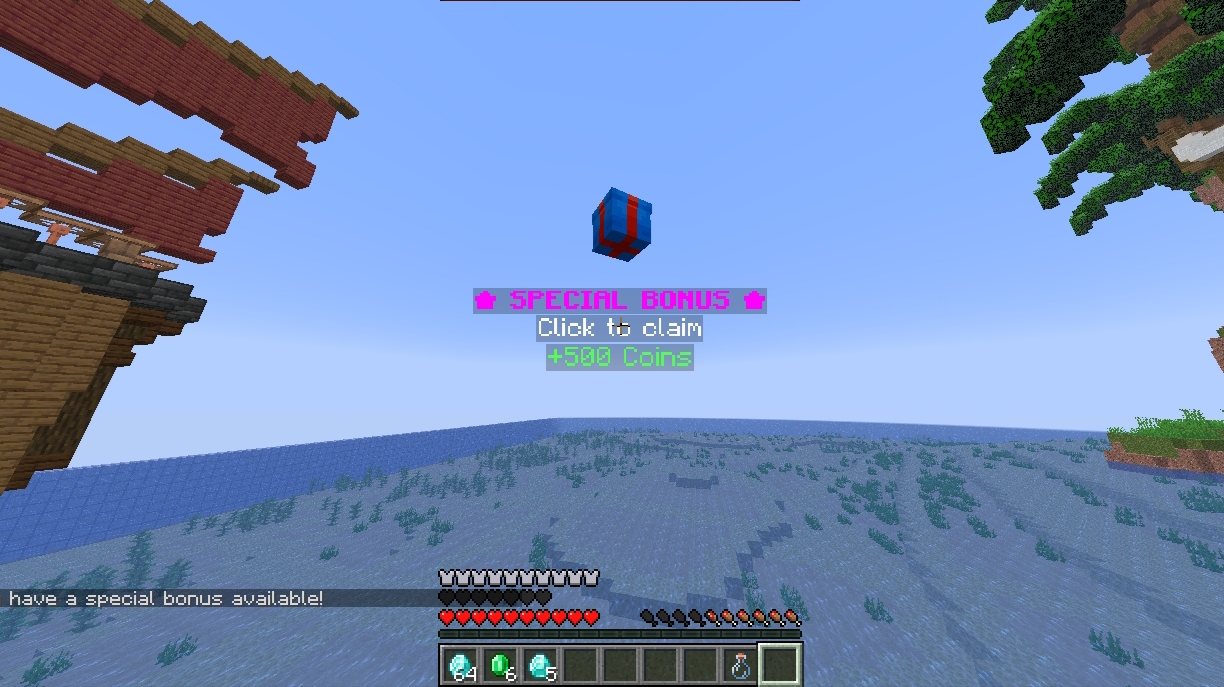
一个适用于 Paper +1.21.11 的插件,可为每位玩家显示带有弹跳动画、头颅旋转、独立奖励概率以及跨服务器重启持久化的冷却时间的浮动奖励全息图。
✨ 功能特性
- 每位玩家独立 — 每位玩家只能看到属于自己的全息图,其他玩家无法查看
- 双渲染器 —
ARMOR_STAND(最大兼容性,Java 版与通过 Geyser 连接的基岩版均可用)或 DISPLAY(TextDisplay/ItemDisplay),可全局设置或针对每个全息图单独选择
- 弹跳动画 — 平滑的上下浮动运动,支持配置振幅和速度
- 头颅自动旋转 — 全息图的头部可以持续旋转
- 高级头颅效果 (DISPLAY) — 卡通式的挤压拉伸效果以及左右倾斜摆动
- 自定义头颅 — 使用 Base64 纹理,可配置高度、缩放比例和初始角度
- 平滑 POP 动画 (DISPLAY) — 出现时缩放进入,消失时缩放退出
- 出现/消失粒子效果 — 两种渲染器均支持
- 视锥模式 (DISPLAY) —
CENTER、VERTICAL、HORIZONTAL、FIXED
- 全局与逐行缩放 (DISPLAY) —
display.scale 加上内联 {line_scale:X} 占位符
- 带颜色的发光效果 (DISPLAY) — 可配置的轮廓颜色
- 文本样式 (DISPLAY) — 阴影、半透明和背景样式
- 带概率的奖励列表 — 每个奖励都有独立的概率;使用
pick 控制发放的数量
- 十六进制颜色支持 — 可与传统的
& 颜色代码一起使用 &#RRGGBB
- 可配置的点击类型 — 每个全息图可设置为
RIGHT、LEFT 或 BOTH
- 点击冷却时间 — 防止刷取奖励
- 持久化冷却时间 — 通过
cooldowns.yml 在服务器重启后依然保留间隔时间
- 世界切换清理 — 当玩家更换世界时,全息图会立即移除
- 无外部依赖 — 仅需 Paper 1.21.11
- 自动清理 — 在启动、关闭以及玩家断开连接时,移除孤立的盔甲架
- 管理员命令 — 生成/移除、活动全息图列表及坐标、传送至全息图等更多功能
? 依赖项
无需额外插件。
视频演示 (+display entities)
⚙️ 完整配置
# ============================================================
# RewardHologram Config
# ============================================================
# 带有弹跳动画的每位玩家独立的奖励全息图。
# 在 "holograms" 部分下,你可以创建任意数量的全息图,并赋予其唯一的 ID。
# ============================================================
settings:
# 调试模式 — 向控制台记录额外信息。
debug: false
# 每位玩家允许点击之间的冷却时间(毫秒)。
# 防止频繁点击全息图以重复触发奖励。
# 500 = 半秒,1000 = 1 秒。
click-cooldown-ms: 500
# 全息图默认使用的渲染引擎(当 "renderer: DEFAULT" 时)。
# ARMOR_STAND — 经典的盔甲架全息图。最大兼容性
# (通过 Geyser 支持 Java 版和基岩版玩家)。
# 忽略 display.* 选项、逐行缩放和平滑的
# 弹出/缩入动画。
# DISPLAY — TextDisplay/ItemDisplay 实体(Minecraft 1.19.4+)。
# 启用视锥模式、全局和逐行缩放、
# 带颜色的发光效果、文本样式选项、高级头颅
# 动画(挤压、倾斜)以及平滑的 POP 出现/消失效果。
# 基岩版 (Geyser) 的支持取决于你的 Geyser 版本 —
# 如果需要考虑基岩版兼容性,请使用 ARMOR_STAND。
renderer: DISPLAY
# ============================================================
# 奖励全息图
# ============================================================
holograms:
daily_reward:
# 仅针对此全息图的渲染器。
# DEFAULT — 使用上方 settings.renderer 的设置
# ARMOR_STAND — 强制对此全息图使用盔甲架
# DISPLAY — 强制对此全息图使用 display 实体
renderer: DEFAULT
# 生成概率(0.0 - 100.0)。在间隔时间过后每秒评估一次。30.0 = 每秒 30% 的概率。
chance: 30.0
# 每位玩家每次生成评估之间的秒数。
# 即使已被领取,在此间隔过去之前,全息图也不能再次生成。
interval: 600
# 若未被领取,全息图消失前的秒数。
despawn-after: 20
# 相对于玩家的位置偏移。
# z 轴方向基于玩家的朝向,“前方”即玩家注视的方向。
offset:
# 相对于玩家面向方向的水平位移左(-)/右(+)。
x: 0.0
# 垂直位移上(+)/下(-)。
y: 1.5
# 玩家前方的距离。
z: 2.5
# 弹跳动画(上下浮动移动)。
bobbing:
# 启用/禁用垂直移动。
enabled: true
# 振幅(方块单位)— 从基础位置向上/向下移动的幅度。
amplitude: 0.15
# 振荡速度 — 数值越高,弹跳越快。
speed: 0.05
# 全息图各行之间的间距(方块单位)。
line-spacing: 0.28
# 领取奖励所需的点击类型:
# RIGHT — 仅右键点击
# LEFT — 仅左键点击(攻击)
# BOTH — 任意点击均可
click-type: RIGHT
全息行 — 支持颜色代码和十六进制颜色 &#RRGGBB。
#
# 可选的行内占位符,用于单独设置每行文本的缩放比例
#(仅限 DISPLAY 渲染器使用 — ARMOR_STAND 下会被忽略):
# "{line_scale:1.2}你的文本内容"
# 未使用该占位符的行将使用默认缩放比例 1.0。
#
# 警告:使用占位符时务必将整行用引号括起来 ——
# YAML 会将开头的 { 视为映射结构,从而导致配置损坏。
lines:
- "{line_scale:1.2}&#FFD700&l✦ 每日奖励 ✦"
- "&e点击以 &a领取"
- "{line_scale:0.9}BFFF&7双倍经验持续 10 分钟"
- "&b专为你准备!"
# 带有独立概率的奖励列表。
rewards:
# 领取时从列表中选取多少个奖励:
# -1 = 评估所有奖励,每个奖励各自进行概率判定
# 1 = 随机选取 1 个并进行概率判定
# 2 = 随机选取 2 个并分别进行概率判定
# N = 随机选取 N 个(上限为列表大小)
pick: -1
list:
# %player% 将被替换为领取者的玩家名称。
- command: "give %player% diamond 3"
chance: 100.0 # 必定获得
- command: "effect give %player% speed 600 1"
chance: 50.0 # 50% 概率
- command: "give %player% emerald 1"
chance: 25.0 # 25% 概率
# 全息图出现时的聊天消息(可用 %player%)。
# 设置为 "" 可禁用。
appear-message: "&6&l[奖励] &e你有一个待领取的奖励!请看向你前方。"
# 玩家领取奖励时的聊天消息。
# 设置为 "" 可禁用。
claim-message: "&a&l[奖励] &f你已领取每日奖励!&7请在 10 分钟后回来。"
# 全息图出现时在屏幕上显示的主题文字。
title:
# 启用/禁用主题文字。
enabled: true
# 主标题文本(较大,屏幕中央)。
title: "&6&l✦ 奖励 ✦"
# 副标题文本(较小,位于主标题下方)。
subtitle: "&e一个奖励出现在你面前"
# 所有时间单位均为刻(tick)(20 刻 = 1 秒)。
fade-in: 10
stay: 60
fade-out: 20
# 全息图出现时播放的声音。
# 声音列表:https://hub.spigotmc.org/javadocs/spigot/org/bukkit/Sound.html
sound:
# 启用/禁用以声音。
enabled: true
# 声音名称(无需添加 minecraft: 前缀)。
name: "ENTITY_EXPERIENCE_ORB_PICKUP"
# 音量(0.0 - 1.0+)。
volume: 1.0
# 音调(0.5 = 低,1.0 = 正常,2.0 = 高)。
pitch: 1.2
# ── 仅 DISPLAY 选项(ARMOR_STAND 渲染器下无效) ─────────
display:
# billboard 模式 — 实体如何旋转以面向查看者:
# CENTER — 水平和垂直方向均旋转(始终面向玩家)
# VERTICAL — 仅绕垂直轴旋转(左右转动)
# HORIZONTAL — 仅绕水平轴旋转(上下俯仰)
# FIXED — 无自动旋转,保持固定朝向
billboard: CENTER
# 全局缩放 — 应用于每一行文本和头颅模型。
# 1.0 = 正常大小,1.5 = 大 50%,0.5 = 一半大小。
scale: 1.0
# 所有全息实体的发光轮廓效果。
glow:
# 启用/禁用发光效果。
enabled: false
# 发光颜色:WHITE, RED, GOLD, YELLOW, GREEN, AQUA, BLUE,
# LIGHT_PURPLE, DARK_* 变体, BLACK, GRAY...
color: YELLOW
# 全息行文本的样式设置。
text:
shadowed: true
see-through: false
# 文本背景 — 接受 3 种格式:
# TRANSPARENT — 完全透明(经典全息图外观)
# DEFAULT — 原版深色面板(25% 不透明度的黑色)
# "#AARRGGBB" — 自定义 ARGB 颜色(Alpha + 十六进制)
# "#RRGGBB" — 自定义 RGB 颜色(完全不透明)
# 警告:十六进制值必须加引号,否则 '#' 会被视为 YAML 注释开头
background: "#40000000"
# 示例:
# background: TRANSPARENT # 不可见(此前一直如此)
# background: DEFAULT # 原版面板
# background: "#80000000" # 50% 不透明度的黑色
# background: "#80FF0000" # 50% 不透明度的红色
# background: "FFD700" # 不透明的金色(6 位数字)
# 全息图 APPEAR(出现)时的特效。
appear:
# 生成时的动画(仅限 DISPLAY 渲染器):
# NONE — 实体立即以全尺寸出现
# POP — 实体从约 0 缩放到全尺寸,平滑插值
animation: POP
# POP 动画的持续时间(以刻为单位)(数值越高 = 越慢/感觉越大)。
duration-ticks: 6
# 在全息图中心生成的粒子效果。
# 这两种渲染器(盔甲架和显示实体)均适用。
particles:
# 启用/禁用出现时的粒子效果。
enabled: true
# 粒子类型。请使用不需要额外数据的类型 ——
# 避免使用 DUST, ITEM, BLOCK, FALLING_* 等(它们会因不支持而被跳过并给出警告)。
type: TOTEM_OF_UNDYING
# 生成的粒子数量。
count: 25
# 每个轴上的扩散半径(粒子散射的范围)。
spread: 0.5
# 粒子运动速度。
speed: 0.1
# 全息图 DESPAWN(消失,超时或已被领取)时的特效。
despawn:
# 移除时的动画(仅限 DISPLAY 渲染器):
# NONE — 实体立即消失
# POP — 实体缩小至约 0 后再被移除
# 在动画播放期间,该全息图无法再被领取。
animation: POP
# POP 退出动画的持续时间(以刻为单位)。
duration-ticks: 6
# 在全息图中心生成的粒子效果。
# 这两种渲染器(盔甲架和显示实体)均适用。
particles:
# 启用/禁用消失时的粒子效果。
enabled: true
# 粒子类型(与出现粒子的限制相同)。
type: CLOUD
count: 15
spread: 0.4
speed: 0.05
全息图顶部显示的自定义头颅。
skull:
# 启用/禁用头颅。
enabled: true
# Base64 纹理(从 minecraft-heads.com 获取 —— 复制“Value”字段的值)。
texture: "eyJ0ZXh0dXJlcyI6eyJTS0lOIjp7InVybCI6Imh0dHA6Ly90ZXh0dXJlcy5taW5lY3JhZnQubmV0L3RleHR1cmUvMjhkYzNjODQ0OTFjNGZmMTAzZGU2ZWEwMTg4MGUyZDgzNDMyY2Q0ODc4Yjg0ZDZiNDMyNTNjYzUxZmQ5NzhlNyJ9fX0="
# 初始头部角度(0 = 北,90 = 东,180 = 南,270 = 西)。
head-yaw: 0.0
# 最后一行上方的高度偏移。
# 如果头颅与文本重叠则增加此值,如果有间隙则减小。
# 注意:使用 DISPLAY 渲染器时,头颅会以其位置为中心居中,因此
# 可能需要与 ARMOR_STAND 不同的数值。
height-offset: 0.7
# 使用 DISPLAY 渲染器时的头颅大小(1.0 = 物品尺寸)。
# 尝试 1.5 - 2.0 以获得更大、更明显的头部。
# 在 ARMOR_STAND 模式下无效。
scale: 1.5
# 头颅的自动连续 Y 轴旋转。
rotation:
# 启用/禁用旋转动画。
enabled: true
# 每刻旋转的度数 —— 设置为 2.0 时,完整旋转 360° 大约需要 9 秒。
speed: 2.0
# 高级头颅动画 —— 仅限 DISPLAY 渲染器。
effects:
# 挤压与拉伸 —— 头部像卡通一样被挤压和拉伸
# (在一个轴上压缩,同时在其他轴上扩展)。
squash:
# 启用/禁用挤压效果。
enabled: true
# 变形强度(0.1 = 细微,0.3 = 非常卡通化)。
amplitude: 0.10
# 振荡速度 —— 数值越高,挤压循环越快。
speed: 0.15
# 摇摆 —— 头部轻微的左右倾斜。
tilt:
# 启用/禁用倾斜效果。
enabled: true
# 每侧最大倾斜角度(8 = 细微,20 = 夸张)。
amplitude: 8.0
# 振荡速度 —— 数值越高,摇摆越快。
speed: 0.06
# 领取奖励时播放的声音。
claim-sound:
# 启用/禁用声音。
enabled: true
# 声音名称(无需添加 minecraft: 前缀)。
name: "ENTITY_PLAYER_LEVELUP"
# 音量(0.0 - 1.0+)。
volume: 1.0
# 音调(0.5 = 低,1.0 = 正常,2.0 = 高)。
pitch: 1.5
bonus_reward:
renderer: DEFAULT
chance: 10.0
interval: 1800
despawn-after: 15
offset:
x: 0.0
y: 1.8
z: 2.5
bobbing:
enabled: true
amplitude: 0.20
speed: 0.08
line-spacing: 0.28
# BOTH 允许通过右键或左键点击来领取。
click-type: BOTH
lines:
- "{line_scale:1.3}&#FF00FF&l★ SPECIAL BONUS ★"
- "&fClick to claim"
- "FF7F&a+500 Coins"
rewards:
# 从列表中随机选择 1 个奖励并检查其概率。
pick: 1
list:
- command: "eco give %player% 500"
chance: 100.0
- command: "eco give %player% 250"
chance: 40.0
- command: "broadcast &a%player% &fgot a special bonus!"
chance: 100.0
appear-message: "&d&l[Bonus] &fYou have a special bonus available!"
claim-message: "&a&l[Bonus] &fYou claimed &a500 coins&f! Thanks for playing."
title:
enabled: true
title: "&d&l★ SPECIAL BONUS ★"
subtitle: "&fClick to claim 500 coins!"
fade-in: 10
stay: 60
fade-out: 20
sound:
enabled: true
name: "UI_TOAST_CHALLENGE_COMPLETE"
volume: 1.0
pitch: 1.0
display:
billboard: CENTER
scale: 1.0
glow:
enabled: true
color: LIGHT_PURPLE
text:
shadowed: false
see-through: false
background: TRANSPARENT
appear:
animation: POP
duration-ticks: 8
particles:
enabled: true
type: PORTAL
count: 40
spread: 0.7
speed: 0.3
despawn:
animation: POP
duration-ticks: 6
particles:
enabled: false
type: CLOUD
count: 15
spread: 0.4
speed: 0.05
skull:
enabled: true
texture: "eyJ0ZXh0dXJlcyI6eyJTS0lOIjp7InVybCI6Imh0dHA6Ly90ZXh0dXJlcy5taW5lY3JhZnQubmV0L3RleHR1cmUvNWI4NWUyOWYyOWVjOWE5MGU0ODJlYTViODM5MWJjYjQ1NjBiYmFlMGRjZDE1ZDdjZTFkODYwMTZiNDM1NmU5OCJ9fX0="
head-yaw: 45.0
height-offset: 0.7
scale: 1.2
rotation:
enabled: false
speed: 3.0
effects:
squash:
enabled: false
amplitude: 0.12
speed: 0.15
tilt:
enabled: false
amplitude: 8.0
speed: 0.06
claim-sound:
enabled: true
name: "ENTITY_PLAYER_LEVELUP"
volume: 1.0
pitch: 1.0
## ? 颜色支持
```yaml
lines:
- "&6Orange text" # 经典颜色代码
- "&#FF5733Hex red text" # 十六进制颜色
- "&lFFFFCyan bold text" # 组合样式
- "{line_scale:1.3}&#FF00FF&lBig magenta" # 逐行缩放(仅限 DISPLAY 渲染器)
? 奖励系统
rewards:
pick: 1 # 从列表中随机选择 1 个奖励
list:
- command: "give %player% diamond 5"
chance: 30.0
- command: "give %player% gold_ingot 10"
chance: 60.0
- command: "give %player% iron_ingot 20"
chance: 100.0
当 pick: 1 时,会从列表中随机选择一个奖励并评估其 chance。当 pick: -1 时,所有奖励都会独立进行评估。当 pick: N 时,会随机选择 N 个奖励(不超过列表总数),并分别根据各自的 chance 进行评估。
? 生成的文件
plugins/RewardHologram/
├── config.yml # 全息图配置
└── cooldowns.yml # 每个玩家的持久化冷却时间(自动生成)
? 重要提示:
本插件由 AI 创建,但我已进行了广泛的测试,以确保其功能完整且性能稳定,各项特性均可正常运行。您也可以查看 GitHub 仓库中的插件源代码。
RewardHologram ?
A Paper +1.21.11 plugin that displays per-player floating reward holograms with bobbing animation, skull rotation, individual reward chances, and cooldowns that persist across server restarts.

✨ Features
- Per-player — each player sees their own hologram, protected from other players
- Dual renderer —
ARMOR_STAND (max compatibility, Java + Bedrock via Geyser) or DISPLAY (TextDisplay/ItemDisplay), selectable globally or per hologram
- Bobbing animation — smooth up/down movement with configurable amplitude and speed
- Skull auto-rotation — the hologram's head can spin continuously
- Advanced skull effects (DISPLAY) — cartoon squash & stretch and left/right tilt sway
- Custom skull — Base64 texture with configurable height, scale and initial angle
- Smooth POP animations (DISPLAY) — scale-in on appear and scale-out on despawn
- Particles on appear/despawn — work with both renderers
- Billboard modes (DISPLAY) —
CENTER, VERTICAL, HORIZONTAL, FIXED
- Global and per-line scale (DISPLAY) —
display.scale plus the inline {line_scale:X} placeholder
- Glow with color (DISPLAY) — configurable outline color
- Text styling (DISPLAY) — shadow, see-through and background style
- Reward list with chances — each reward has its own probability; use
pick to control how many are given
- Hex color support — use
&#RRGGBB alongside classic & color codes
- Configurable click type —
RIGHT, LEFT, or BOTH per hologram
- Click cooldown — prevents reward spam
- Persistent cooldowns — intervals are respected across server restarts via
cooldowns.yml
- World change cleanup — holograms are removed immediately when a player changes worlds
- No external dependencies — only requires Paper 1.21.11
- Auto cleanup — removes orphaned armor stands on startup, shutdown, and when players disconnect
- Admin commands — spawn/remove, active hologram list with coordinates, teleport to hologram, and more
? Dependencies
| Dependency |
Type |
Link |
| Paper +1.21.11 |
Required |
papermc.io |
No additional plugins required.
VIDEO (+display entities)
⚙️ Full Configuration
# ============================================================
# RewardHologram Config
# ============================================================
# Per-player reward holograms with bobbing animation.
# Create as many holograms as you want with unique IDs under
# the "holograms" section.
# ============================================================
settings:
# Debug mode — logs extra information to the console.
debug: false
# Cooldown in milliseconds between allowed clicks per player.
# Prevents spam-clicking a hologram to trigger rewards repeatedly.
# 500 = half a second, 1000 = 1 second.
click-cooldown-ms: 500
# Default rendering engine used by holograms that have "renderer: DEFAULT".
# ARMOR_STAND — classic armor stand holograms. Maximum compatibility
# (works for Java and Bedrock players via Geyser).
# Ignores display.* options, per-line scale and smooth
# pop-in/pop-out animations.
# DISPLAY — TextDisplay/ItemDisplay entities (Minecraft 1.19.4+).
# Enables billboard modes, global and per-line scale,
# glow with color, text styling options, advanced skull
# animations (squash, tilt) and smooth POP appear/despawn.
# Bedrock (Geyser) support depends on your Geyser version —
# use ARMOR_STAND if Bedrock compatibility matters.
renderer: DISPLAY
# ============================================================
# Reward holograms
# ============================================================
holograms:
daily_reward:
# Renderer for THIS hologram only.
# DEFAULT — uses settings.renderer from above
# ARMOR_STAND — forces armor stands for this hologram
# DISPLAY — forces display entities for this hologram
renderer: DEFAULT
# Spawn probability (0.0 - 100.0). Evaluated once per second after
# the interval has elapsed. 30.0 = 30% chance per second.
chance: 30.0
# Seconds between each spawn evaluation per player.
# The hologram cannot spawn again until this interval has passed,
# even after being claimed.
interval: 600
# Seconds until the hologram disappears if not claimed.
despawn-after: 20
# Position offset relative to the player.
# z is "in front of the player" based on where they are looking.
offset:
# Horizontal shift left(-)/right(+) relative to player's facing.
x: 0.0
# Vertical shift up(+)/down(-).
y: 1.5
# Distance in front of the player.
z: 2.5
# Bobbing animation (up and down floating movement).
bobbing:
# Enable/disable the vertical movement.
enabled: true
# Amplitude in blocks — how high/low it moves from its base position.
amplitude: 0.15
# Oscillation speed — higher = faster bobbing.
speed: 0.05
# Spacing between hologram lines in blocks.
line-spacing: 0.28
# Click type required to claim the reward:
# RIGHT — right-click only
# LEFT — left-click (attack) only
# BOTH — either click works
click-type: RIGHT
# Hologram lines — supports & color codes and hex colors &#RRGGBB.
#
# Optional inline placeholder for per-line text scale
# (DISPLAY renderer only — ignored on ARMOR_STAND):
# "{line_scale:1.2}your text here"
# Lines without the placeholder use scale 1.0.
#
# WARNING: always put the line in quotes when using the placeholder —
# YAML treats a leading { as a mapping and would break the config.
lines:
- "{line_scale:1.2}&#FFD700&l✦ DAILY REWARD ✦"
- "&eClick to &aclaim"
- "{line_scale:0.9}�BFFF&7Double XP for 10 minutes"
- "&bJust for you!"
# Reward list with individual chances.
rewards:
# How many rewards to pick from the list when claimed:
# -1 = evaluate ALL rewards, each one rolls its own chance
# 1 = pick 1 at random and roll its chance
# 2 = pick 2 at random and roll their chances
# N = pick N at random (capped at list size)
pick: -1
list:
# %player% is replaced with the claiming player's name.
- command: "give %player% diamond 3"
chance: 100.0 # Always given
- command: "effect give %player% speed 600 1"
chance: 50.0 # 50% probability
- command: "give %player% emerald 1"
chance: 25.0 # 25% probability
# Chat message when the hologram appears (%player% available).
# Set to "" to disable.
appear-message: "&6&l[Reward] &eYou have a reward available! Look in front of you."
# Chat message when the player claims the reward.
# Set to "" to disable.
claim-message: "&a&l[Reward] &fYou claimed your daily reward! &7Come back in 10 minutes."
# Title shown on screen when the hologram appears.
title:
# Enable/disable the title.
enabled: true
# Main title text (large, center of screen).
title: "&6&l✦ REWARD ✦"
# Subtitle text (smaller, below the title).
subtitle: "&eA reward appeared in front of you"
# All times in ticks (20 ticks = 1 second).
fade-in: 10
stay: 60
fade-out: 20
# Sound played when the hologram appears.
# Sound list: https://hub.spigotmc.org/javadocs/spigot/org/bukkit/Sound.html
sound:
# Enable/disable the sound.
enabled: true
# Sound name (without the minecraft: prefix).
name: "ENTITY_EXPERIENCE_ORB_PICKUP"
# Volume (0.0 - 1.0+).
volume: 1.0
# Pitch (0.5 = low, 1.0 = normal, 2.0 = high).
pitch: 1.2
# ── DISPLAY-only options (ignored with ARMOR_STAND renderer) ─────────
display:
# Billboard mode — how the entities rotate to face viewers:
# CENTER — rotates both horizontally and vertically (always faces the player)
# VERTICAL — rotates only around the vertical axis (turns left/right)
# HORIZONTAL — rotates only around the horizontal axis (pitches up/down)
# FIXED — no auto-rotation, stays in a fixed orientation
billboard: CENTER
# Global scale — multiplies every line and the skull.
# 1.0 = normal size, 1.5 = 50% bigger, 0.5 = half size.
scale: 1.0
# Glowing outline around all hologram entities.
glow:
# Enable/disable the glow effect.
enabled: false
# Glow color: WHITE, RED, GOLD, YELLOW, GREEN, AQUA, BLUE,
# LIGHT_PURPLE, DARK_* variants, BLACK, GRAY...
color: YELLOW
# Text styling for the hologram lines.
text:
shadowed: true
see-through: false
# Text background — accepts 3 formats:
# TRANSPARENT — fully invisible (classic hologram look)
# DEFAULT — vanilla dark panel (black at 25%)
# "#AARRGGBB" — custom ARGB color (alpha + hex)
# "#RRGGBB" — custom RGB color (fully opaque)
# WARNING: hex values MUST be quoted, otherwise '#' starts a YAML comment
background: "#40000000"
# Examples:
# background: TRANSPARENT # invisible (as it was until now)
# background: DEFAULT # vanilla panel
# background: "#80000000" # black at 50%
# background: "#80FF0000" # red at 50%
# background: "FFD700" # opaque gold (6 digits)
# Effects when the hologram APPEARS.
appear:
# Animation on spawn (DISPLAY renderer only):
# NONE — entities appear instantly at full size
# POP — entities scale up from ~0 to full size, smoothly interpolated
animation: POP
# Duration of the POP animation in ticks (higher = slower/bigger feel).
duration-ticks: 6
# Particles spawned at the hologram's center on appear.
# These work with BOTH renderers (armor stand and display).
particles:
# Enable/disable appear particles.
enabled: true
# Particle type. Use types that don't require extra data —
# avoid DUST, ITEM, BLOCK, FALLING_* etc. (they are skipped with a warning).
type: TOTEM_OF_UNDYING
# Number of particles spawned.
count: 25
# Spread radius on each axis (how far particles scatter).
spread: 0.5
# Particle motion speed.
speed: 0.1
# Effects when the hologram DESPAWNS (timeout or claim).
despawn:
# Animation on removal (DISPLAY renderer only):
# NONE — entities vanish instantly
# POP — entities shrink down to ~0 before being removed
# While animating out, the hologram can no longer be claimed.
animation: POP
# Duration of the POP-out animation in ticks.
duration-ticks: 6
# Particles spawned at the hologram's center on despawn.
# These work with BOTH renderers (armor stand and display).
particles:
# Enable/disable despawn particles.
enabled: true
# Particle type (same restrictions as appear particles).
type: CLOUD
count: 15
spread: 0.4
speed: 0.05
# Custom skull displayed at the top of the hologram.
skull:
# Enable/disable the skull.
enabled: true
# Base64 texture (get it from minecraft-heads.com — copy the "Value" field).
texture: "eyJ0ZXh0dXJlcyI6eyJTS0lOIjp7InVybCI6Imh0dHA6Ly90ZXh0dXJlcy5taW5lY3JhZnQubmV0L3RleHR1cmUvMjhkYzNjODQ0OTFjNGZmMTAzZGU2ZWEwMTg4MGUyZDgzNDMyY2Q0ODc4Yjg0ZDZiNDMyNTNjYzUxZmQ5NzhlNyJ9fX0="
# Initial head angle (0 = north, 90 = east, 180 = south, 270 = west).
head-yaw: 0.0
# Extra height above the last line.
# Increase if the skull overlaps the lines, decrease if there's a gap.
# Note: with DISPLAY the skull is centered on its position, so it may
# need a different value than with ARMOR_STAND.
height-offset: 0.7
# Skull size with the DISPLAY renderer (1.0 = item size).
# Try 1.5 - 2.0 for a bigger, more visible head.
# Ignored with ARMOR_STAND.
scale: 1.5
# Automatic continuous Y rotation of the skull.
rotation:
# Enable/disable the spinning.
enabled: true
# Degrees per tick — at 2.0 a full 360° rotation takes ~9 seconds.
speed: 2.0
# Advanced skull animations — DISPLAY renderer only.
effects:
# Squash & stretch — the head squashes and stretches like a cartoon
# (compresses on one axis while expanding on the others).
squash:
# Enable/disable the squash effect.
enabled: true
# Deformation intensity (0.1 = subtle, 0.3 = very cartoonish).
amplitude: 0.10
# Oscillation speed — higher = faster squash cycle.
speed: 0.15
# Sway — subtle left/right leaning of the head.
tilt:
# Enable/disable the tilt effect.
enabled: true
# Maximum lean in degrees each side (8 = subtle, 20 = dramatic).
amplitude: 8.0
# Oscillation speed — higher = faster swaying.
speed: 0.06
# Sound played when the reward is claimed.
claim-sound:
# Enable/disable the sound.
enabled: true
# Sound name (without the minecraft: prefix).
name: "ENTITY_PLAYER_LEVELUP"
# Volume (0.0 - 1.0+).
volume: 1.0
# Pitch (0.5 = low, 1.0 = normal, 2.0 = high).
pitch: 1.5
bonus_reward:
renderer: DEFAULT
chance: 10.0
interval: 1800
despawn-after: 15
offset:
x: 0.0
y: 1.8
z: 2.5
bobbing:
enabled: true
amplitude: 0.20
speed: 0.08
line-spacing: 0.28
# BOTH allows claiming with either right or left click.
click-type: BOTH
lines:
- "{line_scale:1.3}&#FF00FF&l★ SPECIAL BONUS ★"
- "&fClick to claim"
- "�FF7F&a+500 Coins"
rewards:
# Pick 1 reward at random from the list and roll its chance.
pick: 1
list:
- command: "eco give %player% 500"
chance: 100.0
- command: "eco give %player% 250"
chance: 40.0
- command: "broadcast &a%player% &fgot a special bonus!"
chance: 100.0
appear-message: "&d&l[Bonus] &fYou have a special bonus available!"
claim-message: "&a&l[Bonus] &fYou claimed &a500 coins&f! Thanks for playing."
title:
enabled: true
title: "&d&l★ SPECIAL BONUS ★"
subtitle: "&fClick to claim 500 coins!"
fade-in: 10
stay: 60
fade-out: 20
sound:
enabled: true
name: "UI_TOAST_CHALLENGE_COMPLETE"
volume: 1.0
pitch: 1.0
display:
billboard: CENTER
scale: 1.0
glow:
enabled: true
color: LIGHT_PURPLE
text:
shadowed: false
see-through: false
background: TRANSPARENT
appear:
animation: POP
duration-ticks: 8
particles:
enabled: true
type: PORTAL
count: 40
spread: 0.7
speed: 0.3
despawn:
animation: POP
duration-ticks: 6
particles:
enabled: false
type: CLOUD
count: 15
spread: 0.4
speed: 0.05
skull:
enabled: true
texture: "eyJ0ZXh0dXJlcyI6eyJTS0lOIjp7InVybCI6Imh0dHA6Ly90ZXh0dXJlcy5taW5lY3JhZnQubmV0L3RleHR1cmUvNWI4NWUyOWYyOWVjOWE5MGU0ODJlYTViODM5MWJjYjQ1NjBiYmFlMGRjZDE1ZDdjZTFkODYwMTZiNDM1NmU5OCJ9fX0="
head-yaw: 45.0
height-offset: 0.7
scale: 1.2
rotation:
enabled: false
speed: 3.0
effects:
squash:
enabled: false
amplitude: 0.12
speed: 0.15
tilt:
enabled: false
amplitude: 8.0
speed: 0.06
claim-sound:
enabled: true
name: "ENTITY_PLAYER_LEVELUP"
volume: 1.0
pitch: 1.0
? Color Support
lines:
- "&6Orange text" # Classic color code
- "&#FF5733Hex red text" # Hex color
- "&l�FFFFCyan bold text" # Combined
- "{line_scale:1.3}&#FF00FF&lBig magenta" # Per-line scale (DISPLAY renderer only)
? Reward System
rewards:
pick: 1 # Pick 1 reward at random from the list
list:
- command: "give %player% diamond 5"
chance: 30.0
- command: "give %player% gold_ingot 10"
chance: 60.0
- command: "give %player% iron_ingot 20"
chance: 100.0
With pick: 1, one reward is chosen at random and its chance is evaluated. With pick: -1, all rewards are evaluated independently. With pick: N, N rewards are chosen at random (capped at the list size) and each one is evaluated by its chance.
? Generated Files
plugins/RewardHologram/
├── config.yml # Hologram configuration
└── cooldowns.yml # Per-player persistent cooldowns (auto-generated)
? Important:
This plugin was created using AI, but I've conducted extensive testing to ensure that it is 100% functional, both in terms of its features and its performance. You can also view the plugin's code in the GitHub repository.
评论 0
登录后参与评分
还没有评论,来抢沙发吧
