
使用 RHSignItem,你可以为任意物品添加签名。
在德国用心制作 ??
功能特性
命令
/sign
使用此命令可立即签署物品。描述栏(lore)的内容由 config.yml 中 SHORT 下的内容决定。以下是 /sign 的所有参数列表:
/sign help → 显示所有命令列表。/sign <text> → 根据 DEFAULT 内容创建带有自定义文本的签名/sign delete → 移除已应用的签名/sign lock → 锁定物品,防止通过 /sign 或 /sign <text> 添加签名/sign unlock → 解除物品的锁定状态,允许再次签名/sign version → 显示版本信息
示例:
/sign <yellow>这件物品太<gold>棒<yellow>了,而且非常<gold>稀有<yellow>,<br>每个玩家都想拥有它。
/rename
使用命令 /rename <text> 可以更改物品的显示名称。它也支持颜色格式和占位符!
示例:
/rename 这是一个<aqua>酷炫<reset>的物品名称!
格式化
配置文件和语言文件中的所有消息均支持 MiniMessage。要了解如何使用它,请访问 Adventure 网站。我强烈建议使用 MiniMessage 格式,因为这也是 Paper 及其衍生版本所有用户的当前最佳实践。
Legacy 格式如 & 或 &#rrggbb 也能勉强工作,但不推荐使用!你还可以使用 PlaceholderAPI 及其扩展中的所有占位符!
语言文件
RHSignItem 附带了一些默认语言文件:德语、英语和俄语。你可以根据需要修改它们。
你也可以创建新文件并进行集成。
在这种情况下,请确保在配置中将 locale 正确设置为文件名。
自动锁定
为了使签名过程尽可能简单,你可以启用 auto-lock 设置。之后,每个新签名都会自动将锁定状态应用到物品上。如果你希望指定此功能,同时仅允许具有相应权限的玩家执行该操作,请通过 permission-based 设置激活它。玩家需要 rhsignitem.command.sign.lock.auto 权限。
副手物品要求
通过 offhand-item-mode 设置,你可以选择玩家在创建签名(使用 /sign 或 /sign <text>)时是否需要在副手中持有物品。type 决定了所需的物品类型。
此外,你可以选择物品是否会被消耗。
物品黑名单
作为服务器所有者或管理员,你可能不希望所有物品都能被签名。RHSignItem 提供了黑名单功能,可以轻松配置和扩展。
Vault 集成
如果你想通过付费才能使用这些命令,只需在 config.yml 文件中切换其设置即可!
你可以为执行任何命令设置固定价格,切换各个命令并选择哪些命令应该放在付费墙后。
你还可以在使用支付系统时切换提示信息。
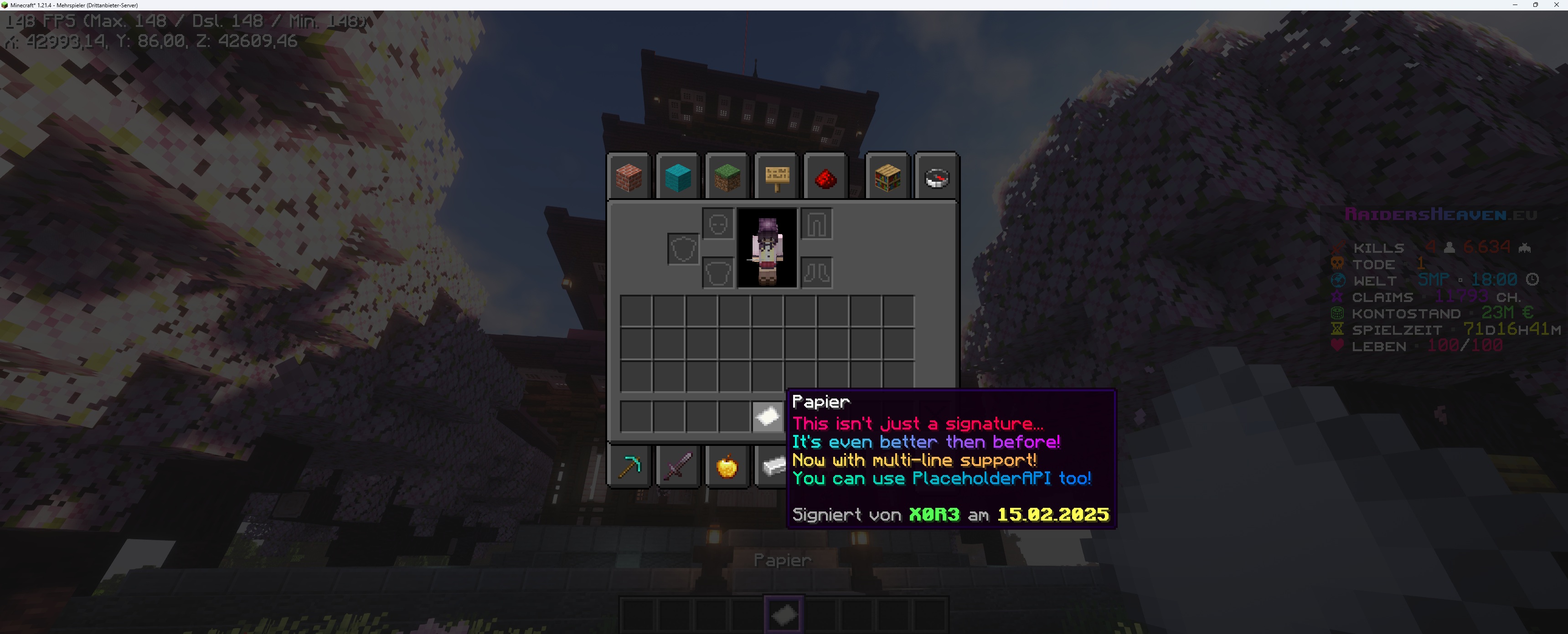
游戏内效果预览
权限
插件要求玩家拥有下列相应的权限:
rhsignitem.* → 授予访问所有插件命令的权限rhsignitem.admin → 授予 删除 和 解锁 的覆盖权限(用于管理目的)rhsignitem.command.sign → /sign 和 /sign helprhsignitem.command.sign.sign → /sign <text>rhsignitem.command.sign.delete → /sign deleterhsignitem.command.sign.lock → /sign lockrhsignitem.command.sign.lock.auto → 用于基于权限处理的 自动锁定rhsignitem.command.sign.unlock → /sign unlockrhsignitem.command.sign.version → /sign versionrhsignitem.command.rename → /rename <text>
支持
如果你需要关于 RHSignItem 的帮助,可以加入 Discord 上的 RaidersHeaven 服务器。
只需在 #rhsignitem-paper-plugin 频道发帖即可。由于支持完全由我个人提供,可能会出现延迟和较长的回复时间,因为我无法立即阅读所有消息,或者只能在一天中的某些时间查看。
感谢你的理解!
指标收集
RHSignItem 通过 bStats 收集匿名的服务器统计数据,bStats 是一个用于 Minecraft 软件的开源统计服务。你可以在 plugins/bStats/config.yml 中随时退出。
With RHSignItem you are able to add a signature to an item of your choice.
Made with love in Germany ??
Features
Commands
/sign
With this command you can sign an item instantly. The lore will be determined by the content under SHORT inside of the config.yml.Here is a list of all arguments for /sign:
/sign help → will show you a list of all commands./sign <text> → creates a signature with a custom text, depending on the DEFAULT content/sign delete → removes an applied signature/sign lock → will lock an item to prevent adding a signature with /sign or /sign <text>/sign unlock → will free an item from it's locked state and allows signatures again/sign version → shows you some version information
Example:
/sign <yellow>That item is so <gold>awesome<yellow> and <gold>rare<yellow>,<br>that every player wants to own.
/rename
With the command /rename <text> you can change an items displayname. It uses color formats and placeholders here too!
Example:
/rename This is a <aqua>cool<reset> item name!
Formatting
All messages within the configuration and language files support MiniMessage. To learn how to use it, please visit the Adventure website.I highly recommend using the MiniMessage format, as it is also the current best practice for all users of Paper and it's derivatives.
Legacy formats such as & or &#rrggbb will kinda work too, but are not recommended!You can also use all placeholders from the PlaceholderAPI and it's expansions!
Language Files
RHSignItem ships with some default language files: German, English and Russian. You can change these as you desire.
But you can also create a new file and integrate it.
In this case, make sure to properly set the locale to the files name in the config.
Auto-Locking
In order to make the signing process as easy as possible, you can enable the auto-lock setting. After that, every new signature will automatically set the locked state onto the item.If you want to specify that feature, while only allowing players with the correct permission to do that, activate it through the permission-based setting. Players will need the rhsignitem.command.sign.lock.auto permission.
Optional Offhand Requirements
With the offhand-item-mode setting you can choose, if the player needs to hold an item in his offhand in order to create a signature with /sign or /sign <text>.type determines the item that is needed.Also you can choose, if the item should be used.
Item Blacklist
As a server owner or administrator, you probably don't want all items to be allowed for signatures. RHSignItem comes with a blacklist feature, that can easily be configured and extented.
Vault integration
If you want to make the commands only usable through a payment, just toggle it's setting inside the config.yml file!
You can set a fixed price for executing any command, toggle each command and choose, which ones should be set behind a paywall.
Also you can toggle messages when using the payment system.
What does it look like in-game?
Permissions
The plugin requires a player to have the respective permissions listed below:
rhsignitem.* → grants access to all plugin commandsrhsignitem.admin → grants an override status to delete and unlock (for administrative purposes)rhsignitem.command.sign → /sign and /sign helprhsignitem.command.sign.sign → /sign <text>rhsignitem.command.sign.delete → /sign deleterhsignitem.command.sign.lock → /sign lockrhsignitem.command.sign.lock.auto → for auto-lock with permission based command handlingrhsignitem.command.sign.unlock → /sign unlockrhsignitem.command.sign.version → /sign versionrhsignitem.command.rename → /rename <text>
Support
If you need help with RHSignItem, you can join the RaidersHeaven server on Discord.
Just post inside the #rhsignitem-paper-plugin channel.Since support is provided exclusively by me, there may be delays and longer response times as I cannot read all messages immediately or only at certain times of the day.
Thank you for your understanding!
Metrics collection
RHSignItem collects anonymous server statistics through bStats, an open-source statistics service for Minecraft software. You can opt out in plugins/bStats/config.yml at anytime.


 插件

 插件
 插件
 插件
 插件
 插件
评论 0
登录后参与评分
还没有评论,来抢沙发吧