

RPUniverse
将 FiveM 角色扮演带入 Minecraft!
 RP Universe 是一款 Minecraft 插件,旨在控制整个游戏服务器并将角色扮演(RP)的概念引入 Minecraft。它提供了对游戏各个方面的控制,从移动方式到交流沟通。该插件不包含语音聊天功能,但添加了实用的命令如 /me、/do 和 /status,允许玩家表达他们的情绪、活动和状态。
RP Universe 的工作系统完全可以在游戏中配置,为管理员提供了创建和编辑玩家工作的能力。服务器所有者可以灵活地选择如何以及在哪里存储数据——本地(例如以 JSON 格式)或数据库。
该插件还为开发者提供了一个 API 来自定义和扩展插件,并且计划与 Minecraft 流行的脚本插件 Skript 集成。
RP Universe 的其他功能包括一个用于控制玩家与插件交互的系统、计费系统、玩家之间的支付、房产购买、全面的银行系统和本地化系统。
 Minecraft 的 RP Universe 插件在实现 /me、/do 和 /status 命令方面非常复杂,类似于 GTA V 修改框架 FiveM 中的那些命令。

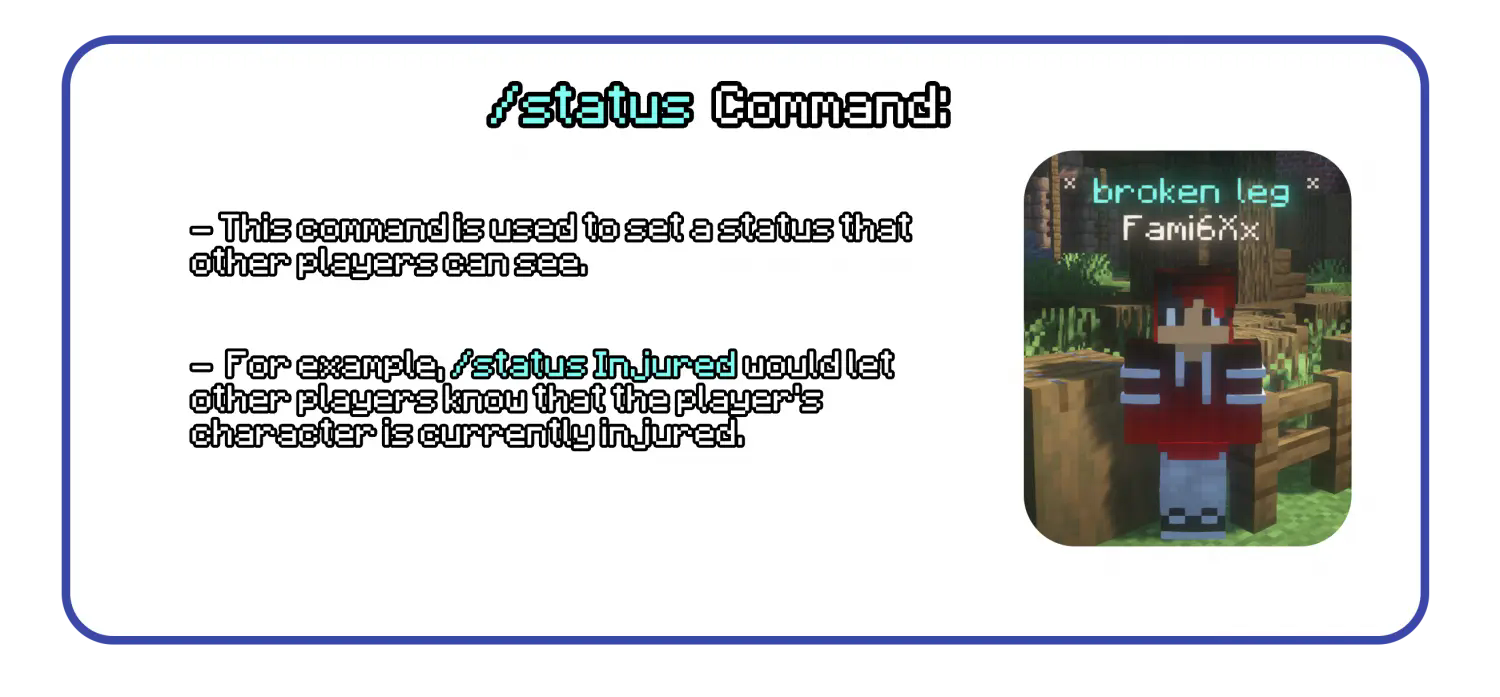
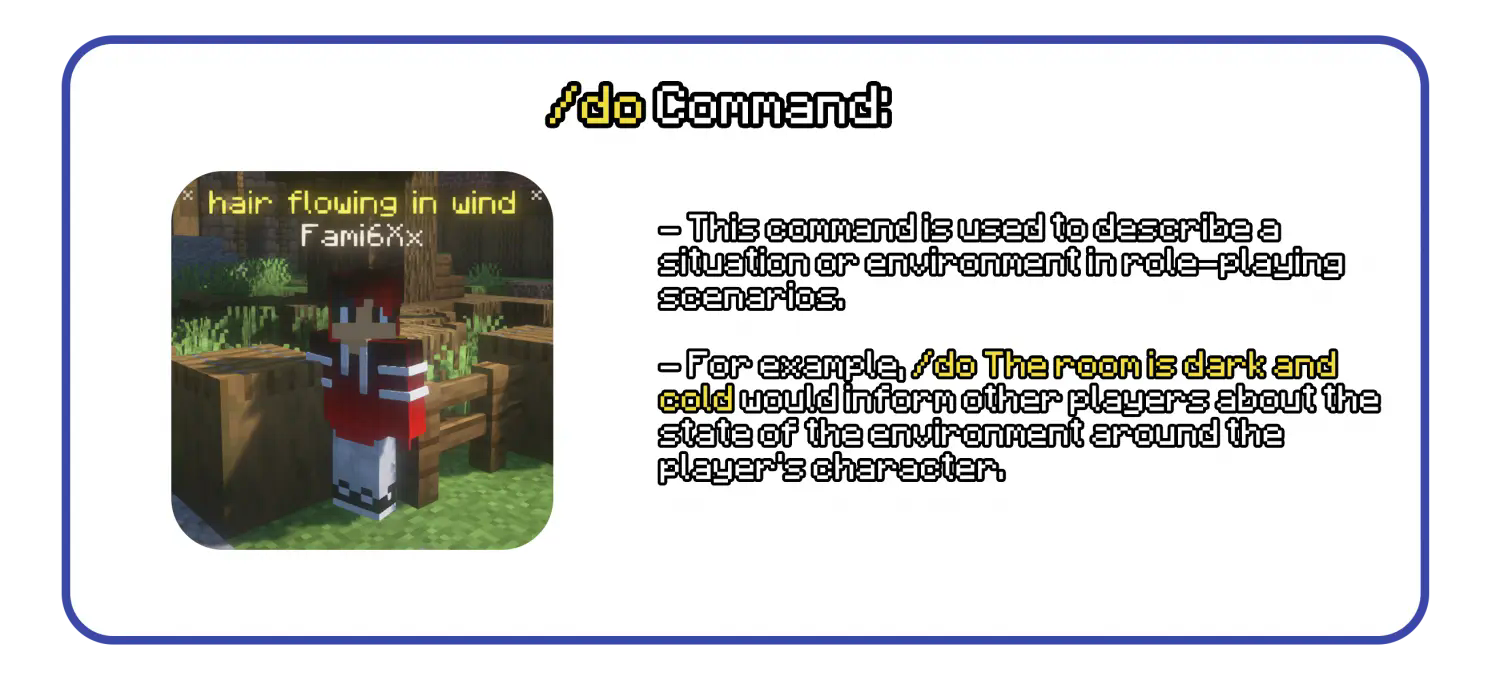 这些命令在 RP Universe 插件中的实现方式与 Minecraft 环境无缝集成。由插件创建的全息图在可配置的可见范围内可见,并且不会穿墙显示,这样其他玩家就无法通过这种方式获取关于玩家位置的信息。
另一个功能是 /tag 和 /settag,供管理员和版主使用,以便当版主或建筑者做出不符合角色设定的行为且当前不在角色扮演状态时,可以向其他玩家展示这一点。这些标签可以穿墙显示。

 此插件包含一个非常容易使用的工作系统,所有内容都可以由管理员在游戏中创建,然后某些内容可以由工作主管进行修改。所有操作都基于 GUI,并且可以在 plugins 文件夹中生成的 locales.yml 文件中进行本地化。
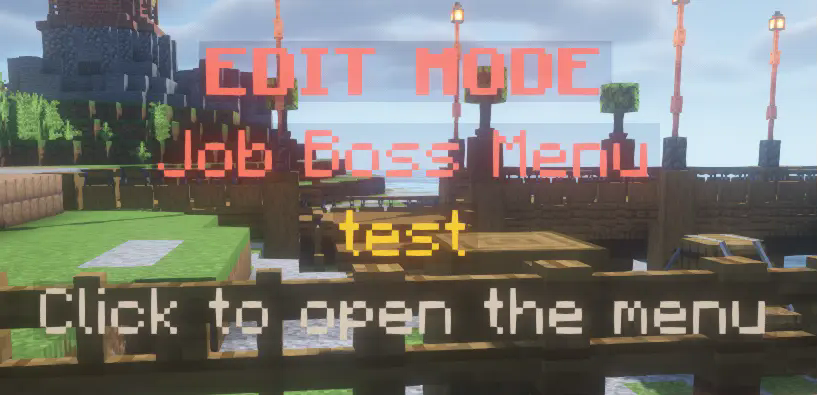
这是管理员可以看到的内容
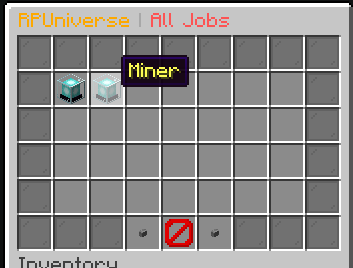
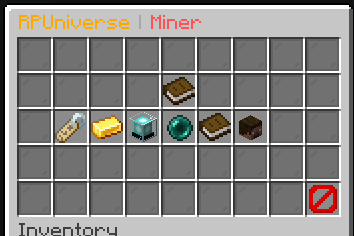
这是玩家看到的内容
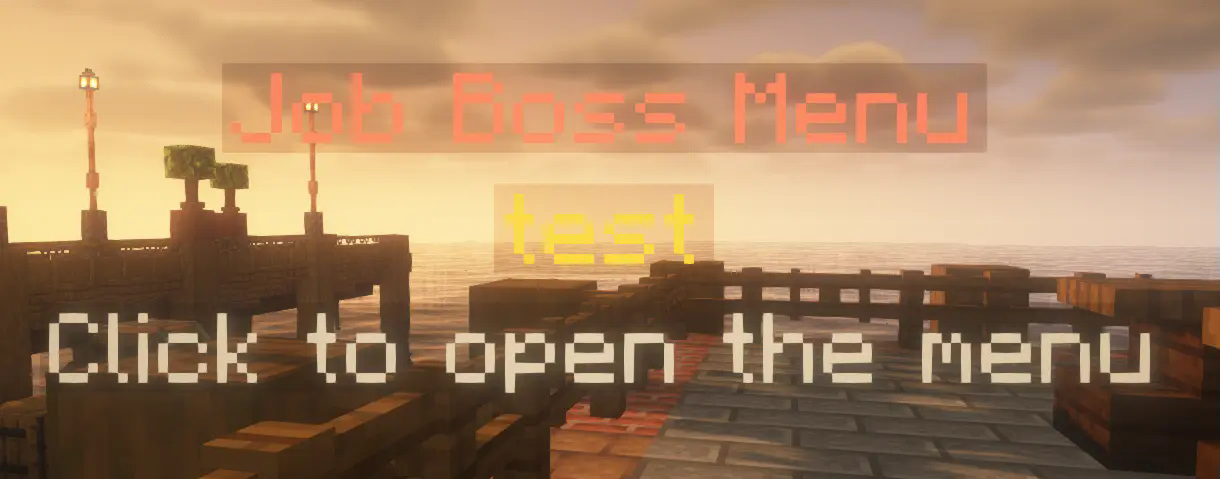


(上图显示了玩家当前选择的工作及其位置)

# RPUniverse 配置文件
# 此文件包含 RPUniverse 的所有设置
# 如果你不知道自己在做什么,请不要触碰任何东西!
# 如果要编辑某些内容,请先停止服务器!
# 如果有任何问题,请在 Discord 上联系我:https://discord.gg/SRzxwmBxk5

# 如果有更新更改了配置中的某些内容,你需要
# 删除配置文件并重启服务器以生成新的配置文件。
version: '0.8'

# 对于任何文本,支持颜色代码(使用 & 代替 §),目前不支持 RichText

# 所有消息的前缀(支持颜色代码,目前不支持 RichText)
prefix: '&c&lRPU &8»&r'

# 常规设置
# bossBarColor: 老板栏的颜色(BLUE, GREEN, PINK, PURPLE, RED, WHITE, YELLOW)
# hideNicknames: 如果为 true,插件将隐藏玩家的昵称
# localOOC: 如果为 true,玩家仅在聊天中输入时的 OOC 聊天将是本地的
# localOOCRange: OOC 聊天可见的范围
# localOOCFormat: 本地 OOC 聊天的格式
# logLocalToConsole: 如果为 true,本地 OOC 聊天将被记录到控制台
# globalOOC: 如果为 true,注册全局 ooc 命令
# globalOOCFormat: 全局 OOC 聊天的格式
general:
    bossBarColor: RED
    hideNicknames: true
    localOOC: true
    localOOCRange: 15
    localOOCFormat: '&b&lLocalOOC &7{player} &8» &r{message}'
    logLocalToConsole: true
    globalOOC: true
    globalOOCFormat: '&a&lGlobalOOC &7{player} &8» &r{message}'
作业设置
preferPermissionsOverModeForEdit: 如果为 true,插件将优先使用权限而非模式(ADMIN 或 MODERATOR)来编辑作业
neededModeToEditJobs: 编辑作业所需的模式(ADMIN 或 MODERATOR)
needsPermissionToHaveMultipleJobs: 如果为 true,玩家需要拥有 rpu.multiplejobs 权限才能拥有多个作业
maxJobsPerPlayer: 玩家最多可以拥有的作业数量
menuRange: 菜单全息图可见的范围(例如老板菜单)
distanceToAddToJob: 玩家必须靠近 Boss 的距离才能被添加到作业中
jobs: preferPermissionsOverModeForEdit: false neededModeToEditJobs: ADMIN needsPermissionToHaveMultipleJobs: true maxJobsPerPlayer: 3 menuRange: 5 distanceToAddToJob: 5
全息图的设置
range: 全息图可见的范围
timeAlive: 创建后全息图可见的时间(秒)(适用于 /me、/do 等命令)
maximumAbovePlayer: 玩家头顶最多可以拥有的全息图数量
holograms: range: 15 timeAlive: 10 maximumAbovePlayer: 5
数据保存的设置
saveInterval: 从保存队列中保存数据的间隔时间(秒)
completeSaveInterval: 完全保存数据的间隔时间(秒),忽略保存队列
selectedSaveMethod: 用于保存数据的方法(目前仅支持 json)
data: saveInterval: 60 completeSaveInterval: 600 selectedSaveMethod: json
基本需求的设置
enabled: 如果为 true,则启用基本需求
interval: 更新基本需求的间隔时间(秒)
preferPermissionsOverModeForEdit: 如果为 true,插件将优先使用权限而非模式(ADMIN 或 MODERATOR)来编辑基本需求
neededModeToEdit: 编辑基本需求所需的模式(ADMIN 或 MODERATOR)
removedHunger: 每个间隔减少的饥饿值
removedThirst: 每个间隔减少的口渴值
addedPoop: 每个间隔增加的排便量
addedPee: 每个间隔增加的排尿量
basicNeeds: enabled: true interval: 60 preferPermissionsOverModeForEdit: false neededModeToEdit: ADMIN removedHunger: 4 removedThirst: 2 addedPoop: 4 addedPee: 2

已实现的功能
- 用于角色扮演动作的命令:/me, /do, /status 和 /doc
- 全息图不会穿墙显示
- 使用自研的光线追踪算法
- 不占用过多资源
- 基本需求(进食、饮水、排便、排尿)
- 可在配置文件中禁用此功能
- 可通过 /consumables 菜单管理可食用/饮用的物品
- 玩家需要通过排泄、饮水和进食来维持生命,否则系统将对其造成伤害。
- 作业系统
- 管理员在游戏中创建作业
- 作业银行
- 玩家的工资从此作业银行发放
- 作业的职位可由该作业的老板自行编辑,无需修改配置文件
- 玩家可以拥有多个作业,且仅对 VIP 玩家开放(基于权限)
- 门和箱子的作业锁
- 玩家锁
- 所有内容均可本地化,甚至菜单中的物品也可以本地化为你的语言,这样玩家就不需要懂英语
- 数据处理程序
- JSON 数据处理程序
- 开发者 API
- 属性系统
- 游戏内语言编辑器 (/rpu languages)
即将推出的功能
- Skript 集成
- MySQL 数据处理程序

正如在 RPUniverse 介绍中所说,该插件提供了一个非常可扩展的 API,使您可以添加几乎任何内容,让您的服务器比以往更加独特!
要将 RPUniverse 集成到您的插件中,只需从 [jitpack.io RPUniverse.](https://jitpack.io/#Fami6Xx/RP-Universe) 添加它即可。Javadoc 文档位于 [Github Repository](https://github.com/Fami6Xx/RP-Universe)。
RPUniverse
FiveM Roleplay taken to minecraft!
RP Universe is a Minecraft plugin designed to control an entire game server and introduce the concept of role-playing (RP) into Minecraft. It offers control over various game aspects, from movement to communication. The plugin does not contain voice chat but adds functional commands like /me, /do, and /status, which allow players to express their emotions, activities, and statuses.
The job system in RP Universe is fully configurable in-game, providing moderators with the ability to create and edit jobs for players. Server owners have the flexibility to configure how and where to store data - locally (for example, in JSON format) or in a database.
The plugin also offers an API for developers to customize and extend the plugin, and plans for integration with the popular scripting plugin for Minecraft, Skript, are in place.
Additional features of RP Universe include a system to control player interactions with the plugin, a billing system, payments between players, property purchase, a comprehensive banking system, and a localization system.
The RP Universe plugin for Minecraft is sophisticated in its implementation of the /me, /do, and /status commands, similar to those found in FiveM, a modification framework for GTA V.
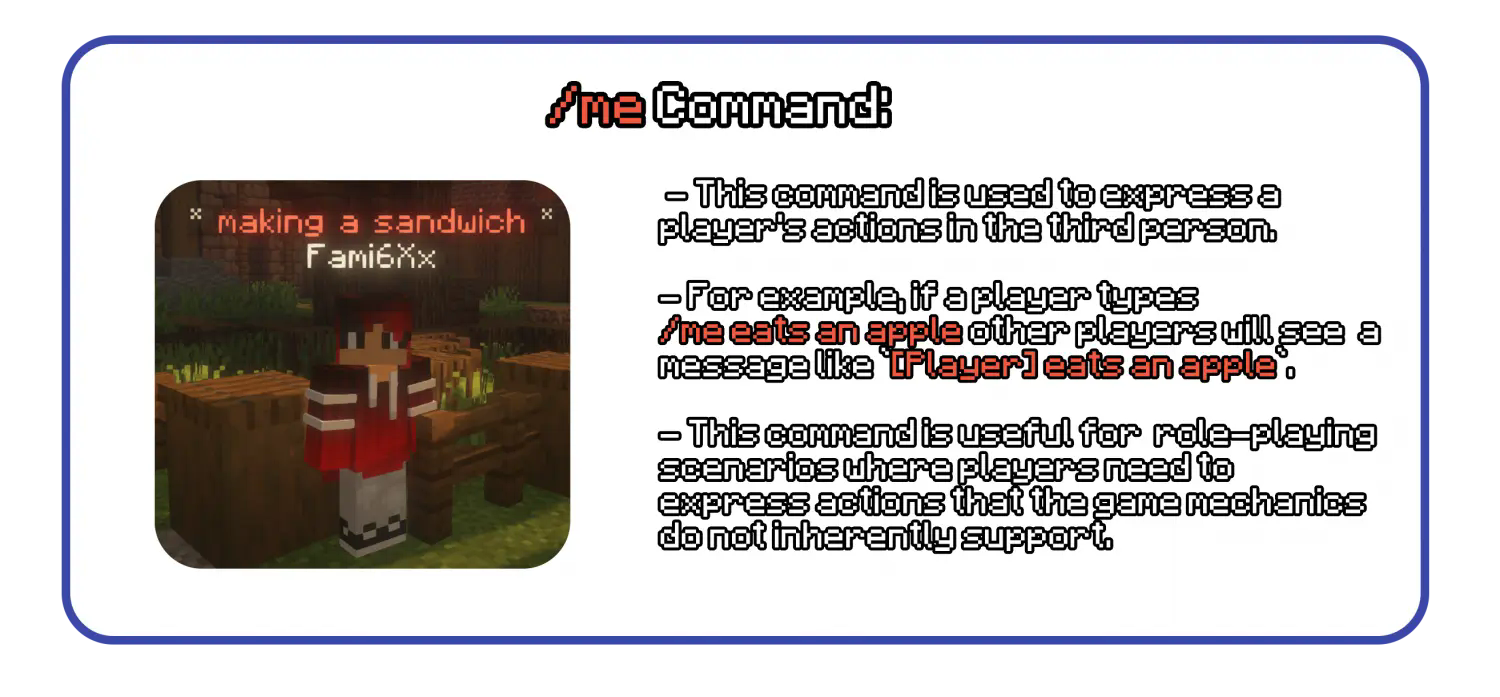 The implementation of these commands in the RP Universe plugin is done in a way that integrates seamlessly with the Minecraft environment. Holograms created by the plugin are visible in the configurable visible range and are not visible through walls so that players can't get information about the players position because of that.
An additional feature is an /tag and /settag for moderators and admins, so that when moderator or builder is doing something that is out of character and isn't in roleplay state right now, they can display it to the other players. These tags are visible through walls.
This plugin includes an very easy to use job system, where everything can be created in-game by admins and then some things are modifiable by bosses of the job. Everything is GUI based and can be localized in the locales.yml file generated in the plugins folder.
This is what the admin can see
This is what player sees
(The upper image is showing the players current selected job with his position)
# RPUniverse config file
# This file contains all the settings for RPUniverse
# If you don't know what you are doing, don't touch anything!
# If you want to edit something, please stop the server first!
# If you have any questions, please contact me on discord: https://discord.gg/SRzxwmBxk5

# If there was an update changing something in the config, you need to
# delete the config file and restart the server to generate a new one.
version: '0.8'

# For any text, color codes are supported (use & instead of §) and RichText is not currently supported

# The prefix for all messages (color codes are supported, RichText is not currently supported)
prefix: '&c&lRPU &8»&r'

# General settings
# bossBarColor: The color of the boss bar (BLUE, GREEN, PINK, PURPLE, RED, WHITE, YELLOW)
# hideNicknames: If true, the plugin will hide the nicknames of the players
# localOOC: If true, the OOC chat when player just types in the chat is local
# localOOCRange: The range in which the OOC chat is visible
# localOOCFormat: The format of the local OOC chat
# logLocalToConsole: If true, the local OOC chat is logged to the console
# globalOOC: If true, the global ooc command is registered
# globalOOCFormat: The format of the global OOC chat
general:
    bossBarColor: RED
    hideNicknames: true
    localOOC: true
    localOOCRange: 15
    localOOCFormat: '&b&lLocalOOC &7{player} &8» &r{message}'
    logLocalToConsole: true
    globalOOC: true
    globalOOCFormat: '&a&lGlobalOOC &7{player} &8» &r{message}'

# Job settings
# preferPermissionsOverModeForEdit: If true, the plugin will prefer permissions over the mode (ADMIN or MODERATOR) for editing jobs
# neededModeToEditJobs: The mode needed to edit jobs (ADMIN or MODERATOR)
# needsPermissionToHaveMultipleJobs: If true, the player needs the permission rpu.multiplejobs to have multiple jobs
# maxJobsPerPlayer: The maximum amount of jobs a player can have
# menuRange: The range in which the holograms are visible for the menus (For example boss menus)
# distanceToAddToJob: The distance the player has to be near the boss to be added to the job
jobs:
    preferPermissionsOverModeForEdit: false
    neededModeToEditJobs: ADMIN
    needsPermissionToHaveMultipleJobs: true
    maxJobsPerPlayer: 3
    menuRange: 5
    distanceToAddToJob: 5

# The settings for the holograms
# range: The range in which the holograms are visible
# timeAlive: The time in seconds the holograms are visible after they are created (For /me, /do etc..)
# maximumAbovePlayer: The maximum amount of holograms the player can have above themselves
holograms:
    range: 15
    timeAlive: 10
    maximumAbovePlayer: 5

# The settings for saving data
# saveInterval: The interval in seconds in which the data is saved from save queue
# completeSaveInterval: The interval in seconds in which the data is saved completely, ignoring the save queue
# selectedSaveMethod: The method used to save the data (currently only json is supported)
data:
    saveInterval: 60
    completeSaveInterval: 600
    selectedSaveMethod: json

# The settings for the basic needs
# enabled: If true, the basic needs are enabled
# interval: The interval in seconds in which the basic needs are updated
# preferPermissionsOverModeForEdit: If true, the plugin will prefer permissions over the mode (ADMIN or MODERATOR) for editing the basic needs
# neededModeToEdit: The mode needed to edit the basic needs (ADMIN or MODERATOR)
# removedHunger: The amount of hunger removed every interval
# removedThirst: The amount of thirst removed every interval
# addedPoop: The amount of poop added every interval
# addedPee: The amount of pee added every interval
basicNeeds:
    enabled: true
    interval: 60
    preferPermissionsOverModeForEdit: false
    neededModeToEdit: ADMIN
    removedHunger: 4
    removedThirst: 2
    addedPoop: 4
    addedPee: 2
 Implemented features
- /me, /do, /status and /doc for roleplaying actions
- Holograms are not visible through walls
- Using our own raytrace
- Isn't resource intensive
- Basic needs (Eating, Drinking, Pooping, Peeing)
- You can disable this in the config
- Managable eatable / drinkable items using /consumables menu
- Players need to poop, pee, drink and eat to stay alive, if not the system damages the player.
- Job system
- Creating of jobs in-game by admins
- Job Bank
- Player received paychecks from this job go from jobs bank
- Job positions editable by boss of the job himself, without any need of config editation
- Players are able to have multiple job, can be added only to VIPs as it is permission based.
- Job locks for doors and chests
- Player locks
- Literally everything is localizable, even the items in the menus can be localized to your - language so that players don't need to be able to speak english
- Data handlers
- JSON Data handler
- Developer API
- Property system
- In-game language editor (/rpu languages)
Incoming features
- Skript integration
- MySQL Data Handler
 As said in what is RPUniverse, this plugin provides a very extensible API so that you can add almost anything and make your server even more unique then ever!
For integrating RPUniverse into your plugin, just add it from jitpack.io RPUniverse.. The javadocs are in the Github Repository.

下载 RPUniverse
需要联机服务器吗?
稳定流畅、一键部署,几分钟即可和朋友联机开服
最低仅需 8 元/月 即可畅快联机
下载 RPUniverse
需要联机服务器吗?
稳定流畅、一键部署,几分钟即可和朋友联机开服
最低仅需 8 元/月 即可畅快联机
下载 RPUniverse
需要联机服务器吗?
稳定流畅、一键部署,几分钟即可和朋友联机开服
最低仅需 8 元/月 即可畅快联机
下载 RPUniverse
需要联机服务器吗?
稳定流畅、一键部署,几分钟即可和朋友联机开服
最低仅需 8 元/月 即可畅快联机
下载 RPUniverse
需要联机服务器吗?
稳定流畅、一键部署,几分钟即可和朋友联机开服
最低仅需 8 元/月 即可畅快联机
下载 RPUniverse
需要联机服务器吗?
稳定流畅、一键部署,几分钟即可和朋友联机开服
最低仅需 8 元/月 即可畅快联机
下载 RPUniverse
需要联机服务器吗?
稳定流畅、一键部署,几分钟即可和朋友联机开服
最低仅需 8 元/月 即可畅快联机
下载 RPUniverse
需要联机服务器吗?
稳定流畅、一键部署,几分钟即可和朋友联机开服
最低仅需 8 元/月 即可畅快联机
下载 RPUniverse
需要联机服务器吗?
稳定流畅、一键部署,几分钟即可和朋友联机开服
最低仅需 8 元/月 即可畅快联机
下载 RPUniverse
需要联机服务器吗?
稳定流畅、一键部署,几分钟即可和朋友联机开服
最低仅需 8 元/月 即可畅快联机
功能特性
- 新增发票系统
修复内容
- 修复所有已报告的错误
更新内容
- 将 Modrinth 发布操作的目标版本更新至 v2,由 @zefir-git 在 中完成
完整更新日志:
关于这个资源的讨论、问题反馈与使用心得
还没有讨论,来发第一帖吧
你是这个资源的作者?登录后可认领此资源。
相似资源
 插件
ExyliaPlugins 的库。
 插件
重新定义服务器上的生物运输方式。使用高度可定制的口袋道具,安全地捕获、存储和释放任何实体。
 插件

使床在所有维度中爆炸的模组
 插件
为 Armor Poser 模组添加兼容性
 插件

SkyBlock、OneBlock、Boxed、SkyGrid、AcidIsland、CaveBlock、Poseidon、StrangerRealms——以及更多!这些只是由 BentoBox 支持的基于岛屿的游戏模式之一。来自原版 ASkyBlock 的作者。
 插件
一个在游戏内运行的 Minecraft 地图编辑器! 支持选区、蓝图、复制粘贴、笔刷和脚本。 可在创造模式中使用,也可在生存模式中临时使用。
评论 0
登录后参与评分
还没有评论,来抢沙发吧