⭐面向服务器管理员
下载
点击下载按钮并选择 rtag .jar 文件进行下载,然后将其放入插件文件夹中。
要求
- Minecraft 版本至少为 1.8.8,较低版本可能不兼容。
- Java 版本最低为 11,请更新您的 Java 版本,旧版 MC 在 Java 11 上也能正常运行。
兼容性
✅ Bukkit
✅ Spigot
✅ Paper
✅ 使用 Mojang Mappings 的 Paper
✅ Folia
✅ 上述所有不使用 craftbukkit relocation 的版本(参见 PaperMC 公告)
⚓面向开发者
⏩Rtag 是什么?
Rtag 提供了一种无需 NMS 即可编辑 NBT 标签的简便方法,并避免了对大型服务器造成不良的性能影响。
因此,它完全支持阴影化(shadeable),您可以直接将 rtag 集成到您的插件中。
有关 Rtag 的详细信息,请访问 wiki 页面。
Rtag 可将任何 Java 对象转换为 NBT 标签,反之亦然:
// 使用 Item
RtagItem tag = new RtagItem(item);
// 使用 Entity
RtagEntity tag = new RtagEntity(entity);
// 使用 Block
RtagBlock tag = new RtagBlock(block);
// --- 设置值
// 在 "display.Name" 路径下设置值为 "Custom Text"
tag.set("Custom Text", "display", "Name");
// 或在 "someKey" 路径下设置整数值
tag.set(40, "someKey");
// 包括与任何类型对象的兼容性,例如 MyObject
MyObject myobject = new MyObject();
tag.set(myobject, "any", "path");
// 这样您就可以添加列表
tag.set(new ArrayList(), "list", "path");
// 并在列表中添加值
tag.add((short) 3, "list", "path");
// 或替换现有列表的值
tag.set((short) 5, "list", "path", 0); // 索引 0
// --- 获取值
// 从路径 "display" -> "Name" 获取值
String name = tag.get("display", "Name");
// 安全地从路径 "someKey" 获取值,若不存在则默认为 -1
int intValue = tag.getOptional("someKey").or(-1);
int sameValue = tag.getOptional("someKey").asInt(-1); // 此方法尝试将任何类型转换为 int
// 显式获取自定义对象的值
MyObject sameobject = tag.getOptional("any", "path").as(MyObject.class);
// 将值合并到标签中
tag.merge(Map.of("asd", 123, "someKey", 41), true);
// 获取列表
List<Short> list = tag.get("list", "path");
// 从索引获取列表值
short listValue = tag.get("list", "path", 0); // 索引 0
// 将整个对象标签作为 Java 对象的 Map 获取
Map<String, Object> map = tag.get();
// --- 将更改加载回对象
// 将更改加载到原始对象中
tag.load();
// RtagItem 提供创建已加载更改的物品副本的选项
ItemStack itemCopy = tag.loadCopy();
// --- 如果原始对象被编辑,则更新当前标签
tag.update();
⏩获取 Rtag
对于 Gradle Groovy 项目:
build.gradle
repositories {
maven { url 'https://jitpack.io' }
}
dependencies {
compileOnly 'com.saicone.rtag:rtag:VERSION'
// 其他模块
compileOnly 'com.saicone.rtag:rtag-block:VERSION'
compileOnly 'com.saicone.rtag:rtag-entity:VERSION'
compileOnly 'com.saicone.rtag:rtag-item:VERSION'
}
对于 Gradle Kotlin 项目:
build.gradle.kts
repositories {
maven("https://jitpack.io")
}
dependencies {
compileOnly("com.saicone.rtag:rtag:VERSION")
// 其他模块
compileOnly("com.saicone.rtag:rtag-block:VERSION")
compileOnly("com.saicone.rtag:rtag-entity:VERSION")
compileOnly("com.saicone.rtag:rtag-item:VERSION")
}
对于 Maven 项目:
pom.xml
<repositories>
<repository>
<id>Jitpack</id>
<url>https://jitpack.io</url>
</repository>
</repositories>
<dependencies>
<dependency>
<groupId>com.saicone.rtag</groupId>
<artifactId>rtag</artifactId>
<version>VERSION</version>
<scope>provided</scope>
</dependency>
<!-- 其他模块 -->
<dependency>
<groupId>com.saicone.rtag</groupId>
<artifactId>rtag-block</artifactId>
<version>VERSION</version>
<scope>provided</scope>
</dependency>
<dependency>
<groupId>com.saicone.rtag</groupId>
<artifactId>rtag-entity</artifactId>
<version>VERSION</version>
<scope>provided</scope>
</dependency>
<dependency>
<groupId>com.saicone.rtag</groupId>
<artifactId>rtag-item</artifactId>
<version>VERSION</version>
<scope>provided</scope>
</dependency>
</dependencies>
⭐特性
还有其他库可以编辑 NBT 标签,为什么应该使用 Rtag 而不是其他库?
1️⃣易于理解
你不需要成为 NBT 标签专家,只需使用简单的方法即可设置和获取普通的 Java 对象。
Rtag rtag = new Rtag();
rtag.set(compound, "Normal string", "CustomTagPath");
String string = rtag.get(compound, "CustomTagPath");
主要的 RtagEditor 实例提供了使标签编辑更简便的方法。
RtagItem tag = new RtagItem(item);
tag.setUnbreakable(true);
tag.setRepairCost(20);
int level = tag.getEnchantmentLevel("unbreaking"); // Enchantment enum, name or id
RtagEntity tag = new RtagEntity(entity);
tag.setAttributeBase("generic.attackDamage", 0.5);
RtagBlock tag = new RtagBlock(block);
tag.setCustomName("§eColored name");
你可以使用 RtagEditor 实例中的函数来编辑对象并返回任何类型的对象。
ItemStack item = ...;
// 编辑原始对象
RtagItem.edit(item, tag -> {
tag.set("Custom Text", "display", "name");
tag.set(30, "someKey");
});
// 返回副本
ItemStack copy = RtagItem.edit(item, tag -> {
tag.set(30, "someKey");
return tag.loadCopy();
});
2️⃣编辑数据组件!(实验性)
自 Minecraft 1.20.5 起,物品使用组件来保存原版数据。
通过 RtagItem,你可以像操作普通 Java 对象一样简单地编辑组件。
RtagItem tag = new RtagItem(item);
if (tag.hasComponent("minecraft:custom_model_data")) {
tag.removeComponent("minecraft:custom_model_data");
} else {
tag.setComponent("minecraft:custom_model_data", 40);
}
Object component = tag.getComponent("minecraft:custom_model_data");
Integer number = ComponentType.encodeJava("minecraft:custom_model_data", component).orElse(null);
3️⃣存储自定义对象
默认情况下,Rtag 使用 Bukkit 内部的 Gson 库来(反)序列化自定义对象,但你需要使用显式转换来获取它们。
Rtag rtag = new Rtag();
MyObject myObject = new MyObject();
rtag.set(compound, myObject, "CustomTagPath");
MyObject sameObject = rtag.getOptional(compound, "CustomTagPath").as(MyObject.class);
因此,你可以在 Rtag 实例中注册(反)序列化器,以便自动转换地设置和获取自定义对象。
此转换会在保存的标签中添加一个额外的键,以便使用提供的 ID 进行检测。
示例
public class MyObjectSerializer implements RtagSerializer<MyObject>, RtagDeserializer<MyObject> {
public MyObjectSerializer(Rtag rtag) {
rtag.putSerializer(MyObject.class, this);
rtag.putDeserializer(this);
}
// MyObject -> Map
@Override
public String getInID() {
// 建议使用唯一的命名空间键
return "myplugin:MyObject";
}
// Map -> MyObject
@Override
public String getOutID() {
return "myplugin:MyObject";
}
@Override
public Map<String, Object> serialize(MyObject object) {
// 将你的自定义对象转换为 map
}
@Override
public MyObject deserialize(Map<String, Object> compound) {
// 将 compound 转换为你自定义的对象
}
}
然后,你可以无需显式转换直接获取自定义对象。
Rtag rtag = new Rtag();
new MyObjectSerializer(rtag);
MyObject myObject = new MyObject();
rtag.set(compound, myObject, "CustomTagPath");
MyObject sameObject = rtag.get(compound, "CustomTagPath");
4️⃣TagStream 实例
通过 ItemTagStream 实例,你可以将物品转换为 Base64|File|Bytes|Map|String,反之亦然。
包括跨版本支持!在任何版本上保存物品,并在任何版本上获取,而不会出现兼容性问题。材料、附魔、药水……等等,所有这些都将被转换!
ItemTagStream tag = ItemTagStream.INSTANCE;
String string = tag.toBase64(item);
ItemStack sameItem = tag.fromBase64(string)[0];
5️⃣纹理头颅
通过 SkullTexture 类,你可以从 base64、URL、纹理 ID、玩家名称或 UUID 获取带纹理的头颅。
// Base64
ItemStack head = SkullTexture.getTexturedHead("eyJ0ZXh0dXJlcyI6eyJTS0lOIjp7InVybCI6Imh0dHA6Ly90ZXh0dXJlcy5taW5lY3JhZnQubmV0L3RleHR1cmUvZmVkZmEyZTBmZGVhMGMwNDIzODA0Y2RiNWI2MmFkMDVhNmU5MTRjMDQ2YzRhM2I3ZTM1NWJmODEyNjkxMjVmZCJ9fQ==");
// URL
ItemStack head = SkullTexture.getTexturedHead("http://textures.minecraft.net/texture/fedfa2e0fdea0c0423804cdb5b62ad05a6e914c046c4a3b7e355bf81269125fd");
// Texture ID
ItemStack head = SkullTexture.getTexturedHead("fedfa2e0fdea0c0423804cdb5b62ad05a6e914c046c4a3b7e355bf81269125fd");
// Player name
ItemStack head = SkullTexture.getTexturedHead("Rubenicos");
// Player UUID
ItemStack head = SkullTexture.getTexturedHead("7ca003dc-175f-4f1f-b490-5651045311ad");
6️⃣聊天组件
通过 ChatComponent 类,你可以将 (json) 字符串转换为聊天组件,反之亦然。
// 转为组件
Object component = ChatComponent.fromJson("{\"bold\":true,\"italic\":false,\"color\":\"dark_purple\",\"text\":\"Colored text!\"}");
Object sameComponent = ChatComponent.fromString("§5§lColored text!");
// 从组件获取
String json = ChatComponent.toJson(component);
String string = ChatComponent.toString(component);
// 跨兼容性
String json = ChatComponent.toJson("§5§lColored text!");
String string = ChatComponent.toString("{\"bold\":true,\"italic\":false,\"color\":\"dark_purple\",\"text\":\"Colored text!\"}");
✨漂亮的 NBT
更多信息,请访问 维基页面。
使用默认、十六进制或 minimessage 调色板,将任何 nbt 对象格式化为单行或多行。
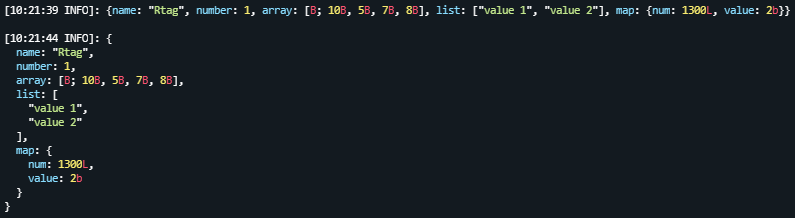
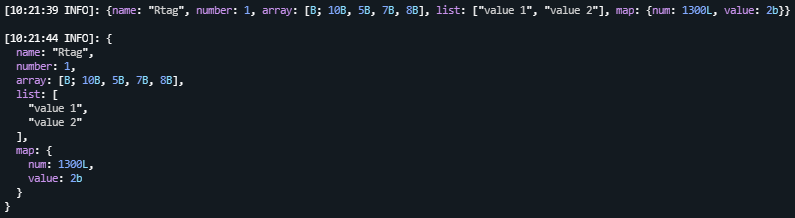
或者使用你自己的自定义调色板。
⭐For server owners
Downloading
Click on download button and select rtag .jar file to download, then put it on plugins folder.
Requirements
- At least Minecraft 1.8.8, lower versions may be not compatible.
- Minimum Java 11, update your Java version, old MC versions works fine on Java 11.
Compatibility
✅ Bukkit
✅ Spigot
✅ Paper
✅ Paper with Mojang Mappings
✅ Folia
✅ Any of above without craftbukkit relocation (see PaperMC announce)
⚓For developers
⏩What is Rtag?
Rtag provides an easy way to edit NBT tags without NMS and avoiding bad performance impact on big servers.
So it's completely shadeable, you can implement rtag directly in your plugin.
For detailed information about Rtag, visit the wiki page.
Rtag convert any Java object into NBT tag and viceversa:
// Using Item
RtagItem tag = new RtagItem(item);
// Using Entity
RtagEntity tag = new RtagEntity(entity);
// Using block
RtagBlock tag = new RtagBlock(block);
// --- Put values
// Set the value "Custom Text" at "display.Name" path
tag.set("Custom Text", "display", "Name");
// Or set an integer at "someKey" path
tag.set(40, "someKey");
// Including compatibility with any type of object like MyObject
MyObject myobject = new MyObject();
tag.set(myobject, "any", "path");
// So you can add lists
tag.set(new ArrayList(), "list", "path");
// And add values into list
tag.add((short) 3, "list", "path");
// Or replace the values of existing list
tag.set((short) 5, "list", "path", 0); // index 0
// --- Get values
// Value from path "display" -> "Name"
String name = tag.get("display", "Name");
// Safe value get from path "someKey", or -1 by default
int intValue = tag.getOptional("someKey").or(-1);
int sameValue = tag.getOptional("someKey").asInt(-1); // This method try to convert any type to int
// Explicit value get for custom objects
MyObject sameobject = tag.getOptional("any", "path").as(MyObject.class);
// Merge values into tag
tag.merge(Map.of("asd", 123, "someKey", 41), true);
// Get lists
List<Short> list = tag.get("list", "path");
// Get list value from index
short listValue = tag.get("list", "path", 0); // index 0
// Get the entire object tag as Map of Java objects
Map<String, Object> map = tag.get();
// --- Load changes into object
// Load changes into original object
tag.load();
// RtagItem as the option to create an item copy with changes loaded
ItemStack itemCopy = tag.loadCopy();
// --- Update current tag if the original object was edited
tag.update();
⏩Get Rtag
For Gradle Groovy project:
build.gradle
repositories {
maven { url 'https://jitpack.io' }
}
dependencies {
compileOnly 'com.saicone.rtag:rtag:VERSION'
// Other modules
compileOnly 'com.saicone.rtag:rtag-block:VERSION'
compileOnly 'com.saicone.rtag:rtag-entity:VERSION'
compileOnly 'com.saicone.rtag:rtag-item:VERSION'
}
For Gradle Kotlin project:
build.gradle.kts
repositories {
maven("https://jitpack.io")
}
dependencies {
compileOnly("com.saicone.rtag:rtag:VERSION")
// Other modules
compileOnly("com.saicone.rtag:rtag-block:VERSION")
compileOnly("com.saicone.rtag:rtag-entity:VERSION")
compileOnly("com.saicone.rtag:rtag-item:VERSION")
}
For Maven project:
pom.xml
<repositories>
<repository>
<id>Jitpack</id>
<url>https://jitpack.io</url>
</repository>
</repositories>
<dependencies>
<dependency>
<groupId>com.saicone.rtag</groupId>
<artifactId>rtag</artifactId>
<version>VERSION</version>
<scope>provided</scope>
</dependency>
<!-- Other modules -->
<dependency>
<groupId>com.saicone.rtag</groupId>
<artifactId>rtag-block</artifactId>
<version>VERSION</version>
<scope>provided</scope>
</dependency>
<dependency>
<groupId>com.saicone.rtag</groupId>
<artifactId>rtag-entity</artifactId>
<version>VERSION</version>
<scope>provided</scope>
</dependency>
<dependency>
<groupId>com.saicone.rtag</groupId>
<artifactId>rtag-item</artifactId>
<version>VERSION</version>
<scope>provided</scope>
</dependency>
</dependencies>
⭐Features
There are other libraries to edit NBT tags, why should Rtag be used over the others?
1️⃣Easy to understand
You don't need to be an expert with NBT tags, just with simple methods you can set and get normal Java objects.
Rtag rtag = new Rtag();
rtag.set(compound, "Normal string", "CustomTagPath");
String string = rtag.get(compound, "CustomTagPath");
The main RtagEditor instances have methods to make tag editing easier.
RtagItem tag = new RtagItem(item);
tag.setUnbreakable(true);
tag.setRepairCost(20);
int level = tag.getEnchantmentLevel("unbreaking"); // Enchantment enum, name or id
RtagEntity tag = new RtagEntity(entity);
tag.setAttributeBase("generic.attackDamage", 0.5);
RtagBlock tag = new RtagBlock(block);
tag.setCustomName("§eColored name");
You can edit objects using functions inside RtagEditor instances and return any type of object.
ItemStack item = ...;
// Edit original
RtagItem.edit(item, tag -> {
tag.set("Custom Text", "display", "name");
tag.set(30, "someKey");
});
// Return a copy
ItemStack copy = RtagItem.edit(item, tag -> {
tag.set(30, "someKey");
return tag.loadCopy();
});
2️⃣Edit data components! (Experimental)
Since Minecraft 1.20.5, items use components to save vanilla data.
With RtagItem you can edit components in a simple way as normal Java objects.
RtagItem tag = new RtagItem(item);
if (tag.hasComponent("minecraft:custom_model_data")) {
tag.removeComponent("minecraft:custom_model_data");
} else {
tag.setComponent("minecraft:custom_model_data", 40);
}
Object component = tag.getComponent("minecraft:custom_model_data");
Integer number = ComponentType.encodeJava("minecraft:custom_model_data", component).orElse(null);
3️⃣Store custom objects
By default, Rtag uses the Gson library inside Bukkit to (de)serialize custom objects, but you need to get them using explicit conversion.
Rtag rtag = new Rtag();
MyObject myObject = new MyObject();
rtag.set(compound, myObject, "CustomTagPath");
MyObject sameObject = rtag.getOptional(compound, "CustomTagPath").as(MyObject.class);
So you can register (de)serializers in Rtag instance to set and get custom objects with automatic conversion.
This conversion put an additional key into your saved tag to detect it using the provided ID.
example
public class MyObjectSerializer implements RtagSerializer<MyObject>, RtagDeserializer<MyObject> {
public MyObjectSerializer(Rtag rtag) {
rtag.putSerializer(MyObject.class, this);
rtag.putDeserializer(this);
}
// MyObject -> Map
@Override
public String getInID() {
// It's suggested to use a unique namespaced key
return "myplugin:MyObject";
}
// Map -> MyObject
@Override
public String getOutID() {
return "myplugin:MyObject";
}
@Override
public Map<String, Object> serialize(MyObject object) {
// Convert your custom object into map
}
@Override
public MyObject deserialize(Map<String, Object> compound) {
// Convert compound into you custom object
}
}
Then you can get your custom object without explicit conversion.
Rtag rtag = new Rtag();
new MyObjectSerializer(rtag);
MyObject myObject = new MyObject();
rtag.set(compound, myObject, "CustomTagPath");
MyObject sameObject = rtag.get(compound, "CustomTagPath");
4️⃣TagStream instances
With ItemTagStream instance you can convert items into Base64|File|Bytes|Map|String and viceversa.
Including cross-version support! Save an item on any version and get on any version without compatibility problems. Materials, enchantments, potions... etc, all will be converted!
ItemTagStream tag = ItemTagStream.INSTANCE;
String string = tag.toBase64(item);
ItemStack sameItem = tag.fromBase64(string)[0];
5️⃣Textured heads
With SkullTexture class you can get textured heads from base64, url, texture ID, player name or uuid.
// Base64
ItemStack head = SkullTexture.getTexturedHead("eyJ0ZXh0dXJlcyI6eyJTS0lOIjp7InVybCI6Imh0dHA6Ly90ZXh0dXJlcy5taW5lY3JhZnQubmV0L3RleHR1cmUvZmVkZmEyZTBmZGVhMGMwNDIzODA0Y2RiNWI2MmFkMDVhNmU5MTRjMDQ2YzRhM2I3ZTM1NWJmODEyNjkxMjVmZCJ9fQ==");
// URL
ItemStack head = SkullTexture.getTexturedHead("http://textures.minecraft.net/texture/fedfa2e0fdea0c0423804cdb5b62ad05a6e914c046c4a3b7e355bf81269125fd");
// Texture ID
ItemStack head = SkullTexture.getTexturedHead("fedfa2e0fdea0c0423804cdb5b62ad05a6e914c046c4a3b7e355bf81269125fd");
// Player name
ItemStack head = SkullTexture.getTexturedHead("Rubenicos");
// Player UUID
ItemStack head = SkullTexture.getTexturedHead("7ca003dc-175f-4f1f-b490-5651045311ad");
6️⃣Chat Component
With ChatComponent class you can convert (json) strings into chat components and viceversa.
// To component
Object component = ChatComponent.fromJson("{\"bold\":true,\"italic\":false,\"color\":\"dark_purple\",\"text\":\"Colored text!\"}");
Object sameComponent = ChatComponent.fromString("§5§lColored text!");
// From component
String json = ChatComponent.toJson(component);
String string = ChatComponent.toString(component);
// Cross-compatibility
String json = ChatComponent.toJson("§5§lColored text!");
String string = ChatComponent.toString("{\"bold\":true,\"italic\":false,\"color\":\"dark_purple\",\"text\":\"Colored text!\"}");
✨Pretty NBT
For more information, visit the wiki page.
Format any nbt object into single or multiple lines using default, hex or minimessage color palette.

Or use your custom color palette.

评论 0
登录后参与评分
还没有评论,来抢沙发吧