Save Stage
Save Stage 是一款专为 Minecraft 角色扮演、电影制作、生存故事和机器影片(machinima)创作而设计的 Paper 插件。
无需在每次录制后重建场景,Save Stage 允许你保存当前舞台状态并随时恢复。它能捕获玩家、世界设置、道具和视觉效果,使场景重拍既快速又一致。
为内容创作者、制作团队和角色扮演服务器打造。
功能
? 完整的舞台保存
保存完美重拍所需的几乎所有内容:
- 玩家位置
- 物品栏
- 生命值与饥饿值
- 经验值
- 游戏模式
- 活跃药水效果
- 发光状态
- 记分板标签
- 时间
- 天气
- 生物状态
- 方块变化
- 道具 / 已放置的物体
将一切原样还原。
? 导演模式
录制时冻结舞台。
导演模式通过冻结以下内容来防止意外的世界变化:
非常适合拍摄多个镜头。
? 预览模式
截图

在加载之前预览已保存的舞台。
- 临时预览模式
- 平滑淡入淡出过渡
- 随时退出而不影响实际世界
? 玩家与环境加载
选择确切要还原的内容。
- 加载整个舞台
- 仅加载单个玩家
- 仅加载环境(时间与天气)
当演员不需要重置时非常有用。
? 舞台备注
为每个舞台附加备注。
示例:
/stage notes intro First village scene
非常适合管理大量场景的导演。
? 自动保存
在录制过程中自动创建检查点。
如果出现问题,只需恢复最新的自动保存即可。
? 方块回滚
在录制后还原所有被修改的方块。
适用于:
⭐ 收藏(置顶)舞台
固定重要舞台,使其始终保持在列表顶部。
? 导出与导入
在不同服务器之间共享舞台。
非常适合备份和团队协作。
✏ 重命名舞台
无需重新录制即可重命名已保存的舞台。
? 现代化 GUI
截图
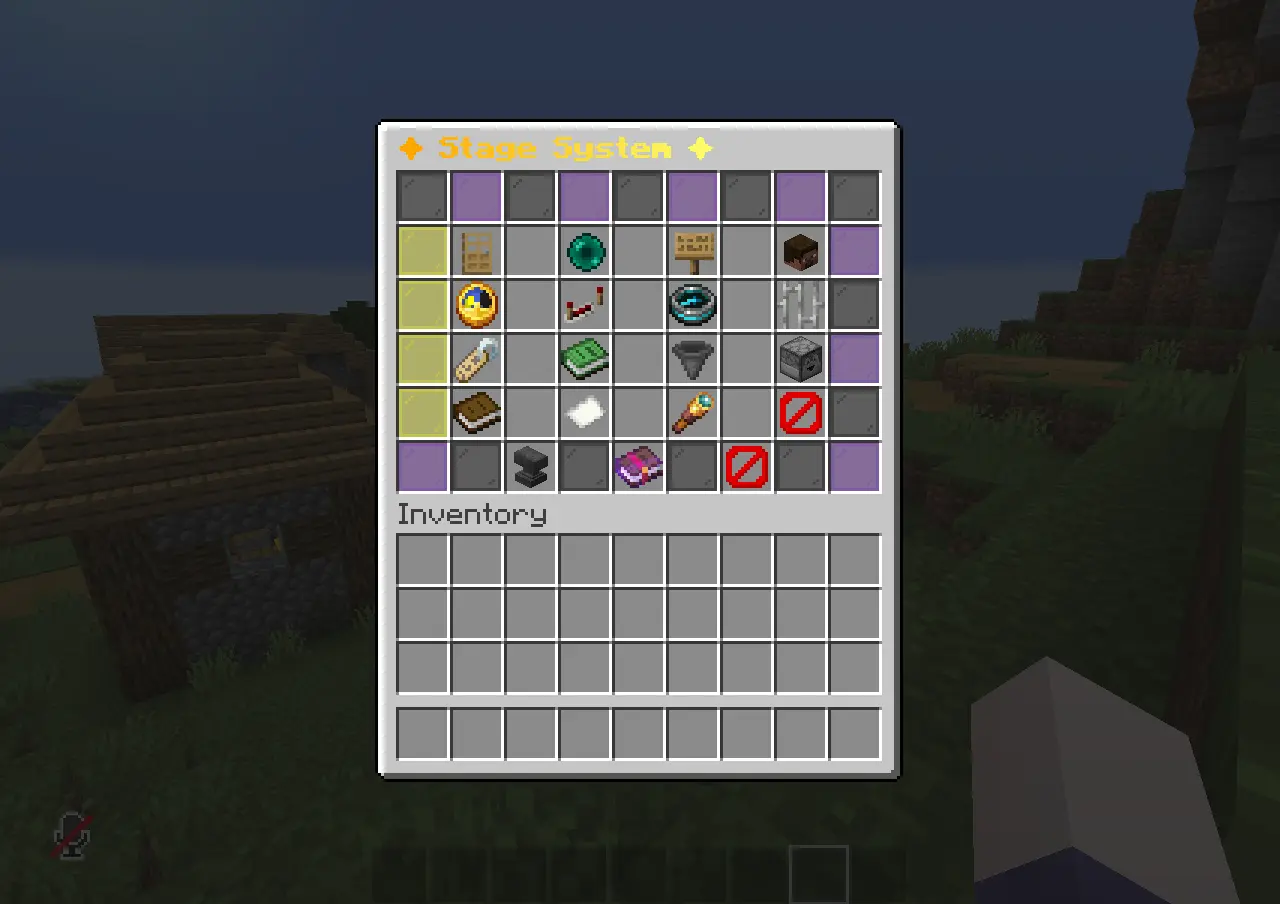
完全重新设计的 GUI,具备:
- 更简洁的布局
- 更好的组织性
- 舞台预览
- 点击加载
- GUI 动画
- 确认菜单
✅ 确认 GUI
截图
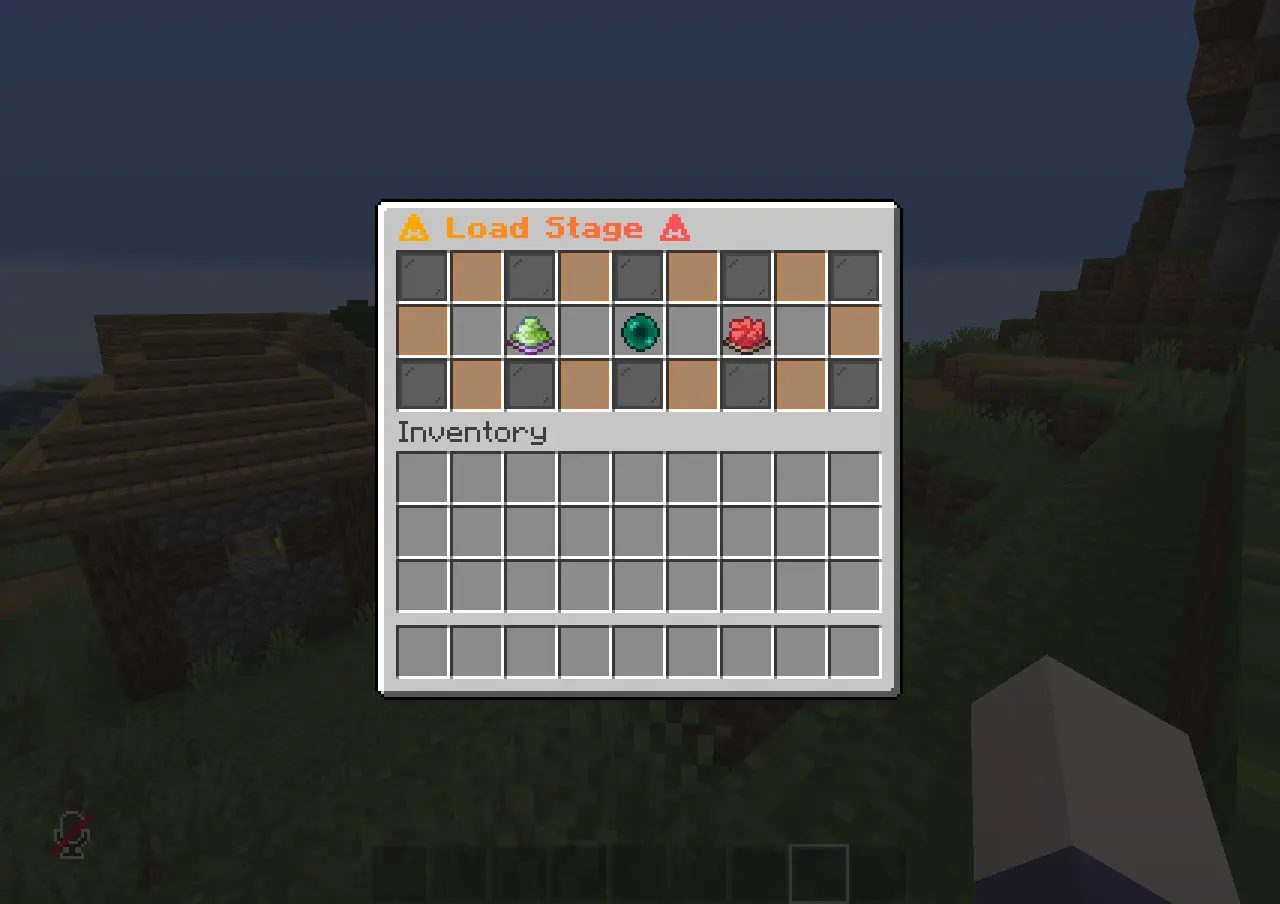
潜在的危险操作(例如加载舞台)需要通过 GUI 进行确认,以防止意外错误。
? 多语言支持
通过编辑 lang 文件夹内的文件来翻译所有插件消息。
? 活动日志
跟踪插件活动,包括:
⚙ 易于配置
使用 config.yml 自定义插件。
? 加载冲突预防
如果两名工作人员几乎同时尝试加载同一个舞台,Save Stage 会防止意外冲突。
示例:
“该舞台刚刚由 Steve 加载。是否继续?”
这有助于导演避免覆盖彼此的工作。
? 玩家通知
当导演重新加载舞台时,受影响的玩家会收到标题(Title)或动作栏(Action Bar)消息。
示例:
你的状态已被导演重新加载。
玩家不会因突然传送或世界变化而感到困惑。
? 旁观者保护
可以将处于旁观模式的玩家排除在舞台加载之外,防止摄影师受到影响。
命令
| 命令 |
描述 |
/stage save <name> |
保存当前舞台。 |
/stage load <name> |
加载已保存的舞台。 |
/stage load <name> <player> |
仅加载选定玩家的状态。 |
/stage load <name> ground |
仅加载环境(时间与天气)。 |
/stage preview <name> |
在加载前预览舞台。 |
/stage preview exit |
退出预览模式。 |
/stage notes <name> <text> |
添加或编辑舞台备注。 |
/stage notes <name> clear |
清除所有备注。 |
/stage undo |
撤销上一次舞台加载。 |
/stage list |
显示所有已保存的舞台。 |
/stage info <name> |
查看舞台信息。 |
/stage history <name> |
显示舞台加载历史。 |
/stage rename <old> <new> |
重命名舞台。 |
/stage duplicate <name> <new> |
复制现有舞台。 |
/stage pin <name> |
固定或取消固定舞台。 |
/stage export <name> |
将舞台导出为 JSON 文件。 |
/stage import <file> [new-name] |
从 JSON 文件导入舞台。 |
/stage delete <name> |
删除舞台。 |
/stage director <on/off> |
启用或禁用导演模式。 |
/stage autosave <on/off> [seconds] |
启用自动检查点。 |
/stage gui |
打开舞台 GUI。 |
/stage exclude <player> |
包含或排除玩家在舞台加载之外。 |
/stage log [count] |
查看最近的活动日志。 |
/stage reload |
重新加载插件配置文件和语言文件。 |
安装
- 下载最新版本的 Save Stage。
- 将插件
.jar 文件放入服务器的 plugins 文件夹中。
- 启动或重启服务器。
- 插件将自动生成其文件。
- 如有需要,编辑
config.yml 或 lang 文件夹内的文件。
- 更改后运行
/stage reload。
插件文件
plugins/
└── SaveStage/
    ├── config.yml
    ├── stage-log.txt
    ├── lang/
    ├── stages/
    └── exports/
完美适用于
- Minecraft 角色扮演服务器
- 生存故事系列
- 电影化片段
- 机器电影(Machinima)
- YouTube 内容创作
- 多人制作项目
- 冒险地图
- 事件录制
- 测试与开发
为什么选择 Save Stage?
制作 Minecraft 角色扮演内容通常意味着需要反复录制同一场景。
Save Stage 消除了每次拍摄后手动重置玩家、方块、天气、时间、道具、药水效果及其他场景元素的需求。
减少重建世界的时间,将更多精力投入到精彩故事的创作中。
Save Stage
Save Stage is a Paper plugin designed for Minecraft roleplay, cinematics, survival stories, and machinima production.
Instead of rebuilding your scene after every recording, Save Stage lets you save the current stage and restore it at any time. It captures players, world settings, props, and visual effects, making scene retakes fast and consistent.
Built for content creators, production teams, and roleplay servers.
Features
? Complete Stage Saving
Save almost everything needed for a perfect retake:
- Player position
- Inventory
- Health & Hunger
- Experience
- Gamemode
- Active potion effects
- Glowing state
- Scoreboard tags
- Time
- Weather
- Mob states
- Block changes
- Props / placed objects
Load everything back exactly as it was.
? Director Mode
Freeze the stage while recording.
Director Mode prevents unwanted world changes by freezing:
Perfect for filming multiple takes.
? Preview Mode
screenshot
Preview a saved stage before loading it.
- Temporary preview mode
- Smooth fade transition
- Exit anytime without affecting the actual world
? Player & Environment Loading
Choose exactly what to restore.
- Load the entire stage
- Load only one player
- Load only the environment (time & weather)
Useful when actors don't need to be reset.
? Stage Notes
Attach notes to every stage.
Example:
/stage notes intro First village scene
Perfect for directors managing many scenes.
? Autosave
Automatically create checkpoints while recording.
If something goes wrong, simply restore the latest autosave.
? Block Rollback
Restore every modified block after recording.
Great for:
- Explosions
- PvP fights
- Destroyed buildings
- Environmental damage
⭐ Favorite (Pin) Stages
Pin important stages so they always stay at the top of the list.
? Export & Import
Share stages between servers.
- Export to JSON
- Import from JSON
Perfect for backups and team collaboration.
✏ Rename Stages
Rename saved stages without recording them again.
? Modern GUI
Screenschot
A completely redesigned GUI featuring:
- Cleaner layout
- Better organization
- Stage previews
- Click-to-load
- GUI animations
- Confirmation menus
✅ Confirmation GUI
Screenshot
Potentially dangerous actions (such as loading a stage) require confirmation through a GUI to prevent accidental mistakes.
? Multi-language Support
Translate all plugin messages by editing the files inside the lang folder.
? Activity Logs
Track plugin activity including:
- Saves
- Loads
- Deletes
- Imports
- Exports
- Renames
- Rollbacks
⚙ Easy Configuration
Customize the plugin using config.yml.
? Load Conflict Prevention
If two staff members try to load the same stage almost simultaneously, Save Stage prevents accidental conflicts.
Example:
"This stage was just loaded by Steve. Continue anyway?"
This helps directors avoid overwriting each other's work.
? Player Notifications
When a director reloads a stage, affected players receive a Title or Action Bar message.
Example:
Your condition has been reloaded by the director.
Players won't be confused by sudden teleports or world changes.
? Spectator Protection
Players in Spectator Mode can be excluded from stage loading, preventing camera operators from being affected.
Commands
| Command |
Description |
/stage save <name> |
Save the current stage. |
/stage load <name> |
Load a saved stage. |
/stage load <name> <player> |
Load only the selected player's state. |
/stage load <name> ground |
Load only the environment (time & weather). |
/stage preview <name> |
Preview a stage before loading it. |
/stage preview exit |
Exit preview mode. |
/stage notes <name> <text> |
Add or edit notes for a stage. |
/stage notes <name> clear |
Remove all notes. |
/stage undo |
Undo the last stage load. |
/stage list |
Show all saved stages. |
/stage info <name> |
View stage information. |
/stage history <name> |
Show stage load history. |
/stage rename <old> <new> |
Rename a stage. |
/stage duplicate <name> <new> |
Duplicate an existing stage. |
/stage pin <name> |
Pin or unpin a stage. |
/stage export <name> |
Export a stage to a JSON file. |
/stage import <file> [new-name] |
Import a stage from a JSON file. |
/stage delete <name> |
Delete a stage. |
/stage director <on/off> |
Enable or disable Director Mode. |
/stage autosave <on/off> [seconds] |
Enable automatic checkpoints. |
/stage gui |
Open the Stage GUI. |
/stage exclude <player> |
Include or exclude a player from stage loading. |
/stage log [count] |
View recent activity logs. |
/stage reload |
Reload the plugin configuration and language files. |
Installation
- Download the latest version of Save Stage.
- Place the plugin
.jar into your server's plugins folder.
- Start or restart the server.
- The plugin will automatically generate its files.
- Edit
config.yml or the files inside the lang folder if needed.
- Run
/stage reload after making changes.
Plugin Files
plugins/
└── SaveStage/
    ├── config.yml
    ├── stage-log.txt
    ├── lang/
    ├── stages/
    └── exports/
Perfect For
- Minecraft Roleplay Servers
- Survival Story Series
- Cinematics
- Machinima
- YouTube Content
- Multiplayer Productions
- Adventure Maps
- Event Recording
- Testing & Development
Why Save Stage?
Creating Minecraft roleplay content often means recording the same scene many times.
Save Stage eliminates the need to manually reset players, blocks, weather, time, props, potion effects, and other scene elements after every take.
Spend less time rebuilding your world, and more time creating great stories.


 插件

 插件
 插件
 插件
 插件
 插件
评论 0
登录后参与评分
还没有评论,来抢沙发吧