

SecureCommands 是一个插件,让你能够轻松提升服务器的安全性,重点关注那些若被未授权用户使用可能造成最大破坏的高风险命令。
你可以通过以下链接捐赠以支持该插件:
加入我的支持 Discord 服务器
? 安装指南
此插件兼容 1.18x 至 1.21x 版本。
下载该插件的最新版本,并将其上传至服务器的 plugins 文件夹中。
上传完成后,重启服务器以使更改生效。
✅ 特性:
- 使用单独的用户代码和用户白名单来阻止易受攻击的命令。
- Discord Webhook 集成
- 数据库连接 (必需)
- 自动检测拥有 OP 权限但未添加到插件白名单的用户。
- 自动检测高级用户。如果破解用户之前曾以高级用户身份登录,现在将禁止其访问服务器。
- 新增 PlugmanBlocker 模块,使用该插件时无法使用 Plugman 命令。
⌨️ 命令:
- /sc setcode <玩家>
- /sc resetcode <玩家>
- /sc reload
- /sc resetall
- /sc add <玩家>
- /sc remove <玩家>
- /sc addcommand <命令>
- /sc removecommand <命令>
- /sc premium <玩家>
- /sclogin
⁉️ 常见问题:
将你的插件与 Discord Webhook 连接
通过 Discord Webhook 配置,将插件更新和安全通知发送到你的 Discord。
我忘记了设置代码,该怎么办?
要重置代码,您必须从服务器控制台执行 /sc resetcode 命令。完成后,/sc setcode 命令将再次启用。
我想为所有用户重置代码,该怎么做?
只需从服务器控制台运行 /sc resetall 命令即可。
? 截图
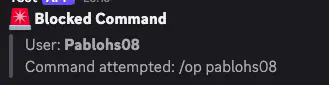
Discord Webhook 集成: 当用户未使用预设代码登录而执行命令时,你会收到通知。
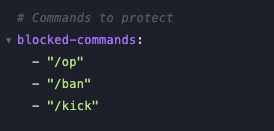
Command Blocker: 你可以锁定所需的命令,以防止未经授权的用户使用它们。
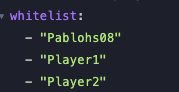
Whitelisted Users: 你可以将用户加入白名单。如果用户猜到了代码但不在该列表中,他们将无法使用相应的命令。
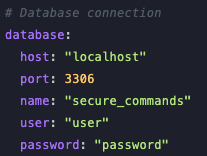
数据库连接(必需): 此插件需要连接至数据库,因为您设置的加密代码将存储在其中。
SpigotMC:
SecureCommands is a plugin that allows you to easily add more security to your server by focusing on the most vulnerable commands that can cause the most damage if used by an unauthorized user.
You can support the plugin by making a donation through this link:
Join to my Support Discord Server
? Installation Guide
This plugin is compatible from version 1.18x to 1.21x.
Download the latest version of the plugin and upload it to your server's plugins folder.
Once uploaded, restart the server for the changes to take effect.
✅ Features:
- Block vulnerable commands using individual codes for user and user whitelisting.
- Discord Webhook Integration
- Database Connection (Required)
- Automatic detection of users who have OP but have not been added to the Plugin Whitelist.
- Automatic Premium User Detection. Cracked users are now prevented from accessing the server if they have previously logged in as Premium.
- Added new PlugmanBlocker module, you cannot use Plugman commands with this plugin.
⌨️ Commands:
- /sc setcode <player>
- /sc resetcode <player>
- /sc reload
- /sc resetall
- /sc add <player>
- /sc remove <player>
- /sc addcommand <command>
- /sc removecommand <command>
- /sc premium <player>
- /sclogin
⁉️ FAQ:
Connect your Plugin with a Discord Webhook
Send plugin updates and security notifications to your Discord with the Discord Webhook config.
I forgot the set code what do I do?
To reset the code you must execute the /sc resetcode command from the server console, once done the /sc setcode command will be enabled again.
I want to reset the code for all users, how can I do it?
To do this you just need to run the /sc resetall command from the server console.
? Screenshots

Discord Webhook Integration: You will receive notifications when a user performs a command without being logged in with the pre-defined code.

Command Blocker: You can lock the commands you need so that unauthorized users cannot use them.

Whitelisted Users: You can add users to the whitelist. If a user guesses the code but isn't on this list, they won't be able to use the corresponding command.

Database Connection (Required): This plugin requires connection to a database as the encrypted code you set will be stored there.
SpigotMC:
评论 0
登录后参与评分
还没有评论,来抢沙发吧