
Server Optimiser V3 链接:
.
? ServerOptimiser v2 - 智能性能管理
通过智能 TPS 控制和全面优化,提升服务器性能。
? 已验证的结果 - 真实性能数据
使用 ServerOptimiser 前:
- TPS: 20.00(标准)
- CPU 占用率: 8.0%
- 内存占用: 0.49GB
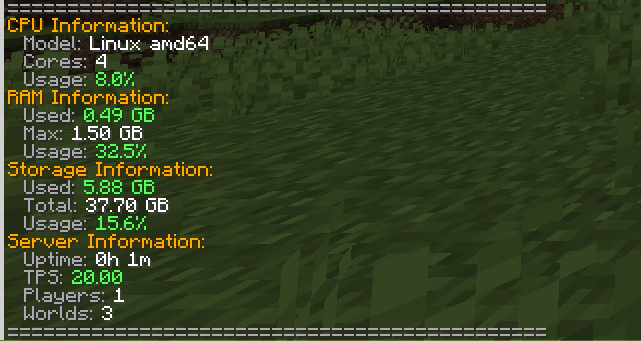
使用 ServerOptimiser 后(TPS 限制为 15):
- TPS: 15.14(受控)
- CPU 占用率: 2.5%
- 内存占用: 0.38GB
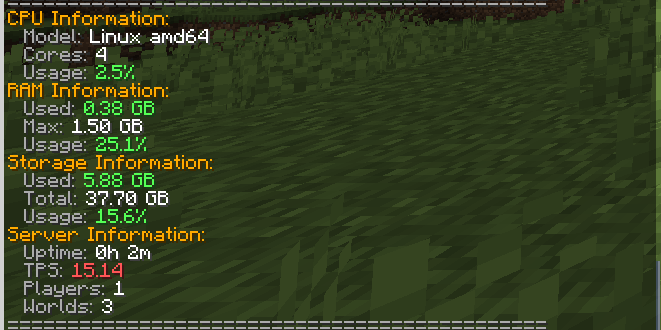
? 结果:内存减少 25%,CPU 占用降低超过 50%,且 TPS 处于可控状态!
⚠️ TPS 限制完全可选
仅推荐以下情况使用 TPS 限制:
- 生存服务器,其中对精确计时要求不高
- 空岛服务器,侧重于建造和经济系统
- 和平/非 PvP 服务器,战斗计时无关紧要
- 经济/RP 服务器,流畅的性能比精确计时更重要
不推荐用于:
- PvP 服务器 - 战斗需要精确的计时
- 小游戏服务器 - 快节奏游戏需要满 TPS
- 红石密集型服务器 - 复杂的装置需要 20 TPS
? 为什么降低 TPS 实际上能提升性能
智能 TPS 限制的背后的科学原理:
大多数玩家在生存玩法中无法分辨 20 TPS 和 15 TPS 的区别,但你的服务器可以!原因如下:
✅ 减少 CPU 周期 - 游戏刻数减少 25%,意味着 CPU 处理量减少 25%
✅ 降低内存占用 - 更少的实体更新和区块处理节省内存
✅ 减少磁盘 I/O - 世界保存和区块加载频率降低
✅ 提高稳定性 - 防止在高活动期间的卡顿峰值
✅ 更好的资源分配 - 更多 CPU 可用于插件和玩家操作
? 核心功能
智能 TPS 管理(可选)
- 智能 TPS 限制: 设置目标 TPS(15-20),使用
/ob tps 15
- 自动性能缩放: 根据服务器负载动态调整
- 手动覆盖: 需要时可瞬间重置回 20 TPS
- 完全可选: 仅在有利于你的服务器类型时使用
实体优化
- 智能实体限制: 减少高流量区域的生物密度
- AI 优化: 在不破坏行为的前提下提升生物 AI 性能
- 自动清理: 智能移除导致卡顿的实体
区块管理
- 智能卸载: 自动卸载未使用的区块
- 预加载系统: 保持频繁访问的区域就绪
- 内存优化: 减少区块开销带来的内存占用
系统监控
- 实时统计:
/obstats 显示 CPU、内存和存储使用情况
- 卡顿检测: 自动识别并解决性能瓶颈
- 性能警报: 通知管理员关键性能问题
管理工具
- 自动权限管理: 简化的权限分配
- 综合命令: 拥有完整控制权的
/ob 主命令
- 配置灵活性: 广泛的 YAML 配置选项
? 命令
主要命令:
/ob - 运行全服优化/ob tps 15 - 将 TPS 限制为 15 以获得更好性能(可选)/ob tps reset - 恢复正常的 20 TPS/obstats - 查看详细系统统计信息
特定优化:
/ob entities - 仅优化实体/ob chunks - 仅优化区块/ob lag - 运行卡顿检测
其他命令:
/ob stats - 显示性能统计信息/ob reload - 重新加载配置/ob help - 显示所有可用命令
⚙️ 技术细节
- 平台: PaperMC 1.21.8+ (Java 21)
- 性能影响: 极小的开销,巨大的收益
- 线程安全: 正确处理异步操作
- 数据分析: 可选的 bStats 集成以获取使用洞察
? 完美适用于
✅ 生存服务器 - 提升性能且不影响游戏玩法
✅ 经济服务器 - 为商店插件和交易提供更好的稳定性
✅ 空岛服务器 - 平滑的建造和进度体验
✅ RPG 服务器 - 自定义内容下更好的性能
✅ 社区服务器 - 相同硬件下容纳更多玩家
✅ 预算托管 - 在有限资源下最大化性能
? 不推荐用于 TPS 限制
❌ PvP 服务器 - 精确的战斗计时至关重要
❌ 红石密集型服务器 - 复杂的装置需要满 TPS
❌ 小游戏服务器 - 快节奏游戏需要 20 TPS
❌ 竞技服务器 - 每一刻都至关重要
? 安装与设置
- 下载并放入
plugins/ 文件夹
- 重启服务器
- 可选: 如果是生存/空岛服务器,运行
/ob tps 15
- 使用
/obstats 监控你的性能提升!
请记住:TPS 限制完全可选,仅应在适用的服务器类型上使用!
体验差异——你的服务器(以及你的托管账单)会感谢你的!
该插件的测试是在 server.pro 的 "hosting" 套餐上进行的
Server Optimiser V3 Link:
.
? ServerOptimiser v2 - Intelligent Performance Management
Transform your server's performance with smart TPS control and comprehensive optimization.
? Proven Results - Real Performance Data
Before ServerOptimiser:
- TPS: 20.00 (standard)
- CPU Usage: 8.0%
- RAM Usage: 0.49GB
After ServerOptimiser (TPS limited to 15):
- TPS: 15.14 (controlled)
- CPU Usage: 2.5%
- RAM Usage: 0.38GB
? Result: 25% reduction in RAM & 50%> CPU usage with controlled TPS!
⚠️ TPS Limiting is ENTIRELY OPTIONAL
TPS limiting is only recommended for:
- Survival servers where precision timing isn't critical
- Skyblock servers focused on building and economy
- Peaceful/Non-PvP servers where combat timing doesn't matter
- Economy/RP servers where smooth performance > precise timing
NOT recommended for:
- PvP servers - Combat requires precise timing
- Minigame servers - Fast-paced games need full TPS
- Redstone-heavy servers - Complex contraptions need 20 TPS
? Why Lower TPS Actually Improves Performance
The Science Behind Smart TPS Limiting:
Most players can't tell the difference between 20 TPS and 15 TPS in survival gameplay, but your server definitely can! Here's why:
✅ Reduced CPU Cycles - 25% fewer game ticks means 25% less CPU processing
✅ Lower RAM Usage - Fewer entity updates and chunk processing saves memory
✅ Decreased Disk I/O - Less frequent world saves and chunk loading
✅ Improved Stability - Prevents lag spikes during high activity periods
✅ Better Resource Distribution - More CPU available for plugins and player actions
? Core Features
Smart TPS Management (Optional)
- Intelligent TPS Limiting: Set target TPS (15-20) with
/ob tps 15
- Automatic Performance Scaling: Dynamically adjusts based on server load
- Manual Override: Instant reset to 20 TPS when needed
- Completely Optional: Use only if it benefits your server type
Entity Optimization
- Smart Entity Limiting: Reduces mob density in high-traffic areas
- AI Optimization: Improves mob AI performance without breaking behavior
- Automatic Cleanup: Removes lag-causing entities intelligently
Chunk Management
- Smart Unloading: Automatically unloads unused chunks
- Preloading System: Keeps frequently accessed areas ready
- Memory Optimization: Reduces RAM usage from chunk overhead
System Monitoring
- Real-time Stats:
/obstats shows CPU, RAM, and storage usage
- Lag Detection: Automatically identifies and resolves performance bottlenecks
- Performance Alerts: Notifies admins of critical performance issues
Admin Tools
- Auto-Permission Management: Streamlined permission assignment
- Comprehensive Commands: Master
/ob command with full control
- Configuration Flexibility: Extensive YAML configuration options
? Commands
Main Commands:
/ob - Run full server optimization/ob tps 15 - Limit TPS to 15 for better performance (optional)/ob tps reset - Restore normal 20 TPS/obstats - View detailed system statistics
Specific Optimizations:
/ob entities - Optimize entities only/ob chunks - Optimize chunks only/ob lag - Run lag detection
Additional Commands:
/ob stats - Show performance statistics/ob reload - Reload configuration/ob help - Show all available commands
⚙️ Technical Details
- Platform: PaperMC 1.21.8+ (Java 21)
- Performance Impact: Minimal overhead, major benefits
- Thread Safety: Properly handles async operations
- Analytics: Optional bStats integration for usage insights
? Perfect For
✅ Survival Servers - Improved performance without gameplay impact
✅ Economy Servers - Better stability for shop plugins and transactions
✅ Skyblock Servers - Smooth building and progression experience
✅ RPG Servers - Better performance with custom content
✅ Community Servers - Handle more players with same hardware
✅ Budget Hosting - Maximize performance on limited resources
? Not Recommended For TPS Limiting
❌ PvP Servers - Where precise combat timing is crucial
❌ Redstone-Heavy Servers - Complex contraptions need full TPS
❌ Minigame Servers - Fast-paced games require 20 TPS
❌ Competitive Servers - Where every tick matters
? Installation & Setup
- Download and place in your
plugins/ folder
- Restart your server
- Optional: Run
/ob tps 15 if you have a survival/skyblock server
- Use
/obstats to monitor your performance improvements!
Remember: TPS limiting is completely optional and should only be used on appropriate server types!
Experience the difference - your server (and your hosting bill) will thank you!
the tests of the plugin were done on the "hosting" plan on server.pro


 插件
 插件
 插件

 插件
 插件

 插件
评论 0
登录后参与评分
还没有评论,来抢沙发吧