
描述
 Server Shader Gate & Enforcer (SSGE) – 一个客户端模组和服务端插件,要求玩家安装特定的着色器并使用指定的着色器选项才能在服务器上游玩。
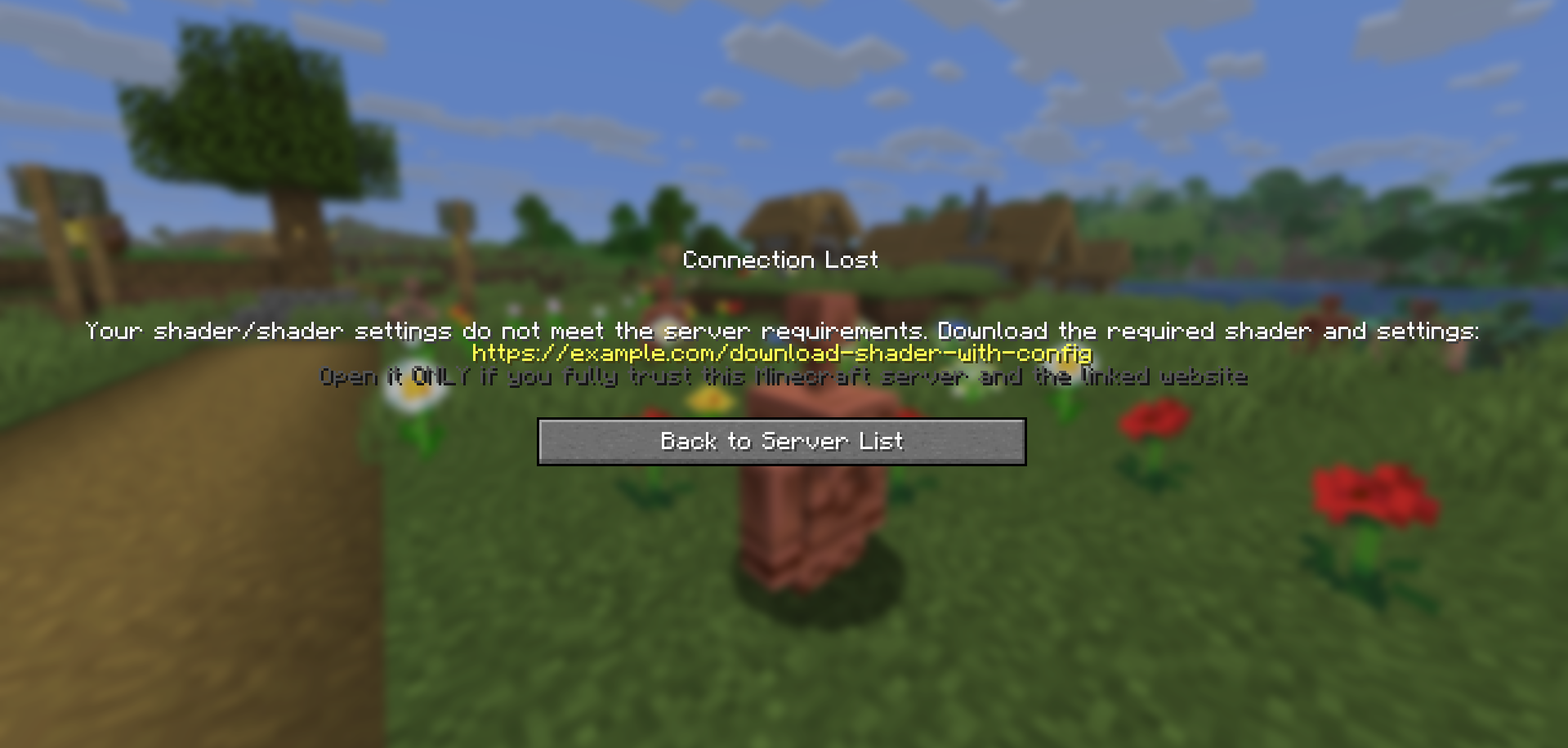
当连接到服务器时,SSGE 客户端模组会自动将其关于当前着色器及其设置的配置数据发送给服务端插件。服务端插件会将接收到的数据与其自身的配置进行比较。如果数据匹配,玩家将被允许进入服务器;否则,连接将被拒绝。
该模组需要 Iris 和 Fabric API 才能正常工作。
配置
模组的配置文件为 ssge_mod.json;
服务端的插件配置文件为 ssge.yml
ssge_mod.json
{
  "shaderFile": "",
  "shaderOptions": "",
  "sizeShader": 0,
  "sizeOptions": 0,
  "shaderHash": "",
  "enableShaders": false
}
此配置在连接到服务器时自动生成,并取决于 Iris 的设置:着色器的开启/关闭状态、选定的着色器文件以及选定的着色器设置。
shaderFile – 着色包(shaderpack)文件
shaderOptions – 着色器设置文件。如果着色器使用默认设置,由于文件不存在,该字符串将为 空。
sizeShader – 着色包的大小(以字节为单位)。
sizeOptions – 着色器设置的大小(以字节为单位)。如果着色器使用默认设置,该值为 0。
shaderHash - 着色器文件的 SHA-256 哈希值。
enableShaders – 着色器启用/禁用开关
ssge.yml
require_enabled: true
shader_file: ''
shader_options: ''
size_shader: 0
size_options: 0
shader_hash: ""
require_shader: true
require_options: true
link: https://example.com/download-shader-with-config
exempt_players: []
自动生成,必须手动配置才能正常工作。
require_enabled – 着色器启用/禁用开关。
shader_file – 着色包(shaderpack)文件。
shader_options – 着色器设置文件。如果着色器使用默认设置,由于文件不存在,该字符串将为 空。
size_shader – 着色包的大小(以字节为单位)。
size_options – 着色器设置的大小(以字节为单位)。如果着色器使用默认设置,该值为 0。
shader_hash – 着色器文件的 SHA-256 哈希值。
require_shader – 要求特定的着色包。
require_options – 要求特定的着色器设置。
link – 用于下载着色器和特定设置的链接。
exempt_players - 豁免玩家列表,这些玩家可以无需安装 SSGE 客户端模组或使用任何着色器即可在服务器上游玩(例如管理员或 Moderators)。
使用 /ssge reload 重新加载插件配置。
发送和接收链接
如果玩家已安装客户端模组但其配置与服务器不匹配,插件会在踢出玩家之前向其发送一个下载链接。
客户端模组会接收该链接,并将其保存到 .minecraft/config 目录下的 ssge_link.txt 文件中,并自动为用户打开该文件。
ssge_link.txt
您收到此文件是因为您尝试加入一个 Minecraft 服务器,该服务器要求
安装特定的着色器(或着色器设置),而您可能尚未安装。

请按照以下说明操作(除非另有说明),从服务器管理员提供的链接下载着色器:
1. 从下面的链接下载着色器存档 (.zip) 和着色器设置 (.txt)。
2. 将这两个文件放入游戏目录的 "shaderpacks" 文件夹中。
3. 进入 Iris 菜单,从列表中选择并启用此着色器,然后尝试再次登录服务器。

如果服务器提供了校验和(SHA-256),请将其与下载的着色器文件进行比对验证。
如果您在加入服务器时仍遇到任何困难,请联系服务器管理团队寻求帮助。

!!! 警告:下方的外部链接可能存在危险 !!!
仅在您完全信任此 Minecraft 服务器及链接网站的情况下打开它。

潜在风险包括:
 - 可能损害您系统的恶意安装程序、病毒或特洛伊木马
 - 旨在窃取 Minecraft、Discord、电子邮件或其他凭据的钓鱼页面
 - 可收集个人敏感信息的网页脚本
 - 静默提取密码、令牌或浏览器数据的窃密工具
 - 未经明确同意即可执行的挂马或自动下载行为
 - 伪造或篡改的下载内容(实际文件与声称的不符)

如果不确定 —— 请勿打开该链接。

https://example.com/download-shader-with-config
请注意:服务器管理员可能会提供恶意链接以损害您的系统或窃取您的数据。始终使用在线扫描工具检查链接,如果看起来可疑则不要打开。如果发现威胁,请在托管平台或列表网站上举报该服务器。
在插件配置中放置链接时,请遵循以下准则:
-
链接不应过短或过长。
-
链接应易于阅读,且不包含随机字符串。
-
避免使用缩短后的 URL 或重定向到第三方资源的链接。
-
链接不得指向包含恶意软件、脚本或可疑内容的网站。
-
如果链接指向文件共享服务,它应直接指向
.zip文件或包含着色器和设置的文件夹。 -
如果您的 Minecraft 服务器有自己的网站,最好创建一个专用的下载页面。
-
链接不应指向任何安装程序文件(
.exe、.msi、.jar等)。 -
网站不应要求注册、电话号码、电子邮件或其他个人信息。
示例
假设我们希望服务器上的所有玩家都使用 thejinxedartist 的 MC VHS 光影。
那么插件配置可以如下所示:
require_enabled: true              <––
shader_file: 'MCVHSV2.zip'         <––  必需
shader_options: 'MCVHSV2.zip.txt'  <––   值
size_shader: 275232                <––
size_options: 79                   <––
shader_hash: "e59a3d139..."        <––
require_shader: true
require_options: true
link: https://modrinth.com/shader/mc-vhs
exempt_players: ["Admin", "You"]
模组配置必须与插件配置匹配,并如下所示:
{
  "shaderFile": "MCVHSV2.zip",
  "shaderOptions": "MCVHSV2.zip.txt",
  "sizeShader": 275232,
  "sizeOptions": 79,
  "shaderHash": "e59a3d139...",
  "enableShaders": true
}
如果玩家的配置不同,服务器将会将其踢出。
Description
Server Shader Gate & Enforcer (SSGE) – a client-side mod and server-side plugin that requires players to install a shader and use specific shader options to play on the server.
Upon connecting to the server, the SSGE client mod automatically sends its configuration data about the current shader and its settings to the server plugin. The server plugin compares the received data with its own configuration. If the data matches, the player is allowed onto the server. Otherwise, the connection is refused.
The mod requires Iris and Fabric API to work.
Сonfiguration
The configuration file of the mod – ssge_mod.json;
the configuration file of the plugin for the server – ssge.yml
ssge_mod.json
{
  "shaderFile": "",
  "shaderOptions": "",
  "sizeShader": 0,
  "sizeOptions": 0,
  "shaderHash": "",
  "enableShaders": false
}
This configuration is generated automatically when connected to the server and depends on the Iris settings: the switch on/off shader, selected shader file and selected shader settings
shaderFile – shaderpack file
shaderOptions – shader settings file. If the shader uses default settings, this string will be empty because the file does not exist.
sizeShader – shaderpack size in bytes.
sizeOptions – shader settings size in bytes. If the shader uses default settings, this value is 0.
shaderHash - SHA-256 hash of the shader file.
enableShaders – shaders enabled/disabled switch
ssge.yml
require_enabled: true
shader_file: ''
shader_options: ''
size_shader: 0
size_options: 0
shader_hash: ""
require_shader: true
require_options: true
link: https://example.com/download-shader-with-config
exempt_players: []
Generated automatically and must be configured manually to work properly.
require_enabled – shaders enabled/disabled switch.
shader_file – shaderpack file.
shader_options – shader settings file. If the shader uses default settings, this string will be empty because the file will not exist.
size_shader – shaderpack size in bytes.
size_options – shader settings size in bytes. If the shader uses default settings, this value is 0.
shader_hash – SHA-256 hash of the shader file.
require_shader – requires a specific shaderpack.
require_options – requires specific shader settings.
link – your link to download the shader and specific settings.
exempt_players - list of exempt players can play on the server without installing the SSGE client mod or using any shaders (e.g., admins or moderators).
Use /ssge reload to reload the plugin configuration.
Sending and receiving a link
If a player has the client mod installed but their configuration does not match the server’s, the plugin sends them a download link before kicking the player.
The client mod receives the link, saves it to the file ssge_link.txt in the .minecraft/config directory, and automatically opens the file for the user.
ssge_link.txt
You received this file because you tried to join a Minecraft server that requires
a specific shader (or shader settings) that you may not have installed.

Download the shader from the link provided by the server administrator and follow
these instructions unless otherwise noted:
1. Download the shader archive (.zip) and the shader settings (.txt) from the link below.
2. Put both files into your game directory's "shaderpacks" folder.
3. Go to the Iris menu, select and enable this shader from the list, and try logging into the server again.

If the server provides a checksum (SHA-256), verify it against the downloaded shader file.
If you still have any difficulties joining the server, please contact the server administration for help.

!!! WARNING: External link below may be dangerous !!!
Open it ONLY if you fully trust this Minecraft server and the linked website.

Possible risks include:
 - malicious installers, viruses, or trojans that can harm your system
 - phishing pages designed to steal Minecraft, Discord, email or other credentials
 - web scripts that can collect personal or sensitive information
 - stealers that silently extract passwords, tokens, or browser data
 - drive-by or automated downloads that execute without clear consent
 - spoofed or tampered downloads (files different from what they claim)

If unsure — do NOT open the link.

https://example.com/download-shader-with-config
Be careful: the server administrator may provide a malicious link to harm your system or steal your data. Always check the link using online scanners and do not open it if it looks suspicious. If you detect a threat, report the server on the hosting platform or listing website.
When placing a link in the plugin configuration, follow these guidelines:
-
The link should not be excessively short or long.
-
The link should be readable and not contain random strings.
-
Avoid shortened URLs or redirects to third-party resources.
-
The link must not lead to websites containing malware, scripts, or suspicious content.
-
If the link leads to a file-sharing service, it should point directly to a
.zipfile or afoldercontaining the shader and settings. -
If your Minecraft server has its own website, it’s better to create a dedicated download page.
-
The link should not point to any installer files (
.exe,.msi,.jar, etc.). -
The website should not require registration, phone numbers, email, or other personal data.
For example
Let's say we want all players on our server to play using thejinxedartist's MC VHS shader.
Then the plugin configuration can be like this:
require_enabled: true              <––
shader_file: 'MCVHSV2.zip'         <––  Required
shader_options: 'MCVHSV2.zip.txt'  <––   values
size_shader: 275232                <––
size_options: 79                   <––
shader_hash: "e59a3d139..."        <––
require_shader: true
require_options: true
link: https://modrinth.com/shader/mc-vhs
exempt_players: ["Admin", "You"]
The mod configuration must match the plugin configuration and be like this:
{
  "shaderFile": "MCVHSV2.zip",
  "shaderOptions": "MCVHSV2.zip.txt",
  "sizeShader": 275232,
  "sizeOptions": 79,
  "shaderHash": "e59a3d139...",
  "enableShaders": true
}
If the player has a different configuration, the server will kick him.

下载 Server Shader Gate & Enforcer
需要联机服务器吗?
稳定流畅、一键部署,几分钟即可和朋友联机开服
最低仅需 8 元/月 即可畅快联机
下载 Server Shader Gate & Enforcer
需要联机服务器吗?
稳定流畅、一键部署,几分钟即可和朋友联机开服
最低仅需 8 元/月 即可畅快联机
下载 Server Shader Gate & Enforcer
需要联机服务器吗?
稳定流畅、一键部署,几分钟即可和朋友联机开服
最低仅需 8 元/月 即可畅快联机
下载 Server Shader Gate & Enforcer
需要联机服务器吗?
稳定流畅、一键部署,几分钟即可和朋友联机开服
最低仅需 8 元/月 即可畅快联机
下载 Server Shader Gate & Enforcer
需要联机服务器吗?
稳定流畅、一键部署,几分钟即可和朋友联机开服
最低仅需 8 元/月 即可畅快联机
下载 Server Shader Gate & Enforcer
需要联机服务器吗?
稳定流畅、一键部署,几分钟即可和朋友联机开服
最低仅需 8 元/月 即可畅快联机
下载 Server Shader Gate & Enforcer
需要联机服务器吗?
稳定流畅、一键部署,几分钟即可和朋友联机开服
最低仅需 8 元/月 即可畅快联机
下载 Server Shader Gate & Enforcer
需要联机服务器吗?
稳定流畅、一键部署,几分钟即可和朋友联机开服
最低仅需 8 元/月 即可畅快联机
下载 Server Shader Gate & Enforcer
需要联机服务器吗?
稳定流畅、一键部署,几分钟即可和朋友联机开服
最低仅需 8 元/月 即可畅快联机
下载 Server Shader Gate & Enforcer
需要联机服务器吗?
稳定流畅、一键部署,几分钟即可和朋友联机开服
最低仅需 8 元/月 即可畅快联机
新增
-
客户端模组、服务端模组和插件配置中添加了
shader_hash参数。-
客户端模组现在可以使用
SHA-256算法自动计算光影文件的哈希值。 -
服务端模组和插件配置中必须手动指定该哈希值(用于验证)。
-
-
在客户端模组、服务端模组和插件配置中隐藏了
clientVersion参数。-
此参数不会写入配置文件,用户或管理员也无法修改它。
-
服务端模组/插件会将客户端版本与自身要求的版本进行比对。如果检测到不匹配,玩家将被踢出服务器,并显示特定消息提示其更新客户端模组。
-
-
服务端模组和插件配置中新增了
exempt_players参数。-
允许将某些玩家排除在配置检查和客户端模组检查之外。
-
被豁免的玩家可以在服务器上游玩,而无需安装 SSGE 客户端模组或使用任何光影。
-
适用于管理员、版主及其他服务器工作人员。
-
-
新增服务端命令
/ssge reload。- 允许在不重启服务器的情况下重新加载插件或服务端模组配置。
-
新的连接终止消息以及对现有消息的调整。
-
版本不匹配时:显示一条独特的 SSGE 客户端版本不匹配 消息,所需版本号以绿色高亮显示,并附带下载链接。
-
光影/配置不匹配时:显示一条带有黄色高亮链接的消息,下方伴有深灰色警告信息。
-
缺少客户端模组时:显示一条指明所需模组版本及下载链接的消息。
-
更改
-
对接收和写入
ssge_link.txt文件链接的行为进行了微调。-
仅当客户端与服务端之间存在配置不匹配时,才会向客户端模组发送链接。
-
客户端模组在接收并写入链接后会自动打开
ssge_link.txt文件。 -
ssge_link.txt文件现在包含生成原因说明、简短的光影安装指南,以及关于遵循外部链接风险的详细警告。
-
关于这个资源的讨论、问题反馈与使用心得
还没有讨论,来发第一帖吧
你是这个资源的作者?登录后可认领此资源。
相似资源
 插件

PacketEvents 是一款专为 Minecraft Java 版打造的协议库,旨在简化数据包的处理与传输。
 插件
ExyliaPlugins 的库。
 插件
通过对话框或铁砧界面帮助你的 Anthme
 插件
重新定义服务器上的生物运输方式。使用高度可定制的口袋道具,安全地捕获、存储和释放任何实体。
 插件
为基于 Spigot/Paper/Folia 的服务器添加对 Vivecraft 的支持
 插件
用于绘制游戏内地图或在浏览器中随探索实时进行地图绘制的实时地图。
评论 0
登录后参与评分
还没有评论,来抢沙发吧