
ServerSuite
ServerSuite 将大多数 Minecraft 服务器所需的核心工具整合到一个插件中:员工等级、管理、家园、传送点、TPA、RTP、隐身、队伍、出生点保护、统计、排行榜、世界控制、原版/游戏规则调整以及服务器管理。
专为 Paper 和 Purpur 1.21.x (Java 21) 构建。
无需为每个功能管理单独的插件,ServerSuite 将它们统一在一个等级系统、权限系统、配置、管理面板和音效系统之下。
经过测试,ServerSuite 可以替代大约 30 个独立的插件,使其既适合小型 SMP 也适合大型服务器。
入门指南
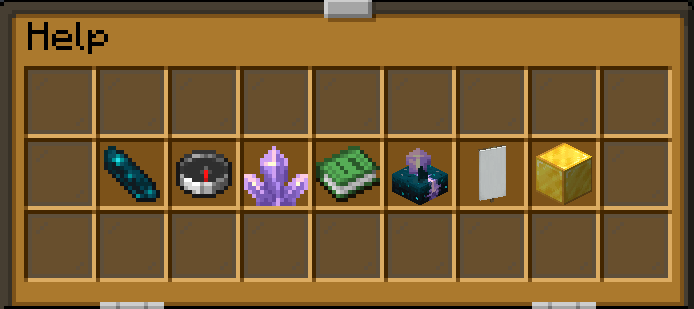
自定义帮助界面

/help 为玩家提供服务器信息、相关命令、队伍、统计数据和出生点指引。
/commands (/cmd, /cmds) 显示完整的分类命令列表,并根据玩家的等级自动过滤。
管理面板

高级管理面板

/admin 打开一个两页、54 格的管理界面,用于在不编辑配置文件的情况下控制服务器功能。拥有 Administrator、Owner 和 Developer 等级的成员可以打开这两个页面。第二页包含高级机制。
管理 PvP、难度、怪物生成、传送门、保留物品栏、传送、聊天过滤器、隐私模式、名字标签等。 高级控制功能包括可重复使用的保险箱、不会售罄的村民交易、复制控制、末影珍珠行为以及世界循环。
该面板还提供对物品查看器、玩家举报、队伍、出生点保护、附魔、自定义配方以及其他管理工具的访问权限。
功能与命令
等级与权限
员工层级
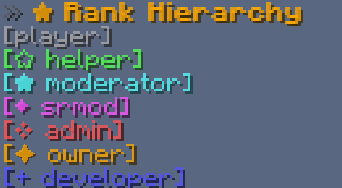
Player → Helper → Moderator → Senior Moderator → Administrator → Owner → Developer
ServerSuite 包含一个完整的员工层级系统,具有基于等级的权限和管理限制。开发人员还可以创建自定义等级。
低于 Developer 等级的员工无法管理同等或更高等级的玩家。Developer 可以对其他 Developer 和 OP 玩家采取行动。OP 玩家可以更改其显示的等级,同时保留 Developer 权限。
等级管理
/rank [player] — 检查玩家的等级。/ranks — 显示交互式浮动等级层级图。Helper 及以上等级可以检查每个等级的成员。/promote <player> / /demote <player> — 在层级中提升或降低玩家等级。/setrank <rank> <player> — 直接分配等级,无需授予 OP。/rankscommand <command> <rank> — 实时更改命令的等级要求。/ranksname <rank> "name" — 重命名等级以用于聊天、Tab 列表和菜单。权限保持不变。/rankscreate "name" <symbol|none> <color> — 创建自定义等级,可选择添加符号或使用 none 表示无符号。它位于 Player 之上,然后使用 /rankscommand 将命令移至该等级。/ranksremove <rank> — 移除等级(点击确认或在 30 秒内再次运行)。该等级中的玩家会降一级。无法移除 Player 和 Developer 等级。/ranksorder <rank> — 通过点击框将等级移动到层级中的新位置。
等级显示
/rankshide [nametags|chat|tablist|list] — 控制等级图标出现的位置。/taborder — 按等级排序玩家列表。当 /rankshide 隐藏等级图标时,它会自动关闭。/taghide [player] — 隐藏个别员工的等级标签。
员工历史记录
/logs [player] [full] — 审查管理操作、物品栏编辑、等级变更以及其他员工活动,包括执行每项操作的人员。
权限集成
支持内置的等级权限和可选的 LuckPerms 同步。
管理与玩家控制
ServerSuite 包含一个完整的管理系统,具备惩罚、玩家举报、员工备注、账户检查和行动历史功能。
惩罚
/ban <player> <time|perm> [reason] — 发布临时或永久封禁。/unban <player> — 撤销封禁。/banlist — 浏览被封禁的玩家并解除封禁。/mute <player> <time> [reason] — 限制公共和私人通信。/unmute <player> — 解除当前的静音状态。/warn <player> <reason> — 发出编号警告。/unwarn <player> — 重置警告历史。
警告支持可选的自动升级至静音或封禁。
被封禁的玩家会在配置了 Discord 申诉链接时收到惩罚原因、剩余时长和 Discord 申诉链接。
举报与调查
/report <player> <reason> — 举报违规行为。/reported — 浏览员工举报队列。/report clear <player> — 清除已解决的举报。/note <player> [text] — 记录并审查员工备注。/alts <player|@a|@r> — 识别共享 IP 地址的账户。@a 检查所有在线玩家,@r 随机选择一名玩家。/rancommand <player> — Senior Moderator 及以上等级:查看玩家最近执行的 10 条命令。/seen <player> — Helper 及以上等级:查看玩家上次在线时间。/logs [player] [full] — 检查员工操作。
玩家控制
/freeze <player> / /unfreeze <player> — 冻结或释放玩家。/frozen — 列出被冻结的玩家。/wipe [player|selector] [inventory|enderchest|stats|homes|all] — 重置选定玩家的数据,对每个目标进行权限检查(echest 也可用)。选择器需要明确的范围,例如 /wipe @a inventory。
被冻结的玩家会被玻璃、冰和雪的效果包围。他们仍然可以与工作人员沟通,但无法移动或参与战斗。
支持的工作人员命令接受玩家选择器。惩罚和权限命令需要从玩家那里获取命名目标;控制台可以使用这些命令的选择器。
聊天过滤
/filter [bypass <player>|<player>|list] — 管理过滤和豁免。/filter addword|delword <word> — 编辑被过滤的单词列表。
维护
/maintenance <start|stop|bypass|list|allow|message <text>>
在维护期间限制服务器访问,配置消息,并管理允许的玩家。
工作人员工具
隐身与监视
/vanish — 对普通玩家不可见,但对授权的工作人员可见。/spy <player|exit|lock|next> — 从玩家视角观察其他玩家,包括跨维度。/spy ground — 从地面高度观察玩家。/clone [player] — 使用另一名玩家的皮肤、名牌和身份来伪装自己,这会影响聊天和死亡信息中的显示。/fakeleave — 模拟离开或重新加入,并在标签页中隐藏,而不会使玩家真正消失。
隐身、监视、克隆和假离开的消息尊重隐私模式。取消伪装会宣布伪装离开和真实身份加入;隐藏的玩家对授权工作人员保持私密。灰色的 [vanished] 和 [spying] 标签向玩家和同等或更高级别的工作人员标识这些状态。
物品栏与玩家工具
/inventory <player> (/inv) — 查看或编辑玩家物品栏。如果不提供名称,则打开玩家选择器。/echest — 打开自己的末影箱,如果开启了 /doublechest,还包括额外的槽位。/ec <player> (/enderchest) — 查看或编辑另一名玩家的末影箱。如果不提供名称,则打开玩家选择器。当开启 /batchdata 时,可以查看离线玩家(只读)。/homes <player> — 管理员及以上权限:打开玩家的家园列表以传送、重命名或删除它们。/cords <player> — 查看玩家坐标。/health [player] (/hp) — 助手及以上权限:在聊天中显示玩家当前的生命值。/heal [player] — 恢复生命值和饥饿值。/staffchat <message> (/sc) — 与工作人员私下沟通。/nametags — 切换服务器全局名牌显示。
公告与世界工具
/announce "text" chat gold underline — 立即广播带样式的公告;支持聊天、标题和操作栏三种发送方式。文本之后,发送类型、颜色和字体可以按任意顺序排列。/announce <join|welcome|routine|list|remove> — 使用相同的发送和样式选项创建和管理自动公告。/fakevein <ore> — 生成虚假的矿脉。/fakechest — 生成虚假的箱子。/tree <type> <size> — 生长原版树木。
出生点保护
无需安装单独的区块管理插件即可创建受保护的出生点区域。
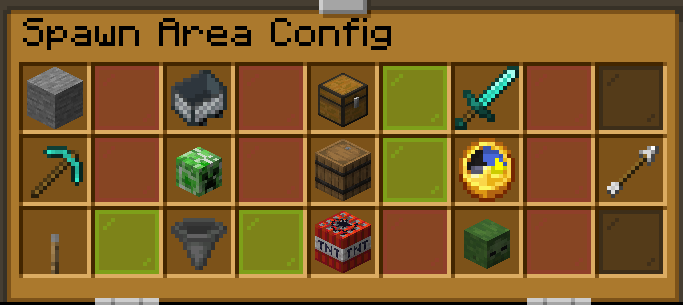
保护系统
/sp (/spawnprotection) 提供了用于创建和管理受保护区域、区块和单个方块例外的工具。
功能包括:
- 为每个区域配置可定制的保护规则。
- 多个相连的区域。
- 单个方块的例外设置。
- 阻止区域内来自其他插件的自动更改:流体流动、活塞、爆炸和火焰。操作员仍可在该区域使用命令。
- 可视化边界预览。
- 自定义进入消息,样式可以在文本之后按任意顺序排列。
- 返回出生点区域。
- 仅限出生点的飞行和二段跳区域。
区域边界显示为发光的虚线轮廓,仅对配置它们的管理员可见。
命令
/sp area|region|block — 管理受保护的位置。/sp config — 打开保护配置 GUI。/sp clear — 清除保护设置。/sp bypass — 管理保护豁免。/sp fly — 配置仅限出生点的飞行。/sp doublejump [height] [speed] — 配置弹射区域。/sp exact [clear] — 设置或清除精确的出生点位置。
返回出生点区域可以在进入时自动将玩家送回出生点。
传送与家园
个人家园
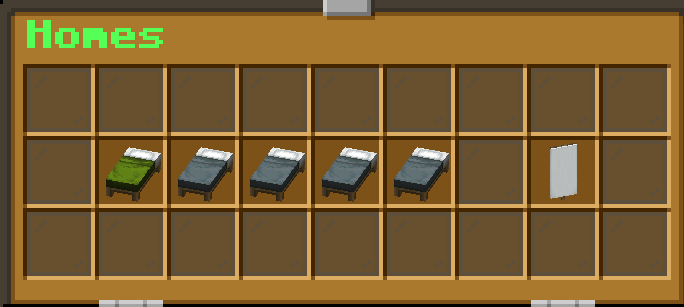
玩家可以保存最多 28 个个人家园(由服务器设定),并通过交互式 GUI 访问它们,GUI 会自动调整大小并居中以适应屏幕。拥有 1 到 5 个家园时,家园列表和团队旗帜会共享一行整洁的布局。
/sethome [slot] — 保存一个家园。/home [slot] — 传送到一个家园。/sethome max [1-28] — 配置家园数量上限。
传送点 (Warps)
供所有人使用的服务器级传送点,传送时会显示黑洞动画效果。
/warp <name> — 传送到某个传送点。/warps — 列出所有传送点(点击名称即可前往)。/setwarp <name> — 管理员及以上权限:在当前位置创建一个传送点,或移动现有的传送点。/delwarp <name> — 管理员及以上权限:删除一个传送点。
通过管理面板中的 Homes / Spawn / Warps 开关可以启用或禁用传送点。
传送请求
/tpa <player> — 请求传送到另一名玩家处。/tpahere <player> — 请求另一名玩家传送到你这里。/tpaccept — 接受请求。/tpacancel — 取消请求。/tpauto — 切换自动接受模式。
传送请求包含交互式确认控件,并在 30 秒后过期。
随机传送与出生
/rtp [world|nether|end] — 在世界边界内随机传送。/spawn — 返回到配置的出生点位置。
传送行为、延迟和冷却时间均可配置。
团队与社交功能
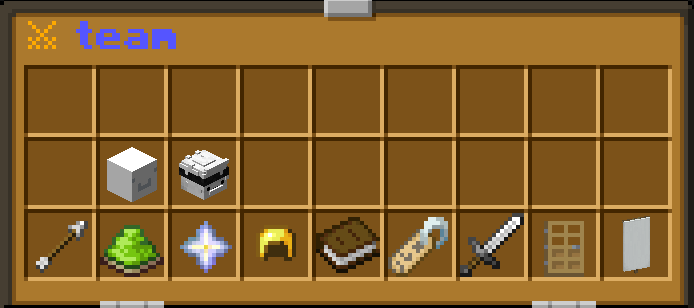
创建并管理 PvP 团队,支持共享家园、私密通讯、邀请、等级以及视觉自定义。
团队功能
- 团队邀请与成员管理。
- 团队队长与管理者角色。
- 共享团队家园。
- 私密团队聊天。
- 自定义团队颜色与文本样式。
- 队友轮廓着色。
- 高大的团队家园标志,带有飘扬的团队颜色布料、金色细节和分叉尾翼,对附近的队友可见。
- 浏览团队的管理员可快速使用以下工具:邀请玩家、切换团队颜色、切换发光效果。
队友轮廓仅对同一团队的成员可见,队长、管理者与普通成员的颜色各不相同。
命令
/team (/t) — 打开团队管理界面。/team <player> — Helper+ 权限:查看某玩家所在的团队。/tc — 发送团队聊天消息。/team color <color> [fonts] — 自定义团队外观。/team glow — 切换队友轮廓显示。
私信功能
/w <player> <message> — 发送私信。/r <message> — 回复最近一次对话。/ignore <player> — 忽略某玩家。/ignored — 查看已忽略的玩家列表。
隐私模式
/privacy — 切换全服隐私模式。
隐私模式会屏蔽公共死亡、进度达成以及加入/离开服务器的消息。
世界管理
自定义配方
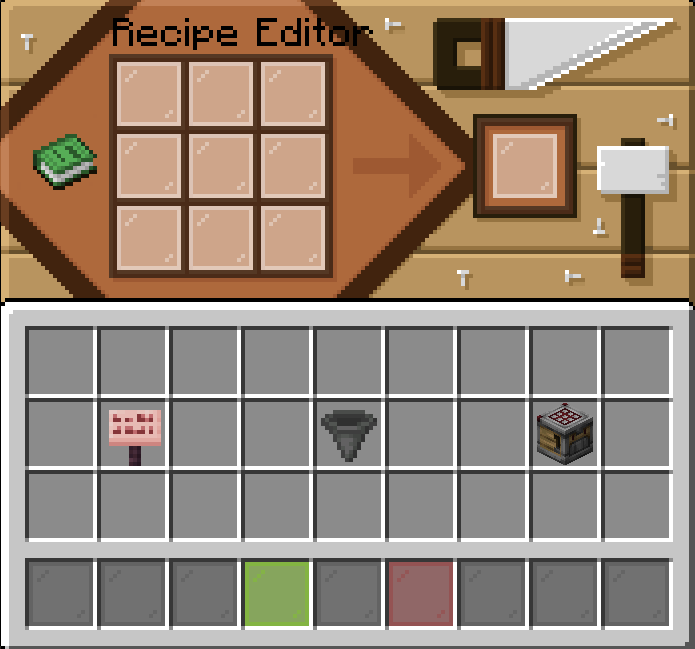
/customrecipes — 在游戏中创建和编辑自定义合成配方。/recipes <item name> — 查看已保存的配方。
附魔控制
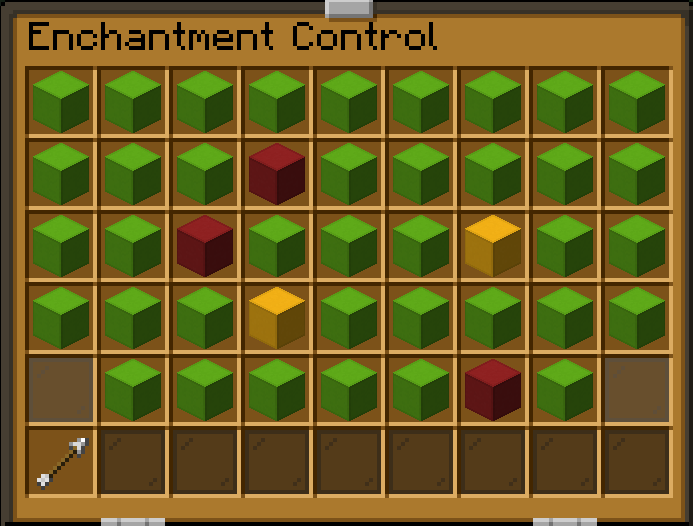
/enchantments — 启用或禁用单个原版附魔及其等级。
世界与物品控制
/border [amount] [world] — 跨维度管理世界边界。/limit — 配置单玩家及全服的物品上限。/limit combat <item> 可在战斗期间切换物品使用限制(包括末影珍珠和鞘翅)。/hopper — 管理漏斗放置上限及实验性性能设置。/doublechest — 切换 27 格或 54 格的末影箱。缩小箱子容量需要确认并保留额外物品;管理面板会显示黄色的“再次点击以确认”提示框。/toteminventory — 允许从背包任意位置激活不死图腾。
弹射垫
/launchpad (/lp) — 创建、配置、移除和列出弹射垫。
弹射垫具有视觉效果,并可配置发射高度和速度。
在战斗中退出游戏会导致死亡并掉落所有手持物品。创造模式和旁观者模式玩家不受此影响。
末影珍珠可设置为死亡时消失,或在重生后保留并继续使用。
标签页列表自定义
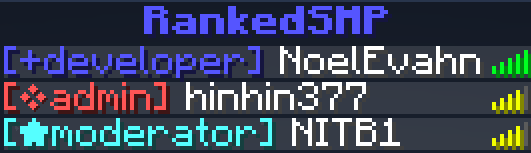
/tabname — 自定义玩家列表头部、颜色、字体以及可选的玩家数量底部信息。
服务器控制
/pluginhide — 对非 OP 玩家隐藏插件信息和命令命名空间。/commanddisable <command|list|enable <command>|disable <command>> — 启用或禁用 ServerSuite 命令,使用 list 可查看当前禁用的命令。/setdiscord <link> — 配置服务器的 Discord 链接(必须以 http 或 https 开头的网页链接)。/batchdata — 仅限开发者。开启保存玩家的背包、末影箱和皮肤数据,使工作人员可以只读查看离线玩家的背包。执行后会显示保存内容,然后点击确认(或在 30 秒内再次运行);再次运行则关闭该功能。/serversuite (/ss) — 访问诊断工具和重新加载配置。
统计、排行榜与装饰
玩家统计

/stats [player|global] — 显示交互式浮动统计面板,包含玩家头像和动态图标。
追踪的统计数据包括:
- 玩家击杀数与生物击杀数。
- 死亡次数。
- 破坏与放置的方块数。
- 移动距离。
- 总游戏时长。
排行榜
/leaderboard [type] — 浏览排名,支持搜索和点击查看玩家统计数据。
装饰标签
/tags — 装备最多三个 PvP 标签。
可用类别包括 Sword(剑)、Axe(斧)、Mace(战锤)、Crystal(水晶)、UHC、NethPot、Creeper、Cart 以及 Elytra Mace(鞘翅战锤)PvP 标签。
玩家实用工具
/fly [player] — 切换二段跳飞行模式,附带防摔保护。/speed <1-10> — 调整飞行速度。/hide — 对普通玩家混淆你的头顶/聊天名称,但保持正常的标签页名称;你和 Helper+ 工作人员会看到灰色的 [hidden] 标签及你的真实姓名。/hat — 将手中的物品作为头盔佩戴。/bin (/trash) — 丢弃手中物品。/bin inventory 丢弃所有物品,/bin recover 找回最近丢弃的物品。/nv — 切换永久夜视效果。/ping [player] — 检查网络延迟。/suicide (/die) — 自杀。在战斗中也有效,且计为正常死亡。/time — 显示当前时间。操作员仍可设置时间,例如 /time set day。/weather — 显示当前天气。操作员仍可设置天气,例如 /weather clear。/discord — 查看配置的 Discord 邀请链接。
配置与兼容性
ServerSuite 使用 config.yml 来管理冷却时间、上限、传送、家园、聊天过滤、权限及其他服务器设置。
各项设置均包含描述和支持的值。
LuckPerms 为可选安装。安装后,ServerSuite 可在保留手动分配的临时或上下文权限的同时同步排名权限。克隆格式设置也支持使用 LuckPerms 或 TAB 的前缀与后缀。
数据迁移
已在使用 EssentialsX 或 CMI?
/migratedata <essentials|cmi> <scan|import|list> [overwrite]
导入现有的家园、禁言和封禁记录。在导入前请先扫描您的数据,并选择是否覆盖现有记录。
当从离线模式切换到在线模式时,ServerSuite 还支持玩家数据的迁移。
注意事项
部分功能默认处于禁用状态,可通过管理面板启用。
每当 ServerSuite 发布新版本时,管理员加入服务器时会收到一条包含下载链接的通知。
支持
如有任何问题、反馈或建议,请在 Discord 上联系 NoelEvahn。
ServerSuite
ServerSuite combines the core tools most Minecraft servers need into one plugin: staff ranks, moderation, homes, warps, TPA, RTP, vanish, teams, spawn protection, statistics, leaderboards, world controls, vanilla/gamerule tweaking and server management.
Built for Paper and Purpur 1.21.x (Java 21).
Instead of managing separate plugins for every feature, ServerSuite brings them together under one rank system, permission system, configuration, Admin Panel, and sound system.
From testing, ServerSuite can replace around 30 separate plugins, making it suitable for both small SMPs and larger servers.
Getting Started
Custom Help GUI
/help starts off the player with server info, related commands, teams, stats, spawn.
/commands (/cmd, /cmds) displays the complete categorized command list, automatically filtered by the player's rank.
Admin Panel
Advance Admin Panel
/admin opens a two-page, 54-slot management interface for controlling server features without editing configuration files. Administrator, Owner, and Developer ranks can open both pages. The second page holds the advanced mechanics.
Manage PvP, difficulty, mob spawning, portals, Keep Inventory, teleportation, chat filters, Privacy Mode, nametags, and more. Advanced controls include reusable vaults, villager trades that do not sell out, duplication controls, pearl behavior, and world cycles.
The panel also provides access to inventory viewers, player reports, teams, spawn protection, enchantments, custom recipes, and other administrative tools.
Features & Commands
Ranks & Permissions
Staff Hierarchy
Player → Helper → Moderator → Senior Moderator → Administrator → Owner → Developer
ServerSuite includes a complete staff hierarchy with rank-based permissions and moderation restrictions. Developers can also create custom ranks.
Staff below Developer cannot moderate players of equal or higher rank. Developers can act on other Developers and OPs. OP players may change their displayed rank while retaining Developer permissions.
Rank Management
/rank [player] — check a player's rank./ranks — display an interactive floating rank hierarchy. Helper+ can inspect members of each rank./promote <player> / /demote <player> — move players through the hierarchy./setrank <rank> <player> — directly assign a rank without granting OP./rankscommand <command> <rank> — change command rank requirements live./ranksname <rank> "name" — rename a rank for chat, tab, and menus. Permissions stay the same./rankscreate "name" <symbol|none> <color> — create a custom rank, with a symbol or with none for no symbol. It is placed just above Player, then move commands to it with /rankscommand./ranksremove <rank> — remove a rank (click Confirm or run it again within 30 seconds). Players in it move down one rank. Player and Developer can't be removed./ranksorder <rank> — move a rank to a new place in the hierarchy by clicking a box.
Rank Display
/rankshide [nametags|chat|tablist|list] — control where rank icons appear./taborder — sort the player list by rank. Turns off by itself while /rankshide is hiding rank icons./taghide [player] — hide individual staff rank tags.
Staff History
/logs [player] [full] — review moderation actions, inventory edits, rank changes, and other staff activity, including who performed each action.
Permission Integration
Supports built-in rank permissions and optional LuckPerms synchronization.
Moderation & Player Management
ServerSuite includes a complete moderation system with punishments, player reports, staff notes, account checks, and action history.
Punishments
/ban <player> <time|perm> [reason] — issue temporary or permanent bans./unban <player> — revoke bans./banlist — browse banned players and unban them./mute <player> <time> [reason] — restrict public and private communication./unmute <player> — remove active mutes./warn <player> <reason> — issue numbered warnings./unwarn <player> — reset warning history.
Warnings support optional automatic escalation to mutes or bans.
Banned players receive their punishment reason, remaining duration, and a Discord appeal link when configured.
Reports & Investigations
/report <player> <reason> — report rule violations./reported — browse the staff report queue./report clear <player> — clear resolved reports./note <player> [text] — record and review staff notes./alts <player|@a|@r> — identify accounts sharing an IP address. @a checks everyone online, @r picks one random player./rancommand <player> — Senior Moderator+: see a player's last 10 commands./seen <player> — Helper+: see when a player was last online./logs [player] [full] — inspect staff actions.
Player Controls
/freeze <player> / /unfreeze <player> — freeze or release players./frozen — list frozen players./wipe [player|selector] [inventory|enderchest|stats|homes|all] — reset selected player data, with rank checks for each target (echest also works). A selector needs an explicit scope, for example /wipe @a inventory.
Frozen players are surrounded by glass, ice, and snow effects. They can still communicate with staff but cannot move or participate in combat.
Supported staff commands accept player selectors. Punishment and rank commands require named targets from players; console may use selectors for those commands.
Chat Filtering
/filter [bypass <player>|<player>|list] — manage filtering and bypasses./filter addword|delword <word> — edit the filtered word list.
Maintenance
/maintenance <start|stop|bypass|list|allow|message <text>>
Restrict server access during maintenance, configure messages, and manage allowed players.
Staff Utilities
Vanish & Surveillance
/vanish — become invisible to regular players while remaining visible to authorized staff./spy <player|exit|lock|next> — observe players from their perspective, including across dimensions./spy ground — observe players from ground level./clone [player] — disguise yourself using another player's skin, nametag, and identity in chat and death messages./fakeleave — simulate leaving or rejoining and hide from tab without making the player invisible.
Vanish, spy, clone, and fake-leave messages respect Privacy Mode. Uncloning announces the disguise leaving and the real identity joining; hidden players remain private to authorized staff. Gray [vanished] and [spying] labels identify these states to the player and staff of equal or higher rank.
Inventory & Player Tools
/inventory <player> (/inv) — view or edit player inventories. With no name, opens the player picker./echest — open your own Ender Chest, including the extra slots when /doublechest is on./ec <player> (/enderchest) — view or edit another player's Ender Chest. With no name, opens the player picker. Offline players can be viewed (read-only) while /batchdata is on./homes <player> — Administrator+: open a player's homes to teleport, rename, or delete them./cords <player> — view player coordinates./health [player] (/hp) — Helper+: show a player's current health in chat./heal [player] — restore health and hunger./staffchat <message> (/sc) — communicate privately with staff./nametags — toggle server-wide nametags.
Announcements & World Tools
/announce "text" chat gold underline — broadcast a styled announcement immediately; chat, title, and actionbar delivery are supported. After the text, the delivery type, color, and fonts can go in any order./announce <join|welcome|routine|list|remove> — create and manage automated announcements using the same delivery and styling options./fakevein <ore> — generate a fake ore vein./fakechest — generate a fake chest./tree <type> <size> — grow a vanilla tree.
Spawn Protection
Create protected spawn areas without installing a separate region-management plugin.
Protection System
/sp (/spawnprotection) provides tools for creating and managing protected areas, regions, and individual block exceptions.
Features include:
- Configurable protection rules for each area.
- Multiple connected regions.
- Individual block exceptions.
- Blocks automatic changes from other plugins inside the area: fluid flow, pistons, explosions, and fire. Ops can still use commands there.
- Visual boundary previews.
- Custom entry messages, styled in any order after the text.
- Backspawn regions.
- Spawn-only flight and double-jump areas.
Region boundaries appear as glowing dashed outlines visible only to the administrator configuring them.
Commands
/sp area|region|block — manage protected locations./sp config — open the protection configuration GUI./sp clear — clear protection settings./sp bypass — manage protection bypasses./sp fly — configure spawn-only flight./sp doublejump [height] [speed] — configure launch areas./sp exact [clear] — set or clear the exact spawn location.
Backspawn regions can automatically return players to spawn when entered.
Teleportation & Homes
Personal Homes
Players can save up to 28 personal homes (set by the server) and access them through an interactive GUI that resizes and centers itself to fit. With 1 to 5 homes, the homes and team banner share one neat row.
/sethome [slot] — save a home./home [slot] — teleport to a home./sethome max [1-28] — configure the home limit.
Warps
Server-wide teleport points that everyone can use, with a black hole animation when you teleport.
/warp <name> — teleport to a warp./warps — list every warp (click a name to go there)./setwarp <name> — Administrator+: create a warp at your location, or move an existing one./delwarp <name> — Administrator+: delete a warp.
Warps turn on and off with the Homes / Spawn / Warps switch in the Admin Panel.
Teleport Requests
/tpa <player> — request teleportation to another player./tpahere <player> — request another player teleport to you./tpaccept — accept a request./tpacancel — cancel a request./tpauto — toggle automatic acceptance.
Teleport requests include interactive confirmation controls and expire after 30 seconds.
Random Teleportation & Spawn
/rtp [world|nether|end] — teleport randomly within the world border./spawn — return to the configured spawn location.
Teleportation behavior, delays, and cooldowns are configurable.
Teams & Social Features
Create and manage PvP teams with shared homes, private communication, invitations, ranks, and visual customization.
Team Features
- Team invitations and membership management.
- Team leader and moderator roles.
- Shared team homes.
- Private team chat.
- Custom team colors and text styling.
- Colored teammate outlines.
- Tall team-home standards with waving team-colored cloth, gold details and split tails, visible to nearby teammates.
- Admins browsing a team get quick tools: invite a player, cycle the team color, and toggle glow.
Teammate outlines are only visible to members of the same team, with different colors for leaders, moderators, and members.
Commands
/team (/t) — open team management./team <player> — Helper+: see which team a player is on./tc — send team-chat messages./team color <color> [fonts] — customize team appearance./team glow — toggle teammate outlines.
Private Messaging
/w <player> <message> — send a private message./r <message> — reply to the latest conversation./ignore <player> — ignore a player./ignored — view ignored players.
Privacy Mode
/privacy — toggle server-wide Privacy Mode.
Privacy Mode suppresses public death, advancement, and join/leave messages.
World Management
Custom Recipes
/customrecipes — create and edit custom crafting recipes in-game./recipes <item name> — view saved recipes.
Enchantment Controls
/enchantments — enable or disable individual vanilla enchantments and levels.
World & Item Controls
/border [amount] [world] — manage world borders across dimensions./limit — configure per-player and server-wide item limits. /limit combat <item> toggles item-use restrictions during combat, including pearls and elytra./hopper — manage hopper placement limits and experimental performance settings./doublechest — toggle 27-slot or 54-slot Ender Chests. Shrinking requires confirmation and preserves extra items; the Admin Panel shows a yellow “Click again to confirm” pane./toteminventory — allow totems to activate from anywhere in the inventory.
Launch Pads
/launchpad (/lp) — create, configure, remove, and list launch pads.
Launch pads feature visual effects and configurable launch height and speed.
Logging out during combat causes death and full carried-item drops. Creative and spectator players are exempt.
Pearls can be set to despawn on death or survive and remain usable after respawn.
Tab List Customization
/tabname — customize the player list header, colors, fonts, and optional player-count footer.
Server Controls
/pluginhide — hide plugin information and command namespaces from non-OP players./commanddisable <command|list|enable <command>|disable <command>> — enable or disable ServerSuite commands, with list to see what is off./setdiscord <link> — configure the server's Discord link (must be a web link starting with http or https)./batchdata — Developer only. Turn on saving of players' inventories, ender chests and skins, which lets staff view offline players' inventories (read-only). Shows what it saves, then click Confirm (or run it again within 30 seconds); run it again to turn it off./serversuite (/ss) — access diagnostics and reload configuration.
Statistics, Leaderboards & Cosmetics
Player Statistics
/stats [player|global] — display an interactive floating statistics board featuring player heads and animated icons.
Tracked statistics include:
- Player kills and mob kills.
- Deaths.
- Blocks broken and placed.
- Distance travelled.
- Total playtime.
Leaderboards
/leaderboard [type] — browse rankings with search and clickable player statistics.
Cosmetic Tags
/tags — equip up to three PvP tags.
Available categories include Sword, Axe, Mace, Crystal, UHC, NethPot, Creeper, Cart, and Elytra Mace PvP.
Player Utilities
/fly [player] — toggle double-jump flight with fall-damage protection./speed <1-10> — adjust flight speed./hide — scramble your overhead/chat name for regular players while keeping a normal tab name; you and Helper+ staff see a gray [hidden] label and your real name./hat — wear the item in your hand as a helmet./bin (/trash) — trash the item you're holding. /bin inventory trashes everything, and /bin recover brings the last trashed item back./nv — toggle permanent night vision./ping [player] — check network latency./suicide (/die) — kill yourself. Works during combat and counts as a normal death./time — show the current time. Operators can still set it, for example /time set day./weather — show the current weather. Operators can still set it, for example /weather clear./discord — view the configured Discord invitation.
Configuration & Compatibility
ServerSuite uses config.yml to manage cooldowns, limits, teleportation, homes, chat filtering, permissions, and other server settings.
Settings include descriptions and supported values.
LuckPerms is optional. When installed, ServerSuite can synchronize rank permissions while preserving manually assigned temporary or contextual permissions. Clone formatting can also use LuckPerms or TAB prefixes and suffixes.
Migration
Already using EssentialsX or CMI?
/migratedata <essentials|cmi> <scan|import|list> [overwrite]
Import existing homes, mutes, and bans. Scan your data before importing, and choose whether existing records should be overwritten.
ServerSuite also supports player-data migration when switching from offline mode to online mode.
Important Notes
Some features are disabled by default and can be enabled through the Admin Panel.
When a new ServerSuite version is out, operators see a notice on join with a download link.
Support
For questions, issues, or suggestions, contact NoelEvahn on Discord.


 插件

 插件

 插件
 插件
 插件
 插件
评论 0
登录后参与评分
还没有评论,来抢沙发吧