? ServerConnect
连接你的 Minecraft 服务器 —— 无需代理
ServerConnect 是一款轻量且易于使用的插件,可将多个 Paper 和 Spigot 服务器连接在一起,无需 Velocity、BungeeCord、Waterfall 或任何其他代理软件。
打造一个无缝的 Minecraft 网络,具备以下功能:
- ? 全局聊天
- ? 全网络加入与离开消息
- ? 共享玩家计数
- ? 死亡与进度同步
- ✉️ 跨服务器私聊
- ? Paper 服务器传输
- ⚡ 全网络命令
无论你的服务器托管在专用机器、VPS、家用服务器,还是通过 playit.gg 和 Ngrok 等服务提供,ServerConnect 都能保持整个网络的同步。
✨ 特性
? 全局网络聊天
与所有已连接服务器上的玩家聊天。
无论他们身在何处,所有人共享同一个对话。
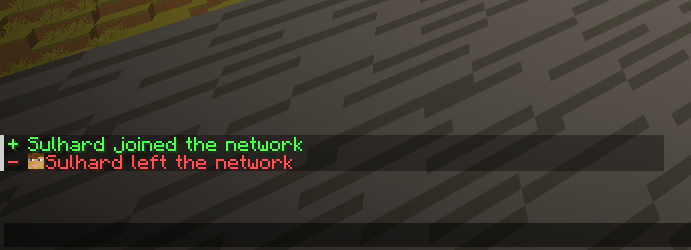
? 网络加入与离开消息
在整个网络中广播加入和退出消息。
每个服务器均可完全自定义配置。
你甚至可以选择仅在玩家加入 HUB(枢纽)服务器时显示消息。
? Paper 服务器传输
使用以下命令在服务器之间传输玩家:
/sc send <player> <server>
ServerConnect 使用现代的 Paper 传输 API,实现无代理的平滑服务器切换。
? 共享全局玩家计数
显示所有已连接服务器的合计在线人数。
示例:
- 服务器 A:15 名玩家
- 服务器 B:20 名玩家
玩家看到的将是:
35 Online
而非仅本地服务器的在线人数。
? 死亡与进度同步
让你的整个网络保持连接。
✉️ 跨服务器私聊
向所有已连接服务器上的玩家发送消息。
支持的命令:
/msg
/tell
/w
支持玩家名称自动补全。
⚡ 网络管理
从任何已连接的服务器管理整个网络。
功能包括:
- 在所有服务器上执行命令
- 查看网络状态
- 传输玩家
- 关闭整个网络
- 实时调试工具
? 简单设置(HUB & NODE)
ServerConnect 采用简单的 HUB(枢纽)与 NODE(节点)系统。
? HUB(主控端)
选择一个服务器作为中央网络枢纽。
通常这是你的大厅服务器。
设置步骤
- 设置:
mode: HUB
- 选择一个安全的:
auth-key
- 在防火墙中打开配置的端口:
bind-port: 25560
?️ NODE(辅助端)
对于每一个额外的服务器:
- 设置:
mode: NODE
- 输入 HUB 的地址:
hub-host
- 使用相同的:
auth-key
就这么简单。
不需要 Velocity。
不需要 BungeeCord。
不需要 Waterfall。
/sc help

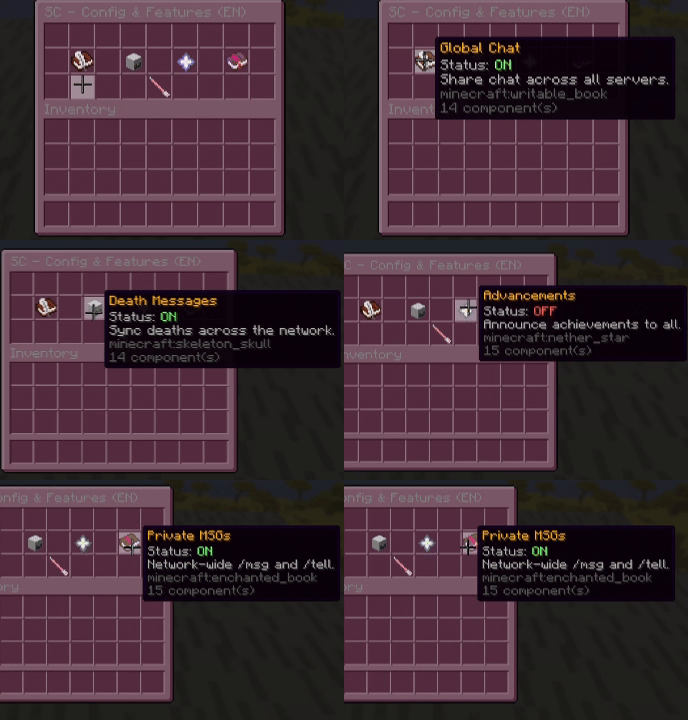
? 命令与权限
| Command |
Description |
Permission |
/sc info |
显示插件信息及 Modrinth 链接 |
Everyone |
/sc help |
打开交互式 GUI 帮助菜单 |
serverconnect.help |
/sc reload |
重新加载配置并重启网络连接 |
serverconnect.reload |
/sc status |
查看已连接的服务器(标记 HUB) |
serverconnect.status |
/sc send <player> <server> |
传输一名玩家 |
serverconnect.send |
/sc stop |
关闭整个网络 |
serverconnect.stop |
/sc command <command> |
在所有服务器上执行命令 |
serverconnect.command |
/sc debug |
切换实时网络日志 |
serverconnect.debug |
/msg <player> |
跨服务器私聊 |
Everyone |
? 游戏内配置
直接从 Minecraft 中管理重要设置。
/sc setname <name>
更改服务器名称。
/sc setmode <HUB|NODE>
切换网络角色。
/sc setkey <password>
更新认证密钥。
/sc sethubip <IP:Port>
设置 HUB 传输快捷方式。
/sc hidetab <Server>
在本地标签列表中隐藏来自特定服务器的玩家。
/sc language <de|en>
即时切换插件语言。
? 全局标签列表设置
由于 ServerConnect 在无代理环境下运行,我们使用 TAB 插件的 Layout(布局)功能来显示全网络玩家。
1️⃣ 配置玩家格式
在 ServerConnect 中:
tab:
  format: "&b%player% &7(%server%)"
示例:
Steve (Lobby)
Alex (Survival)
Notch (Creative)
2️⃣ 在 TAB 中启用布局
layout:
  enabled: true
3️⃣ 添加占位符
示例:
- '24|%serverconnect_p1%'
- '25|%serverconnect_p2%'
- '26|%serverconnect_p3%'
一直添加至:
%serverconnect_p80%
ServerConnect 会自动将所有已连接服务器的玩家填充到这些槽位中。
必须安装 PlaceholderAPI。
| Placeholder |
Description |
%serverconnect_global_online% |
整个网络中的总在线玩家数 |
%serverconnect_server_online% |
当前服务器上的在线玩家数 |
%serverconnect_p1% → %serverconnect_p80% |
网络玩家条目 |
? 技术要求
Java
Java 21+
Minecraft 版本
支持版本
- Minecraft 1.20.1 ✅
- Minecraft 1.20.2 ✅
- Minecraft 1.20.3 ✅
- Minecraft 1.20.4 ✅
- Minecraft 1.20.5 ✅
- Minecraft 1.20.6 ✅
- Minecraft 1.21 ✅
- Minecraft 1.21.1 ✅
- Minecraft 1.21.2 ✅
- Minecraft 1.21.3 ✅
- Minecraft 1.21.4 ✅
- Minecraft 1.21.5 ✅
- Minecraft 1.21.6 ✅
- Minecraft 1.21.7 ✅
- Minecraft 1.21.8 ✅
- Minecraft 1.21.9 ✅
- Minecraft 1.21.10 ✅
- Minecraft 1.21.11 ✅
已测试版本
备注
- 该插件旨在兼容 Minecraft 1.20.1–1.21.11。
- 目前仅对 Minecraft 1.21.11 进行了测试。
支持的服务器软件
- Paper ✅ (强烈推荐)
- Purpur ✅
- Pufferfish ✅
- Spigot ❌ (不支持)
强烈建议使用 Paper。
? 依赖项
必需
PlaceholderAPI
若未安装 PlaceholderAPI,部分网络功能将无法正常运行。
推荐
TAB
使用 TAB 来显示:
? 网络要求
HUB 服务器
需要:
- 一个开放的防火墙端口
- 默认端口:
25560
- 可在
config.yml 中配置
NODE 服务器
需要:
? 家庭主机支持
ServerConnect 完美支持以下服务:
- playit.gg
- Ngrok
- 其他 TCP 隧道服务
只需将您的隧道地址用作 HUB 主机即可。
⚡ 性能
ServerConnect 使用轻量级 TCP 通信,对服务器性能的影响极小。
专为希望在不使用传统代理方案复杂性的情况下实现跨服功能的中小型 Minecraft 网络而设计。
? 故障排除
遇到连接问题?
运行命令:
/sc debug
ServerConnect 可帮助识别:
❤️ 为什么选择 ServerConnect?
✅ 无需 Velocity
✅ 无需 BungeeCord
✅ 无需 Waterfall
✅ 支持多台机器协同工作
✅ 适合家庭主机部署
✅ 共享聊天、死亡统计与进度成就
✅ 快速且轻量
✅ 几分钟内即可完成设置
❤️ 由 FelixFGF 用心开发
感谢您使用 ServerConnect。
? 在 Modrinth 下载最新版本,立即开始连接您的服务器。
? ServerConnect
Connect Your Minecraft Servers — Without Proxies
ServerConnect is a lightweight and easy-to-use plugin that links multiple Paper and Spigot servers together without requiring Velocity, BungeeCord, Waterfall, or any other proxy software.
Create a seamless Minecraft network with:
- ? Global Chat
- ? Network-wide Join & Leave Messages
- ? Shared Player Counts
- ? Death & Advancement Synchronization
- ✉️ Cross-Server Private Messaging
- ? Paper Server Transfers
- ⚡ Network-wide Commands
Whether your servers are hosted on dedicated machines, VPSs, home servers, or through services like playit.gg and Ngrok, ServerConnect keeps your entire network synchronized.
✨ Features
? Global Network Chat
Chat with players across every connected server.
No matter where they are, everyone shares the same conversation.
? Network Join & Leave Messages
Broadcast joins and quits across your entire network.
Fully configurable per server.
You can even choose to only display messages when players join the HUB server.
? Paper Server Transfers
Transfer players between servers using:
/sc send <player> <server>
ServerConnect uses the modern Paper Transfer API for smooth server switching without a proxy.
? Shared Global Player Count
Display the combined player count of all connected servers.
Example:
- Server A: 15 players
- Server B: 20 players
Players see:
35 Online
instead of only the local server count.
? Death & Advancement Synchronization
Keep your entire network connected.
- Share death messages
- Broadcast advancements
- Celebrate achievements together
✉️ Cross-Server Private Messaging
Send messages to players across every connected server.
Supported commands:
/msg
/tell
/w
Includes player name tab-completion.
⚡ Network Administration
Manage your entire network from any connected server.
Features:
- Execute commands on all servers
- View network status
- Transfer players
- Shutdown the entire network
- Real-time debugging tools
? Simple Setup (HUB & NODE)
ServerConnect uses a straightforward HUB & NODE system.
? HUB (The Boss)
Choose one server to act as the central network hub.
Typically this is your lobby server.
Setup
- Set:
mode: HUB
- Choose a secure:
auth-key
- Open the configured port:
bind-port: 25560
in your firewall.
?️ NODE (The Helpers)
For every additional server:
- Set:
mode: NODE
- Enter the HUB address:
hub-host
- Use the same:
auth-key
That's it.
No Velocity.
No BungeeCord.
No Waterfall.
/sc help
? Commands & Permissions
| Command |
Description |
Permission |
/sc info |
Show plugin information & Modrinth link |
Everyone |
/sc help |
Open the interactive GUI help menu |
serverconnect.help |
/sc reload |
Reload configuration and restart networking |
serverconnect.reload |
/sc status |
View connected servers (HUB marked) |
serverconnect.status |
/sc send <player> <server> |
Transfer a player |
serverconnect.send |
/sc stop |
Shutdown the whole network |
serverconnect.stop |
/sc command <command> |
Execute a command on all servers |
serverconnect.command |
/sc debug |
Toggle live network logs |
serverconnect.debug |
/msg <player> |
Cross-server private message |
Everyone |
? In-Game Configuration
Manage important settings directly from Minecraft.
/sc setname <name>
Change the server name.
/sc setmode <HUB|NODE>
Switch network role.
/sc setkey <password>
Update authentication key.
/sc sethubip <IP:Port>
Set HUB transfer shortcut.
/sc hidetab <Server>
Hide players from a specific server in your local tab list.
/sc language <de|en>
Switch plugin language instantly.
? Global Tab List Setup
Because ServerConnect operates without a proxy, we use the Layout feature of TAB to display network-wide players.
1️⃣ Configure Player Format
In ServerConnect:
tab:
  format: "&b%player% &7(%server%)"
Example:
Steve (Lobby)
Alex (Survival)
Notch (Creative)
2️⃣ Enable Layouts in TAB
layout:
  enabled: true
3️⃣ Add Placeholders
Example:
- '24|%serverconnect_p1%'
- '25|%serverconnect_p2%'
- '26|%serverconnect_p3%'
Continue up to:
%serverconnect_p80%
ServerConnect automatically fills slots with players from all connected servers.
PlaceholderAPI is required.
| Placeholder |
Description |
%serverconnect_global_online% |
Total players online across the network |
%serverconnect_server_online% |
Players online on the current server |
%serverconnect_p1% → %serverconnect_p80% |
Network player entries |
? Technical Requirements
Java
Java 21+
Minecraft Versions
Supported Versions
- Minecraft 1.20.1 ✅
- Minecraft 1.20.2 ✅
- Minecraft 1.20.3 ✅
- Minecraft 1.20.4 ✅
- Minecraft 1.20.5 ✅
- Minecraft 1.20.6 ✅
- Minecraft 1.21 ✅
- Minecraft 1.21.1 ✅
- Minecraft 1.21.2 ✅
- Minecraft 1.21.3 ✅
- Minecraft 1.21.4 ✅
- Minecraft 1.21.5 ✅
- Minecraft 1.21.6 ✅
- Minecraft 1.21.7 ✅
- Minecraft 1.21.8 ✅
- Minecraft 1.21.9 ✅
- Minecraft 1.21.10 ✅
- Minecraft 1.21.11 ✅
Tested On
Notes
- The plugin is designed to work on Minecraft 1.20.1–1.21.11.
- Only Minecraft 1.21.11 has been tested so far.
Supported Server Software
- Paper ✅ (Highly Recommended)
- Purpur ✅
- Pufferfish ✅
- Spigot ❌ (Not Supported)
Paper is strongly recommended.
? Dependencies
Required
PlaceholderAPI
Without PlaceholderAPI several network features will not function correctly.
Recommended
TAB
Use TAB to display:
- Network player lists
- Global online counts
- Advanced layouts
- Scoreboards
? Network Requirements
HUB Server
Requires:
- One open firewall port
- Default:
25560
- Configurable in
config.yml
NODE Servers
Require:
- Outgoing internet access
- HUB address
- Matching authentication key
? Home Hosting Support
ServerConnect works perfectly with:
- playit.gg
- Ngrok
- Other TCP tunneling services
Simply use your tunnel address as the HUB host.
⚡ Performance
ServerConnect uses lightweight TCP communication and has minimal impact on server performance.
Designed for small and medium-sized Minecraft networks that want network-wide features without the complexity of traditional proxy solutions.
? Troubleshooting
Having connection issues?
Run:
/sc debug
ServerConnect can help identify:
- Invalid authentication keys
- Closed ports
- Connectivity problems
- Configuration mistakes
❤️ Why ServerConnect?
✅ No Velocity required
✅ No BungeeCord required
✅ No Waterfall required
✅ Works across multiple machines
✅ Home-hosting friendly
✅ Shared chat, deaths and advancements
✅ Fast and lightweight
✅ Easy setup in minutes
❤️ Developed with Love by FelixFGF
Thank you for using ServerConnect.
? Download the latest version on Modrinth and start connecting your servers today.

 插件

 插件
 插件
 插件
 插件
 插件
评论 0
登录后参与评分
还没有评论,来抢沙发吧