
此插件已不再积极开发。我可能会偶尔为新版本的 Minecraft 进行更新,但请不要期待功能更新。不过,源代码可在 GitHub 上找到。;)
ServerMinimap
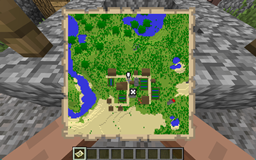
该插件允许你通过原版地图为用户提供一个迷你地图,无需任何客户端模组。
你可以配置渲染区块的比例、更新时间以及颜色。还有一个选项可以在迷你地图上显示其他玩家。
它还具备一个简单的路标系统,并提供自定义事件以在地图上显示自己的光标。(例如用于更高级的路标系统)
本插件基于 toxictroop 及其团队的想法:。请求帖
此插件会在每次 Minecraft 更新时失效。目前支持 1.5.2 至 1.10。
Beta Notice
此插件处于测试版状态。如果你发现任何错误,请报告它们。
此外,根据你的设置,此插件可能会消耗大量的 CPU、带宽和内存。
Usage
安装方式与所有 Bukkit 插件一样,只需下载并放入 plugins 文件夹即可。
首次运行后,插件应会创建一个带有默认值的默认配置文件。
当你启动服务器时,它会告诉你插件使用的地图 ID 以及获取该地图的命令(授予 OP 权限)。
Configuration
scale
定义地图的比例。1 个地图像素对应 scale*scale 个方块。较大的比例在首次运行时渲染地图需要更多的 CPU,但缓存数值时使用的内存更少。
runPerTicks
插件每隔多少刻(1 刻 = 1/20 秒)计算当前的渲染器队列。较高的值让服务器有更多时间从卡顿中恢复,较低的值则允许服务器更均匀地分配负载。(我推荐较低的值)
chunksPerRun
此值决定每次运行渲染多少个 16x16 像素的区块(地图区块)以及处理多少方块变化。较高的值会加快新区域的渲染速度,但在较短的时间内使用更多的 CPU 资源(如果有足够的任务可渲染)。每个地图区块仅在服务器启动后渲染一次。确保此值不要过低,否则渲染器的速度可能跟不上队列填充的速度。
fastTicks
此值允许你设置拥有 "minimap.fastupdate" 权限的用户获得完整地图更新的间隔时间(单位:刻,1 刻 = 1/20 秒)。每次完整发送的额外带宽使用量约为每更新一次每位玩家 16KiB。
canSeeOthers
激活后,每个玩家都可以在其迷你地图上看到其他玩家。如果插件修改了 MinimapPlayerCursorEvent,此行为可能会发生变化。
mapID
这是插件所使用的地图 ID。它将在每次服务器启动时显示在日志中。除非你确定已有使用新 ID 的地图,否则不建议更改此 ID。
showDistantWaypoints
设置是否将超出范围的航点显示在地图的角落。
mysql
在此部分中,你需要填写连接 MySQL 服务器所需的所有信息(如果你打算使用它)。需要提供主机、端口、用户名、密码和目标数据库。
worlds
此部分允许你为每个世界设置多项内容。其格式为:<世界名称>: <键>: <值>
可用的键包括:enabled
允许你在特定世界中禁用地图渲染器。默认情况下渲染器是启用的。
scale
与上述相同,但会覆盖默认值。
drawHeight
允许你设置渲染算法的上边界。(默认为世界的最大高度 - 255)
可用于洞穴映射等情况。(例如下界 Nether)
默认配置
scale: 1
chunksPerRun: 4
runPerTicks: 5
fastTicks: 20
canSeeOthers: true
showDistantWaypoints: false
mysql:
  enabled: false
  host: localhost
  port: 3306
  user: user
  pass: password
  database: database
worlds:
  world_nether:
    enabled: true
    drawHeight: 75
    scale: 2
命令
命令权限如下所示
/minimap - 给予你小地图物品
/waypoint help [command] - 提供关于该命令的信息
/waypoint add [x] [z] - 添加一个航点,可以是你的当前位置,也可以是指定的 x 和 z 坐标。
/waypoint list - 列出你所有的航点及其索引
/waypoint remove <index> - 移除索引为 <index> 的航点。注意:移除航点后,索引会发生变化。
/waypoint hide <index> [true|false] - 切换某个航点的可见性,或将其设置为给定的布尔值。
权限
minimap.fastupdate
每隔设定的刻数对玩家的小地图进行完整更新。会占用大量带宽。未启用此选项的玩家可能需要静止站立约5秒,小地图才会变得清晰。
minimap.command.minimap
允许你使用 /minimap 命令。
minimap.command.waypoint.help
允许你使用 /waypoint help 命令。
minimap.command.waypoint.list
允许你使用 /waypoint list 命令。
minimap.command.waypoint.add
允许你使用 /waypoint add 命令。
minimap.command.waypoint.remove
允许你使用 /waypoint remove 命令。
minimap.command.waypoint.hide
允许你使用 /waypoint hide 命令。
指标数据
本插件使用了 Hidendra 的插件指标系统。你可以在 <yourPluginFolder>/PluginMetrics/config.yml 中选择退出。
将收集以下信息:
- 一个唯一标识符
- 服务器的 Java 版本
- 服务器是否处于离线模式或在线模式
- 插件的版本号
- 服务器的实现类型和游戏版本
- 操作系统版本/名称及架构
- CPU 的核心数量
- 当前在线玩家数量
- 指标系统的版本号
- 你的在线模式设置
- 你的服务器位置
- 你在配置文件中设置的 scale、runPerTicks、fastTicks 和 chunksPerRun 的值

This plugin is not in active development anymore. I might update it for a new Minecraft version from time to time, but don't expect feature updates. The source code is available on GitHub, though. ;)
ServerMinimap
This plugin allows you to provide a minimap to your users, without any client mod by using the vanilla maps.
You can configure the scale, updatetime and colors at which blocks are rendered. There is also a option to show other players on the minimap.
It also features a simple waypoint system and custom events to display own cursors on the map. (E.g. for more advanced waypoint systems)
The plugin is based on a idea from toxictroop and the team at: . Request Thread
This plugin will break with every Minecraft update. It currently supports 1.5.2 to 1.10
Beta Notice
This plugin is in beta state. If you find bugs, please report them.
Also, this plugin can use big amounts of CPU, Bandwidth and RAM, depending on your settings.
Usage
Installing is, as every Bukkit plugin, just downloading and moving into the plugins folder.
After the first run, the plugin should create a default config with default values.
When you start up the server, it'll tell you which mapID the plugin uses together with a command to obtain the map a OP.
Configuration
scale
Defines the scale of the map. 1 map pixel is scale*scale blocks. Biggers scales need more CPU to render the map in the first run, while using less RAM to cache the values.
runPerTicks
After how much ticks (1/20 sec) the plugin should calculate the current renderer queue. Higher values give the server more time to recover from lag, lower values allow the server to distribute the load more evenly. (I recommend lower values)
chunksPerRun
This value determins who much 16x16 pixelblocks (map chunks) and block changes are rendered per run. Higher values will speed up the rendering of new areas, while using more CPU resources in a shorter timespan (if there is enough to render). Every map chunk is only rendered once after a server start. Make sure this value is not too low, otherwise the renderer may be slower than the queue is filled.
fastTicks
This value allows you to set the time in ticks (1/20 sec) after which users with the permission "minimap.fastupdate" get a complete update of the map. The additional bandwidth usage of every complete send is about 16KiB per Update, per player.
canSeeOthers
When activated, every player can see other player's on their minimap. This may be changed when plugins modify the MinimapPlayerCursorEvent.
mapID
This is the id of the map, the plugin uses. It will be shown every server startup in log. It is no recommended to change this id unless you know that a map with the new id already exists.
showDistantWaypoints
Sets whether waypoints, that are out of range, shall be displayed on the cornor of the map.
mysql
Under this section you need to put all needed information to connect to your MySQL server and if you want to use it. The host, port, username, password and the target database are needed.
worlds
This section allows you to set several things per world. It follows the format: <worldname>: <key>: <value>
possible keys are: enabled
Allows you to disable the map renderer in certain worlds. The renderer is enabled by default.
scale
Same as above but overrides the default value.
drawHeight
Allows you to set the upper border of the rendering algorythm. (Default the worlds max height - 255)
Use this for things like cave mapping. (e.g. Nether)
Default Configuration
scale: 1
chunksPerRun: 4
runPerTicks: 5
fastTicks: 20
canSeeOthers: true
showDistantWaypoints: false
mysql:
  enabled: false
  host: localhost
  port: 3306
  user: user
  pass: password
  database: database
worlds:
  world_nether:
    enabled: true
    drawHeight: 75
    scale: 2
Commands
Permissions for the commands can be found below
/minimap - gives you the minimap item
/waypoint help [command] - gives you information about this command
/waypoint add [x] [z] - adds a waypoint either on your current location, or to the specified x and z coordinates.
/waypoint list - lists all your waypoints together with their index
/waypoint remove <index> - removes the waypoint with the index <index>. Note: indcies change, when removing waypoints.
/waypoint hide <index> [true|false] - either toggles visibility of a waypoint, or sets it to the given boolean.
Permissions
minimap.fastupdate
Makes a full update of the player's minimap every defined amount of ticks. Uses big amounts of Bandwidth. Player's without this node may need to stand still for about 5 seconds to have a clear map.
minimap.command.minimap
Allows you to use the /minimap command.
minimap.command.waypoint.help
Allows you to use the /waypoint help command
minimap.command.waypoint.list
Allows you to use the /waypoint list command
minimap.command.waypoint.add
Allows you to use the /waypoint add command
minimap.command.waypoint.remove
Allows you to use the /waypoint remove command
minimap.command.waypoint.hide
Allows you to use the /waypoint hidecommand
Metrics
This plugin utilises Hidendra's plugin metrics system. You can opt-out under <yourPluginFolder>/PluginMetrics/config.yml
The following informations will be collected:
- A unique identifier
- The server's version of Java
- Whether the server is in offline or online mode
- The plugin's version
- The server's implementation and game version
- The OS version/name and architecture
- The core count for the CPU
- The number of players online
- The Metrics version
- Your online-mode
- Your server location
- Your config values for scale, runPerTicks, fastTicks, and chunksPerRun
下载 ServerMinimap
需要联机服务器吗?
稳定流畅、一键部署,几分钟即可和朋友联机开服
最低仅需 8 元/月 即可畅快联机
下载 ServerMinimap
下载 ServerMinimap
需要联机服务器吗?
稳定流畅、一键部署,几分钟即可和朋友联机开服
最低仅需 8 元/月 即可畅快联机
下载 ServerMinimap
需要联机服务器吗?
稳定流畅、一键部署,几分钟即可和朋友联机开服
最低仅需 8 元/月 即可畅快联机
下载 ServerMinimap
需要联机服务器吗?
稳定流畅、一键部署,几分钟即可和朋友联机开服
最低仅需 8 元/月 即可畅快联机
下载 ServerMinimap
需要联机服务器吗?
稳定流畅、一键部署,几分钟即可和朋友联机开服
最低仅需 8 元/月 即可畅快联机
下载 ServerMinimap
需要联机服务器吗?
稳定流畅、一键部署,几分钟即可和朋友联机开服
最低仅需 8 元/月 即可畅快联机
下载 ServerMinimap
下载 ServerMinimap
需要联机服务器吗?
稳定流畅、一键部署,几分钟即可和朋友联机开服
最低仅需 8 元/月 即可畅快联机
下载 ServerMinimap
需要联机服务器吗?
稳定流畅、一键部署,几分钟即可和朋友联机开服
最低仅需 8 元/月 即可畅快联机
* 添加了 1.18.1 兼容性
关于这个资源的讨论、问题反馈与使用心得
还没有讨论,来发第一帖吧
你是这个资源的作者?登录后可认领此资源。
相似资源
 插件
重新定义服务器上的生物运输方式。使用高度可定制的口袋道具,安全地捕获、存储和释放任何实体。
 插件

使床在所有维度中爆炸的模组
 插件
为 Armor Poser 模组添加兼容性
 插件

SkyBlock、OneBlock、Boxed、SkyGrid、AcidIsland、CaveBlock、Poseidon、StrangerRealms——以及更多!这些只是由 BentoBox 支持的基于岛屿的游戏模式之一。来自原版 ASkyBlock 的作者。
 插件
一个高度兼容、功能完善且稳定的 TPA 模组
 插件
AbAcc AbAcc 是一款适用于 Minecraft 服务器的管理插件,可简化玩家作弊检测与举报管理工作。工作人员可以发起并管理对可疑玩家的检查流程,并在检查完成后将其释放。
评论 0
登录后参与评分
还没有评论,来抢沙发吧