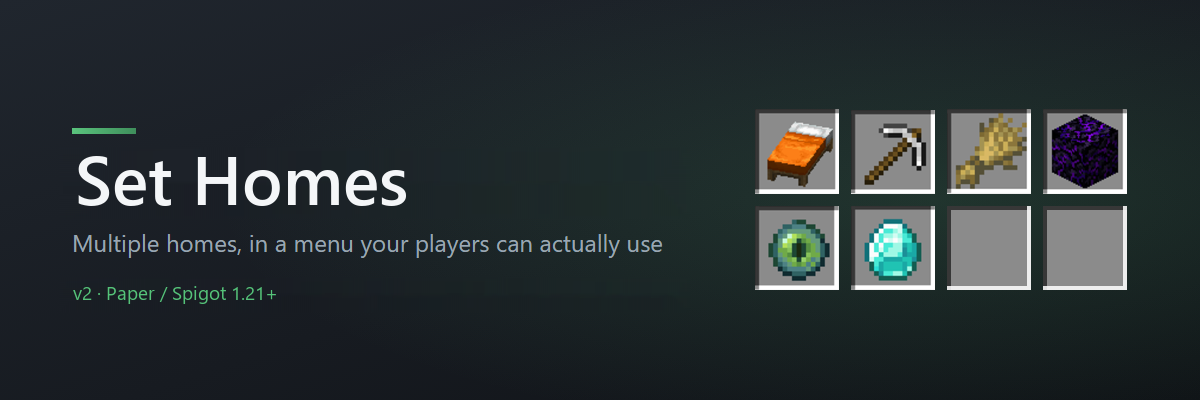
Set Homes 为每位玩家提供其家园的菜单。 左键点击即可传送。右键点击可重命名、移动、更改图标或删除它。
完整文档 | 报告错误 | 捐赠
为什么选择 Set Homes
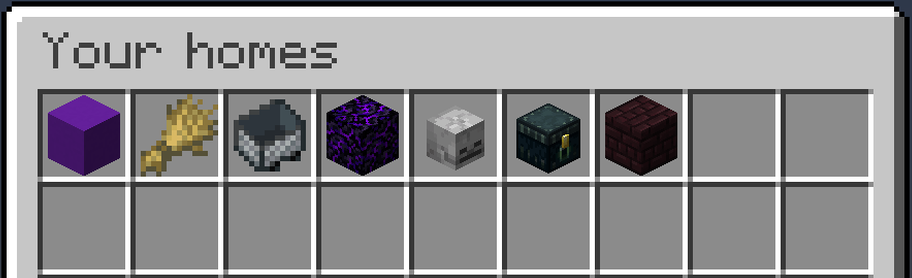
- 一个菜单,或一组命令。 家园存储在类似箱子的图形用户界面中。玩家通过
/homes 命令或右键点击配置的“家园物品”打开它。
- 每个家园都有独特的图标。 创建家园时可以选择任意 Minecraft 物品,或者之后将其更改为你当前手持的物品。基地、矿洞和农场不再千篇一律。
- 在游戏中重命名、移动和删除。 右键点击任何家园即可管理它。删除操作始终会先询问确认,因此没有人会因为误触而丢失基地。
- 安全的传送体验。 Set Homes 会检查目的地,并将你转移到最近的安全位置,而不是把你传送到方块内部、岩浆中或导致坠落伤害。
- 无缝切换且不丢失数据。
/import-homes essentialsx 会将所有 EssentialsX 的家园迁移过来,并在执行前预览具体操作。然后你可以移除 EssentialsX,因为两个插件都声称占用 /sethome 和 /home 命令。
- 基于权限组的家园数量限制。 可以通过 LuckPerms 组给予捐赠者比默认玩家更多的家园数量,或者设置整个服务器的统一上限。
- 可通过配置文件修改的权限。 每个
sh2.* 节点都有合理的默认值,并且可以在 config.yml 中调整。无需额外的权限插件。
快速开始
- 将 jar 文件放入
plugins 文件夹并重启服务器。
- 在你站立的位置运行
/sethome base。
- 运行
/homes 并点击它。
这就是完整的设置过程。玩家权限默认为已授予,因此插件加载后你的玩家即可立即创建和使用家园。
命令
| 命令 |
功能 |
/sethome [name] |
在你站立的位置创建一个家园。 |
/home [name] |
传送至指定家园。 |
/homes |
打开家园菜单。 |
/delhome <name> |
删除指定家园。 |
/uhome <name> |
将你指定的家园移动到你所站立的位置。 |
在 /sethome 和 /home 中名称是可选的。如果不提供名称,两者都将使用名为 default 的家园。
管理员还可以使用 /set-max-homes、/blacklist、/import-homes,以及查看、访问、移动和删除其他玩家家园的命令。完整命令列表(包含长格式和别名)请参见 GitHub。
管理家园
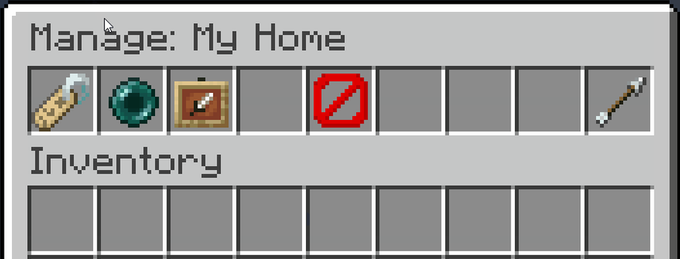
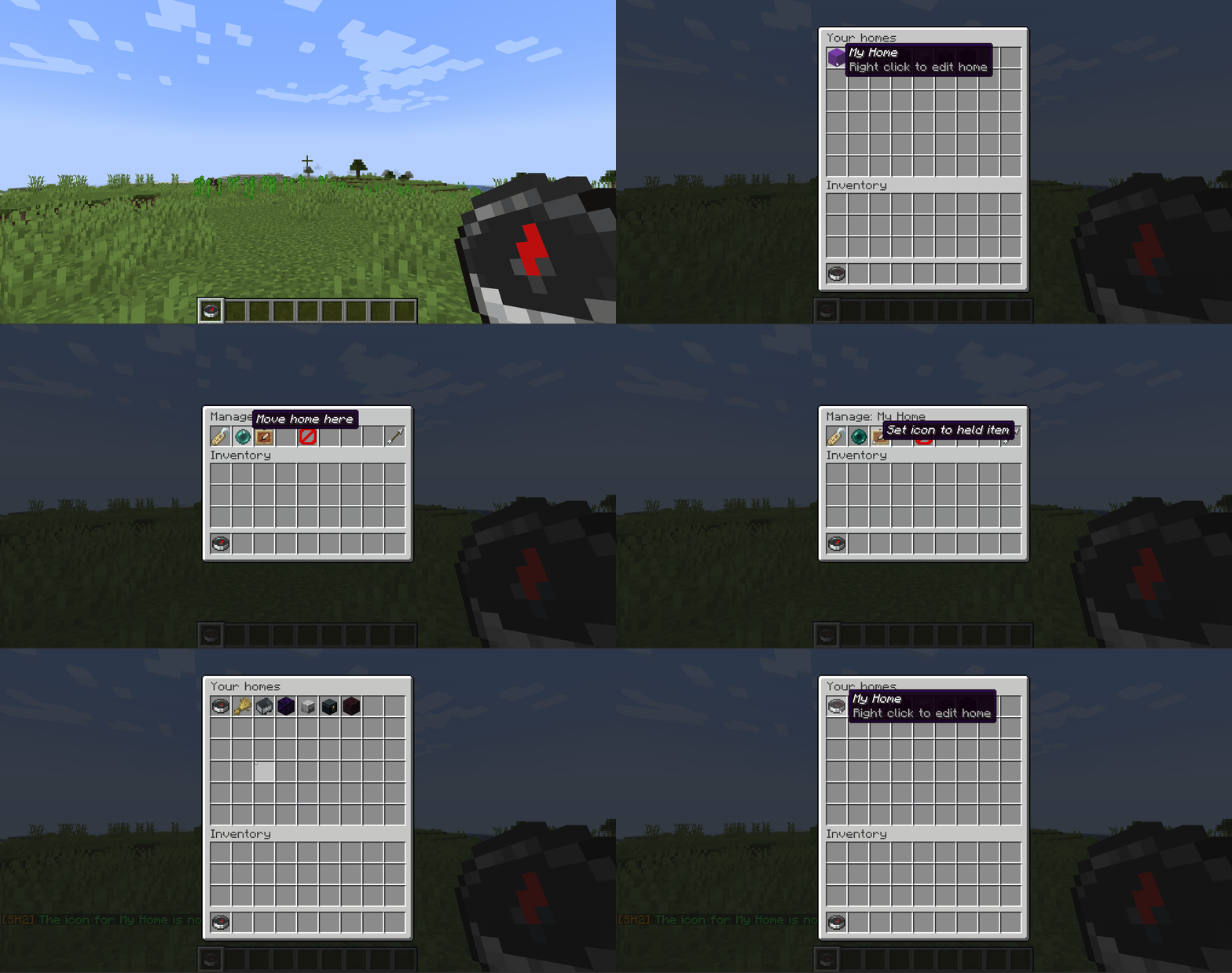
通过 /homes 打开家园菜单,或右键点击家园物品。左键点击家园进行传送,右键点击可重命名、将其移动到你站立的位置、将其图标设置为当前手持的物品,或将其删除(需确认)。
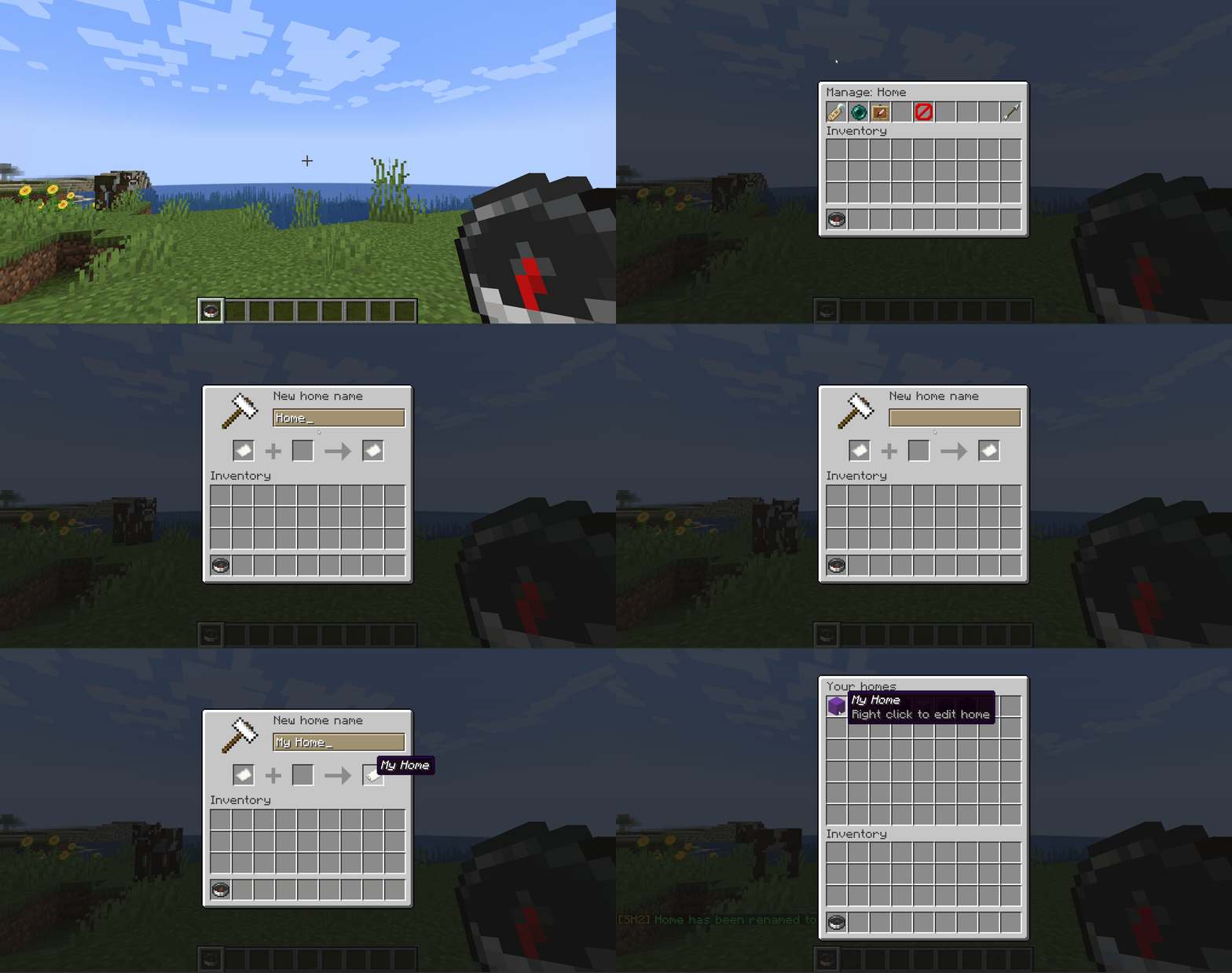
传送
默认情况下,玩家在传送触发前需要等待三秒,且移动会取消传送,因此家园不是战斗中的免费逃生手段。设置 delay: 0 可实现即时传送,或设置 cancelOnMove: false 允许玩家在倒计时期间行走。
在传送任何人之前,Set Homes 会检查目的地是否安全。如果家园已被掩埋、被岩浆淹没或悬挂在掉落物上方,玩家将被转移到最近的安全位置。可通过 teleportSafety: false 关闭此功能。
权限
这里不需要权限插件。开箱即用,每个玩家都可以创建、列出、传送至和管理自己的家园,而操作员(OP)则拥有所有其他权限。两个权限包涵盖了这些内容:
| 权限包 |
默认状态 |
包含内容 |
sh2.player |
所有人 |
普通玩家所需的所有节点 |
sh2.admin |
OP |
sh2.player,加上所有管理员和绕过节点 |
若要在不使用权限插件的情况下更改默认值,请在 config.yml 中取消注释 permissions: 块:
permissions:
  sh2.manage-homes: false
  sh2.get-player-homes: true
  sh2.import-homes: op
接受的值包括 true、false、op 和 not-op。如果你运行 LuckPerms 或其他类似插件,那里的显式授予或拒绝仍然具有最高优先级。完整权限列表请参见 GitHub。
配置
设置位于 plugins/SetHomesTwo/config.yml 中,该文件在插件首次启动时生成。编辑它,保存,然后重启服务器。文件中包含全程注释,插件发送的所有消息均可在此重写。大多数服务器会修改的设置如下:
| 设置项 |
默认值 |
功能 |
delay |
3 |
传送前必须静止不动的秒数。0 表示即时。 |
cancelOnMove |
true |
如果在倒计时期间玩家移动,则取消传送。 |
teleportSafety |
true |
转移到最近的安全位置,而不是传送到危险区域。 |
maxHomeEnabled |
false |
启用家园数量限制。 |
maxHomesType |
groups |
singular 用于单一全服限制,groups 用于基于权限组的限制。 |
openHomeItem |
compass |
玩家右键点击以打开菜单的物品。 |
每个排名的限制需要 LuckPerms。其余配置均在 default-config.yml 中,这是你的 config.yml 首次生成时所依据的文件。
要求
- Paper 或 Spigot 1.21+
- Java 21(Minecraft 1.21 服务器已必需)
- 可选:LuckPerms,仅用于按排名设置的家数量限制
支持
GitHub 上的 README 包含了完整的命令与权限列表、EssentialsX 导入指南、常见问题解答(FAQ)以及更新日志。
发现 Bug 或有功能建议?请在 GitHub 上提交 Issue。其响应速度比在此页面留言更快。
源代码 | 报告 Bug | 捐赠
Set Homes gives every player a menu of their homes. Left-click one to teleport. Right-click it to rename it, move it, change its icon, or delete it.
Full documentation | Report a bug | Donate
Why Set Homes
- A menu, or a list of commands. Homes live in a chest-style GUI. Players open it with
/homes or by right-clicking the configured "Home Item".
- Every home gets its own icon. Pick any Minecraft item when you create a home, or change it later to whatever you are holding. A base, a mine and a farm stop looking identical.
- Rename, move and delete in-game. Right-click any home to manage it. Deleting always asks first, so nobody loses a base to a misclick.
- Teleports that do not kill you. Set Homes checks the destination and relocates you to the nearest safe spot rather than dropping you into blocks, lava, or a fall.
- Switch without losing anything.
/import-homes essentialsx brings every EssentialsX home across, and previews exactly what it will do before it does it. Then remove EssentialsX, since both plugins claim /sethome and /home.
- Per-rank home limits. Give donors more homes than default players with LuckPerms groups, or set one server-wide limit.
- Permissions you can change from the config. Every
sh2.* node has a sensible default, and any of them can be moved in config.yml. No permissions plugin required.
Quick start
- Drop the jar into your
plugins folder and restart the server.
- Run
/sethome base where you are standing.
- Run
/homes and click it.
That is genuinely the whole setup. Player permissions default to granted, so your players can create and use homes the moment the plugin loads.
Commands
| Command |
What it does |
/sethome [name] |
Creates a home where you stand. |
/home [name] |
Teleports you to a home. |
/homes |
Opens the homes menu. |
/delhome <name> |
Deletes a home. |
/uhome <name> |
Moves one of your homes to where you are standing. |
Names are optional on /sethome and /home. Leave the name off and both use a home called default.
Admins also get /set-max-homes, /blacklist, /import-homes, and commands to view, visit, move and delete other players' homes. The full command list, with long forms and aliases, is on GitHub.
Managing homes
Open your homes with /homes, or right-click the homes item. Left-click a home to teleport, right-click it to rename it, move it to where you are standing, set its icon to the item you are holding, or delete it (with a confirmation).
Teleporting
By default players wait three seconds before a teleport fires, and moving cancels it, so a home is not a free escape from a fight. Set delay: 0 for instant teleports, or cancelOnMove: false to let players walk during the countdown.
Before it drops anyone anywhere, Set Homes checks the destination is safe to stand in. If a home has been built over, flooded with lava, or left hanging above a drop, the player is moved to the nearest safe spot instead. Turn it off with teleportSafety: false.
Permissions
Nothing here needs a permissions plugin. Out of the box, every player can create, list, teleport to and manage their own homes, and operators get everything else. Two bundles cover it:
| Bundle |
Default |
Contains |
sh2.player |
everyone |
Every node an ordinary player needs |
sh2.admin |
OP |
sh2.player, plus every admin and bypass node |
To change a default without a permissions plugin, uncomment the permissions: block in config.yml:
permissions:
  sh2.manage-homes: false
  sh2.get-player-homes: true
  sh2.import-homes: op
Accepted values are true, false, op and not-op. If you run LuckPerms or similar, an explicit grant or deny there still wins. The full permission list is on GitHub.
Configuration
Settings live in plugins/SetHomesTwo/config.yml, written the first time the plugin starts. Edit it, save, then restart the server. The file is commented throughout, and every message the plugin sends can be rewritten in it. The settings most servers change:
| Setting |
Default |
What it does |
delay |
3 |
Seconds you must stand still before teleporting. 0 is instant. |
cancelOnMove |
true |
Cancel the teleport if the player moves during the countdown. |
teleportSafety |
true |
Relocate to the nearest safe spot instead of teleporting into danger. |
maxHomeEnabled |
false |
Turn home limits on. |
maxHomesType |
groups |
singular for one server-wide limit, groups for per-rank limits. |
openHomeItem |
compass |
The item players right-click to open the menu. |
Per-rank limits need LuckPerms. Everything else is in default-config.yml, the file your config.yml is first written from.
Requirements
- Paper or Spigot 1.21+
- Java 21, which Minecraft 1.21 servers already require
- Optional: LuckPerms, only for per-rank home limits
Support
The README on GitHub has the full command and permission lists, the EssentialsX import guide, an FAQ and the changelog.
Found a bug or want a feature? Open an issue on GitHub. It gets seen faster than a comment on this page.
Source | Report a bug | Donate


 插件
 插件
 插件

 插件

 插件

 插件

评论 0
登录后参与评分
还没有评论,来抢沙发吧