
为玩家创建可互动的兴趣点,完全契合你的服务器主题以及 AirHead 所扮演的角色。你可以随意创建任意数量,并对每一个细节进行定制。该插件完全独立运行,且为开源项目。
此插件需要 Packet Events!
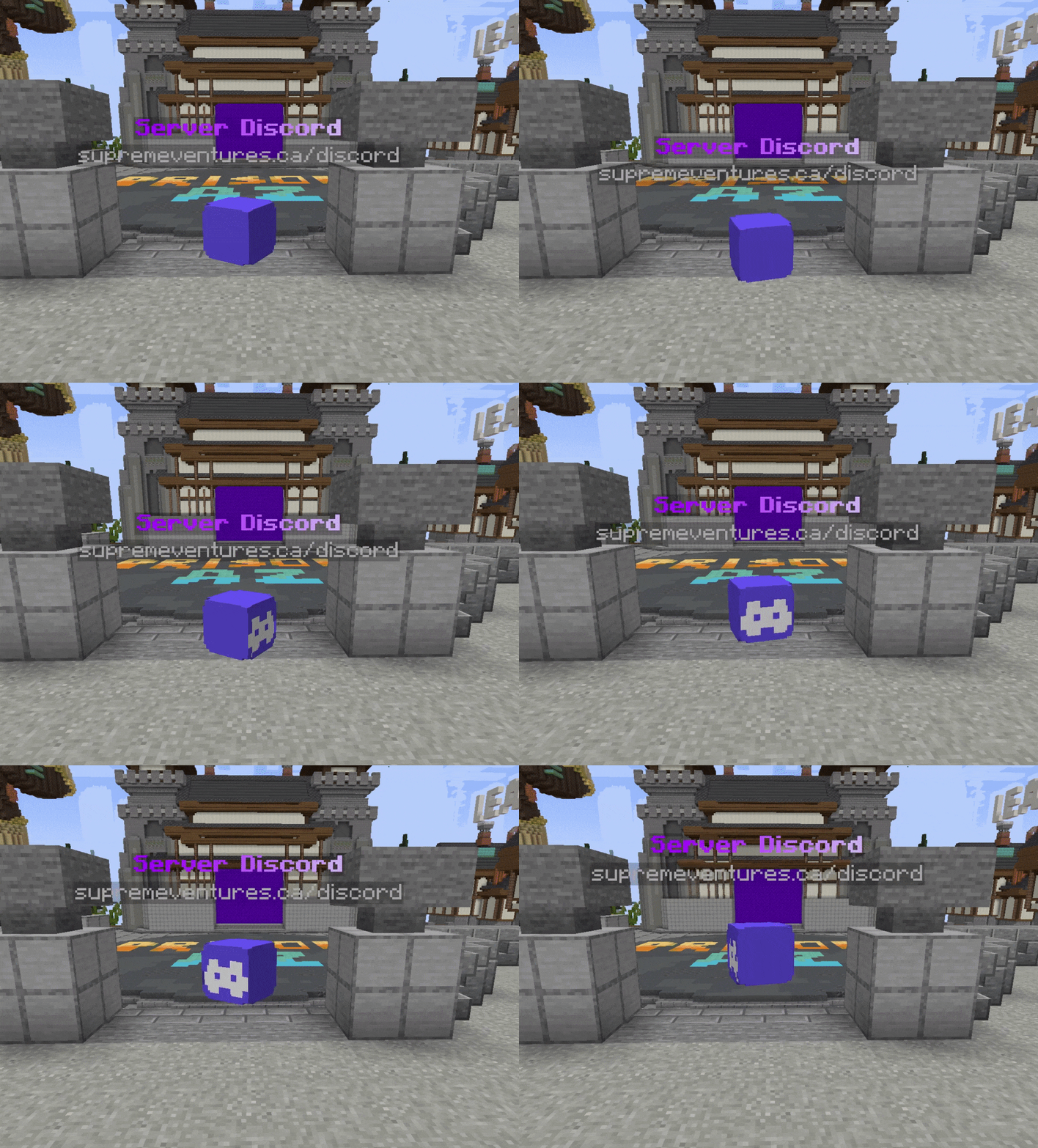
主要特性
-
支持版本:1.20.5 - 1.21.8
-
创建无限个独特的 AirHeads,并将它们放置在任何地方!
-
自定义每个 AirHeads 的动画、外观和行为。
-
轻量且高效。不会因真实实体拖慢服务器性能。
-
提供强大的开发者 API,让您随时随地产出 AirHeads。
-
使用新的 1.20+ TextDisplay 实体(背景颜色、Billboard Display 等)实现内部全息投影效果。
-
头部缩放范围从正常大小的 5% 到最大 10 倍。
-
可发送消息、播放声音、执行控制台命令或模拟玩家执行命令。
-
为 AirHead 添加方块叠加层,为您的 AirHeads 增添更多层次感。
-
支持 Velocity Send-To-Server
配置
airheads:
  levels:
    # AirHead 生成的位置。
    location:
      world: test_world
      x: -438.0
      y: -38.0
      z: 293.0
      yaw: 0.0 # 如果禁用了旋转,则使用此值
      pitch: 0.0 # 如果禁用了旋转,则使用此值
    hologram-text-display-settings:
      # 全息图随玩家旋转的方式。
      # 选项:
      # FIXED - 全息图完全不旋转。
      # VERTICAL - 全息图随玩家旋转,但仅在 Y 轴上。
      # HORIZONTAL - 全息图随玩家旋转,但仅在 X 轴上。
      # CENTERED - 全息图在所有轴向上随玩家旋转。
      billboard-constraints: VERTICAL
      # 文本在全息图中的自动对齐方式。
      # 选项:
      # LEFT - 文本左对齐。
      # CENTERED - 文本居中对齐。
      # RIGHT - 文本右对齐。
      text-alignment: CENTERED
      hologram-text:
        - <#ADBED1><st>--</st> <#fded07><bold>玩家等级</bold> <#ADBED1><st>--</st>
        - <gray>1.20.5 - 1.21.5
      # 全息图距离 AirHead 上方的垂直距离。
      hologram-offset: 0.5
      # 缩放全息图的大小。范围在 0.1 到 10.0 之间。
      scale-x: 1.0
      scale-y: 1.0
      scale-z: 1.0
      # 如何平移全息图的位置(高级用户)
      translation-x: 0.0
      translation-y: 0.0
      translation-z: 0.0
      # 覆盖全息图的宽度/高度。
      # 如果文本尺寸更大,将被覆盖。
      width: 200
      height: 50
      # 全息图上的文本是否有阴影?
      has-text-shadow: false
      # 全息图背景是否透明?
      transparent-background: true
      # 如果不透明,背景是什么颜色?
      # 使用 ARGB 格式。#AARRGGBB
      background-color: '#40000000'
      # 全息图阴影的半径。
      shadow-radius: 0.0
      # 全息图阴影的强度。
      shadow-strength: 0.0
      # 全息图更新占位符的频率。
      # 如果不使用占位符或占位符不变化,设为 -1 以禁用。
      update-interval-ticks: 5
      # 全息图可见的最大距离。
      render-distance: 100
      # 全息图的俯仰角和偏航角。
      pitch: 0.0
      yaw: 0.0
    appearance-settings:
      # 头部的 Base64 编码纹理。
      head-texture: eyJ0ZXh0dXJlcyI6eyJTS0lOIjp7InVybCI6Imh0dHA6Ly90ZXh0dXJlcy5taW5lY3JhZnQubmV0L3RleHR1cmUvMWUzMWRhZWEzMGU1NzFiYjhiZGZhMGM2ZDJjOGVhMWJjNzIxYTRiMTJhY2NmN2RhNDM4YjZmMDU5OGJmMDg4NiJ9fX0=
      # 头部的缩放比例。范围在 0.1 到 10.0 之间。
      scale: 2.0
      # 覆盖在头部上方的材质(类似头盔)
      # AIR - 无覆盖层,仅显示头部。
      overlay-material: YELLOW_STAINED_GLASS
叠加层(Overlay)的缩放比例。 (头盔会变大多少)
  overlay-offset: 0.45
interact-settings:
  # 玩家在每次交互时执行的命令
  interact-commands:
    - levels
  # 玩家在每次左键点击时执行的命令
  left-click-commands: []
  # 玩家在每次右键点击时执行的命令
  right-click-commands: []
  # 控制台在每次交互时执行的命令
  console-commands: []
  # 控制台在每次左键点击时执行的命令
  left-click-console-commands: []
  # 控制台在每次右键点击时执行的命令
  right-click-console-commands: []
  # 每次交互时发送给玩家的消息
  interact-message: []
  # 每次交互时播放给玩家的声音
  sound-settings:
    volume: 1.0
    pitch: 1.0
    sound: minecraft:entity.player.levelup
    enabled: true
  # 当玩家与 AirHead 交互时,将其传送至另一个服务器。
  # 留空以禁用此功能。
  send-to: "factions"
animation-settings:
  # 头部是否应上下浮动?
  do-float: true
  # 头部应在起始位置上方和下方浮动多远
  float-up-max: 0.5
  float-down-max: 0.5
  # 动画完成一个上下循环所需的时长(整数刻)。
  # 数值越大 = 速度越慢
  float-cycle-duration-ticks: 80
    # 头部是否应旋转?
  do-rotation: true
  # 头部每刻旋转的速度(以度为单位)。
  # 数值越大 = 速度越快
  rotation-per-tick: 5
Create points of interest for players to interact with, completely themed to match your server & the role the AirHead plays. Create as many as you like, customizing each one down to the letter. It runs completely standalone and is open source.
This plugin requires Packet Events!
Key Features
- 1.20.5 - 1.21.8 Supported
- Create unlimited unique AirHeads, put them everywhere!
- Configure each AirHeads animation, appearance, and behavior.
- Lightweight & fast. No real entities bogging down your server.
- Powerful developer API for spawning AirHeads wherever & whenever you want.
- Internal Holograms using new 1.20+ TextDisplay entities (Background color, Billboard Display, etc)
- Scale heads up to 10x normal size, and down to 5% of normal size.
- Sends messages, play sounds, dispatch console commands or execute commands as the player.
- Add block-overlays to the AirHead, to add another layer of depth to your AirHeads.
- Velocity Send-To-Server support
Config
airheads:
  levels:
    # The location the AirHead will spawn at.
    location:
      world: test_world
      x: -438.0
      y: -38.0
      z: 293.0
      yaw: 0.0 # Used if rotation is disabled
      pitch: 0.0 # Used if rotation is disabled
    hologram-text-display-settings:
      # How the hologram rotates with the player.
      # Options:
      # FIXED - Hologram doesn't rotate at all.
      # VERTICAL - Hologram rotates with the player, but only on the Y axis.
      # HORIZONTAL - Hologram rotates with the player, but only on the X axis.
      # CENTERED - Hologram rotates with the player on all axes.
      billboard-constraints: VERTICAL
      # How text is auto aligned in the hologram.
      # Options:
      # LEFT - Text is aligned to the left.
      # CENTERED - Text is aligned to the center.
      # RIGHT - Text is aligned to the right.
      text-alignment: CENTERED
      hologram-text:
        - <#ADBED1><st>--</st> <#fded07><bold>ᴘʟᴀʏᴇʀ ʟᴇᴠᴇʟꜱ</bold> <#ADBED1><st>--</st>
        - <gray>1.20.5 - 1.21.5
      # How far above the AirHead the hologram is.
      hologram-offset: 0.5
      # How big/small to scale the hologram. Between 0.1 and 10.0
      scale-x: 1.0
      scale-y: 1.0
      scale-z: 1.0
      # How to translate the holograms position (Advanced users)
      translation-x: 0.0
      translation-y: 0.0
      translation-z: 0.0
      # Override the width/height of the hologram.
      # Will be override if text size is larger.
      width: 200
      height: 50
      # Does text on the hologram have a shadow?
      has-text-shadow: false
      # Is the hologram background transparent?
      transparent-background: true
      # If not transparent, what color is the background?
      # Uses ARGB format. #AARRGGBB
      background-color: '#40000000'
      # The radius of the hologram shadow.
      shadow-radius: 0.0
      # The strength of the hologram shadow.
      shadow-strength: 0.0
      # How often does the hologram update placeholders.
      # -1 to disable if not using placeholders are used or change.
      update-interval-ticks: 5
      # How far away should the hologram be visible.
      render-distance: 100
      # Hologram pitch and yaw.
      pitch: 0.0
      yaw: 0.0
    appearance-settings:
      # Head texture in base64 format.
      head-texture: eyJ0ZXh0dXJlcyI6eyJTS0lOIjp7InVybCI6Imh0dHA6Ly90ZXh0dXJlcy5taW5lY3JhZnQubmV0L3RleHR1cmUvMWUzMWRhZWEzMGU1NzFiYjhiZGZhMGM2ZDJjOGVhMWJjNzIxYTRiMTJhY2NmN2RhNDM4YjZmMDU5OGJmMDg4NiJ9fX0=
      # Scale of the head. Between 0.1 and 10.0
      scale: 2.0
      # Material overlapping the head (like a helmet)
      # AIR - No overlay, just the head.
      overlay-material: YELLOW_STAINED_GLASS
      # How much larger to scale the overlay. (How much bigger is the helmet)
      overlay-offset: 0.45
    interact-settings:
      # Executed by the player on every interact
      interact-commands:
        - levels
      # Executed by the player on every left-click
      left-click-commands: []
      # Executed by the player on every right-click
      right-click-commands: []
      # Executed by the console on every interact
      console-commands: []
      # Executed by the console on every left-click
      left-click-console-commands: []
      # Executed by the console on every right-click
      right-click-console-commands: []
      # Message sent to the player on every interact
      interact-message: []
      # Sound played to the player on every interact
      sound-settings:
        volume: 1.0
        pitch: 1.0
        sound: minecraft:entity.player.levelup
        enabled: true
      # Send a player to another server when they interact with the AirHead.
      # leave empty to disable.
      send-to: "factions"
    animation-settings:
      # Should the head float up and down?
      do-float: true
      # How far above and below the starting position should it float
      float-up-max: 0.5
      float-down-max: 0.5
      # How long, int ticks, should the animation take to run 1 up-down cycle.
      # Higher = slower
      float-cycle-duration-ticks: 80
        # Should the head rotate?
      do-rotation: true
      # How fast, in degrees, should the head rotate per tick.
      # Higher = faster
      rotation-per-tick: 5

下载 ShockAirHeads
需要联机服务器吗?
稳定流畅、一键部署,几分钟即可和朋友联机开服
最低仅需 8 元/月 即可畅快联机
下载 ShockAirHeads
需要联机服务器吗?
稳定流畅、一键部署,几分钟即可和朋友联机开服
最低仅需 8 元/月 即可畅快联机
下载 ShockAirHeads
需要联机服务器吗?
稳定流畅、一键部署,几分钟即可和朋友联机开服
最低仅需 8 元/月 即可畅快联机
下载 ShockAirHeads
需要联机服务器吗?
稳定流畅、一键部署,几分钟即可和朋友联机开服
最低仅需 8 元/月 即可畅快联机
下载 ShockAirHeads
需要联机服务器吗?
稳定流畅、一键部署,几分钟即可和朋友联机开服
最低仅需 8 元/月 即可畅快联机
下载 ShockAirHeads
需要联机服务器吗?
稳定流畅、一键部署,几分钟即可和朋友联机开服
最低仅需 8 元/月 即可畅快联机
下载 ShockAirHeads
需要联机服务器吗?
稳定流畅、一键部署,几分钟即可和朋友联机开服
最低仅需 8 元/月 即可畅快联机
下载 ShockAirHeads
需要联机服务器吗?
稳定流畅、一键部署,几分钟即可和朋友联机开服
最低仅需 8 元/月 即可畅快联机
下载 ShockAirHeads
需要联机服务器吗?
稳定流畅、一键部署,几分钟即可和朋友联机开服
最低仅需 8 元/月 即可畅快联机
下载 ShockAirHeads
需要联机服务器吗?
稳定流畅、一键部署,几分钟即可和朋友联机开服
最低仅需 8 元/月 即可畅快联机
快速更新以支持 Minecraft 1.21.11(以及上次发布至今之间的版本)
关于这个资源的讨论、问题反馈与使用心得
还没有讨论,来发第一帖吧
你是这个资源的作者?登录后可认领此资源。
相似资源
 插件

PacketEvents 是一款专为 Minecraft Java 版打造的协议库,旨在简化数据包的处理与传输。
 插件
ExyliaPlugins 的库。
 插件
通过对话框或铁砧界面帮助你的 Anthme
 插件
自定义你的Minecraft头像!
 插件
重新定义服务器上的生物运输方式。使用高度可定制的口袋道具,安全地捕获、存储和释放任何实体。
 插件
为基于 Spigot/Paper/Folia 的服务器添加对 Vivecraft 的支持
评论 0
登录后参与评分
还没有评论,来抢沙发吧