SignChestLock - 基于告示牌的箱子锁定
概述
SignChestLock 是一款轻量级的、基于告示牌的容器锁定插件,适用于 Minecraft 服务器。在箱子上放置一个告示牌即可将其用作锁,并通过告示牌的行内容来控制访问权限。
主要功能
核心保护
- 基于告示牌的锁定 - 在第一行放置带有 [Lock] 或 [Locked] 的告示牌以保护箱子
- 所有者控制 - 告示牌的第二行设置箱子所有者
- 受信任玩家 - 在第 3 和第 4 行授予最多 2 名受信任玩家的访问权限
- 爆炸保护 - 被锁定的箱子无法被爆炸破坏
- 防火保护 - 被锁定的箱子不会燃烧或被引燃
- 活塞保护 - 被锁定的箱子不会被活塞移动
- 破坏保护 - 只有所有者和受信任的玩家才能破坏被锁定的箱子
容器保护
- 双层箱子支持 - 自动将双层箱子的两半视为一个被锁定的单元
- 漏斗拦截 - 漏斗无法从被锁定的箱子中提取物品
- 发射器拦截 - 发射器无法向被锁定的箱子中插入物品
- 漏斗矿车拦截 - 漏斗矿车无法从被锁定的箱子中拾取物品
- 比较器抑制 - 读取被锁定箱子的比较器返回零信号
告示牌锁定机制
- 锁定关键词 - 在第一行使用 [Lock] 或 [Locked] 激活锁定
- 所有者行 - 第二行为所有者(自动填充放置者的名称)
- 受信任玩家 - 第 3 和第 4 行用于填写受信任玩家的名称
- 编辑保护 - 创建后,只有所有者可以编辑该锁定告示牌
命令
/signchestlock info - 显示你正看着的被锁定箱子的信息
/signchestlock reload - 重新加载配置文件
/signchestlock help - 显示帮助信息
权限
signchestlock.use - 允许玩家创建和管理锁定告示牌
signchestlock.admin - 完全管理权限,包括重载命令
signchestlock.bypass - 绕过锁定并访问任何被锁定的箱子
配置
插件包含位于 plugins/SignChestLock/ 目录下的 config.yml 文件,其中包含可自定义的选项,包括消息和行为开关。
快速安装
- 下载
SignChestLock.jar 文件
- 将其放入服务器的
plugins 文件夹中
- 启动服务器
- 如有需要,在
plugins/SignChestLock/config.yml 中自定义设置
就这样!在箱子旁边放置一个第一行为 [Lock] 的告示牌即可创建锁定。
使用方法
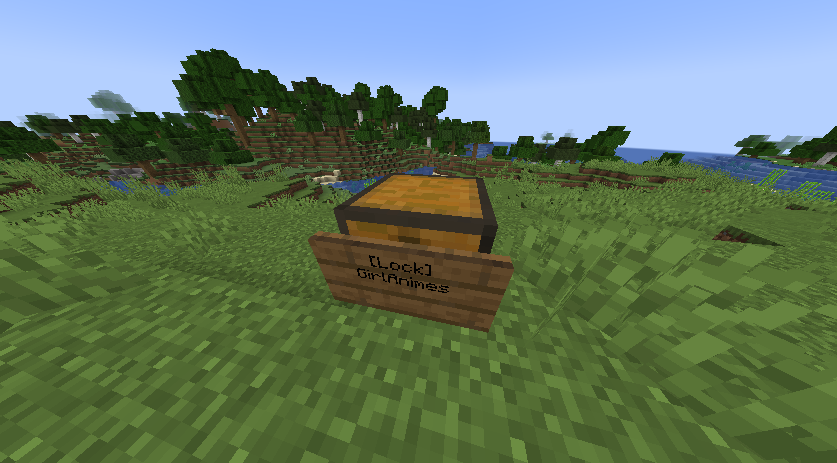
- 在箱子上放置一个告示牌,第一行写上 [Lock] 或 [Locked]
- 第二行会自动填充你的名字作为所有者
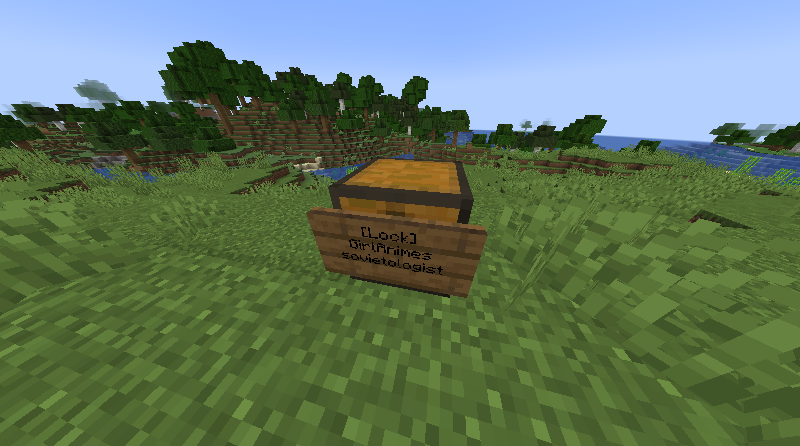
- 在第 3 和第 4 行添加受信任玩家的名称(可选)
- 只有你和受信任的玩家才能打开箱子
- 箱子受到防爆炸、防火、防活塞和防漏斗的保护
截图
!Example
()
!Add multiple users
要求
- Paper 或 Spigot 服务器
- Java 21 或更高版本
用简单的告示牌保护你的箱子!
SignChestLock - Sign-Based Chest Locking
Overview
SignChestLock is a lightweight sign-based container locking plugin for Minecraft servers. Place a sign on a chest and use it as a lock. Control access through the sign lines.
Key Features
Core Protection
- Sign-Based Locking - Place a sign with [Lock] or [Locked] on Line 1 to protect chests
- Owner Control - The chest owner is set on Line 2 of the sign
- Trusted Players - Grant access to up to 2 trusted players on Lines 3 and 4
- Explosion Protection - Locked chests cannot be destroyed by explosions
- Fire Protection - Locked chests cannot burn or ignite
- Piston Protection - Locked chests cannot be moved by pistons
- Breaking Protection - Only the owner and trusted players can break locked chests
Container Protection
- Double Chest Support - Automatically treats both halves of double chests as one locked unit
- Hopper Blocking - Hoppers cannot extract items from locked chests
- Dropper Blocking - Droppers cannot insert items into locked chests
- Hopper Minecart Blocking - Hopper minecarts cannot pick up items from locked chests
- Comparator Suppression - Comparators reading locked chests return zero signal
Sign Lock Mechanics
- Lock Keywords - Use [Lock] or [Locked] on the first line to activate the lock
- Owner Line - Second line is the owner (auto-filled with placer name)
- Trusted Players - Lines 3 and 4 for trusted player names
- Edit Protection - Only the owner can edit the lock sign after creation
Commands
/signchestlock info - Display information about a locked chest you're looking at
/signchestlock reload - Reload the configuration file
/signchestlock help - Display help information
Permissions
signchestlock.use - Allow players to create and manage lock signs
signchestlock.admin - Full administrative access, including reload command
signchestlock.bypass - Bypass locks and access any locked chest
Configuration
The plugin includes a config.yml file in plugins/SignChestLock/ with customizable options including messages and behavior toggles.
Quick Setup
- Download the
SignChestLock.jar file
- Place it in your server's
plugins folder
- Start your server
- Customize settings in
plugins/SignChestLock/config.yml if needed
That's it! Create a lock by placing a sign with [Lock] on Line 1 next to a chest.
How to Use
- Place a sign on a chest with [Lock] or [Locked] on the first line
- The second line will auto-fill with your name as the owner
- Add trusted player names on lines 3 and 4 (optional)
- Only you and trusted players can open the chest
- The chest is protected from explosions, fire, pistons, and hoppers
Screenshots
!Example
()
!Add multiple users

Requirements
- Paper or Spigot server
- Java 21 or higher
Protect your chests with simple signs!
评论 0
登录后参与评分
还没有评论,来抢沙发吧