SignWithLink - 在告示牌中添加链接
描述:
你想在告示牌上添加链接吗?现在你可以做到了!通过 SignWithLink,你可以在告示牌上设置一个链接名称(LinkName),当你右键点击时,PAM 会向你广播该 URL!
安装 SignWithLink 的方法:
- 停止服务器!
- 下载文件:向上/向右。
- 将其放入你的 Bukkit 插件文件夹中。
- 启动服务器。
- 停止服务器。
- 配置配置文件。
- 启动服务器。
- 享受吧!
命令:
- /swl ? - 显示插件的帮助页面。
- /swl add <UrlName> <Url> - 添加带有特定名称的 URL。
- /swl remove <UrlName> - 移除 URL 及其名称。
- /swl change <UrlName> <NewUrl> - 更改特定 URL 名称对应的 URL。
- /swl reload - 重新加载配置文件。
权限:
如果没有指定权限,默认仅管理员(OP)可用。
权限 signwithlink.sign.use 对所有玩家默认开放!
- signwithlink.admin - 访问所有命令并允许使用和创建告示牌。
- signwithlink.commands - 访问所有命令。
- signwithlink.sign - 允许创建和使用告示牌。
- signwithlink.use - 访问命令 /swl。
- signwithlink.use.help - 访问命令 /swl ?。
- signwithlink.use.add - 访问命令 /swl add <UrlName> <Url>。
- signwithlink.use.remove - 访问命令 /swl remove <UrlName>。
- signwithlink.use.change - 访问命令 /swl change <UrlName> <NewUrl>。
- signwithlink.use.reload - 访问命令 /swl reload。
- signwithlink.sign.use - 允许使用告示牌。
- signwithlink.sign.create - 允许创建告示牌。
更新检查器:
此插件包含更新检查功能。因此,当你启动服务器时,插件将检查更新;你可以通过修改配置文件中的“启动时检查更新”(Check Updates on Start)选项为 false 来禁用此功能。
如果服务器上有管理员(Op)或拥有权限 seeplayerinventory.checkupdates 的玩家登录,插件也会检查更新;若要禁用此功能,请在配置文件中将“登录时检查更新”(Check Updates On Login)设置为 false。
颜色代码:

Links.yml:
这是 links.yml 的一个示例,这里只有 4 个示例,但你可以存储多于两个的链接。
Links:
example:
example1:
example2:
example3:
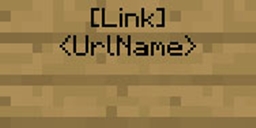
告示牌示例:
输入告示牌格式:
第一行可以通过在设置中更改以下行来修改:“输入行 0: '[Link]'”

更新日志:
版本 1.5
- * 修复了一些小错误
- + 添加了与 CraftBukkit 1.10 的兼容性
版本 1.4
- ! 重构代码。
- * 修复 links.yml 的错误。
- * 修复告示牌的错误。
- ! 更改了 config.yml,现在它将包含注释。
- + 添加了与 CraftBukkit 1.7.2 R0.3 的兼容性。
版本 1.3
- ! 将插件名称从 SignWitchLink 更改为 SignWithLink
- ! 将所有权限从 signwitchlink.ExampleNode 更改为 signwithlink.ExampleNode
- * 修复更新检查器的错误。
版本 1.2
- + 兼容 CraftBukkit 1.6.2 R1。
- + 添加更新检查器。
- + 添加新文件 "links.yml"。现在链接将存储在此文件中,而不是在配置文件中!
- + 为告示牌上的 <urlName> 添加颜色。你可以在配置中进行设置。
- + 添加 Metrics
版本 1.1
- + 兼容 CraftBukkit 1.5.2 R1。
- + 支持颜色代码 "&"。现在你可以使用 & 来表示颜色代码。
版本 1.0
已知错误:
目前没有任何已知错误。
我的其他插件:
SeePlayerInventory:
Metrics:

有关 Metrics 的更多信息,请点击此处
感谢超过 2000 次下载!
SignWithLink - Add Link To a Sign
Description:
Did you want do add a link to a sign? Now your can it! With SignWithLink you can add a LinkName to a sign and then when you do right click, PAM it broadcast you the Url!!!
How to install SignWithLink :
- Stop the server!
- Download the file: Up/Right.
- Drop it in your plugin bukkit folder.
- Start the server.
- Stop the server.
- Configure the config.
- Start the server.
- Enjoy!
Commands:
- /swl ? - Show the help page from the plugin.
- /swl add <UrlName> <Url> - Add a Url with a specific Name.
- /swl remove <UrlName> - Remove a Url and urlname.
- /swl change <UrlName> <NewUrl> - Change from the url from specific urlname.
- /swl reload - Reload the config.
Permissions:
Without permissions, it defaults to OPs.
The permissions signwithlink.sign.use is default for all!
- signwithlink.admin - Access to all command and allow to use and create sign-
- signwithlink.commands - Access to all command.
- signwithlink.sign - Allow to create and use sign.
- signwithlink.use - Access to the command /swl
- signwithlink.use.help - Access to the command /swl ?
- signwithlink.use.add - Access to the command /swl add <UrlName> <Url>
- signwithlink.use.remove - Access to the command /swl remove <UrlName>
- signwithlink.use.change - Access to the command /swl change <UrlName> <NewUrl>
- signwithlink.use.reload - Access to the command /swl reload
- signwithlink.sign.use - Allow to use a sign.
- signwithlink.sign.create - Allow to create a sign.
Update Checker:
This plugin has a update checker. So if u start the server the plugin will check for updates you can disable this change the config : Check Updates on Start to false.
This plugin will also check updates if a Operator(Op) or a player with the permission : seeplayerinventory.checkupdates, to thisable this change in the config: Check Updates On Login to false
Color Codes:

Links.yml:
This is a example from the links.yml there are only 4 examples but you can store more links that only two
Links:
example:
example1:
example2:
example3:
Sign Example:
Imput Sign Format:
The first line can be changed by changing in the setting the line: "Input Line 0: '[Link]'

Changelog:
Version 1.5
- * Fixed some minor bugs
- + Add Compatibility with CraftBukkit 1.10
Version 1.4
- ! Rework Code.
- * Fix error with the links.yml.
- * Fix error with the signs.
- ! Changed the config.yml now it will have comments.
- + Add Compatibility with CraftBukkit 1.7.2 R0.3.
Version 1.3
- ! Changed the plugin name from SignWitchLink to SignWithLink
- ! Changed all permissions from signwitchlink.ExampleNode to signwithlink.ExampleNode
- * Fix the errors with the Update Checker.
Version 1.2
- + Compatibility with CraftBukkit 1.6.2 R1.
- + Add Update Checker.
- + Add a New file "links.yml". Now the links will be store in this file and not in the config!
- + Add Color to the <urlName> in the sign. You can configure it in the config.
- + Add Metrics
Version 1.1
- + Compatibility with CraftBukkit 1.5.2 R1.
- + Add Support to the color code "&". Now you can use the color codes with &.
Version 1.0
Known Bugs:
At the moment there are no known bugs.
My other plugin:
SeePlayerInventory:
Metrics:

For more information about Metrics Click Here
Thanks for +2000 downloads!

评论 0
登录后参与评分
还没有评论,来抢沙发吧