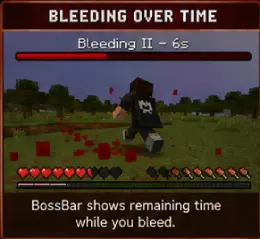
一款轻量级的 Spigot/Paper/Folia 插件,添加了可配置的流血系统:当玩家受到伤害时,有几率开始流血并随时间持续掉血,同时伴有粒子效果、声音以及显示剩余时间的 BossBar。
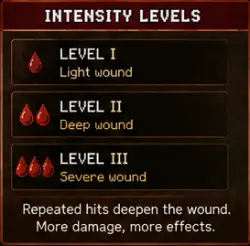
流血可以通过绷带进行治疗,如果在持续受伤状态下伤口会加深至更高强度等级,并且逃跑的玩家会留下血迹。
功能
- 完全可配置的概率、持续时间、间隔和每刻伤害
- 绷带 — 右键点击物品治疗伤口,具有施法时间、冷却时间,且在移动或受到伤害时会中断治疗
- 强度等级 — 重复受击会使伤口加深而非被忽略;伤害和粒子效果随等级增加而增强
- 按原因和武器区分概率 — 剑类攻击会导致流血,摔落则不会
- 血迹 — 流血玩家在移动时会留下掉落物
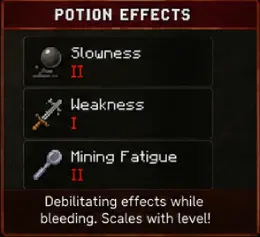
- 流血时的药水效果 — 可选的缓慢、虚弱或其他效果,随强度等级缩放
- PlaceholderAPI 支持 — 用于计分板、标签页列表和全息图的流血状态占位符
- Folia 支持 — 所有任务均感知区域,因此可在现代多线程服务器上运行
- 自定义流血时的粒子效果和声音
- 带有剩余计时器的 BossBar(可配置颜色、样式和标题)
- 自定义消息,支持
& 颜色代码、&#RRGGBB 十六进制颜色以及占位符
- 按世界黑名单及可选的 WorldGuard 集成:
bleed-allowed 标志和/或配置文件中的区域列表
mrtsimplebleed.bypass 权限,用于豁免工作人员/VIP 用户
- 自动配置合并 — 更新 jar 包会将新选项添加到现有的
config.yml 中,同时保留你的值和注释

兼容性
- Minecraft: 1.21 → 26.2(单个 jar 包覆盖整个版本范围)
- 服务器: Spigot, Paper, Purpur, Folia
- Java: 17+
- 可选依赖: WorldGuard 7.0.9+, PlaceholderAPI 2.11+
安装
- 从最新发行版下载
MRTSimpleBleed.jar
- 将其放入服务器的
plugins/ 文件夹
- 启动服务器 — 将生成
plugins/MRTSimpleBleed/config.yml
- 根据需要编辑配置文件并运行
/bleed reload
从 SimpleBleed 1.0.0 更新
- 配置会自动迁移:首次从
plugins/SimpleBleed/ 启动时会自动迁移。旧文件夹将作为备份保留。
- 权限已更改:从
simplebleed.* 变为 mrtsimplebleed.*。这不是自动完成的 — 请更新你的 LuckPerms(或等效插件)组。新的 mrtsimplebleed.admin 节点一次性授予所有权限。
- 在启动前移除旧的
SimpleBleed.jar,否则两个插件会争夺 /bleed 命令的控制权。
命令
| 命令 |
描述 |
权限 |
/bleed reset [player] |
停止流血 |
mrtsimplebleed.reset.self / .others |
/bleed apply [player] |
导致流血 |
mrtsimplebleed.apply |
/bleed info [player] |
显示流血状态和等级 |
mrtsimplebleed.info |
/bleed bandage [player] [amount] |
给予配置的绷带 |
mrtsimplebleed.apply |
/bleed reload |
重载配置 |
mrtsimplebleed.reload |
别名:/mrtbleed, /bleeding
权限
| 权限 |
默认值 |
描述 |
mrtsimplebleed.use |
true |
基本访问 /bleed 命令 |
mrtsimplebleed.reset.self |
true |
清除自身的流血状态 |
mrtsimplebleed.reset.others |
op |
清除他人的流血状态 |
mrtsimplebleed.apply |
op |
施加流血,给予绷带 |
mrtsimplebleed.info |
true |
查看流血状态 |
mrtsimplebleed.reload |
op |
重载配置 |
mrtsimplebleed.bandage |
true |
使用绷带 |
mrtsimplebleed.bypass |
false |
完全免疫流血 |
mrtsimplebleed.admin |
op |
授予上述所有权限 |
配置
bleed:
chance: 0.25 # 默认概率 0.0-1.0
duration-seconds: 8
interval-ticks: 20
damage-per-tick: 1.0
particles:
enabled: true
type: BLOCK
count: 15
sound:
enabled: true
type: minecraft:entity.player.hurt
volume: 0.6
pitch: 1.0
# 重复受击使伤口加深
stacking:
enabled: true
max-level: 3
damage-multiplier: 0.5
# 治疗伤口
bandage:
enabled: true
item: PAPER
apply-time-seconds: 3.0
cooldown-seconds: 10
cancel-on-move: true
cancel-on-damage: true
# 优先级:武器 -> 原因 -> bleed.chance
chances:
causes:
ENTITY_ATTACK: 0.35
FALL: 0.0 # 0.0 完全禁用此原因
weapons:
DIAMOND_SWORD: 0.45
# 奔跑玩家留下的痕迹
trail:
enabled: true
min-distance: 0.8
only-on-ground: true
type: DUST
color: '#8B0000'
# 流血时的衰弱效果(默认关闭)
effects:
enabled: false
apply:
SLOWNESS:
amplifier: 0
scale-with-level: true
bossbar:
enabled: true
color: RED
style: SEGMENTED_10
title: "&cBleeding %level% &7- &f%seconds%s"
worldguard:
enabled: true
disabled-regions:
- spawn
- safezone
messages:
bleed-start: "&c&lYou are bleeding! &7Find a way to stop the hemorrhage..."
bleed-end: "&aThe bleeding has stopped."
# ...
每个选项都在生成的 config.yml 中有内联文档说明。
PlaceholderAPI
| 占位符 |
返回值 |
%mrtsimplebleed_bleeding% |
true / false |
%mrtsimplebleed_bleeding_formatted% |
配置的文字,例如 Bleeding / Healthy |
%mrtsimplebleed_level% |
强度数值,未出血时为 0 |
%mrtsimplebleed_level_roman% |
罗马数字表示的强度 |
%mrtsimplebleed_seconds% |
剩余整秒数 |
%mrtsimplebleed_time% |
剩余时间,格式为 M:SS |
%mrtsimplebleed_progress% |
剩余比例,例如 0.75 |
%mrtsimplebleed_bandage_cooldown% |
距离可再次使用绷带所需的秒数 |
%mrtsimplebleed_total_bleeding% |
全服处于出血状态的玩家数量 |
WorldGuard 集成
如果安装了 WorldGuard,可以通过以下两种方式在某个区域内禁用出血效果:
- 原生标志:
/rg flag <region> bleed-allowed deny
- 配置文件列表:在
worldguard.disabled-regions 下添加区域名称
两种设置同时生效——只要其中任一方式阻止了出血,出血效果就不会触发。
Folia
所有计划任务均绑定到玩家所在的区域,因此该插件可在 Folia 以及 Spigot 和 Paper 上无需修改即可运行。平台会在启动时自动检测,并在启用消息中显示名称。无需额外配置。

Lightweight Spigot/Paper/Folia plugin that adds a configurable bleeding system: when a player takes damage, they have a chance to start bleeding and take damage over time, with particles, sounds, and a BossBar showing the remaining timer.
Bleeding can be treated with bandages, deepens into higher intensity levels when you keep getting hit, and leaves a blood trail behind a fleeing player.
Features
- Fully configurable chance, duration, interval, and damage per tick
- Bandages — right-click an item to treat your wound, with cast time, cooldown, and interruption on movement or damage
- Intensity levels — repeated hits deepen the wound instead of being ignored; damage and particles scale with the level
- Per-cause and per-weapon chances — swords make you bleed, falling does not
- Blood trail — a bleeding player leaves drops behind them as they move
- Potion effects while bleeding — optional slowness, weakness, or anything else, scaling with intensity
- PlaceholderAPI support — bleed state for scoreboards, tab lists, and holograms
- Folia support — every task is region-aware, so it runs on modern threaded servers
- Customizable particles and sounds during bleeding
- BossBar with remaining timer (configurable color, style, and title)
- Customizable messages with
& color codes, &#RRGGBB hex colors, and placeholders
- Per-world blacklist and optional WorldGuard integration:
bleed-allowed flag and/or region list in config
mrtsimplebleed.bypass permission to exempt staff/VIPs
- Automatic config merge — updating the jar adds new options to your existing
config.yml while keeping your values and your comments

Compatibility
- Minecraft: 1.21 → 26.2 (a single jar covers the whole range)
- Server: Spigot, Paper, Purpur, Folia
- Java: 17+
- Optional dependencies: WorldGuard 7.0.9+, PlaceholderAPI 2.11+
Installation
- Download
MRTSimpleBleed.jar from the latest release
- Place it in your server's
plugins/ folder
- Start the server —
plugins/MRTSimpleBleed/config.yml will be generated
- Edit the config as desired and run
/bleed reload
Updating from SimpleBleed 1.0.0
- Your configuration is migrated automatically on first start from
plugins/SimpleBleed/. The old folder is kept as a backup.
- Permissions changed from
simplebleed.* to mrtsimplebleed.*. This is not automatic — update your LuckPerms (or equivalent) groups. The new mrtsimplebleed.admin node grants everything at once.
- Remove the old
SimpleBleed.jar from plugins/ before starting, or both plugins will fight over the /bleed command.
Commands
| Command |
Description |
Permission |
/bleed reset [player] |
Stop bleeding |
mrtsimplebleed.reset.self / .others |
/bleed apply [player] |
Cause bleeding |
mrtsimplebleed.apply |
/bleed info [player] |
Show bleeding status and level |
mrtsimplebleed.info |
/bleed bandage [player] [amount] |
Give configured bandages |
mrtsimplebleed.apply |
/bleed reload |
Reload the configuration |
mrtsimplebleed.reload |
Aliases: /mrtbleed, /bleeding
Permissions
| Permission |
Default |
Description |
mrtsimplebleed.use |
true |
Basic access to the /bleed command |
mrtsimplebleed.reset.self |
true |
Remove bleeding from yourself |
mrtsimplebleed.reset.others |
op |
Remove bleeding from others |
mrtsimplebleed.apply |
op |
Apply bleeding, give bandages |
mrtsimplebleed.info |
true |
View bleeding status |
mrtsimplebleed.reload |
op |
Reload the config |
mrtsimplebleed.bandage |
true |
Use bandages |
mrtsimplebleed.bypass |
false |
Full immunity to bleeding |
mrtsimplebleed.admin |
op |
Grants every permission above |
Configuration
bleed:
chance: 0.25 # default probability 0.0-1.0
duration-seconds: 8
interval-ticks: 20
damage-per-tick: 1.0
particles:
enabled: true
type: BLOCK
count: 15
sound:
enabled: true
type: minecraft:entity.player.hurt
volume: 0.6
pitch: 1.0
# Repeated hits deepen the wound
stacking:
enabled: true
max-level: 3
damage-multiplier: 0.5
# Treat your wound
bandage:
enabled: true
item: PAPER
apply-time-seconds: 3.0
cooldown-seconds: 10
cancel-on-move: true
cancel-on-damage: true
# Precedence: weapon -> cause -> bleed.chance
chances:
causes:
ENTITY_ATTACK: 0.35
FALL: 0.0 # 0.0 disables this cause entirely
weapons:
DIAMOND_SWORD: 0.45
# Drops left behind a running player
trail:
enabled: true
min-distance: 0.8
only-on-ground: true
type: DUST
color: '#8B0000'
# Debilitating effects while bleeding (off by default)
effects:
enabled: false
apply:
SLOWNESS:
amplifier: 0
scale-with-level: true
bossbar:
enabled: true
color: RED
style: SEGMENTED_10
title: "&cBleeding %level% &7- &f%seconds%s"
worldguard:
enabled: true
disabled-regions:
- spawn
- safezone
messages:
bleed-start: "&c&lYou are bleeding! &7Find a way to stop the hemorrhage..."
bleed-end: "&aThe bleeding has stopped."
# ...
Every option is documented inline in the generated config.yml.
PlaceholderAPI
| Placeholder |
Returns |
%mrtsimplebleed_bleeding% |
true / false |
%mrtsimplebleed_bleeding_formatted% |
configured wording, e.g. Bleeding / Healthy |
%mrtsimplebleed_level% |
intensity as a number, 0 when not bleeding |
%mrtsimplebleed_level_roman% |
intensity in Roman numerals |
%mrtsimplebleed_seconds% |
whole seconds remaining |
%mrtsimplebleed_time% |
remaining time as M:SS |
%mrtsimplebleed_progress% |
remaining fraction, e.g. 0.75 |
%mrtsimplebleed_bandage_cooldown% |
seconds until another bandage may be used |
%mrtsimplebleed_total_bleeding% |
how many players are bleeding server-wide |
WorldGuard Integration
If WorldGuard is installed, you can disable bleeding in a region in two ways:
- Native flag:
/rg flag <region> bleed-allowed deny
- Config list: add the region name under
worldguard.disabled-regions
Both apply — if either one blocks, bleeding will not start.
Folia
Every scheduled task is bound to the player's region, so the plugin runs unmodified on Folia as well as on Spigot and Paper. The platform is detected at startup and named in the enable message. No configuration needed.
评论 0
登录后参与评分
还没有评论,来抢沙发吧