
描述
SimpleItemGenerator(SIG)是一个开源插件,配置简单但功能强大。
Wiki
关于该插件的更多信息请查看这里。
重要提示
Simple Item Generator 仍处于早期阶段,因此非常欢迎任何反馈。
此外,如果您对该插件不满意,请告诉我您期望它具备哪些功能,或者我该如何进行调整。
如果您在最新版本中遇到问题,请在这里告知我,而不是下载旧版本的插件!
插件概览
命令与权限
要能够使用 /simpleitemgenerator 命令,您需要拥有 simpleitemgenerator.commands.general 权限。
/simpleitemgenerator reload - 重载插件。需要 simpleitemgenerator.commands.reload 权限。
/simpleitemgenerator give <item> [player] [amount] - item 是您之前配置的物品的键名,player 和 amount 为可选参数。需要 simpleitemgenerator.commands.give 权限。
/simpleitemgenerator set_slot <item> <slot> [player] [amount] - 将自定义物品设置到指定槽位。player 和 amount 为可选参数。需要 simpleitemgenerator.commands.set_slot 权限。
功能
DeluxeMenus 支持
自 DeluxeMenus 1.14.1 起,您可以在 DM 菜单配置中使用 SimpleItemGenerator。请参阅Wiki。示例:
DeluxeMenus 配置
open_command: basicsmenu
size: 9
menu_title: '基础菜单'
items:
  'teststone':
    material: STONE
    slot: 0
    display_name: "&a这是一块特殊的石头"
    lore:
      - "&a测试1"
      - "&c测试2"
      - "&e测试3"
  'sig-item':
    material: simpleitemgenerator-item0
    slot: 1
    lore_append_mode: BOTTOM # 将描述追加到原物品描述的末尾。可选
    lore:
      - "&a测试4"
SimpleItemGenerator 的配置
items:
  item0:
    item:
      material: IRON_INGOT
      name: '<gold>我是一个 SIG 物品'
      lore:
      - '<gold>SIG 描述'
MiniMessage 支持
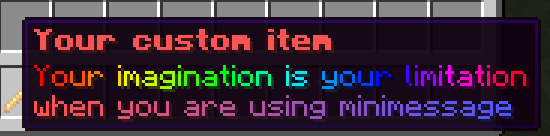
物品配置
MC: 1.20.1items:
loreitem0:
item:
material: BLAZE_ROD
name: <red><bold>你的自定义物品
lore:
- <rainbow>想象力是你的极限</rainbow>
- '<gradient:red:blue>当你使用 minimessage 时'
PlaceholderAPI 自动更新
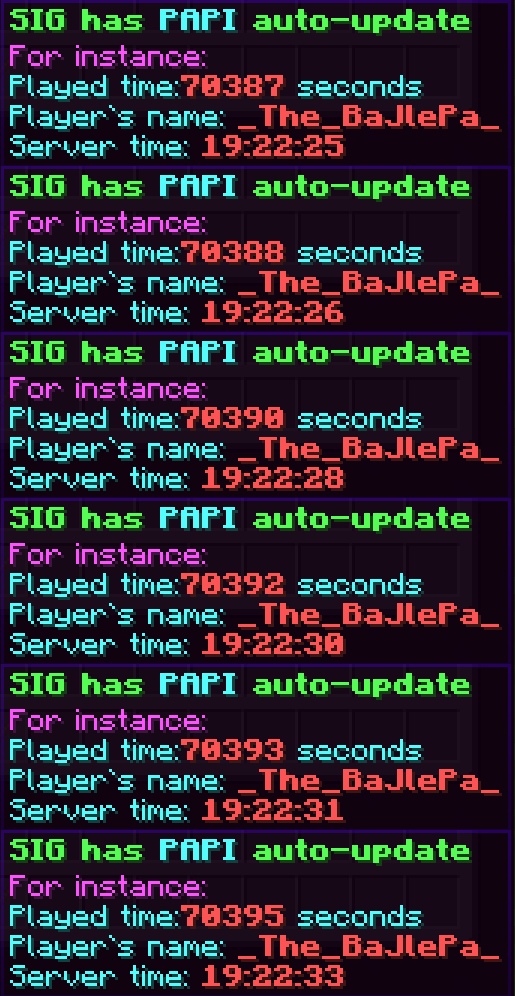
物品配置
MC: 1.20.1items:
loreitem2:
item:
material: BLAZE_ROD
name: '<green><bold>SIG 具有 <aqua>PAPI</aqua> 自动更新功能'
lore:
- '<light_purple>例如:'
- "<aqua>游戏时间:<red><bold>%player_seconds_lived%</red> 秒"
- "<aqua>玩家名称: <red><bold>%player_name%</red>"
- "<aqua>服务器时间: <red><bold>%server_time_HH:mm:ss%</red>"
丰富的交互选项与占位符
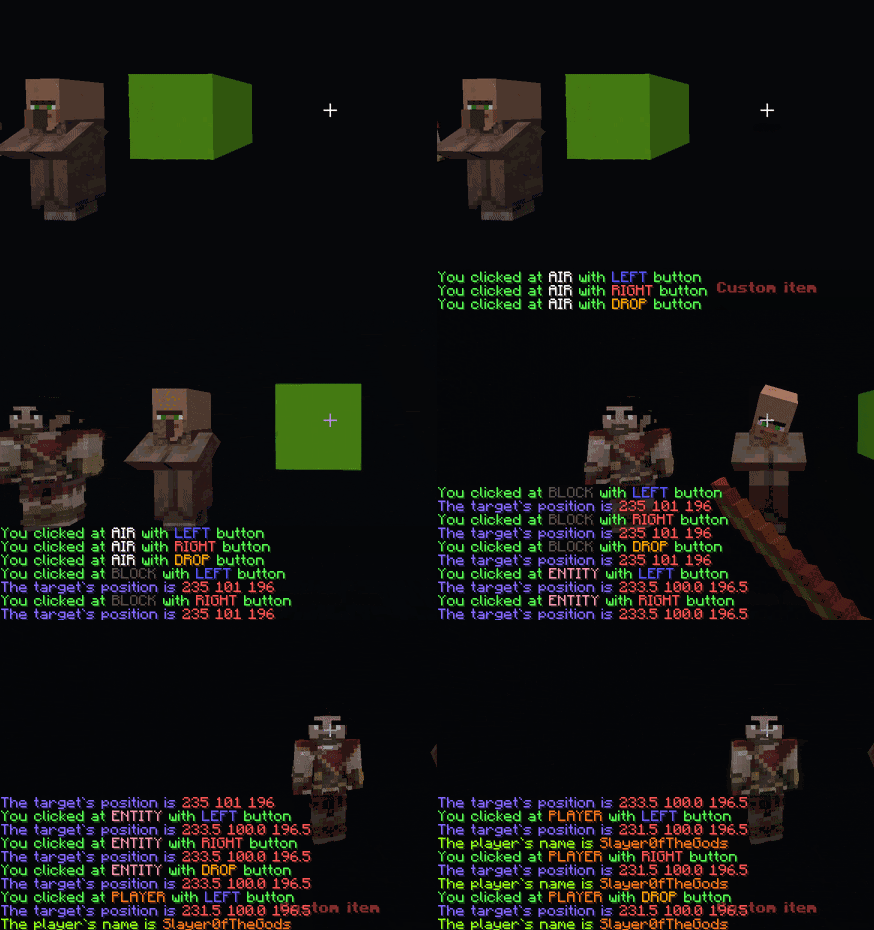
物品配置
MC: 1.20.1items:
interactable-item:
item:
material: BLAZE_ROD
name: <red><bold>自定义物品
usage:
- predicate:
at: air
button: left
commands: '[console] tellraw %player% %minimessage_<green>你使用<blue>左键</blue>点击了<white>空气</white>%%'
- predicate:
at: air
button: right
commands: '[console] tellraw %player% %minimessage_<green>你使用<red>右键</red>点击了<white>空气</white>%%'
- predicate:
at: air
button: drop
commands: '[console] tellraw %player% %minimessage_<green>你使用<gold>丢弃键</gold>点击了<white>空气</white>%%'
- predicate:
at: block
button: left
commands:
- '[console] tellraw %player% %minimessage_<green>你使用<blue>左键</blue>点击了<dark_gray>方块</dark_gray>%%'
- '[console] tellraw %player% %minimessage_<color:#8769ff>目标位置为<red>%target_x% %target_y% %target_z%</red>%%'
- predicate:
at: block
button: right
commands:
- '[console] tellraw %player% %minimessage_<green>你使用<red>右键</red>点击了<dark_gray>方块</dark_gray>%%'
- '[console] tellraw %player% %minimessage_<color:#8769ff>目标位置为<red>%target_x% %target_y% %target_z%</red>%%'
- predicate:
at: block
button: drop
commands:
- '[console] tellraw %player% %minimessage_<green>你使用<gold>丢弃键</gold>点击了<dark_gray>方块</dark_gray>%%'
- '[console] tellraw %player% %minimessage_<color:#8769ff>目标位置为<red>%target_x% %target_y% %target_z%</red>%%'
- predicate:
at: entity
button: left
commands:
- '[console] tellraw %player% %minimessage_<green>你使用<blue>左键</blue>点击了<color:#ff96b4>实体</color>%%'
- '[console] tellraw %player% %minimessage_<color:#8769ff>目标位置为<red>%target_x% %target_y% %target_z%</red>%%'
- predicate:
at: entity
button: right
commands:
- '[console] tellraw %player% %minimessage_<green>你使用<red>右键</red>点击了<color:#ff96b4>实体</color>%%'
- '[console] tellraw %player% %minimessage_<color:#8769ff>目标位置为<red>%target_x% %target_y% %target_z%</red>%%'
- predicate:
at: entity
button: drop
commands:
- '[console] tellraw %player% %minimessage_<green>你使用<gold>丢弃键</gold>点击了<color:#ff96b4>实体</color>%%'
- '[console] tellraw %player% %minimessage_<color:#8769ff>目标位置为<red>%target_x% %target_y% %target_z%</red>%%'
- predicate:
at: player
button: left
commands:
- '[console] tellraw %player% %minimessage_<green>你使用<blue>左键</blue>点击了<color:#ff7b1c>玩家</color>%%'
- '[console] tellraw %player% %minimessage_<color:#8769ff>目标位置为<red>%target_x% %target_y% %target_z%</red>%%'
- predicate:
at: player
button: right
commands:
- '[console] tellraw %player% %minimessage_<green>你使用<red>右键</red>点击了<color:#ff7b1c>玩家</color>%%'
- '[console] tellraw %player% %minimessage_<color:#8769ff>目标位置为<red>%target_x% %target_y% %target_z%</red>%%'
- predicate:
at: player
button: drop
commands:
- '[console] tellraw %player% %minimessage_<green>你使用<gold>丢弃键</gold>点击了<color:#ff7b1c>玩家</color>%%'
- '[console] tellraw %player% %minimessage_<color:#8769ff>目标位置为<red>%target_x% %target_y% %target_z%</red>%%'
- predicate:
at: player
commands:
- '[console] tellraw %player% %minimessage_<color:#9eff0d>该玩家的名称为<color:#ff7b1c>%player_target%</color>%%'
可在任何地方使用
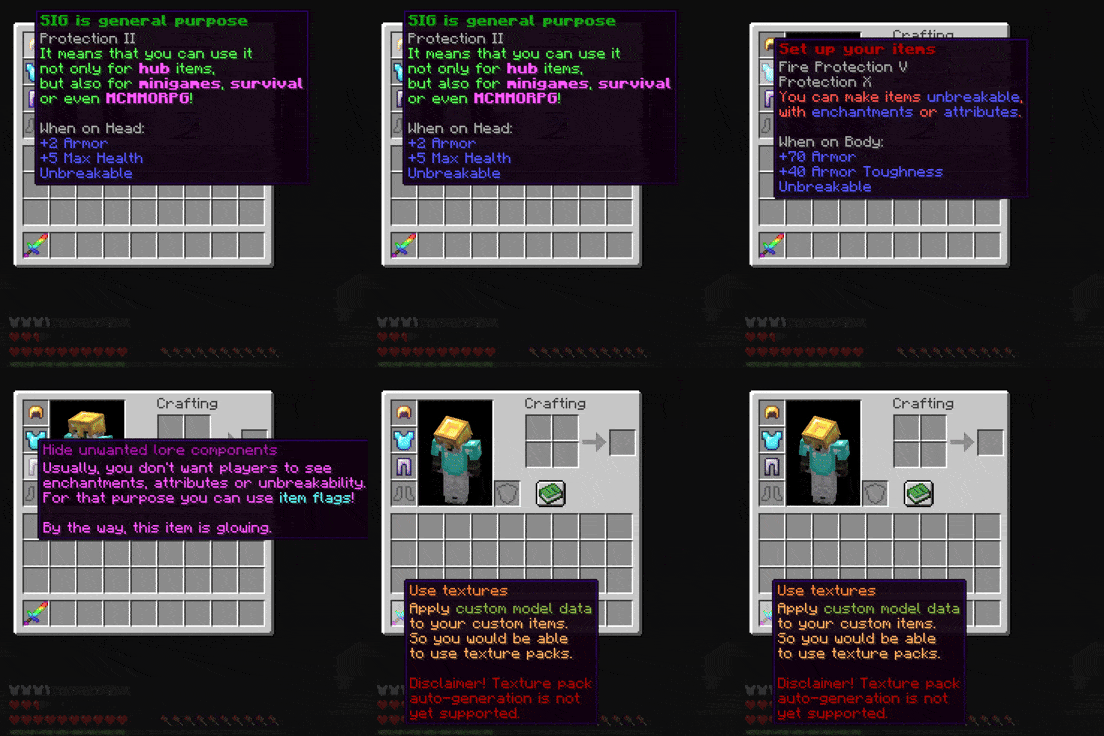
物品配置
MC: 1.20.1items:
helmet:
item:
material: GOLDEN_HELMET
name: '<dark_green><bold>SIG 是通用型的'
lore:
- '<green>这意味着你可以使用它'
- '<green>不仅用于 <light_purple><bold>大厅</light_purple> 物品,'
- '<green>还可以用于 <light_purple><bold>小游戏</light_purple>、<light_purple><bold>生存模式</light_purple>'
- '<green>甚至 <light_purple><bold>MCMMORPG</light_purple>!'
enchantments:
minecraft:protection: 2
unbreakable: true
attributes:
- operation: ADD_VALUE
name: health
attribute: MAX_HEALTH
amount: 5
slot: HEAD
- operation: ADD_VALUE
name: armor
attribute: ARMOR
amount: 2
slot: HEAD
usage:
cancel: false
chestplate:
item:
material: DIAMOND_CHESTPLATE
name: '<dark_red><bold>设置你的物品'
lore:
- '<red>你可以使物品 <blue>不可破坏</blue>,'
- '<red>通过 <blue>附魔</blue> 或 <blue>属性</blue>。'
enchantments:
minecraft:protection: 10
minecraft:fire_protection: 5
unbreakable: true
attributes:
- operation: ADD_VALUE
name: toughness
attribute: ARMOR_TOUGHNESS
amount: 40
slot: CHEST
- operation: ADD_VALUE
name: armor
attribute: ARMOR
amount: 70
slot: CHEST
usage:
cancel: false
leggings:
item:
material: IRON_LEGGINGS
name: '<dark_purple>隐藏不需要的描述文本组件'
lore:
- "<light_purple>通常,你不希望玩家看到"
- "<light_purple>附魔、属性或不可破坏性。"
- "<light_purple>为此目的,你可以使用 <aqua>物品标志</aqua>!"
- ""
- "<light_purple>顺便说一下,这个物品正在发光。"
unbreakable: true
enchantments:
minecraft:fortune: 1
item-flags:
- HIDE_UNBREAKABLE
- HIDE_ENCHANTS
- HIDE_ATTRIBUTES
usage:
cancel: false
sword:
item:
material: NETHERITE_SWORD
cmd: 1
name: '<color:#ff7c17>使用纹理'
lore:
- '<color:#ffa861>将 <color:#88aa3a>自定义模型数据</color></color>'
- '<color:#ffa861>应用到你的自定义物品上。</color>'
- '<color:#ffa861>这样你就能</color>'
- '<color:#ffa861>使用资源包了。</color>'
- ''
- '<dark_red>免责声明!资源包'
- '<dark_red>自动生成目前'
- '<dark_red>尚不支持。</dark_red>'
unbreakable: true
item-flags:
- HIDE_UNBREAKABLE
- HIDE_ENCHANTS
- HIDE_ATTRIBUTES
usage:
cancel: false
纹理可以在 这里 找到
支持
- WorldGuard(7.x.x)
- Nexo
- Oraxen
- ItemsAdder
- HeadDatabase
- PlaceholderAPI
- 自定义药水
- 皮革颜色
- 自定义 NBT
- 以及更多!
反馈
如果你对该插件有任何问题,欢迎在插件的 GitHub 仓库中提交 Issue。你也可以通过 GitHub README 中列出的其他方式联系我。

你是这个资源的作者?登录后可认领此资源。
相似资源
 插件

PacketEvents 是一款专为 Minecraft Java 版打造的协议库,旨在简化数据包的处理与传输。
 插件
ExyliaPlugins 的库。
 插件
通过对话框或铁砧界面帮助你的 Anthme
 插件
重新定义服务器上的生物运输方式。使用高度可定制的口袋道具,安全地捕获、存储和释放任何实体。
 插件
为基于 Spigot/Paper/Folia 的服务器添加对 Vivecraft 的支持
 插件
用于绘制游戏内地图或在浏览器中随探索实时进行地图绘制的实时地图。
评论 0
登录后参与评分
还没有评论,来抢沙发吧