SimpleTrading
一款轻量级、简洁实用的 Paper 服务器交易插件。玩家可以发起交易请求,接受请求,并通过整洁的图形用户界面(GUI)交换物品。
[重要]:已添加对 26.3 版本的支持,但测试仍在进行中。如果您在使用 26.3 时遇到任何错误或问题,请通过我们的错误报告表单提交。
功能特性
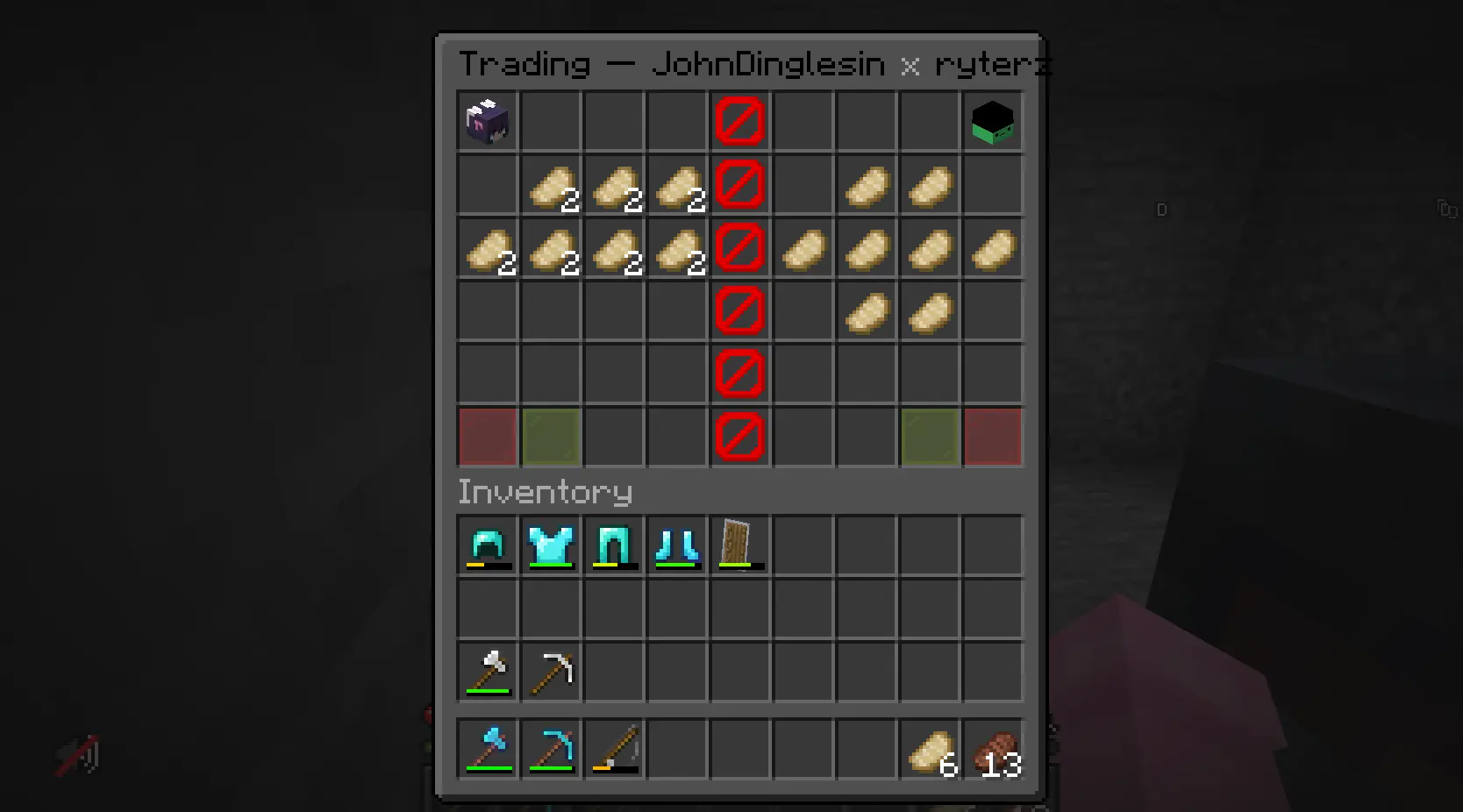
/trade <player> — 向附近的玩家发送交易请求。/tradeaccept — 接受传入的交易请求。/tradedecline — 拒绝传入的交易请求。- 双箱 GUI — 双方玩家看到相同的 54 格背包。一列屏障方块将两侧分开,防止任何人触碰对方的物品。
- 玩家头颅 — 每位玩家的头颅位于其所在侧的顶部角落,以便您清楚哪一侧是自己的。
- 接受 / 拒绝按钮 — 每位玩家在其所在侧的底部角落拥有独立的接受和拒绝按钮。只有双方都接受后,交易才会生效。
- 5 秒接受冷却时间 — 当一名玩家从其交易栏位中添加或移除物品时,双方玩家的接受状态将被重置,并强制执行 5 秒冷却时间,之后才能再次接受。这可以防止玩家在最后一刻抽出物品来欺骗对方。
- 取消时返还物品 — 如果交易被取消或拒绝,放置在 GUI 中的所有物品都将归还给原主。
- 可配置的聊天颜色 — 插件发送的每条消息均根据配置进行着色(
messages.success、messages.error、messages.info),因此您可以调整插件颜色以匹配您的服务器风格。
- 可配置的 GUI 颜色 —
gui.color 和 gui.decline-color 控制交易窗口中按钮和玩家头颅的颜色。
- 可配置的 GUI 标题 —
gui.title 设置交易窗口顶部的文本,支持 %player1% 和 %player2% 占位符。
命令
| 命令 |
描述 |
权限 |
/trade <player> |
向指定玩家发送交易请求。 |
simpletrading.trade |
/tradeaccept |
接受待处理的交易请求。 |
simpletrading.tradeaccept |
/tradedecline |
拒绝待处理的交易请求。 |
simpletrading.tradedecline |
别名:
/trade → /t/tradeaccept → /ta/tradedecline → /td
所有权限默认值为 true(任何人都可以进行交易)。
工作原理
-
发送请求
玩家 A 输入 /trade PlayerB。如果玩家 B 在线、在范围内且未处于其他交易中,玩家 B 会收到一条消息,提示他们输入 /tradeaccept 或 /tradedecline。
-
接受交易
玩家 B 输入 /tradeaccept。如果双方仍处于有效范围内且均未处于其他交易中,则交易 GUI 将同时向两名玩家打开。
-
GUI 界面
两名玩家均会看到一个双格箱子库存(共 54 个槽位)。中间有一列垂直排列的屏障方块(第 4 列)。玩家 A 的物品放置在左侧(第 0–3 列),玩家 B 的物品放置在右侧(第 5–8 列)。
- 顶部角落: 玩家头像,用于标识各自的操作区域。
- 您所在侧的左下角: 拒绝按钮(红色玻璃板)。
- 您所在侧的右下角: 接受按钮(绿色玻璃板)。
- 屏障列: 不可点击、不可移动。
-
交易操作
玩家将物品从自己的库存拖拽至自己所属的交易 GUI 区域。他们无法触碰对方的物品、屏障、头像或不属于他们的按钮。
-
确认交易
每位玩家点击各自的“接受”按钮。若双方均已确认,则交换物品:玩家 A 放入的所有物品归玩家 B 所有,反之亦然。若背包空间不足,多余物品将掉落至地面。
-
拒绝 / 取消交易
若任意一方点击“拒绝”、关闭库存、超出有效范围或断开连接,交易将被取消,所有物品归还给原主。
配置
首次运行后,会在 plugins/SimpleTrading/config.yml 生成一个 config.yml 文件。
# 玩家发送/接受交易请求时彼此之间允许的最大距离(以方块为单位)。
# 设置为 -1 表示无距离限制。
trade-range: 10

# 是否在收到交易请求时通知玩家
notify-on-request: true

# 当玩家移动过远时是否取消交易
cancel-on-move: true

# 本插件发送聊天消息的颜色代码。
# 支持所有颜色代码:&0-&f 表示颜色,以及 &l(粗体)、&o(斜体)、&n(下划线)、
# &m(删除线)和 &k(随机字符)。若希望插件所有消息使用统一颜色,请将所有值设为相同代码。
messages:
  # 确认操作成功的消息(如请求已发送、交易完成等)
  success: '&a'
  # 提示操作失败的消息(如距离过远、已在交易中等待等)
  error: '&c'
  # 中性状态更新(有人已接受、物品发生变化等)
  info: '&e'

# 交易 GUI 本身的相关设置。
gui:
  # GUI 主色调:接受按钮和玩家头像的颜色。
  color: '&a'
  # 拒绝按钮及冷却状态(即“暂不可操作”状态)所使用的颜色。
  decline-color: '&c'
  # GUI 顶部显示的文字。%player1% 和 %player2% 会被替换为实际玩家名称。
  title: '&0Trading — %player1% &7x &0%player2%'
支持
如果您发现了 Bug、有功能建议或评论,请前往 表单
赞助者

SimpleTrading
A lightweight, no-bullshit trading plugin for Paper servers. Players can request trades, accept them, and swap items through a clean GUI.
[Important]: Support for version 26.3 has been added, but testing is still ongoing. If you encounter any bugs or errors while using 26.3, please submit them using our bug report form.
Features
/trade <player> — Send a trade request to a nearby player./tradeaccept — Accept an incoming trade request./tradedecline — Decline an incoming trade request.- Double chest GUI — Both players see the same 54-slot inventory. A barrier block column splits the two sides so nobody can reach into the other person's items.
- Player heads — Each player's head sits in the top corner of their side so you know which side is yours.
- Accept / Decline buttons — Each player has their own accept and decline buttons in the bottom corners of their side. Both must accept for the trade to go through.
- 5-second accept cooldown — When a player adds or removes an item from their trade slots, both players' accept status is reset and a 5-second cooldown is enforced before either can accept again. This prevents players from pulling items out at the last second to scam the other party.
- Items return on cancel — If a trade is cancelled or declined, all items placed in the GUI are returned to their owners.
- Configurable chat colours — Every message the plugin sends is coloured from the config (
messages.success, messages.error, messages.info), so you can recolour the plugin to match your server.
- Configurable GUI colour —
gui.color and gui.decline-color drive the colours of the buttons and player heads in the trade window.
- Configurable GUI title —
gui.title sets the text at the top of the trade window, with %player1% and %player2% placeholders.
Commands
| Command |
Description |
Permission |
/trade <player> |
Sends a trade request to the specified player. |
simpletrading.trade |
/tradeaccept |
Accepts the pending trade request. |
simpletrading.tradeaccept |
/tradedecline |
Declines the pending trade request. |
simpletrading.tradedecline |
Aliases:
/trade → /t/tradeaccept → /ta/tradedecline → /td
All permissions default to true (everyone can trade).
How It Works
-
Sending a request
Player A types /trade PlayerB. If Player B is online, within range, and not already in a trade, Player B receives a message telling them to type /tradeaccept or /tradedecline.
-
Accepting
Player B types /tradeaccept. If both players are still within range and neither is in another trade, the trade GUI opens for both players simultaneously.
-
The GUI
Both players see a double chest inventory (54 slots). A vertical line of barrier blocks runs down the middle (column 4). Player A's items go on the left (columns 0–3), Player B's on the right (columns 5–8).
- Top corners: Player heads so you know which side is yours.
- Bottom left of your side: Decline button (red glass pane).
- Bottom right of your side: Accept button (green glass pane).
- Barrier column: Unclickable, unmovable.
-
Trading
Players drag items from their inventory into their own side of the GUI. They cannot touch the other player's items, the barrier, the heads, or the buttons that don't belong to them.
-
Accepting the trade
Each player clicks their accept button. If both players have accepted, the items are swapped: everything Player A put in goes to Player B's inventory, and vice versa. If there's no room in the inventory, items drop on the ground.
-
Declining / Cancelling
If either player clicks decline, closes the inventory, moves out of range, or disconnects, the trade is cancelled, and all items are returned to their owners.
Configuration
After the first run, a config.yml file is generated in plugins/SimpleTrading/config.yml.
# The maximum distance (in blocks) players can be from each other to send/accept trade requests.
# Set to -1 for unlimited range.
trade-range: 10

# Whether to notify players when they receive a trade request
notify-on-request: true

# Whether to cancel the trade if a player moves too far away
cancel-on-move: true

# Colours for the chat messages this plugin sends.
# Any colour code works: &0-&f for colours, plus &l (bold), &o (italic), &n (underlined),
# &m (strikethrough) and &k (magic). Set every value to the same code if you want all of the
# plugin's messages to use one colour.
messages:
  # Messages that confirm something worked (request sent, trade completed, ...)
  success: '&a'
  # Messages that tell you something went wrong (too far away, already trading, ...)
  error: '&c'
  # Neutral status updates (someone accepted, items changed, ...)
  info: '&e'

# The trade GUI itself.
gui:
  # Main colour of the GUI: the accept button and the player heads.
  color: '&a'
  # Colour used for the decline button and the cooldown state (the "you can't do that yet" colour).
  decline-color: '&c'
  # Text shown at the top of the GUI. %player1% and %player2% are replaced with the players' names.
  title: '&0Trading — %player1% &7x &0%player2%'
Support
If you find a bug or have a feature request, or a review, go to the Form
Sponsor


 插件

 插件

 插件
 插件
 插件
 插件
评论 0
登录后参与评分
还没有评论,来抢沙发吧