skPackets
适用于 Skript 的 PacketEventsSK 即插即用替代品。
创建客户端实体、发送数据包,并更改单个玩家看到的画面,而无需修改服务器端的世界或物品栏。


功能
| 功能 |
描述 |
| 数据包 (Packets) |
创建并发送客户端绑定(clientbound)数据包,包括相机和实体状态数据包。 |
| 数据包实体 |
为选定的观看者生成客户端玩家、掉落物和其他实体。 |
| 装备 |
在真实或虚假实体上显示不同的装备,而不改变其实际物品。 |
| 方块 |
在不编辑世界的情况下,为单个玩家更改方块的视觉效果。 |
| 物品栏 |
在槽位中显示虚假物品,包括合成表和结果槽。 |
| 队伍 (Teams) |
管理数据包队伍的成员资格和颜色。 |
| 持久性 |
在客户端或服务器更新后重新应用支持的视觉更改。 |
基于数据包的更改仅为视觉效果。它们不会创建真实物品、修改方块或施加游戏玩法效果。请单独实现所需的服务器端行为。
依赖项
| 依赖项 |
版本 |
备注 |
| Paper |
1.21.11+ |
必需 |
| Skript |
2.17.0+ |
必需 |
| PacketEvents |
2.14.0+ |
必需 |
| SkBee |
3.26.0+ |
可选,启用 NBT Compound 钩子 |
仅对最新受支持的 Skript 和 Minecraft 版本提供官方支持。旧版本可能可以运行,但并非官方支持。
展示
这些示例展示了 skPackets 在游戏内的效果。每个展示都包含预览和可折叠的 Skript 示例代码。
简化的 F3 信息
使用 /reduced-debug 切换原版简化调试视图,该视图会隐藏 F3 屏幕中的坐标信息。再次运行命令以恢复正常视图。
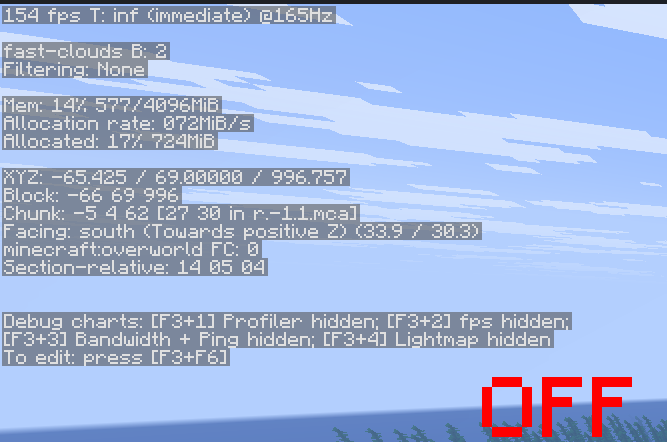
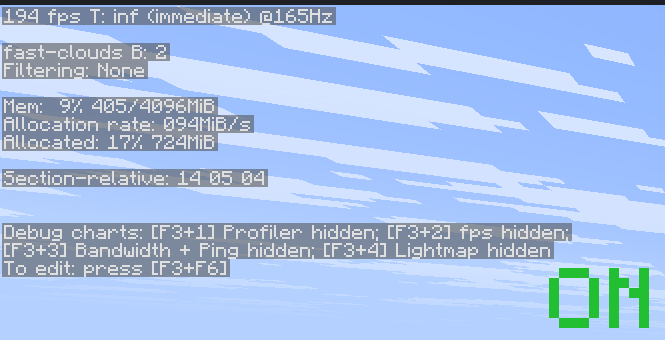
正常 F3(左)与简化 F3(右)
[!NOTE]
这仅更改原版的调试显示界面。经过修改的客户端仍然可以确定玩家的位置。请在通常禁用简化调试信息的世界中进行测试。
查看示例 · /reduced-debug
command /reduced-debug:
    trigger:
        set {_uuid} to uuid of player
        if {-showcase::reducedDebug::%{_uuid}%} is true:
            delete {-showcase::reducedDebug::%{_uuid}%}
            set {_status} to 23
            send "已禁用简化调试信息。" to player
        else:
            set {-showcase::reducedDebug::%{_uuid}%} to true
            set {_status} to 22
            send "已启用简化调试信息。打开 F3!" to player
        set {_packet} to a new clientbound entity status packet:
            entity id: protocol id of player
            status: {_status}
        send packet {_packet} to player
图腾之盾
运行 /second-chance 播放图腾动画,而无需消耗图腾或不受到伤害。它不提供复活或药水效果。
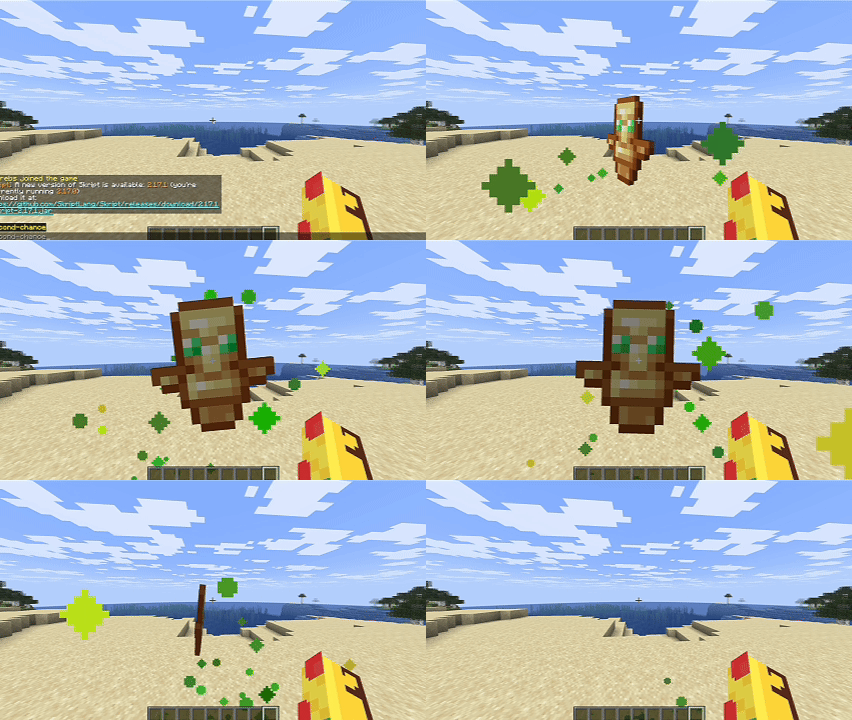
查看示例 · /second-chance
command /second-chance:
    trigger:
        set {_packet} to a new clientbound entity status packet:
            entity id: protocol id of player
            status: 35
        send packet {_packet} to player
相机数据包
注视附近的实体并运行 /change-camera,将你的相机切换到该实体持续五秒钟。该实体必须对你的客户端保持可见。
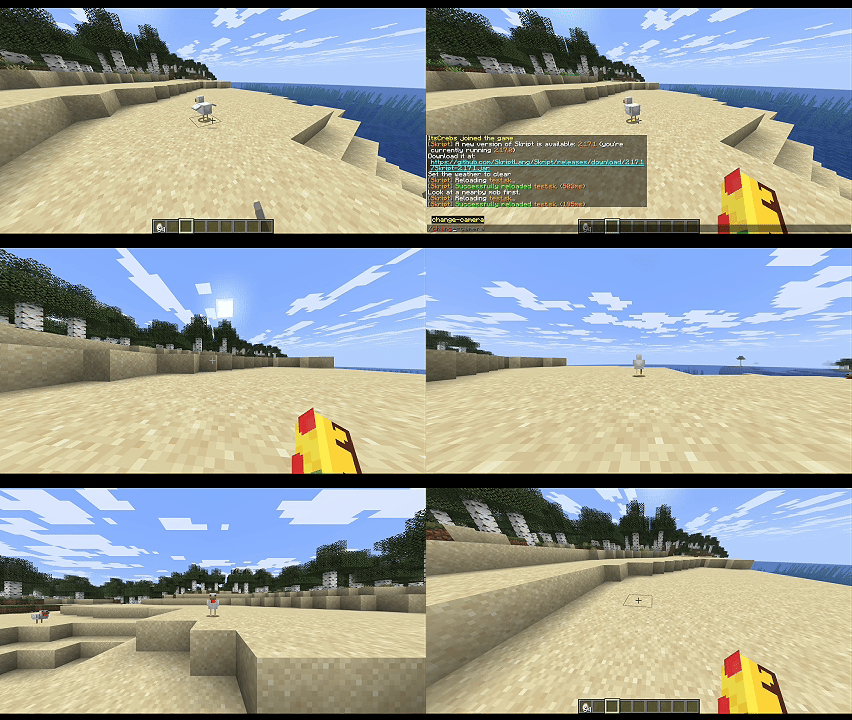
查看示例 · /change-camera
command /change-camera:
    trigger:
        set {_target} to target entity of player
        if {_target} is not set:
            send "请先注视附近的生物。" to player
            stop
        set {_camera} to a new clientbound camera packet:
            entity id: protocol id of {_target}
        send packet {_camera} to player
        wait 5 seconds
        set {_reset} to a new clientbound camera packet:
            entity id: protocol id of player
        send packet {_reset} to player
衣柜克隆体
运行 /wardrobe-clone 创建一个使用你的皮肤和当前装备物品的虚假玩家。当向新的观看者展示该虚假实体时,装备也会显示出来。
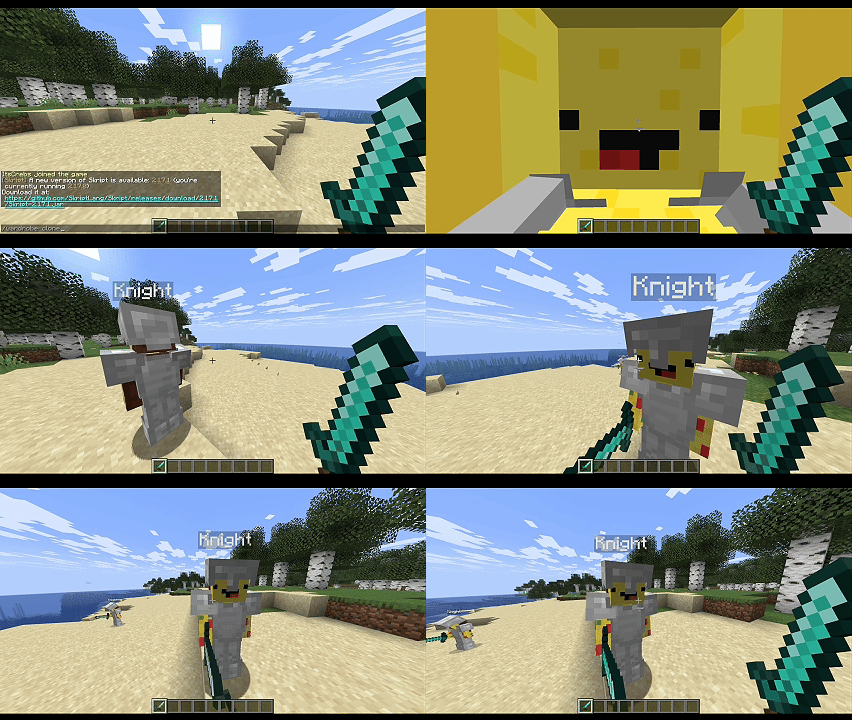
查看示例 · /wardrobe-clone
command /wardrobe-clone:
    trigger:
        set {_clone} to a new fake entity:
            entity: player
            username: "Clone"
            skin: skin of player
            location: location of player
            viewers: player
        set fake equipment helmet slot of {_clone} to player's helmet
        set fake equipment chestplate slot of {_clone} to player's chestplate
        set fake equipment leggings slot of {_clone} to player's leggings
        set fake equipment boots slot of {_clone} to player's boots
        set fake equipment main hand of {_clone} to player's held item
        wait 20 seconds
        kill fake entity {_clone}
要清空某个装备槽位,请使用 delete fake equipment helmet slot of {_clone}。
假装备
运行 /fake-sword 可以让其他玩家看到你手持一把钻石剑,而不会改变你实际的物品栏。
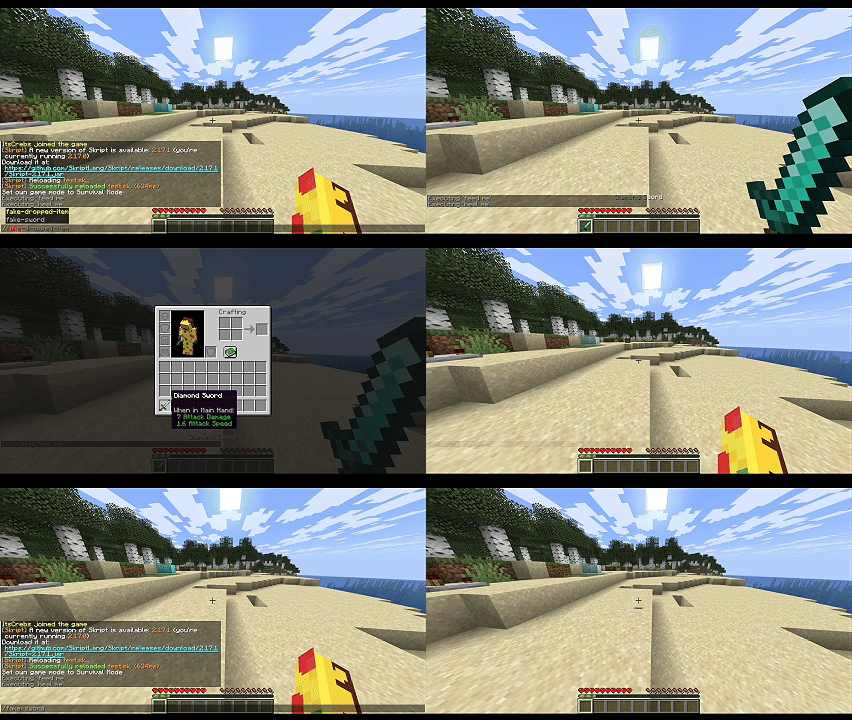
查看示例 · /fake-sword
command /fake-sword:
    trigger:
        make fake equipment main hand of player as diamond sword to all players with persistent
        wait 10 seconds
        reset fake equipment main hand of player for all players
with persistent(持久化)会在装备和追踪更新后重新应用覆盖效果。如果不加此参数,更改仅发送一次。这不会改变你的第一人称视角下的物品或物品栏界面。
使用 reset all fake equipment of player for all players 恢复选定视图者所有玩家的装备。重置操作会移除持久化覆盖效果,并显示实体当前的真实装备。
假掉落物
运行 /fake-dropped-item 以显示一个只有你能看到的钻石。它是一个数据包实体,因此无法被拾取。
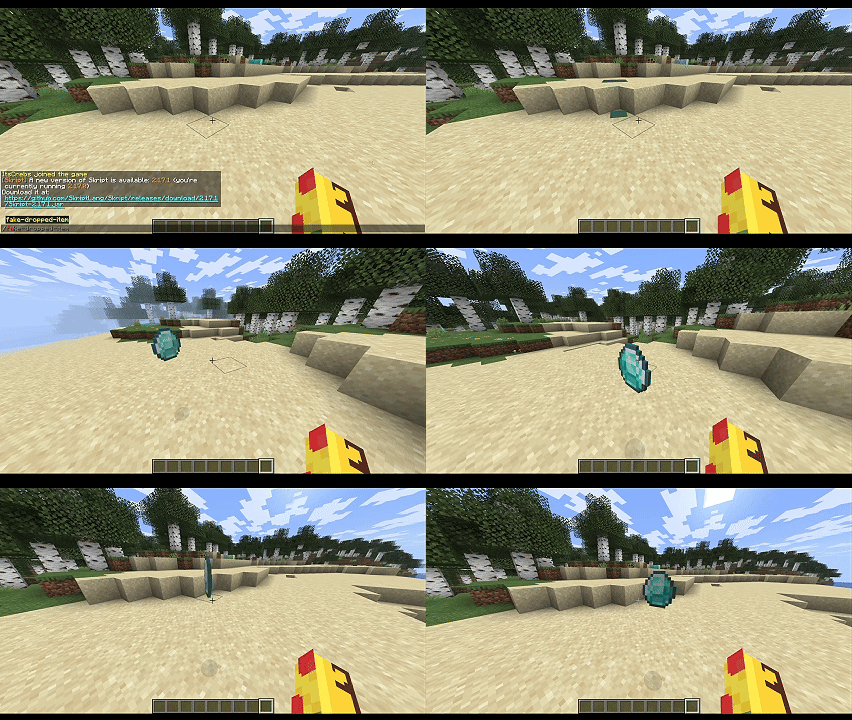
查看示例 · /fake-dropped-item
command /fake-dropped-item:
    trigger:
        set {_spot} to location of player
        set {_loot} to a new fake entity with persistent:
            entity: dropped item
            location: {_spot}~vector(0,2,0)
            viewers: player
            meta field:
                item: diamond
                gravity: false
        wait 20 seconds
        kill fake entity {_loot}
在支持的数据包更新和重连期间,如果该实体仍处于活动状态,持久化的假实体可以被恢复。此示例将在 20 秒后将其移除。
假方块
右键点击一个方块,使其在你眼中呈现为金块,持续五秒钟。只有你能看到这种变化;真实的方块未被触动。
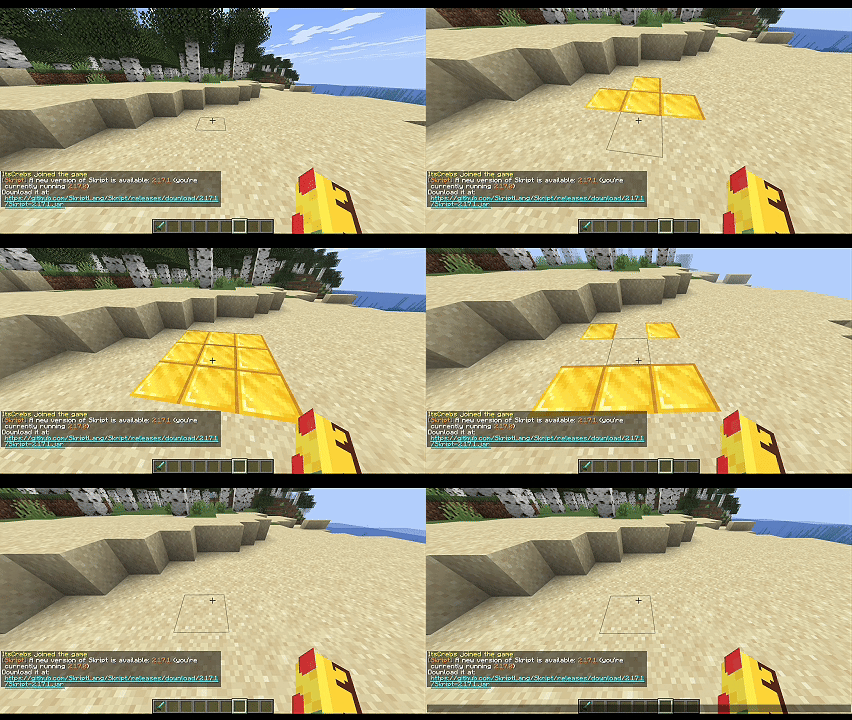
查看示例 · 右键点击一个方块
on right click:
    if clicked block isn't air:
        set {_loc} to location of clicked block
        make fake blocks at {_loc} as gold block to player with persistent
        wait 5 seconds
        reset fake blocks at {_loc} for player
持久的方块覆盖效果可以在当前服务器会话期间,经受住方块更新和重连的影响,直到被重置或清除。
物品栏导航
运行 /inv-nav 可在你自己的合成格中显示一个简单的导航菜单。这些是假的物品栏物品,并非对你真实物品栏的修改。
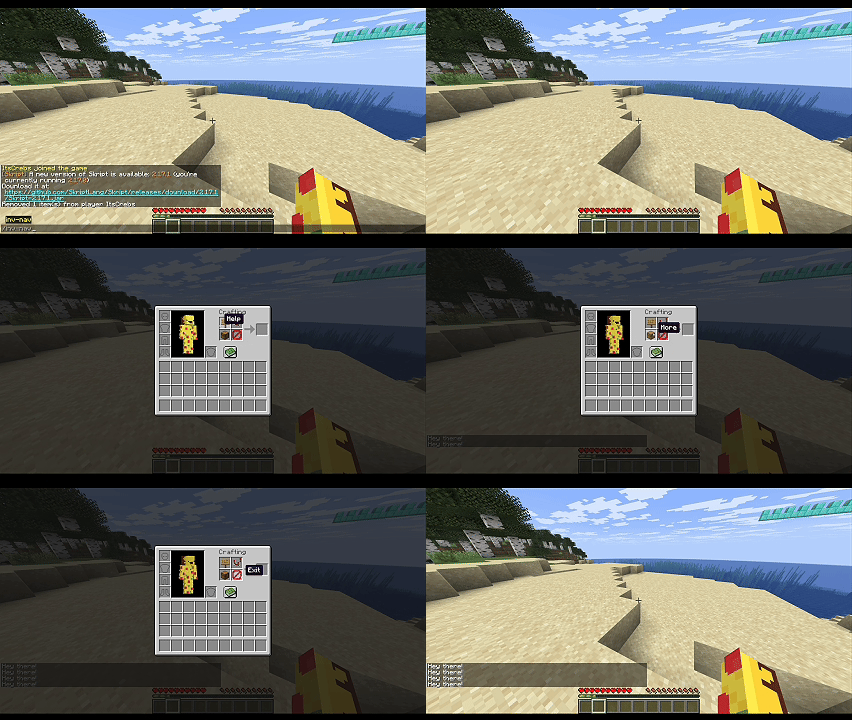
查看示例 · /inv-nav
command /inv-nav:
    trigger:
        if gamemode of player is creative:
            send "Use survival or adventure to preview this." to player
            stop
        close player's inventory
        make fake inventory slot 1 as oak sign named "&fHelp" to player with persistent
        make fake inventory slot 2 as comparator named "&fSettings" to player with persistent
        make fake inventory slot 3 as chest named "&fMore" to player with persistent
        make fake inventory slot 4 as barrier named "&fExit" to player with persistent

on inventory click:
    if event-inventory is top inventory of player:
        send "Hey there!" to player
持久化版本会在支持的物品栏更新和点击后重新应用外观。它不会保护真实物品栏,也不会模拟鼠标悬停物品。请参阅玩家物品栏槽位参考。
恢复单个原始槽位或清除所有假物品栏覆盖效果:
reset fake inventory slots 1, 2, 3 and 4 for player
reset all fake inventory for player
这些操作将恢复当前的真实物品(包括空槽位),并移除持久化效果。单个槽位引用的是当前打开的物品栏视图。
彩虹发光
使用数据包队伍(packet teams)在支持的队伍颜色之间循环切换,同时应用发光效果。队伍颜色接受不带引号的 Skript 颜色;自定义 RGB 颜色将映射到最近的受支持颜色。
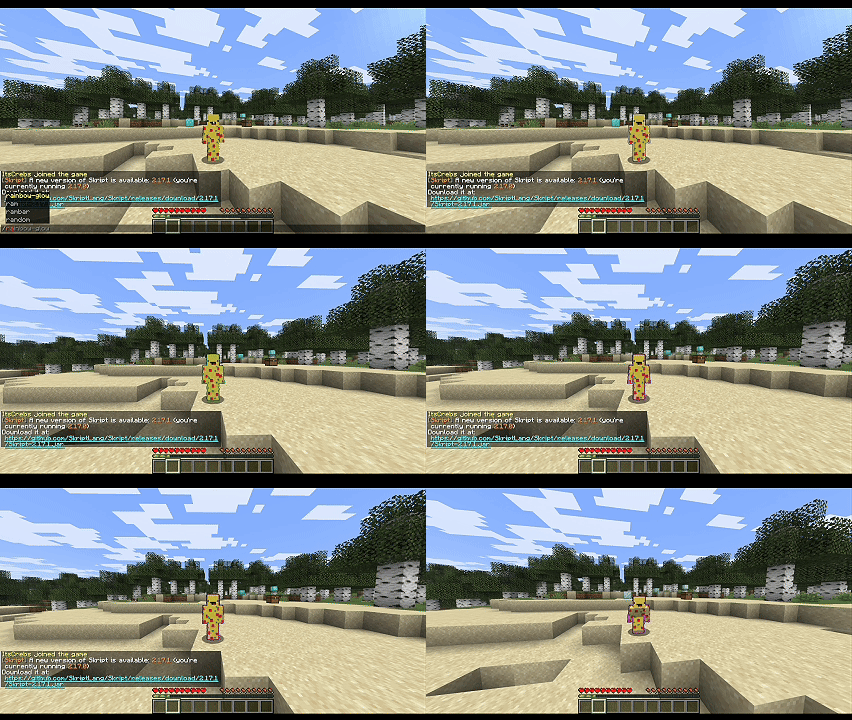
查看示例 · /rainbow-glow
command /rainbow-glow:
    trigger:
        set packet glow state of player to true for player
        set {_team} to a new packet team:
            name: "Rainbow"
        add player to packet team {_team}
        loop all colors:
            set packet team color of {_team} to loop-value
            send packet {_team} to player
            wait 5 ticks
        send packet {_team} to player
        wait 5 seconds
        remove player from the packet team {_team}
        set packet glow state of player to false for player
        send packet {_team} to player
持久性
持久性是可选的。在支持的语法中添加 with persistent,以便在相关更新发生时重新应用客户端覆盖。省略它则仅实现一次性显示效果。
| 覆盖类型 |
持续时间 |
| 物品栏槽位 |
玩家物品栏:直到断开连接。容器物品栏:直到容器关闭。 |
| 装备 |
直到查看者断开连接,或目标实体卸载、死亡、断开连接或切换世界为止。 |
| 假方块 |
在服务端会话期间,可承受方块更新和重连,直到重置或清除。 |
| 假实体 |
使用 a new fake entity with persistent: 创建时启用。 |
不带 with persistent 重新应用物品栏或装备覆盖,会将持久化覆盖替换为一次性显示效果。
[!NOTE]
持久性并非永久存储。覆盖数据不会在服务器重启后保留。
玩家物品栏槽位
假物品栏槽位语法使用原始槽位索引。
| 槽位 |
内容 |
0 |
合成结果 |
1–4 |
2×2 合成网格 |
5–8 |
护甲:头盔、胸甲、护腿、靴子 |
9–35 |
主物品栏 |
36–44 |
快捷栏 |
45 |
副手 |
容器菜单拥有自己的原始槽位布局,从顶部物品栏的 0 开始。打开容器后,需等待一个刻再发送假槽位内容。创造模式下的物品生成行为不同,因此假槽位不能用作物品保护机制。
致谢
skPackets 包含源自 PacketEventsSK(由 3add 开发)的改编代码。相关的源代码文件中保留了原始的 MIT 版权声明和许可证声明。
skPackets
A drop-in alternative to PacketEventsSK for Skript.
Create client-side entities, send packets, and change what individual players see without modifying the server-side world or inventory.
Features
| Feature |
Description |
| Packets |
Create and send clientbound packets, including camera and entity status packets. |
| Packet entities |
Spawn client-side players, dropped items, and other entities for selected viewers. |
| Equipment |
Show different equipment on real or fake entities without changing their actual items. |
| Blocks |
Change the appearance of blocks for individual players without editing the world. |
| Inventory |
Display fake items in slots, including the crafting grid and result slot. |
| Teams |
Manage packet team membership and colors. |
| Persistence |
Reapply supported visual changes after client or server updates. |
Packet-based changes are visual. They do not create real items, modify blocks, or apply gameplay effects. Implement any required server-side behavior separately.
Requirements
| Dependency |
Version |
Notes |
| Paper |
1.21.11+ |
Required |
| Skript |
2.17.0+ |
Required |
| PacketEvents |
2.14.0+ |
Required |
| SkBee |
3.26.0+ |
Optional enables the NBT Compound hook |
Only the latest supported Skript and Minecraft versions receive support. Older versions may work, but are not officially supported.
Showcases
These examples demonstrate skPackets in-game. Each showcase includes a preview and a collapsible Skript example.
Reduced F3 Information
Use /reduced-debug to toggle the vanilla reduced-debug view, which hides coordinates from the F3 screen. Run the command again to restore the normal view.
Normal F3 (left) and reduced F3 (right)
[!NOTE]
This only changes the vanilla debug display. Modified clients can still determine the player's position. Test in a world where reduced debug information is normally disabled.
View example · /reduced-debug
command /reduced-debug:
    trigger:
        set {_uuid} to uuid of player
        if {-showcase::reducedDebug::%{_uuid}%} is true:
            delete {-showcase::reducedDebug::%{_uuid}%}
            set {_status} to 23
            send "Reduced debug information disabled." to player
        else:
            set {-showcase::reducedDebug::%{_uuid}%} to true
            set {_status} to 22
            send "Reduced debug information enabled. Open F3!" to player
        set {_packet} to a new clientbound entity status packet:
            entity id: protocol id of player
            status: {_status}
        send packet {_packet} to player
Totem Pop
Run /second-chance to play the totem animation without consuming a totem or taking damage. It does not grant resurrection or potion effects.
View example · /second-chance
command /second-chance:
    trigger:
        set {_packet} to a new clientbound entity status packet:
            entity id: protocol id of player
            status: 35
        send packet {_packet} to player
Camera Packet
Look at a nearby entity and run /change-camera to switch your camera to it for five seconds. The entity must remain visible to your client.
View example · /change-camera
command /change-camera:
    trigger:
        set {_target} to target entity of player
        if {_target} is not set:
            send "Look at a nearby mob first." to player
            stop
        set {_camera} to a new clientbound camera packet:
            entity id: protocol id of {_target}
        send packet {_camera} to player
        wait 5 seconds
        set {_reset} to a new clientbound camera packet:
            entity id: protocol id of player
        send packet {_reset} to player
Wardrobe Clone
Run /wardrobe-clone to create a fake player using your skin and currently equipped items. The equipment also appears when the fake entity is shown to new viewers.
View example · /wardrobe-clone
command /wardrobe-clone:
    trigger:
        set {_clone} to a new fake entity:
            entity: player
            username: "Clone"
            skin: skin of player
            location: location of player
            viewers: player
        set fake equipment helmet slot of {_clone} to player's helmet
        set fake equipment chestplate slot of {_clone} to player's chestplate
        set fake equipment leggings slot of {_clone} to player's leggings
        set fake equipment boots slot of {_clone} to player's boots
        set fake equipment main hand of {_clone} to player's held item
        wait 20 seconds
        kill fake entity {_clone}
To clear an equipment slot, use delete fake equipment helmet slot of {_clone}.
Fake Equipment
Run /fake-sword to make other players see you holding a diamond sword without changing your actual inventory.
View example · /fake-sword
command /fake-sword:
    trigger:
        make fake equipment main hand of player as diamond sword to all players with persistent
        wait 10 seconds
        reset fake equipment main hand of player for all players
with persistent reapplies the override after equipment and tracking updates. Without it, the change is sent once. This does not change your first-person item or inventory screen.
Restore all equipment for selected viewers with reset all fake equipment of player for all players.
Resetting removes persistent overrides and shows the entity's current real equipment.
Fake Dropped Item
Run /fake-dropped-item to display a diamond that only you can see. It is a packet entity, so it cannot be picked up.
View example · /fake-dropped-item
command /fake-dropped-item:
    trigger:
        set {_spot} to location of player
        set {_loot} to a new fake entity with persistent:
            entity: dropped item
            location: {_spot}~vector(0,2,0)
            viewers: player
            meta field:
                item: diamond
                gravity: false
        wait 20 seconds
        kill fake entity {_loot}
The persistent fake entity can be restored after supported updates and reconnects while it is still active. This example removes it after 20 seconds.
Fake Blocks
Right-click a block to make it appear as gold for five seconds. Only you see the change; the real block is untouched.
View example · right-click a block
on right click:
    if clicked block isn't air:
        set {_loc} to location of clicked block
        make fake blocks at {_loc} as gold block to player with persistent
        wait 5 seconds
        reset fake blocks at {_loc} for player
Persistent block overrides can survive block updates and reconnects during the current server session, until they are reset or cleared.
Inventory Navigation
Run /inv-nav to display a simple navigation menu in your own crafting grid. These are fake inventory items, not changes to your real inventory.
View example · /inv-nav
command /inv-nav:
    trigger:
        if gamemode of player is creative:
            send "Use survival or adventure to preview this." to player
            stop
        close player's inventory
        make fake inventory slot 1 as oak sign named "&fHelp" to player with persistent
        make fake inventory slot 2 as comparator named "&fSettings" to player with persistent
        make fake inventory slot 3 as chest named "&fMore" to player with persistent
        make fake inventory slot 4 as barrier named "&fExit" to player with persistent

on inventory click:
    if event-inventory is top inventory of player:
        send "Hey there!" to player
The persistent version reapplies the appearance after supported inventory updates and clicks. It does not protect the real inventory or spoof the cursor. See the player inventory slot reference.
Restore individual raw slots or clear all fake inventory overrides:
reset fake inventory slots 1, 2, 3 and 4 for player
reset all fake inventory for player
These restore the current real items, including empty slots, and remove persistence. Individual slots refer to the current open inventory view.
Rainbow Glow
Use packet teams to cycle through the supported team colors while applying the glowing effect. Team colors accept Skript colors without quotes; custom RGB colors map to the nearest supported color.
View example · /rainbow-glow
command /rainbow-glow:
    trigger:
        set packet glow state of player to true for player
        set {_team} to a new packet team:
            name: "Rainbow"
        add player to packet team {_team}
        loop all colors:
            set packet team color of {_team} to loop-value
            send packet {_team} to player
            wait 5 ticks
        send packet {_team} to player
        wait 5 seconds
        remove player from the packet team {_team}
        set packet glow state of player to false for player
        send packet {_team} to player
Persistence
Persistence is opt-in. Add with persistent to a supported syntax to reapply a client-side override when relevant updates occur. Omit it for a one-time appearance.
| Override |
Lifetime |
| Inventory slots |
Player inventory: until disconnect. Container inventory: until the container closes. |
| Equipment |
Until the viewer disconnects or the target unloads, dies, disconnects, or changes worlds. |
| Fake blocks |
Survive block updates and reconnects during the server session, until reset or cleared. |
| Fake entities |
Enable on creation with a new fake entity with persistent:. |
Reapplying an inventory or equipment override without with persistent replaces the persistent override with a one-time appearance.
[!NOTE]
Persistence is not permanent storage. Overrides are not saved across server restarts.
Player Inventory Slots
The fake inventory slot syntax uses raw slot indices.
| Slot |
Contents |
0 |
Crafting result |
1–4 |
2×2 crafting grid |
5–8 |
Armor: helmet, chestplate, leggings, boots |
9–35 |
Main inventory |
36–44 |
Hotbar |
45 |
Offhand |
Container menus have their own raw slot layout, starting at 0 in the top inventory. Wait one tick after opening a container before sending fake slot contents. Creative mode has different item-creation behavior, so fake slots must not be used as an inventory protection mechanism.
Credits
skPackets includes code adapted from PacketEventsSK by 3add. The original MIT copyright and license notices are preserved in the relevant source files.


 插件

 插件
 插件
 插件
 插件
 插件
评论 0
登录后参与评分
还没有评论,来抢沙发吧