
skript-variables
是否曾忘记变量的确切名称,然后不得不翻阅所有代码或 variables.csv 来找出它是哪一个?skript-variables 会在网页上展示服务器上的每一个 Skript 变量。浏览它们、修复它们,并实时保存回服务器。
如果你使用过 LuckPerms 的 /lp editor,那么它的理念与此相同,只不过这里是针对你的 Skript 变量。
工作原理
1. 安装它。 将 jar 文件放入 plugins/ 文件夹并重启服务器。这就是全部设置。
2. 在游戏中运行 /skv editor。 聊天栏会显示一个可点击的链接。点击它,编辑器就会打开,并且所有变量都已加载完毕。
3. 修改你需要的内容。 你的编辑仅保存在浏览器中。此时服务器尚未发生任何更改。
4. 运行 /skv apply <sessionId> <code>。 完成操作后,编辑器会提供这两项信息。运行该命令,你的更改就会立即写入服务器。
你的变量变为文件夹
像 {playerdata::uuid::kills} 这样的变量通常是一长行文本。在这里,它会变成你可以展开和折叠的文件夹,就像电脑上的文件一样:
playerdata
4f9a-2b1c-...
kills 148
balance 2,840.5
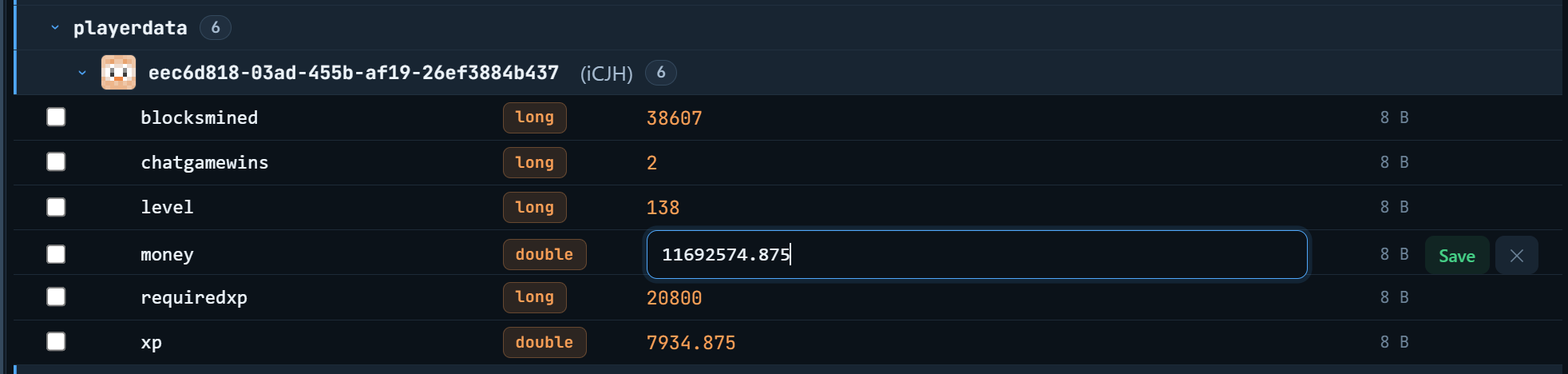
比滚动浏览数千行文本要容易得多。
可编辑的内容
几乎可以编辑 Skript 能存储的所有内容:
- 文本、数字和布尔值(true/false)
- 位置,包含独立的框用于输入世界、X、Y、Z、偏航角和俯仰角
- 向量,在输入时显示长度,并提供归一化按钮
- 物品类型和方块数据
- 文本组件(即带颜色的 fancy text)
- 日期和时间跨度
- NBT 复合标签
- skbee 边界(bounds)
- oopsk 结构体,你可以单独编辑每个字段
- 嵌套列表(列表中的列表中的列表)
对于位置等复杂类型,不需要手动输入原始文本。你会获得每个部分的独立输入框,因此很难出错。
查找所需内容
- 按玩家名称搜索。 输入
Notch,即可找到以该玩家 UUID 为键存储的变量。UUID 是 Minecraft 用于标识玩家的长代码,你无需知道它的具体内容。 - 正则表达式模式,用于进行高级模式搜索。
- 过滤器,仅显示某一类变量,或仅显示你已修改过的变量。
- 侧边栏统计,告诉你每个部分包含多少变量,让你了解哪些部分占用了大量空间。
批量操作
- 选择多个变量,并将它们一次性设置为相同的值
- 重命名变量,或将其复制到一个新名称下
- 删除单个变量,或一次性清除整个部分
安全性如何?
在你确认之前,什么都不会改变。 你在浏览器中的所有操作都暂存等待。只有当你亲自运行 apply 命令时,服务器才会被修改。
apply 代码只能使用一次。 使用后它将失效,因此没有人可以在稍后重新播放它。如果你确实想重复使用它,请在末尾添加 --force。
仅限 OP 使用。 两个权限默认均为 OP 专属,因此普通玩家无法查看你的变量。
你自己的脚本可以阻止它。 VariablesApplyEvent 在保存任何内容之前触发,如果你希望获得额外保护,可以从 Skript 中取消该事件。
没有遗漏。 仍驻留在内存中且尚未保存到文件的变量会自动包含在内。你无需先执行刷新操作。
命令
| 命令 | 功能 |
|---|---|
/skv editor |
上传你的变量并提供编辑器链接 |
/skv apply <sessionId> <code> |
将你的更改保存到服务器 |
/skv apply <sessionId> <code> --force |
同上,但代码保持可用状态 |
/skv help |
显示命令帮助 |
权限为 skriptvariables.use 和 skriptvariables.editor。两者默认均为 OP 专属。
需求
- Paper 1.21.4 或更高版本
- Skript 2.14.x 至 2.16.x
- Java 21 或更高版本
- oopsk 为可选插件,仅用于编辑结构体
附加功能
提供三种颜色主题可供选择:Ocean(海洋)、Slate(石板)和 Ember(余烬)。通过 bStats 收集匿名使用统计数据。
链接
- 网站:
- Discord 支持频道(用于求助和报告 bug):
- 源代码(GPLv3):
skript-variables
Ever forgotten exactly what you named a variable, then had to dig through all your code or inside variables.csv trying to work out which one it was? skript-variables opens
every Skript variable on your server in a website. Look through them, fix
them, and save them back live.
If you have used /lp editor from LuckPerms, this is the same idea, but for
your Skript variables.
How it works
1. Install it. Put the jar in your plugins/ folder and restart.
That is the whole setup.
2. Run /skv editor in game. You get a clickable link in chat. Click
it and the editor opens with every variable already loaded.
3. Change what you want. Your edits are saved in the browser only. Your server has not changed yet.
4. Run /skv apply <sessionId> <code>. The editor gives you both of
these when you are done. Run the command and your changes are written to
the server straight away.
Your variables become folders
A variable like {playerdata::uuid::kills} is normally one long line of
text. Here it turns into folders you can open and close, like files on your
computer:
playerdata
4f9a-2b1c-...
kills 148
balance 2,840.5
Much easier than scrolling through thousands of lines.
What you can edit
Almost everything Skript can store:
- Text, numbers and true/false values
- Locations, with separate boxes for world, X, Y, Z, yaw and pitch
- Vectors, which show their length as you type and have a normalize button
- Item types and block data
- Text components (the fancy coloured text kind)
- Dates and timespans
- NBT compounds
- skbee bounds
- oopsk structs, where you can edit each field on its own
- Lists inside lists inside lists
Tricky types like locations do not make you type raw text. You get proper boxes for each part, so it is hard to get wrong.
Finding what you need
- Search by player name. Type
Notchand it finds the variables saved under that player's UUID. A UUID is the long code Minecraft uses to identify a player, and you do not have to know it. - Regex mode if you want to do advanced pattern searching.
- Filters to show only one type, or only the things you have changed.
- Sidebar stats telling you how many variables each section holds, so you can see what is taking up all the space.
Doing a lot at once
- Pick many variables and set them all to the same value in one go
- Rename a variable, or copy it to a new name
- Delete one variable, or wipe out a whole section at once
Is it safe?
Nothing changes until you say so. Everything you do in the browser sits there waiting. Your server is not touched until you run the apply command yourself.
The apply code only works once. After it is used it stops working, so
nobody can replay it later. If you actually want to reuse it, add --force
on the end.
Only ops can use it. Both permissions default to op, so a random player cannot open your variables.
Your own scripts can block it. VariablesApplyEvent fires before
anything is saved, and you can cancel it from Skript if you want extra
protection.
Nothing gets missed. Variables still sitting in memory that have not been saved to the file yet are included automatically. You do not have to flush anything first.
Commands
| Command | What it does |
|---|---|
/skv editor |
Uploads your variables and gives you the editor link |
/skv apply <sessionId> <code> |
Saves your changes to the server |
/skv apply <sessionId> <code> --force |
Same, but the code stays usable |
/skv help |
Shows the commands |
Permissions are skriptvariables.use and skriptvariables.editor. Both are
op only by default.
What you need
- Paper 1.21.4 or newer
- Skript 2.14.x to 2.16.x
- Java 21 or newer
- oopsk is optional and only needed for editing structs
Extras
Three colour themes to pick from: Ocean, Slate and Ember. Anonymous usage stats are collected through bStats.
Links
- Website:
- Discord for help and bug reports:
- Source code (GPLv3):

下载 skript-variables
需要联机服务器吗?
稳定流畅、一键部署,几分钟即可和朋友联机开服
最低仅需 8 元/月 即可畅快联机
下载 skript-variables
需要联机服务器吗?
稳定流畅、一键部署,几分钟即可和朋友联机开服
最低仅需 8 元/月 即可畅快联机
下载 skript-variables
需要联机服务器吗?
稳定流畅、一键部署,几分钟即可和朋友联机开服
最低仅需 8 元/月 即可畅快联机
下载 skript-variables
需要联机服务器吗?
稳定流畅、一键部署,几分钟即可和朋友联机开服
最低仅需 8 元/月 即可畅快联机
下载 skript-variables
需要联机服务器吗?
稳定流畅、一键部署,几分钟即可和朋友联机开服
最低仅需 8 元/月 即可畅快联机
下载 skript-variables
需要联机服务器吗?
稳定流畅、一键部署,几分钟即可和朋友联机开服
最低仅需 8 元/月 即可畅快联机
下载 skript-variables
需要联机服务器吗?
稳定流畅、一键部署,几分钟即可和朋友联机开服
最低仅需 8 元/月 即可畅快联机
下载 skript-variables
下载 skript-variables
需要联机服务器吗?
稳定流畅、一键部署,几分钟即可和朋友联机开服
最低仅需 8 元/月 即可畅快联机
新增:撤销已删除的变量
当执行 /skv apply 删除变量时,其旧值会先被保存。在成功应用并删除了某些内容后,聊天栏中将显示 Undo with /skv restore last(使用 /skv restore last 进行撤销)。
/skv restore list [page]显示最近删除的变量、删除者以及删除时间/skv restore <id>恢复单个变量或整个列表,包括嵌套条目/skv restore last恢复最近一次 apply 操作所删除的所有内容
如果某个变量在被删除后又重新设置过,则不会允许恢复该变量,从而确保新数据不会被意外覆盖。如需强制覆盖,请添加 --force 参数。
所有恢复命令均需具备 skriptvariables.editor 权限。
须知
- 仅通过
/skv apply执行的删除操作可被恢复。由脚本直接执行的删除无法恢复。 - 历史记录保存在内存中,因此服务器重启或插件重载后会被清除。
- 你可以在
config.yml中修改相关限制:
修复: 数量超过 99 的物品不再导致 /skv 编辑器崩溃;不再为它们生成 Skript “严重错误” 的刷屏提示;包含换行符或制表符的值不再导致上传失败(此问题即所谓的“0 变量”错误);若某个变量上传失败,则跳过该变量,而不是导致整个上传过程失败。
兼容性: 变量应用事件通过 Skript 的新语法注册系统进行注册。
关于这个资源的讨论、问题反馈与使用心得
还没有讨论,来发第一帖吧
你是这个资源的作者?登录后可认领此资源。
相似资源
 插件

PacketEvents 是一款专为 Minecraft Java 版打造的协议库,旨在简化数据包的处理与传输。
 插件
ExyliaPlugins 的库。
 插件
通过对话框或铁砧界面帮助你的 Anthme
 插件
重新定义服务器上的生物运输方式。使用高度可定制的口袋道具,安全地捕获、存储和释放任何实体。
 插件
为基于 Spigot/Paper/Folia 的服务器添加对 Vivecraft 的支持
 插件
用于绘制游戏内地图或在浏览器中随探索实时进行地图绘制的实时地图。
评论 0
登录后参与评分
还没有评论,来抢沙发吧