SkyGridx - 官方支持与下载
加入我们的 Discord 社区 获取帮助、支持、问题反馈、意见交流及讨论!
点击此处加入:加入我们的 Discord
下载链接:
概述
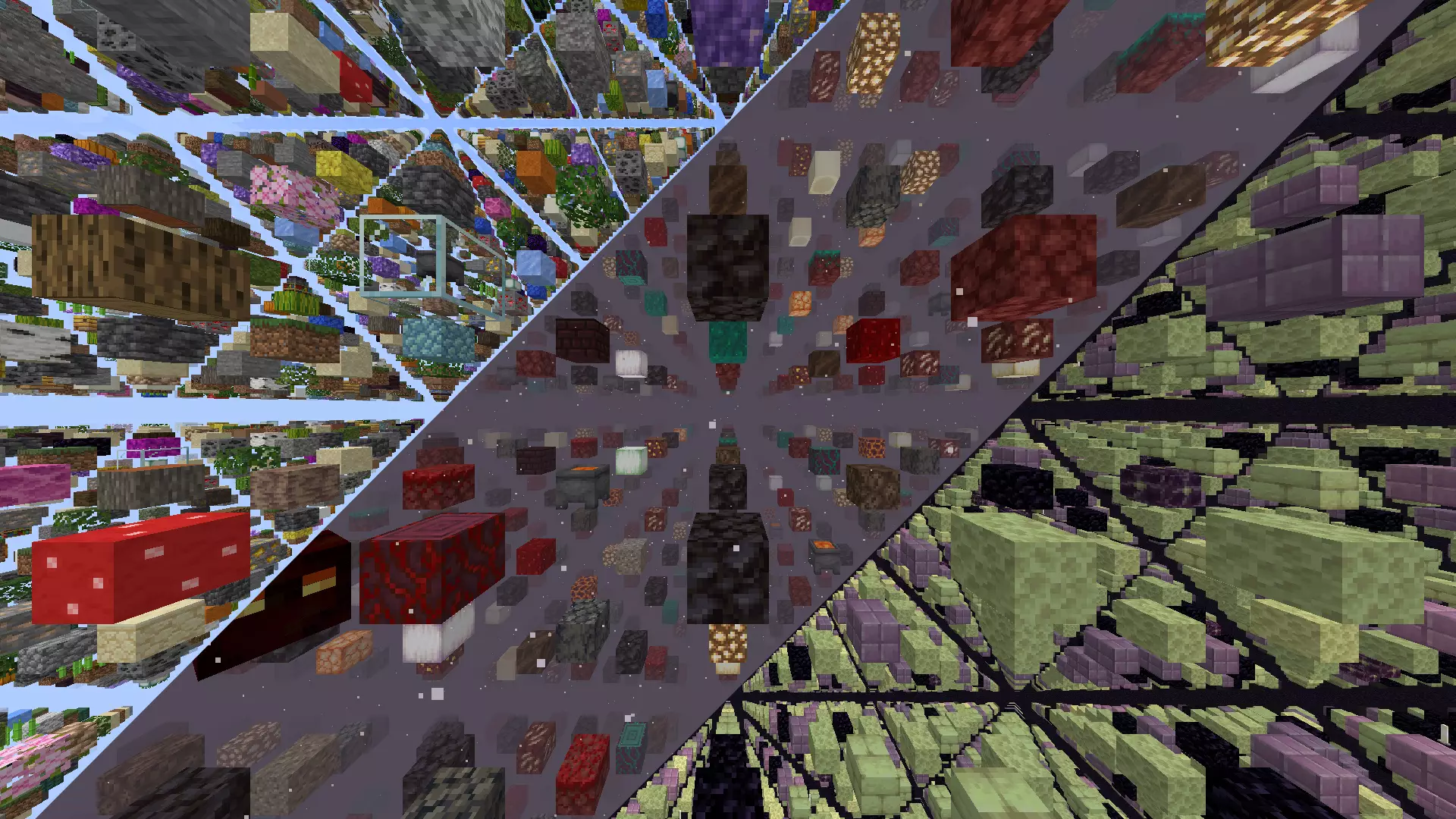
SkyGrid Plugin 提供对最新方块(26.2)的访问权限,并允许用户完全自定义主世界、下界和末地维度中的网格。初始生成过程通常需要约 1 分钟,并且会根据服务器的性能进行调整。随后,所有生成活动都将高效地在实时中进行。
该插件还包含一个内置的随机传送命令,适用于每个维度,确保玩家能够安全地探索所选的世界。此外,它具备一个矿石生成器,可以修改石头生成以创建您选择的各种方块。虽然目前主要配置为矿石,但可能性几乎是无限的。
主要功能:
方块选择:
实时生成:
内置雾气功能:
- 雾功能附带纹理包。管理员可以使用
/fogon 启用此功能,并使用 /fogoff 禁用。此功能允许降低渲染距离而不破坏沉浸感。
- 如果希望默认启用此功能,可在设置文件中找到相关选项,默认情况下它是禁用的。
材料分布:
- 为每个世界的方块放置定义个性化材料。
- 微调材料分布百分比以获得独特的体验。
- 可以选择父级材料以及这些父级方块材料的所有侧面和端部的材料。
生物群系特定网格:
- 在主世界、下界和末地中自定义具有独特方块的网格,粒度达到 biome 级别。
矿石生成:
- 无缝集成到游戏中,此功能将生成的石头、圆石或黑曜石替换为您想要的任何方块。
- 生成的方块类型及其百分比可以在 OreGenBlock 文件夹内的 ores.yml 文件中轻松修改,适用于所有可以生成石头、圆石或黑曜石的世界。
传送命令:
- 安全传送到以下位置的随机地点:
- 主世界(/tpr overworld)或(/tpro)
- 下界(/tpr nether)或(/tprn)
- 末地(/tpr end)或(/tpre)。
- 范围可在设置中自定义
- 设置还包括每世界命令重复使用的冷却时间
- 每种情况都有各自的独立权限
刷怪笼设置:
- 可用的实体可以在 这里 找到
- 微调实体的刷怪笼设置、延迟、最大附近实体数量等。
- 基于生成权重随机选择实体以增加不可预测性。
- 在方块级别为特定生物群系自定义刷怪笼,增加新的自定义层次。例如,如果您指定生物群系为
DEEP_DARK,则可以配置刷怪笼仅在该生物群系中生成 WARDEN 实体。
箱子战利品自定义:
- 精确定制箱子战利品设置,指定物品、百分比、数量、自定义名称、附魔、lore 颜色等。
- 分层战利品分配以增加多样性,每一层都有其自己的物品集合和概率。
- 为特定生物群系自定义箱子战利品,根据环境实现更具沉浸感和主题性的物品分配。
迷你区块再生
- 定期重新生成选定的区块,而不会影响周围的整个世界。
- 选择区块后,通过
/miniregen 或 MiniRegen/mini_regen_settings.yml 进行配置。
- 支持自定义材料分布和分组以实现批量移除。
增强版末影之眼
- 末影之眼沿平滑弧线飞向最近的已注册传送门,停留 5 秒并显示粒子效果,然后退还末影之眼。
- 如果没有传送门存在,它们会立即爆炸并退还。
- 传送门坐标存储在高效的二进制文件 (
portals.dat) 中。
- 这仅用于网格中使用的
END_PORTAL 材料,并作为缺失的要塞结构的替代方案。
命令:
/tpr [world]: 在主世界、下界或末地中随机传送。/tpro: 在主世界中随机传送。/tprn: 在下界中随机传送。/tpre: 在末地中随机传送。/fogon: 启用雾气。/fogoff: 禁用雾气。/eclogson: 启用事件控制日志记录。/eclogsoff: 禁用事件控制日志记录。/patch: 更新材料和实体至最新版本。/miniregen add [interval in seconds] [alias] [distribution] [group(optional)]: 为当前区块安排迷你区块再生。/miniregen remove [alias]: 按别名删除迷你区块再生设置。/miniregen remove group [groupName]: 删除给定组中的所有迷你再生设置。
权限:
(默认全部)
sg.tpr: 允许使用 /tpr [world] 命令传送到主世界、下界和末地。sg.tpr.overworld: 授予使用 /tpro 命令在主世界中传送的权限。sg.tpr.nether: 授予使用 /tprn 命令在下界中传送的权限。sg.tpr.end: 允许使用 /tpre 命令在末地中传送。
(默认 OP 权限)
sg.tpr.*:提供对所有传送命令的访问权限。sg.fogon:允许使用 /fogon 命令启用雾效。sg.fogoff:允许使用 /fogoff 命令禁用雾效。sg.eclogson:授予使用 /eclogson 启用事件控制日志记录的权限。sg.eclogsoff:授予使用 /eclogsoff 禁用事件控制日志记录的权限。sg.patch:允许修补文件,将材质和实体更新到另一个版本。sg.regen:授予使用 /regen 命令重新生成所有已加载区块的权限。sg.miniregen:授予使用 /miniregen 命令管理迷你区块重新生成的权限。sg.*:提供对 SkyGrid 所有命令的访问权限。
安装说明
有关详细的安装说明,请点击此处。
配置文件
其他机制:
SkyGridx - Official Support & Downloads
Join our Discord Community for help, support, issues, feedback, and discussions!
Click here to join: Join Our Discord
Download Links:
Overview
The SkyGrid Plugin offers access to the latest blocks (26.2) and empowers users to fully customize the grids in the Overworld, Nether, and End dimensions. The initial generation process, which typically takes ~1 minute, adapts to the server's capabilities. Subsequently, all generation activities occur efficiently in real-time.
This plugin also includes a built-in random teleport command for each dimension, ensuring that players can safely explore their chosen realm. Furthermore, it features an ore generator that can modify stone generation to create various blocks of your choice. While currently configured primarily for ores, the possibilities are virtually endless.
Key Features:
Block Selection:
- Create a unique SkyGrid with a variety of blocks from the Bukkit Material page.
- Customize block types and percentages effortlessly.
Real-time Generation:
- SkyGrid generates in real-time as you explore.
Built-in Fog Feature:
- Fog feature accompanied by a texture pack. Admins can enable it using
/fogon and disable with /fogoff. This feature allows lower render distances without disrupting immersion.
- Feature is included in the settings file if you would like to enable it by default, it will come as disabled by default.
Material Distribution:
- Define personalized materials for block placement per world.
- Fine-tune material distribution percentages for a distinct experience.
- Choose parent materials as well as materials for all the sides and ends of said parent block material
Biome-Specific Grids:
- Customize grids in Overworld, Nether, and End with unique blocks at the biome level.
Ore Generation:
- Seamlessly integrated into the gameplay, this feature replaced generated stone, cobblestone or basalt with any blocks you want.
- The block types generated, and their percentages can be effortlessly modified to suit your preferences in the ores.yml file inside the OreGenBlock folder, and work on all worlds where stone, cobblestone or basalt can be generated.
Teleportation Command:
- Securely teleport to random locations in
- Overworld (/tpr overworld) or (/tpro)
- Nether (/tpr nether) or (/tprn)
- End (/tpr end) or (/tpre).
- Range can be customized in the settings
- Settings also include cooldown for per world command reuse
- All have their own individualize permissions
Spawner Settings:
- The available entities for use can be found at here
- Fine-tune spawner settings for entities, delay, max nearby entities, and more.
- Random entity selection based on spawn weights for added unpredictability.
- Customize spawners for specific biomes at the block level, adding a new layer of customization. For example, if you specify the biome as
DEEP_DARK, you can configure spawners to spawn WARDEN entities exclusively in that biome.
Chest Loot Customization:
- Tailor chest loot settings with precision, specifying items, percentages, amounts, custom names, Enchantments , lore colors and more.
- Tiered loot distribution for added variety, each tier with its own set of items and probabilities.
- Customize chest loot for specific biomes, allowing for a more immersive and thematic distribution of items based on the environment.
Mini Chunk Regeneration
- Periodically regenerate selected chunks on a timer without touching the surrounding world.
- Configure with
/miniregen or MiniRegen/mini_regen_settings.yml once chunks have been chosen.
- Supports custom material distributions and grouping for bulk removal.
Enhanced Eye of Ender
- Eyes follow a smooth arc to the nearest registered portal, hover for 5 s with particles, then refund the eye.
- If no portal exists, they pop instantly with a small explosion and refund.
- Portal coordinates stored in an efficient binary file (
portals.dat).
- This is only for
END_PORTAL materials used in the grid, and serves as a replacement for the missing stronghold structure.
Commands:
/tpr [world]: Random teleport in the Overworld, Nether, or End./tpro: Random teleport in the Overworld./tprn: Random teleport in the Nether./tpre: Random teleport in the End./fogon: Enable fog./fogoff: Disable fog./eclogson: Enable Event Control logging./eclogsoff: Disable Event Control logging./patch: Patch files to update materials and entities to the newest version./miniregen add [interval in seconds] [alias] [distribution] [group(optional)]: Schedule mini chunk regeneration for your current chunk./miniregen remove [alias]: Remove a mini chunk regeneration setting by alias./miniregen remove group [groupName]: Remove all mini regeneration settings in a given group.
Permissions:
(Default all)
sg.tpr: Allows teleportation to Overworld, Nether, and End using the /tpr [world] command.sg.tpr.overworld: Grants permission to use the /tpro command for teleportation in the Overworld.sg.tpr.nether: Grants permission to use the /tprn command for teleportation in the Nether.sg.tpr.end: Enables usage of the /tpre command for teleportation in the End.
(Default OP)
sg.tpr.*: Provides access to all teleportation commands.sg.fogon: Allows enabling fog using the /fogon command.sg.fogoff: Allows disabling fog with the /fogoff command.sg.eclogson: Grants permission to enable Event Control logging using /eclogson.sg.eclogsoff: Grants permission to disable Event Control logging using /eclogsoff.sg.patch: Allows patching files to update materials and entities to another version.sg.regen: Grants permission to regenerate all loaded chunks using the /regen command.sg.miniregen: Grants permission to manage mini chunk regeneration using the /miniregen command.sg.*: Provides access to all SkyGrid commands.
Installation Instructions
For detailed installation instructions, click here.
Configuration Files
Additional Mechanisms:

 插件

 插件

 插件
 插件
 插件
 插件
评论 0
登录后参与评分
还没有评论,来抢沙发吧