SkyText
Description
兼容 Bukkit 1.7.2!
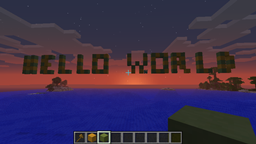
SkyText 是一个插件,允许你在你的世界中书写文字。
使用命令 /skytext hello_world 0 会在你站立的位置用方块拼出 "hello world"。
你可以利用这个插件在传送门上方书写文字,或者在告示牌区域书写文字。
在 v1.1+ 版本中,你现在可以添加定时显示的文字。
例如,如果你有一个小游戏区域,你可以在下方的传送门前设置在不同可用小游戏之间切换的文字。如果其他插件支持,你还可以设置游戏开始前的倒计时。
此外,在 1.1+ 版本中,你还可以让文字根据命令方块进行更改。
如有任何建议请告诉我,这是我的第一个插件(希望是许多中的一个)。
Features
- 书写你选择的文字
- 改变文字的旋转角度
- 在服务器启动时安排显示文字
- 允许更改特定位置的文字
Dependencies
- worldedit - 我强烈建议获取最新的快照版本,特别是如果你运行的是 1.7.2,因为这将拥有最新的 NMS 支持 ()
Optional dependencies
- Vault - 如果你想要任何经济集成,确保你安装了 Vault
- Factions - 如果你是 Factions 的爱好者并想要集成,请确保已安装!
How to install
- 下载 SkyText.jar 并放入 plugins 文件夹
- 从 此处 下载 worldedit 并放入 plugins 文件夹
- 重启服务器
- 如果你更改了配置文件,你需要重启服务器才能使更改生效!
Setup
如果你不希望有随时间变化的文字或与服务器启动关联的文字,则无需进行设置。
Brief Tutorial
消息组教程
Commands
注意:如果你希望在消息中包含空格,请使用 _ 字符
在玩家站立的位置放置指定旋转角度和可选坐标的消息
- /skytext <message> <rotation in degrees (0,90,180 or 270)> [x] [y] [z] [world]
从 1.15 版本起,你还可以使用:
- /skytext <message> <rotation in degrees (0,90,180 or 270)> [blockid] [dataid] [x] [y] [z] [world]
在配置文件中创建新的消息组并设置默认消息
- /skytext create <name_of_message_group> <message>
向消息组中添加要轮换的新消息
- /skytext set <name_of_message_group> <message>
更改消息组设置(1.12 新增功能)
- /skytext set <name_of_message_group> set <world|ticks|rotation|blockid|dataid|location> <value>
从 config.yml 重载
Config.yml
你可以在这里看到一个示例 config.yml config.yml
Permissions
- skytext.write 给予书写权限
- skytext.create 给予创建消息组的权限
- skytext.reload 给予从 config.yml 重载的权限
API
一个更好实现的 API 即将到来,但目前的代码工作完全正常。
将此添加到你的 OnEnable 或初始化代码中:
SkyText SkyTextPlugin = new SkyText();
然后在你希望书写文字的任何地方使用此方法:
Writing.WriteText(new Location(Bukkit.getWorld("world"),100,100,100), "chicken", 0, SkyTextPlugin, 100, 1, 0);
WriteText 参数:
- Location 是世界中的位置。
- 字母是你想要显示的内容,在这种情况下我选择了 "Chicken",
- 角度是旋转角度,可以是 0、90、180 或 270
- 然后将 skytext 插件传递给命令。
- 然后我们传递最大宽度,这目前未被使用。
- 最后我们传递 blockid 和 dataid。
Changelog
- 1.15
- 破坏性变更:更新命令以包含可选的方块 blockid 和 dataid: /skytext <Message> <rotation> [blockid] [dataid] [x] [y] [z] [world_name]
- 为消息添加了一些颜色使其更清晰
- 添加了以下参数:
- %online% - 在线玩家数量
- %maxplayers% - 允许的最大玩家数量
- %playername% - 运行命令的玩家名称
- %playerlevel% - 运行命令的玩家等级
- %playerlevel:PlayerName% - 指定玩家的等级
- %playerbalance% - 运行命令的玩家余额
- %playerbalance:PlayerName% - 指定玩家的余额
- %playerpower% - 运行命令的玩家的 Factions Power
- %playerpower:PlayerName% - 指定玩家的 Factions Power
- %days:EventName% - EventName 发生的天数
- %hours:EventName% - EventName 发生的小时数
- %minutes:EventName% - EventName 发生的分钟数
- %seconds:EventName% - 距离 EventName 发生还有多少秒
- 修复了与 AWE 的兼容性问题
- 修复了冒号无法正常工作的问题
- 不再提前清除区域,改为在添加每个字母时也在字母之间添加空格
- 1.14
- 修复了在未使用我创建的魔法默认世界名称时使用插件导致的崩溃问题。(*拍自己*)
- 1.13
- 添加了重载命令。使用 /skytext reload 重新加载 config.yml
- 添加了 skytext.reload 权限。用于允许任何人进行重载。
- 移除了配置中 setup:true|false 的需求,现在会在复制之前检查原理图是否存在
- 1.12
- 重构代码以使维护更加容易(已经!?)
- 添加了无需编辑 config.yml 即可设置 message_group 的功能
- 增加了更多的错误检查和玩家反馈
- 1.11
- 现在正确清除了旧的消息组单词
- 修复了字母之间的间距问题
- 修复了字母 I 被跳过的问题(如果您从之前的版本升级,请在 config.yml 中设置 setup:false 以重新生成原理图
待办事项
- 添加撤销功能
- 在 skytext 选项中添加广播选项(当天空中的大字还不够震撼时!)
已知问题
- 在使用消息组时,如果其中一行比其他行长,文本可能会重叠。建议使用下划线字符来填充文本以便清除。例如:
- _hello_world_
- how_are_you
- 改进原理图
致谢
- 感谢 desht 提供的 TerrainManager 代码,节省了我的研究时间! :D
SkyText
Description
Compatible with Bukkit 1.7.2!
SkyText is a plugin to allow you to write text in your world
using the command /skytext hello_world 0 will write hello world in blocks where you are standing.
You can use this plugin to write text above your portals or just write text to sign post areas.
In v1.1+ you can now add scheduled text.
For instance, if you have a minigames area you can put text that changes between all your minigames available in the portal beneath. You could also, if other plugins allow, have countdowns to games starting.
Also, in 1.1+, you can now have text that changes based upon command blocks.
Any suggestions then please let me know, this is my first plugin (of many I hope).
Features
- writes text of your choosing
- change the rotation of the text
- Schedule text to display on server start
- Allow changing text in a specific position
Dependencies
- worldedit - I highly recommend getting the latest snapshot, especially if you are running 1.7.2 as this has the latest NMS support ()
Optional dependencies
- Vault - If you want any integration with economy, ensure you have Vault
- Factions - If you are a factions lover, and want to integrate, ensure you have it installed!
How to install
- download SkyText.jar and place in plugins folder
- download worldedit from here and place in plugins folder
- restart server
- If you change the config, you will need to restart the server to get those changes!
Setup
No setup is required if you do not wish to have text that changes on a schedule or is linked to server start.
Brief Tutorial
Tutorial on Message Groups
Commands
Note: If you wish to have a space in your message, use the _ character
Place a message where the player is standing with a specified rotation and optional coordinates
- /skytext <message> <rotation in degrees (0,90,180 or 270)> [x] [y] [z] [world]
From 1.15 you can also use:
- /skytext <message> <rotation in degrees (0,90,180 or 270)> [blockid] [dataid] [x] [y] [z] [world]
Create a new message group in the config and set a default message
- /skytext create <name_of_message_group> <message>
Add a new message to be rotated in a message group
- /skytext set <name_of_message_group> <message>
Change message group settings (new in 1.12)
- /skytext set <name_of_message_group> set <world|ticks|rotation|blockid|dataid|location> <value>
Reload from config.yml
Config.yml
You can see an example config.yml here config.yml
Permissions
- skytext.write gives permission to write
- skytext.create gives permission to create a message group
- skytext.reload gives permission to reload from config.yml
API
A better implemented API is coming shortly, but this code works perfectly fine for now.
Add this to your OnEnable or initialisation code:
SkyText SkyTextPlugin = new SkyText();
Then wherever you wish to write text use this:
Writing.WriteText(new Location(Bukkit.getWorld("world"),100,100,100), "chicken", 0, SkyTextPlugin, 100, 1, 0);
WriteText Parameters:
- Location is the location in the world.
- The letters are what you want to display, in this case I picked "Chicken",
- The angle is the rotation angle, either 0,90,180 or 270
- Then we pass the skytext plugin into the command.
- Then we pass the maxwidth, this is currently unused.
- Finally we pass the blockid and the dataid.
Changelog
- 1.15
- Breaking Change: Updated command to include optional blockid and dataid of block: /skytext <Message> <rotation> [blockid] [dataid] [x] [y] [z] [world_name]
- Added some colours to messages to make them clearer
- Added the following parameters:
- %online% - The number of online players
- %maxplayers% - The maximum amount of players allowed
- %playername% - The name of the player running the command
- %playerlevel% - The level of the player running the command
- %playerlevel:PlayerName% - The level of the specified player
- %playerbalance% - The balance of the player running the command
- %playerbalance:PlayerName% - The level of the specified player
- %playerpower% - The Factions Power for the player running the command
- %playerpower:PlayerName% - The Factions Power for the specified player
- %days:EventName% - Days until EventName happens
- %hours:EventName% - Hours until EventName happens
- %minutes:EventName% - Minutes until EventName happens
- %seconds:EventName% - Seconds until EventName happens
- Fixed compatibility problem with AWE
- Fixed Colon not working
- Area is no longer cleared in advance, rather as each letter is added a space is also added between letters
- 1.14
- Fixed crash when using the plugin when you did not have the magical default world name that I created. (*slaps self*)
- 1.13
- Added reload command. Use /skytext reload to reload config.yml
- Added skytext.reload permission. Use to allow anyone to reload.
- Removed the need for setup:true|false in the config, it will now check if the schematics are present before copying them
- 1.12
- Refactored code to make things a little easier to maintain (Already!?)
- Added setting message_group settings without editing config.yml
- Added more error checking and feedback to the player
- 1.11
- Now correctly clears old word of message group
- Fixed spacing between letters
- Fixed letter I getting skipped (if you upgrade from a previous version, set setup:false in the config.yml to regen the schematics
TODO
- Add Undo
- Add broadcast option to skytext options (when large letters in the sky just aren't enough!)
Bugs
- When using message groups, if one of the lines is longer than the other, the text can overlap. I would recommend using the underscore character to flesh out the text so it gets wiped. For example:
- _hello_world_
- how_are_you
- Improve schematics
Thanks
- Thanks to desht for the TerrainManager code, it saved me some research! :D

 插件
 插件
 插件
 插件

 插件
 插件
评论 0
登录后参与评分
还没有评论,来抢沙发吧