工作原理
- 虚拟掉落: 刷怪笼直接将掉落物和经验值生成并存储在其自身的容器中,无需生成任何实体。
- 玩家范围: 与原版类似,只有当玩家在附近时,刷怪笼才会工作。
- 灵感源自 DonutSMP: 在任意 Paper 或 Folia 服务器上实现 DonutSMP 风格的刷怪笼机制。
刷怪笼菜单
- 单一菜单: 右键点击刷怪笼即可打开其存储界面,收集经验值并管理堆叠数量。
- 分页存储: 可以单次取出一组物品或一次性取出所有物品,按物品排序,并过滤掉玩家不想要的掉落物。
- 出售: 通过 支持的经济插件或商店插件,一键出售整个存储中的所有物品。
- 布局自定义: 每个槽位和文本均可修改,并内置了如 DonutSMP 等预设布局。
| 刷怪笼菜单 |
存储界面 |
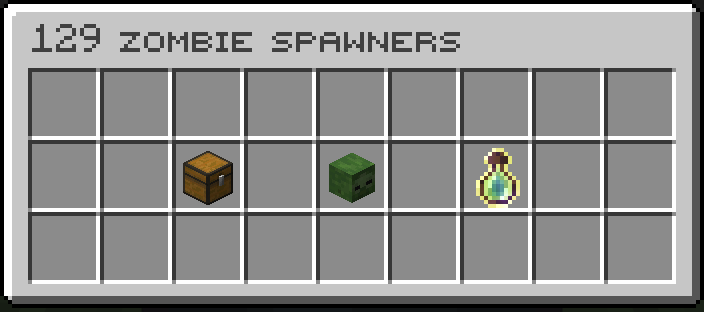 |
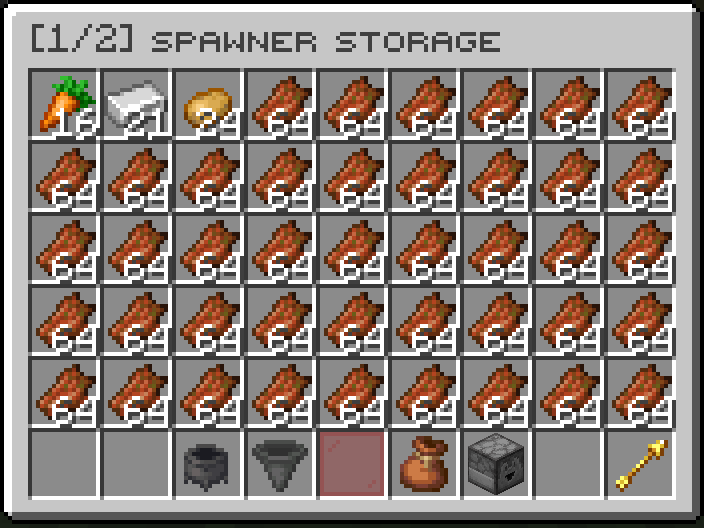 |
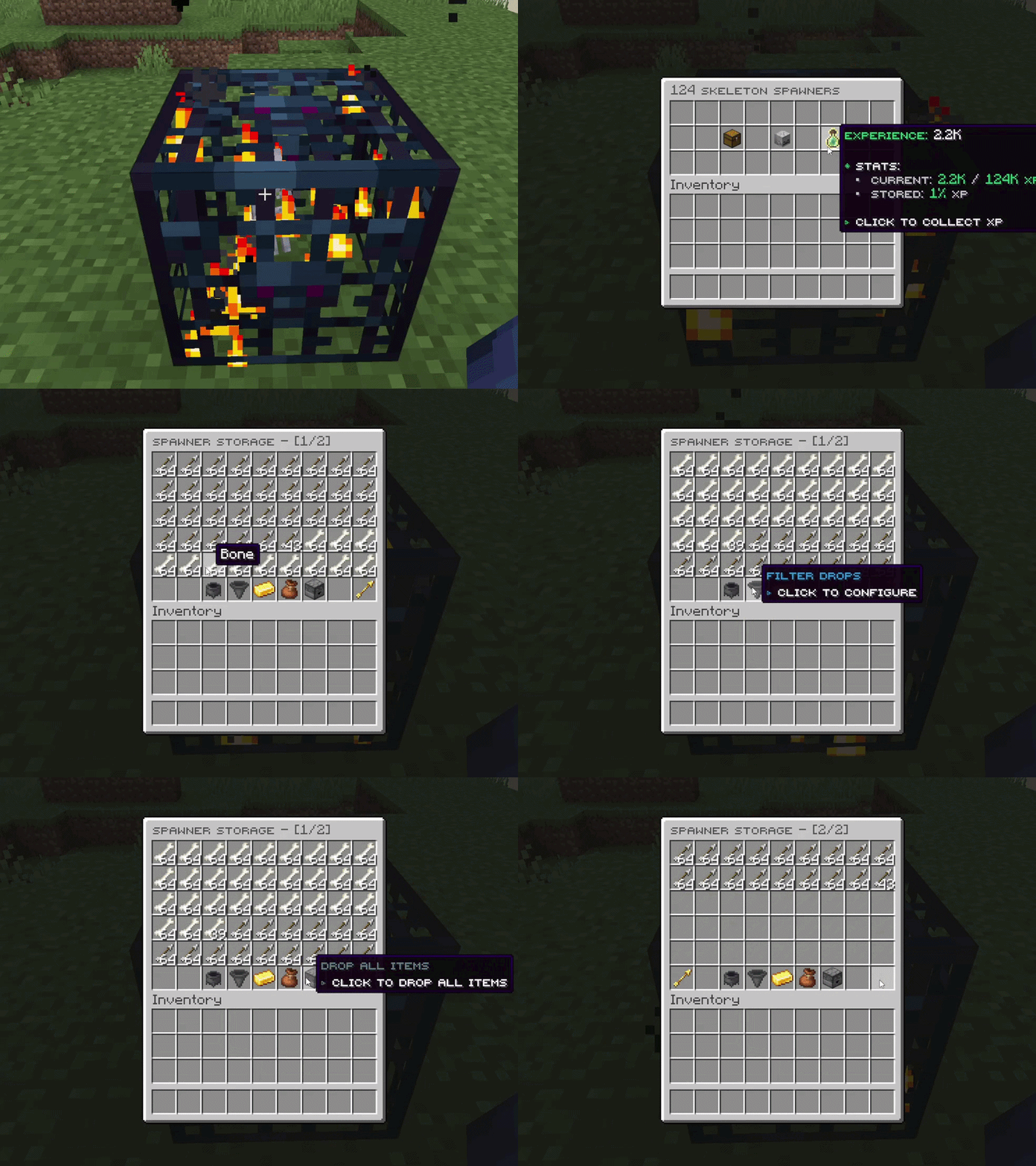
堆叠功能
- 手动堆叠: 手持同类型的另一个刷怪笼右键点击现有刷怪笼即可堆叠。潜行状态下可将手中整组刷怪笼全部加入堆叠。
- 堆叠菜单: 在刷怪笼菜单中精确增加或减少特定数量的刷怪笼。
- 数值缩放: 掉落物、经验值和存储容量随堆叠数量线性增长。100 个刷怪笼产生的掉落物是单个刷怪笼的 100 倍。
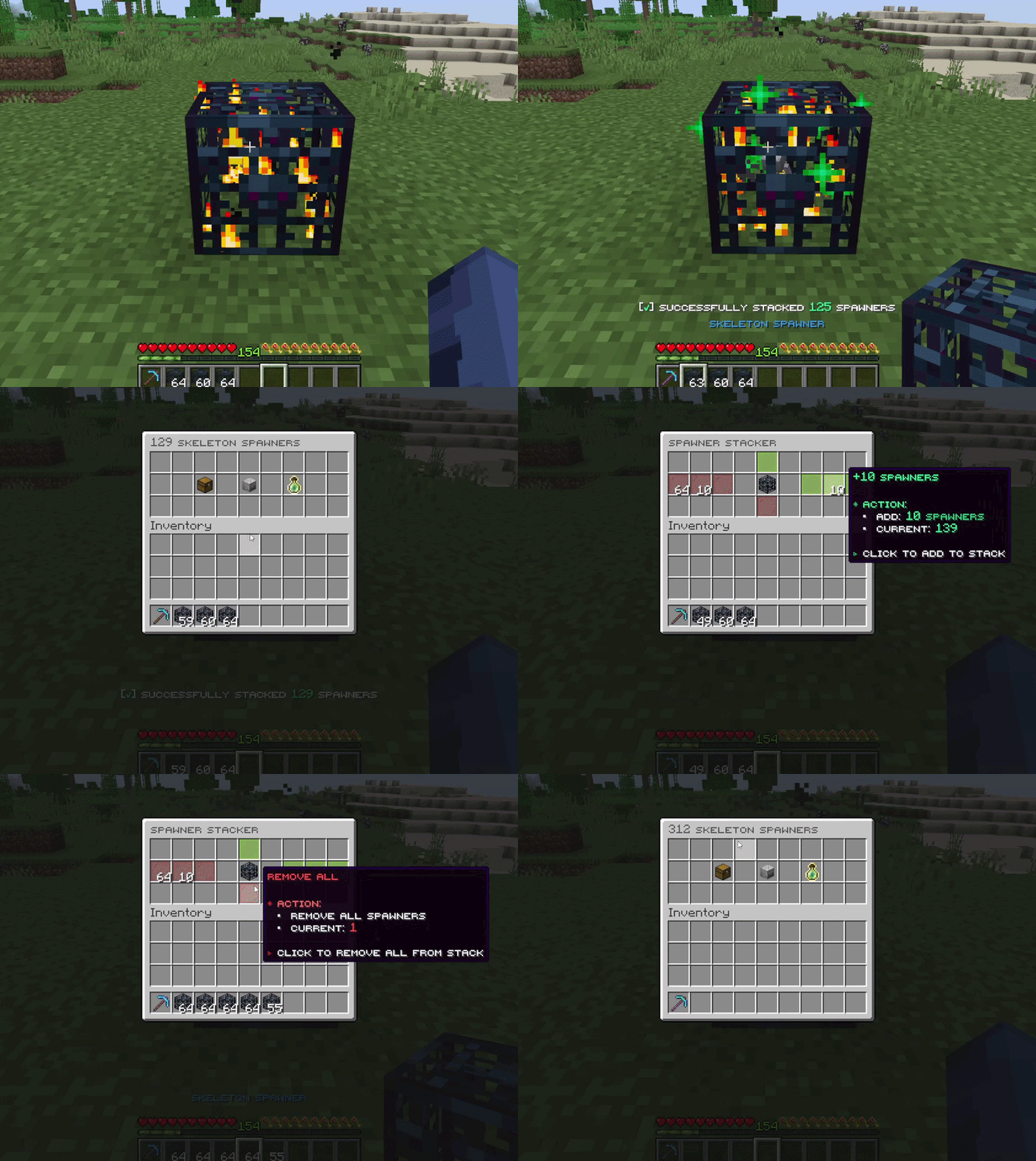
全息显示
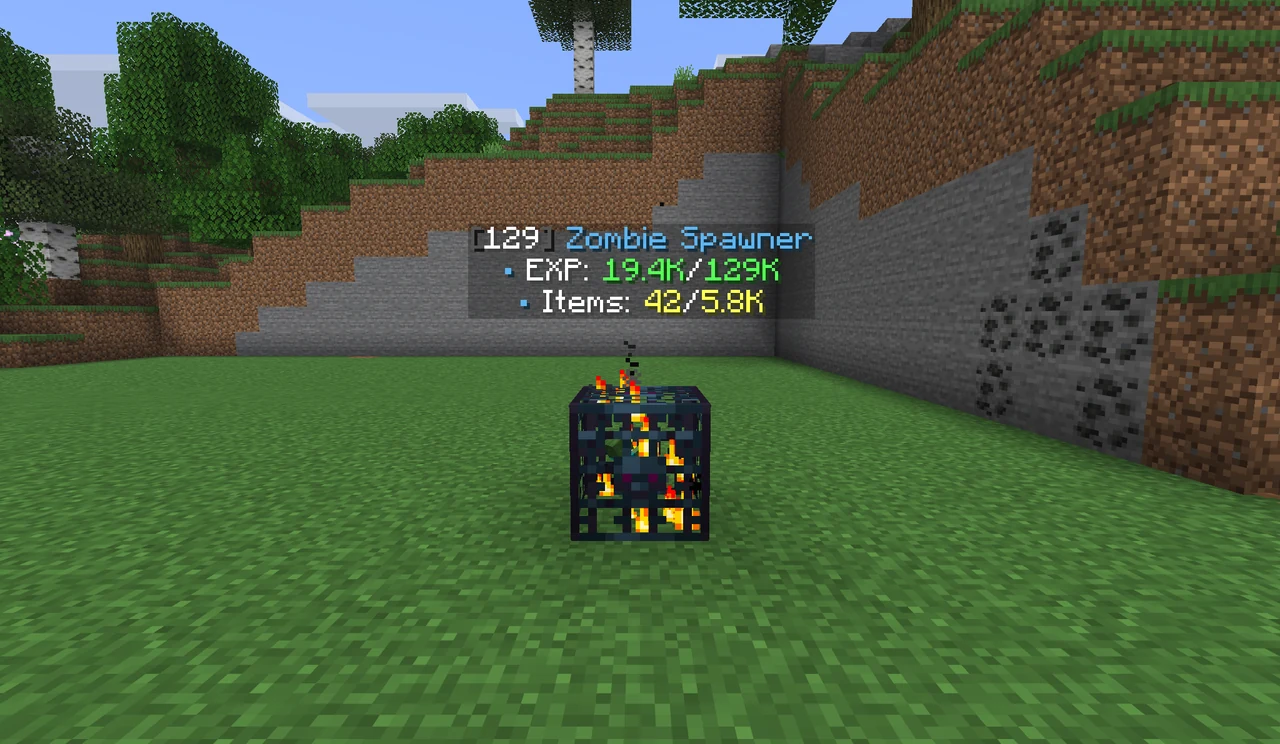
- 一目了然: 每个刷怪笼上方悬浮的文字显示其堆叠数量、存储的经验值和物品信息。
- 开关控制: 使用
/ss hologram 命令开启或关闭全息显示。位置、对齐方式和文本内容均可配置。
刷怪笼类型
- 实体刷怪笼: 支持所有原版实体,每种实体在
spawner_mobs.yml 中拥有独立的掉落表和经验值设置。
- 物品刷怪笼: 生成钻石或铁锭等材料,配置位于
spawner_items.yml。
- 自定义刷怪笼: 可为同一类实体或物品创建任意数量的额外刷怪笼变体,每种拥有独立的掉落表和名称。
- 原版刷怪笼: 正常的 Minecraft 原版刷怪笼,用于生成真实实体,适用于混合搭配场景。
- 游戏内掉落编辑器: 使用
/ss editloot 命令直接修改任何刷怪笼的掉落表,无需编辑配置文件。
管理员工具
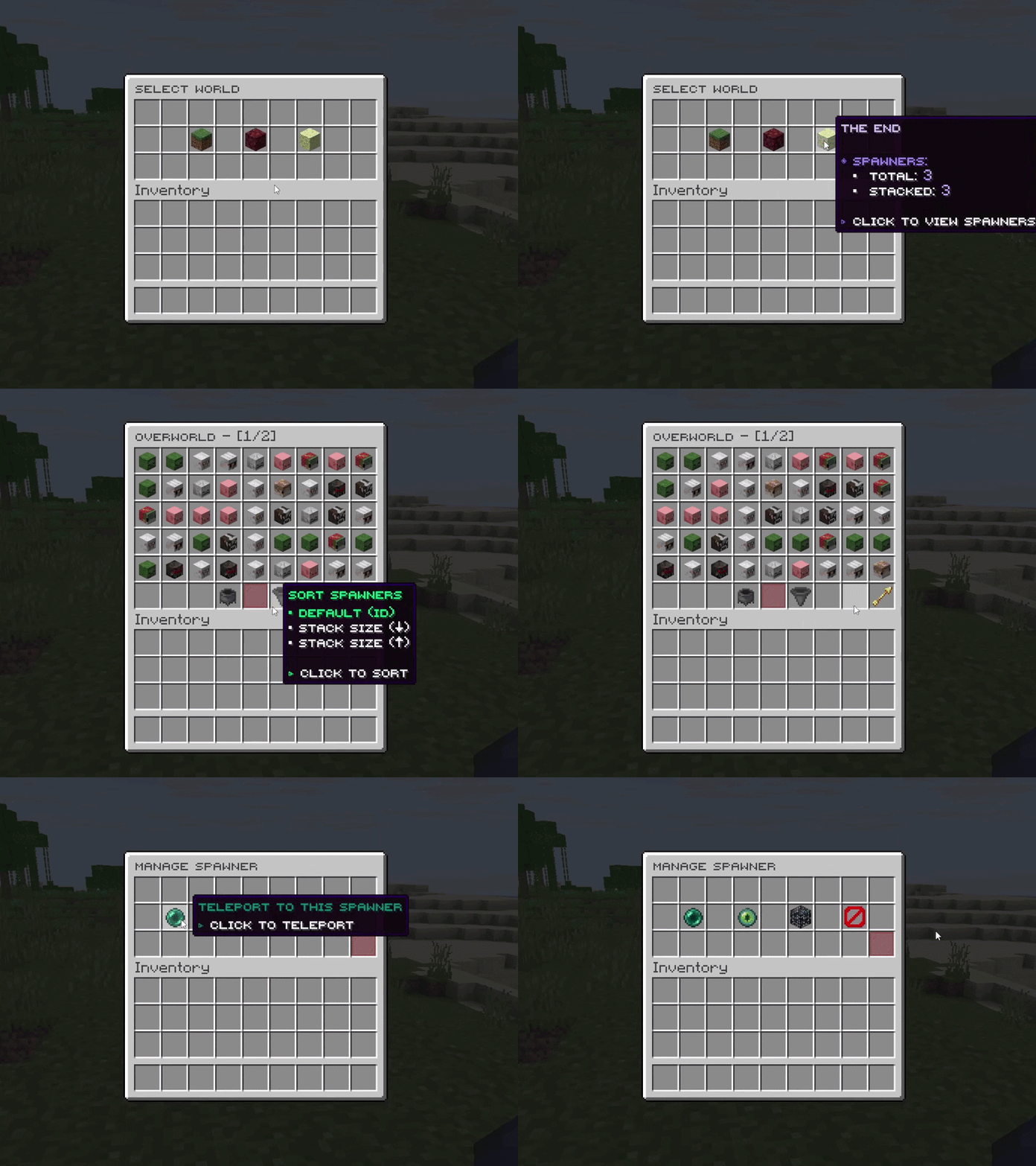
- 刷怪笼列表: 按世界浏览所有刷怪笼,筛选活跃或非活跃状态,传送至指定位置,修改或删除刷怪笼。
- 附近扫描:
/ss near 命令可穿透墙壁高亮显示刷怪笼,仅执行命令的玩家可见。
- 操作日志: 记录放置、破坏、堆叠或出售行为,日志可保存至文件或发送至 Discord Webhook。
更多特性
- 可挖掘刷怪笼: 需要精准采集附魔或特定镐子才能掉落;可设置掉落概率;潜行时可一次破坏最多 64 个堆叠中的刷怪笼。
- 漏斗抽取: 当在
config.yml 中启用后,放置在刷怪笼下方的漏斗会自动从其存储中抽取物品。
- 数据库支持: 默认使用 SQLite,网络服可选 MySQL 或 MariaDB 以共享刷怪笼数据。
- 多语言支持: 所有消息和菜单文本均可编辑,支持 MiniMessage 颜色代码,并可跟随每位玩家的游戏语言自动切换。
插件兼容性
所有集成均为可选功能,仅在对应插件已安装时才会启用。
每个插件的设置方法见 集成指南。
版本支持
| Minecraft 版本 |
Java |
服务端软件 |
支持状态 |
| 26.1 – 26.2 |
25 |
Paper, Folia, Purpur |
活跃 |
| 1.21.6 – 1.21.11 |
21 |
Paper, Folia, Purpur |
活跃 |
单个 jar 文件适用于上述所有列出的版本。ExcellentEconomy 集成需要 Java 25,因为 ExcellentEconomy 本身也要求 Java 25。
命令与权限
/ss、/spawner 和 /smartspawner 均可使用。每条命令都需要 smartspawner.command.use 权限。
| 命令 |
权限 |
功能 |
/ss give <player> <spawner> [amount] |
smartspawner.command.give |
给予玩家刷怪笼 |
/ss list |
smartspawner.command.list |
打开包含所有刷怪笼的管理员列表 |
/ss editloot <name> |
smartspawner.command.editloot |
在游戏中编辑刷怪笼的掉落物 |
/ss reload |
smartspawner.command.reload |
重新加载所有配置文件 |
| 权限 |
默认值 |
允许的操作 |
smartspawner.stack |
所有人 |
堆叠刷怪笼 |
smartspawner.break |
所有人 |
破坏刷怪笼 |
smartspawner.sellall |
所有人 |
从刷怪笼存储中出售物品 |
放置和打开刷怪笼无需任何权限。如果玩家无法放置刷怪笼,可能是其他插件阻止了该操作。
完整列表:命令 和 权限。
开发者参考
Java API,点击展开
创建刷怪笼物品、读取刷怪笼数据并监听刷怪笼事件。通过 JitPack 添加依赖:
repositories { maven { url 'https://jitpack.io' } }
dependencies { compileOnly 'com.github.OpenVdra:SmartSpawner:<version>' }
// 给予一叠 5 个刷怪笼。
SmartSpawnerAPI api = SmartSpawnerProvider.getAPI();
player.getInventory().addItem(api.createSpawnerItem(EntityType.ZOMBIE, 5));

// 仅 VIP 玩家可以将刷怪笼堆叠超过 1,000 个。
@EventHandler
public void onStack(SpawnerStackEvent event) {
    if (event.getNewStackSize() > 1000 && !event.getPlayer().hasPermission("myserver.vip")) {
        event.setCancelled(true);
    }
}
请参阅 开发者 API 指南。
快速常见问题解答
为什么刷怪笼下方会出现警告?
Mojang 在 Minecraft 1.21.4 中添加了此警告。仅 OP(管理员)玩家可见,且无法移除。请参阅 1.21.4 版本发布说明。

它能在 Folia 上运行吗?
可以。同一个 jar 文件可在 Paper、Folia 及其分支上运行。
为什么玩家无法放置刷怪笼?
SmartSpawner 从不请求放置刷怪笼的权限。如果放置被阻止,通常是其他插件在拦截,例如保护、领地或反作弊插件。
玩家可以使用自己的语言吗?
可以。启用 language_auto_detect 后,当安装了相应语言时,消息和菜单将跟随每位玩家的游戏语言。
支持的语言
英语、越南语、简体中文、土耳其语、德语和意大利语。
想要改进或添加翻译?提交拉取请求。
统计数据
来自 bStats 的实时服务器和玩家数量统计。
How It Works
- Virtual Drops: Spawners generate drops and experience straight into their own storage, without spawning a single mob.
- Player Range: A spawner only works while a player is nearby, like vanilla.
- Inspired by DonutSMP: The spawner style of DonutSMP, on any Paper or Folia server.
Spawner Menu
- One Menu: Right-click a spawner to open its storage, collect its experience and manage its stack.
- Paged Storage: Take single stacks or everything at once, sort by item, and filter out drops a player does not want.
- Selling: Sell the whole storage in one click through a supported shop or economy plugin.
- Layouts: Every slot and text can be changed, and presets such as DonutSMP are included.
| Spawner menu |
Storage |
|
|
Stacking
- By Hand: Right-click a spawner with another of the same type to stack it. Sneak to add the whole stack in your hand.
- Stack Menu: Add or remove spawners in exact amounts from the spawner menu.
- Scaling: Drops, experience and storage grow with the stack. 100 spawners give 100 times the drops.
Holograms
- At a Glance: Floating text above each spawner shows its stack size, stored experience and items.
- Toggle: Turn them on or off with
/ss hologram. Position, alignment and text are configurable.
Spawner Types
- Mob Spawners: Every vanilla mob, each with its own loot and experience in
spawner_mobs.yml.
- Item Spawners: Generate materials such as diamonds or iron, set up in
spawner_items.yml.
- Custom Spawners: Any number of extra spawners for the same mob or item, each with its own loot and name.
- Vanilla Spawners: Normal Minecraft spawners that spawn real mobs, for mixed setups.
- In-game Loot Editor: Change any spawner's loot with
/ss editloot, no file editing needed.
Admin Tools
- Spawner List: Browse every spawner by world, filter active and inactive ones, teleport to them, change them or remove them.
- Nearby Scanner:
/ss near highlights spawners through walls, visible only to the player who ran it.
- Action Logging: Record who placed, broke, stacked or sold, to log files or a Discord webhook.
More Features
- Mineable Spawners: Require Silk Touch or certain pickaxes, set drop chances, and break up to 64 from a stack while sneaking.
- Hoppers: When turned on in
config.yml, hoppers under a spawner pull items out of its storage.
- Database: SQLite by default, MySQL or MariaDB for networks that share spawner data.
- Languages: Every message and menu text is editable, with MiniMessage colours, and can follow each player's game language.
Plugin Compatibility
All integrations are optional and turn on only when their plugin is installed.
Setup for each plugin is in the integrations guide.
Version Support
| Minecraft version |
Java |
Server software |
Support status |
| 26.1 – 26.2 |
25 |
Paper, Folia, Purpur |
Active |
| 1.21.6 – 1.21.11 |
21 |
Paper, Folia, Purpur |
Active |
One jar runs on every version listed. The ExcellentEconomy integration needs Java 25, as ExcellentEconomy itself does.
Commands and Permissions
/ss, /spawner and /smartspawner all work. Every command also needs smartspawner.command.use.
| Command |
Permission |
What it does |
/ss give <player> <spawner> [amount] |
smartspawner.command.give |
Gives spawners to a player |
/ss list |
smartspawner.command.list |
Opens the admin list of every spawner |
/ss editloot <name> |
smartspawner.command.editloot |
Edits a spawner's loot in game |
/ss reload |
smartspawner.command.reload |
Reloads every config file |
| Permission |
Default |
What it allows |
smartspawner.stack |
Everyone |
Stacking spawners |
smartspawner.break |
Everyone |
Breaking spawners |
smartspawner.sellall |
Everyone |
Selling from spawner storage |
Placing and opening a spawner need no permission at all. If players cannot place spawners, another plugin is blocking it.
Full lists: Commands and Permissions.
For Developers
Java API, click to expand
Create spawner items, read spawner data and listen to spawner events. Add it from JitPack:
repositories { maven { url 'https://jitpack.io' } }
dependencies { compileOnly 'com.github.OpenVdra:SmartSpawner:<version>' }
// Give a stack of 5 zombie spawners.
SmartSpawnerAPI api = SmartSpawnerProvider.getAPI();
player.getInventory().addItem(api.createSpawnerItem(EntityType.ZOMBIE, 5));

// Only VIPs can stack spawners past 1,000.
@EventHandler
public void onStack(SpawnerStackEvent event) {
    if (event.getNewStackSize() > 1000 && !event.getPlayer().hasPermission("myserver.vip")) {
        event.setCancelled(true);
    }
}
See the Developer API guide.
Quick FAQ
Why is there a warning under spawners?
Mojang added this warning in Minecraft 1.21.4. Only OP players see it, and it cannot be removed. See the 1.21.4 release notes.
Does it work on Folia?
Yes. The same jar runs on Paper, Folia and their forks.
Why can't players place spawners?
SmartSpawner never asks for a permission to place a spawner. If placing is blocked, another plugin is stopping it, usually a protection, claim or anti-cheat plugin.
Can players use their own language?
Yes. With language_auto_detect on, messages and menus follow each player's game language when that language is installed.
Supported languages
English, Vietnamese, Simplified Chinese, Turkish, German and Italian.
Want to improve or add a translation? Open a pull request.
Statistics
Live server and player counts from bStats.

 EconomyShopGUI
 ShopGUI+
 zShop
 Vault
 ExcellentEconomy (Java 25)
 WorldGuard
 GriefPrevention
 Lands
 Towny
 Residence
 RedProtect
 SimpleClaimSystem
 FactionsUUID
 BlockLocker
 SuperiorSkyblock2
 BentoBox
 IridiumSkyblock
 PlotSquared
 minePlots
 AuraSkills
 MythicMobs
 插件

 插件
 插件
 插件
 插件
 插件
评论 0
登录后参与评分
还没有评论,来抢沙发吧