? SoulKeeper 插件 - 用户手册
? 描述
SoulKeeper 会在你死亡时自动创建虚拟坟墓,通过全息投影和抗漏斗保护来确保你的物品安全。从此再也不怕丢失物品!
✨ 主要功能
? 死亡时自动创建坟墓
?️ 临时防止其他玩家破坏
? 抗漏斗机制 - 阻止自动化提取
? 显示剩余时间的信息全息投影
? 用于收集物品的直观 GUI
? 可配置 - 更改方块类型、时间、限制等
? 多语言支持(西班牙语/英语)
? 工作原理
? 死亡时
你的物品会自动保存在虚拟坟墓中
会出现一个代表方块(默认为 lodestone)
生成包含坟墓信息的全息投影
坟墓受到 5 分钟的保护(可配置)
?️ 坟墓交互
右键点击 → 打开 GUI 以单独取出物品
Shift + 右键点击 → 瞬间收集所有物品
破坏方块 → 将所有物品掉落至地面
? 坟墓 GUI
? 45 个物品槽位
⏰ 剩余时间信息
?️ 保护状态
? 位置坐标
?♂️ “一键收集”按钮,快速收集
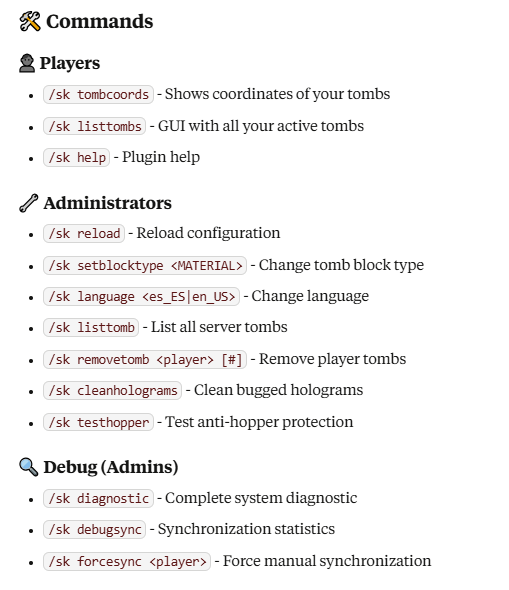
⚙️ 配置
? 坟墓
yamltomb:
block_type: "LODESTONE" # 方块类型
max_tombs_per_player: 5 # 每位玩家的最大坟墓数量
lifespan_seconds: 1800 # 30 分钟生存时间
protection:
duration_seconds: 300 # 5 分钟保护时长
block_automated_extraction_always: true # 抗漏斗机制
? 全息投影
yamlhologram:
enabled: true
lines:
- "&6&l⚰ TOMB ⚰"
- "&7Owner: &e%player%"
- "&7Time remaining: &c%time_remaining%"
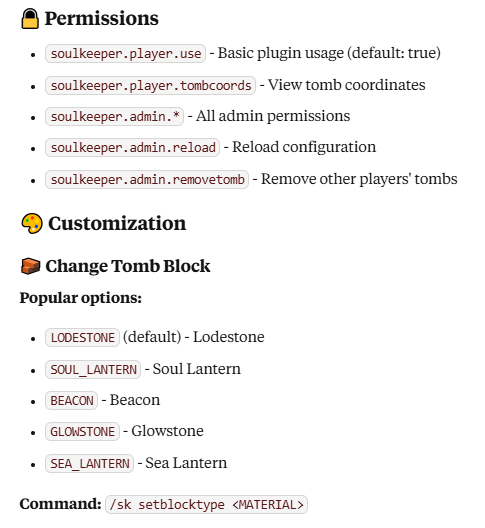
?️ 自定义资源包
✅ 兼容自定义纹理/模型
在你的资源包中使用 CustomModelData
插件会自动检测基础 Material
? 语言
西班牙语 (es_ES) - 默认语言
英语 (en_US) - 使用 /sk language en_US 切换
? 抗漏斗保护
? 阻止漏斗/潜影盒的提取操作
?️ 在受保护和未受保护的坟墓上均有效
⚙️ 可在 block_automated_extraction_always 中配置
? 技术信息
Minecraft 版本:1.16.5+
API:Spigot/Paper
存储方式:基于文件持久化的虚拟存储
性能:针对大型服务器进行了优化
? 故障排除
❓ 坟墓未出现
验证 keepInventory 是否设置为 false
检查玩家权限
确认你是否已达到坟墓数量上限
? 全息投影不可见
使用 /sk cleanholograms 清理出错的全息投影
验证 hologram.enabled 是否设置为 true
? 物品不同步
使用 /sk forcesync 进行手动同步
运行 /sk diagnostic 查看系统状态
? 小贴士
?♂️ Shift+点击是收集所有物品的最快方式
? 使用 /sk tombcoords 保存重要坐标
? 尽快收集 - 坟墓有时限
?️ 前 5 分钟完全受到保护
? 更多信息:Modrinth
?? 开发者:DeLaRosaPlay
? 版本:1.0.0
? SoulKeeper Plugin - User Manual
? Description
SoulKeeper automatically creates virtual tombs when you die, protecting your items with holograms and anti-hopper protection. Never lose your items again!
✨ Key Features
? Automatic tombs on death
?️ Temporary protection against other players
? Anti-hopper - Blocks automated extraction
? Informative holograms with remaining time
? Intuitive GUI for collecting items
? Configurable - Change block type, times, limits
? Multi-language (Spanish/English)
? How It Works
? On Death
Your items are automatically saved in a virtual tomb
A representative block appears (LODESTONE by default)
A hologram is created with tomb information
The tomb is protected for 5 minutes (configurable)
?️ Tomb Interaction
Right click → Opens GUI to take individual items
Shift + Right click → Collects all items instantly
Break block → Drops all items to the ground
? Tomb GUI
? 45 slots for your items
⏰ Time info remaining
?️ Protection status
? Location coordinates
?♂️ "Collect All" button for quick collection
⚙️ Configuration
? Tombs
yamltomb:
block_type: "LODESTONE" # Block type
max_tombs_per_player: 5 # Maximum per player
lifespan_seconds: 1800 # 30 minutes lifespan
protection:
duration_seconds: 300 # 5 minutes protected
block_automated_extraction_always: true # Anti-hopper
? Holograms
yamlhologram:
enabled: true
lines:
- "&6&l⚰ TOMB ⚰"
- "&7Owner: &e%player%"
- "&7Time remaining: &c%time_remaining%"
?️ Custom Resource Packs
✅ Compatible with custom textures/models
Use CustomModelData in your resource pack
Plugin automatically detects base Material
? Languages
Spanish (es_ES) - Default language
English (en_US) - Change with /sk language en_US
? Anti-Hopper Protection
? Blocks extraction by hoppers/hoppers
?️ Works on protected and unprotected tombs
⚙️ Configurable in block_automated_extraction_always
? Technical Information
Minecraft Version: 1.16.5+
API: Spigot/Paper
Storage: Virtual with file persistence
Performance: Optimized for large servers
? Troubleshooting
❓ Tomb doesn't appear
Verify keepInventory is set to false
Check player permissions
Review that you haven't reached tomb limit
? Holograms not visible
Use /sk cleanholograms to clean bugged holograms
Verify hologram.enabled is set to true
? Items don't synchronize
Use /sk forcesync for manual synchronization
Run /sk diagnostic to see system status
? Tips
?♂️ Shift+Click is the fastest way to collect everything
? Save important coordinates with /sk tombcoords
? Collect quickly - Tombs have limited time
?️ First 5 minutes are completely protected
? More information: Modrinth
?? Developed by: DeLaRosaPlay
? Version: 1.0.0


 插件

 插件
 插件
 插件
 插件
 插件
评论 0
登录后参与评分
还没有评论,来抢沙发吧