
为 Paper 及其兼容分支上的每种原版长矛提供统一的精致控制面板。
| 分级限制 |
战斗控制 |
附魔策略 |
持握者感知 |
| 七种独立启用的合成上限,并附带配方被拦截的反馈信息 |
分别启用的 Paper 原生刺击和突进冷却时间 |
运行时发现的白名单及最大等级 |
彩色发光、标签页名称、掉落物品以及位置广播 |
| 在线玩家背包、末影箱及嵌套潜影盒的物品统计 |
自然生成的生物长矛掉落抑制 |
强制遵守附魔台和铁砧的限制 |
垂直与水平均衡的 45 槽 GUI 界面 |
查看演示
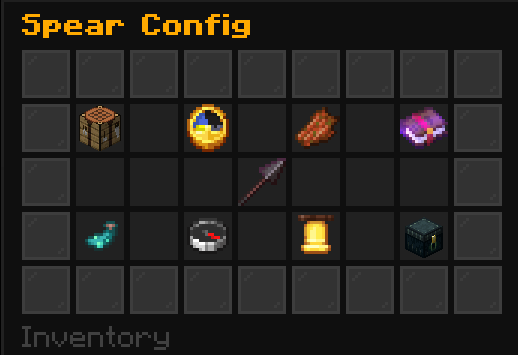
在一个居中的菜单中配置所有选项
八个镜像分类确保每个设置都在可预测的点击路径内。
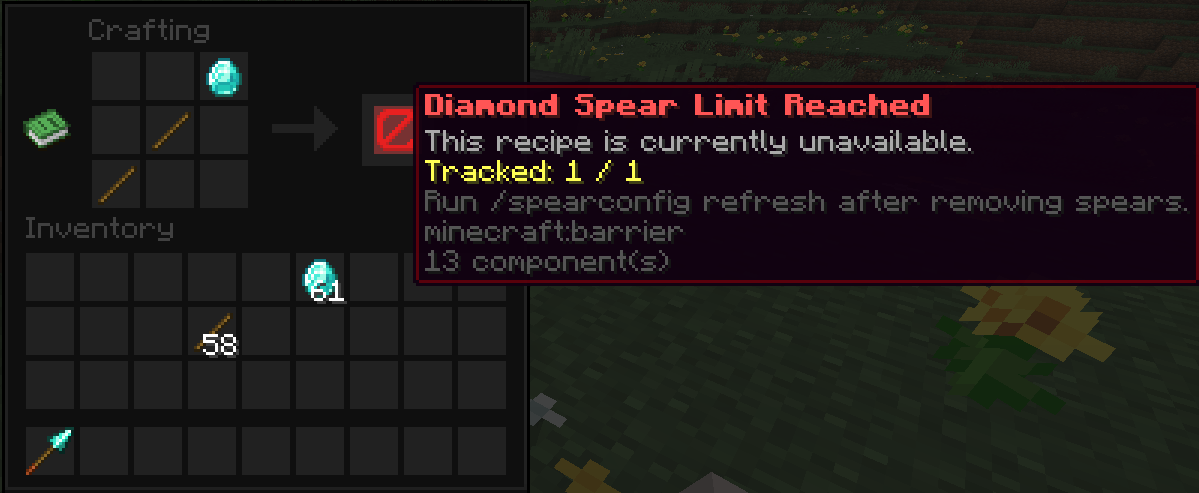
在每个分级上限处干净地停止合成
合成结果会变成解释性的屏障,同时合成事件受到防绕过保护。
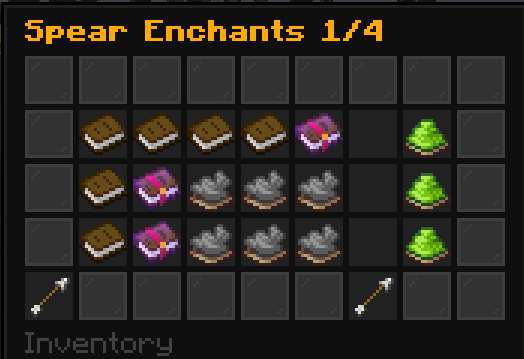
仅控制 Paper 认为有效的附魔
兼容的附魔会从运行中的服务器发现,并以可读的分页书本行呈现,包含单独的启用控制和精确等级控制。
揭示当前长矛持有者
可选的间隔广播会显示每个背包持有者的名称、维度坐标和具体坐标。

安装
- 安装 Paper、Purpur 或其他保留 Paper 26.1 API 兼容性的服务端分支。
- 从 Modrinth 下载 Spear Config。
- 将下载的 jar 文件放入服务端的
plugins/ 文件夹中。
- 启动或重启服务器,然后根据需要编辑
plugins/SpearConfig/config.yml。
支持的平台: Paper 及其兼容下游分支(包括 Purpur),适用于 Java 25 下的服务端版本 26.1–26.2。Spear Config 打包为 Bukkit 风格插件,但其战斗和注册表功能使用仅限 Paper 的 API;因此不支持纯 CraftBukkit 和 Spigot。
使用
- 授予管理员权限
spearconfig.admin;操作员默认获得该权限。
- 运行
/spearconfig gui 打开对称设置菜单。点击数字物品,在聊天栏输入精确的非负整数,或输入 cancel;同一页面会自动重新打开。
- 使用
/spearconfig set limit <tier> <amount> 设置分级的数量,然后通过 /spearconfig toggle limit <tier> 独立启用或禁用执行。有效分级为 wood、stone、copper、iron、gold、diamond 和 netherite。启用且值为 0 时禁止所有合成;未启用的限制则为无上限。
- 使用
/spearconfig set cooldown <jab|lunge> <seconds> 设置战斗延迟,然后通过 /spearconfig toggle cooldown <jab|lunge> 控制其主开关。值为 0 表示真实的零秒延迟,不会改变开关状态。
- 使用
/spearconfig toggle <setting> 对 blockmobdrop、enchantable、glow、tab 或 reveal 进行切换。使用 /spearconfig toggle announcements <chat|title> 控制两个独立的公告频道;/spearconfig toggle announcements 则同时设置两者。
- 使用
/spearconfig set color <color> 配置共享视觉颜色,使用 /spearconfig set revealinterval <seconds> 配置揭示任务。揭示最小间隔为 5 秒。
- 使用
/spearconfig whitelist add|remove|list 和 /spearconfig enchantlevel <enchantment> <max-level> 管理动态附魔策略。GUI 每页分组显示三行可读附魔,并将主附魔开关放在最后一页。
- 运行
/spearconfig refresh 进行重新统计,或在编辑 config.yml 后运行 /spearconfig reload。
根命令也接受 /spearcfg 和 /scconfig。每个命令和参数都支持 Tab 补全。
默认配置启用生物掉落阻止、长矛附魔、聊天公告和标题公告。每个合成限制和冷却主开关初始均处于禁用状态,值为 0;共享颜色为金色,位置揭示在启用时每 300 秒运行一次,兼容附魔初始允许在其自然最大等级下生效。
提示: 从 0.1 版本升级时,标量限制、冷却时间和旧版公告开关会自动迁移。现有的正值变为启用状态;现有的零值变为禁用状态但保留零值。刷新操作会扫描在线玩家的背包、末影箱和嵌套潜影盒,但不包括离线玩家或任意世界容器。
从源代码构建
需要 JDK 25。26.1 和 26.2 API 是二进制兼容的邻居,因此一个构建目标覆盖整个支持范围:
./gradlew clean build
在 Windows PowerShell 中:
.\gradlew.bat clean build
可分发 jar 写入到 build/libs/SpearConfig-<version>.jar。构建过程不会生成源码 jar。
GPL-3.0-only · 2026 · NullKeeper-dev
One polished control surface for every vanilla spear on Paper and compatible forks.
| Tier-aware limits |
Combat controls |
Enchantment policy |
Wielder awareness |
| Seven independently enabled crafting caps with blocked-recipe feedback |
Separately enabled Paper-native jab and lunge cooldowns |
Runtime-discovered allow-list and maximum levels |
Colored glow, tab names, dropped items, and position broadcasts |
| Online inventory, ender chest, and nested-shulker recounting |
Natural mob spear-drop suppression |
Enchanting-table and anvil enforcement |
A vertically and horizontally balanced 45-slot GUI |
See it in action
Configure everything in one centered menu
Eight mirrored categories keep every setting within a predictable click path.
Stop crafting cleanly at each tier limit
The recipe result becomes an explanatory barrier, while the craft event remains protected against bypasses.
Control only the enchantments Paper says are valid
Compatible enchantments are discovered from the running server and presented as readable, paginated book rows with individual allow and exact-level controls.
Reveal current spear owners
Optional interval broadcasts show each inventory owner's name, dimension, and coordinates.
Install
- Install Paper, Purpur, or another server fork that preserves compatibility with the Paper 26.1 API.
- Download Spear Config from Modrinth.
- Drop the downloaded jar into the server's
plugins/ folder.
- Start or restart the server, then edit
plugins/SpearConfig/config.yml if desired.
Supported platforms: Paper and Paper-compatible downstream forks, including Purpur, on server versions 26.1–26.2 with Java 25. Spear Config is packaged as a Bukkit-style plugin, but its combat and registry features use Paper-only APIs; plain CraftBukkit and Spigot are therefore not supported.
Use
- Give administrators
spearconfig.admin; operators receive it by default.
- Run
/spearconfig gui to open the symmetric settings menu. Click a numeric item, type an exact non-negative integer in chat, or type cancel; the same page reopens automatically.
- Set a tier's number with
/spearconfig set limit <tier> <amount>, then independently enable or disable enforcement with /spearconfig toggle limit <tier>. Valid tiers are wood, stone, copper, iron, gold, diamond, and netherite. An enabled amount of 0 blocks every craft; a disabled limit is unlimited.
- Set a combat delay with
/spearconfig set cooldown <jab|lunge> <seconds>, then control its master switch with /spearconfig toggle cooldown <jab|lunge>. A value of 0 is a real zero-second delay and does not change the switch.
- Use
/spearconfig toggle <setting> for blockmobdrop, enchantable, glow, tab, or reveal. Use /spearconfig toggle announcements <chat|title> for the two independent announcement channels; /spearconfig toggle announcements sets both together.
- Configure the shared visual color with
/spearconfig set color <color> and the reveal task with /spearconfig set revealinterval <seconds>. The reveal minimum is 5 seconds.
- Manage the dynamic enchantment policy with
/spearconfig whitelist add|remove|list and /spearconfig enchantlevel <enchantment> <max-level>. The GUI groups three readable enchantment rows per page and places the master enchanting switch on the last page.
- Run
/spearconfig refresh to recount, or /spearconfig reload after editing config.yml.
The root command also accepts /spearcfg and /scconfig. Every command and argument supports tab completion.
The default configuration enables mob-drop blocking, spear enchanting, chat announcements, and title announcements. Every craft-limit and cooldown master switch starts disabled with a value of 0; the shared color is gold, position reveals run every 300 seconds when enabled, and compatible enchantments start allowed at their natural maximum levels.
Tip: Upgrading from 0.1 automatically migrates scalar limits, cooldowns, and the former announcement switch. Existing positive values become enabled; existing zero values become disabled with a retained value of zero. A refresh scans online player inventories, their ender chests, and nested shulker boxes, but not offline players or arbitrary world containers.
Build from source
Requires JDK 25. The 26.1 and 26.2 APIs are binary-compatible neighbors, so one build targets the full supported range:
./gradlew clean build
On Windows PowerShell:
.\gradlew.bat clean build
The distributable jar is written to build/libs/SpearConfig-<version>.jar. The build does not create a sources jar.
GPL-3.0-only · 2026 · NullKeeper-dev


 插件

 插件
 插件
 插件
 插件
 插件
评论 0
登录后参与评分
还没有评论,来抢沙发吧