
InfoGuide
版本:2.4
如果您想查看其实际效果,请加入我们的 Minecraft 服务器: minesrv.almuramc.com
概述
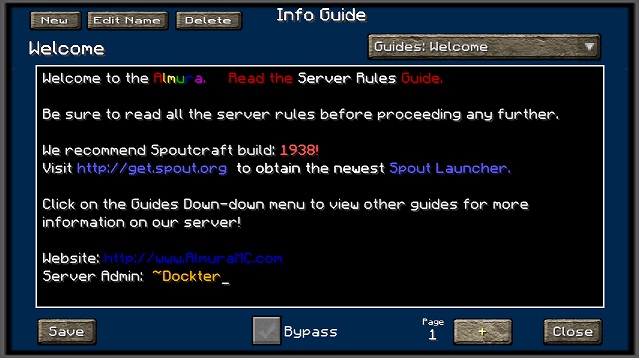
InfoGuide 旨在为玩家提供一个资源库,方便他们查找关于其所玩服务器的相关信息。管理员无需让玩家在网站和插件命令行的 Wiki 之间来回切换,只需使用此插件,将关键信息发布到指南中,玩家便可在需要时随时查阅。
此插件允许管理员实时添加、编辑和删除指南,而无需停止或启动服务器来向所有用户推送新信息。服务器管理员还可以直接在插件为其指南生成的 .yml 文件中剪切和复制信息。
Spoutcraft & SpoutPlugin

立即获取 Spoutcraft & Spoutplugin! >> 获取 Spout!
如何使用?
目前,一旦您将 InfoGuide 插件安装到服务器的插件目录中,它将在用户登录时自动显示。如果用户关闭了它并希望在稍后查看,可以按 F12 键来查看指南。此选项可在 Spoutcraft/客户端的“控制”>“按键绑定”部分进行配置。
现已支持颜色!!您可以在文本字段中使用颜色代码,例如使用 #4 表示红色。它接受所有可能的颜色和格式代码。
命令:
在 2.4 版本发布后,我们增加了通过命令调用特定指南的功能。示例:
/InfoGuide Starter Guide for Newbies
这将打开 InfoGuide 界面,并自动加载“Starter Guide for Newbies”。
文本格式:
- BLACK = #0
- DARK_BLUE = #1
- DARK_GREEN = #2
- DARK_AQUA = #3
- DARK_RED = #4
- DARK_PURPLE = #5
- GOLD = #6
- GRAY = #7
- DARK_GRAY = #8
- BLUE = #9
- GREEN = #a
- AQUA = #b
- RED = #c
- LIGHT_PURPLE = #d
- YELLOW = #e
- WHITE = #f
- MAGIC Random Code = #k
- BOLD = #l
- STRIKETHROUGH = #m
- UNDERLINE = #n
- ITALIC = #o
- RESET to Default = #r
配置
文件:config.yml 选项:
- PromptTitle: (您的服务器名称?)
- TitleX: (用于帮助在指南窗口中居中显示标题的数值)
- DisplayOnLogin: (启用或禁用登录时显示功能)
- Hot_Key: (可配置的默认快捷键,分配给 InfoGuide,之后可在客户端的控制设置中进行更改。)
- GUITexture: 在此处设置自定义纹理或使用我的默认值。
- DefaultGuide: (指定您希望首先加载的指南名称)
- GuestGuide: 基于 InfoGuide.GuestGuide 权限的具体指南
- MemberGuide: 基于 InfoGuide.MemberGuide 权限的具体指南
- SuperMemberGuide: 基于 InfoGuide.SuperMemberGuide 权限的具体指南
- ModeratorGuide: 基于 InfoGuide.ModeratorGuide 权限的具体指南
文件:users.yml
- 这是我们在允许用户在登录时绕过 InfoGuide 屏幕时使用的配置文件。请参阅下方关于权限节点的信息。
文件:guides.yml(文件名根据指南标题动态生成) 选项:
- Name: (在标题和下拉菜单中显示的名称)
- Date: (指南上次修改的时间戳)
- Nr1: (存储指南信息,现在支持无限数量的页面)
权限
以下是此插件的特定权限节点列表及其各自的功能。
- infoguide.bypass = 允许用户设置登录时绕过 InfoGuide 的选项。
- infoguide.bypassall = 允许管理员强制用户或组在登录时绕过 InfoGuide。
- infoguide.edit = 允许用户对指南进行修改。
- infoguide.create = 允许用户创建新指南。
- infoguide.delete = 允许用户删除当前指南。
- infoguide.admin = 允许用户执行以上所有操作,同时覆盖任何 InfoGuide.hide 权限。
- infoguide.view = 允许用户查看所有指南 [可查看所有指南]
- infoguide.view.[guidenamehere] = 允许用户专门查看此指南,同时覆盖 InfoGuide.hide 权限。
- infoguide.hide.[guidenamehere] = 对特定组/用户隐藏此特定指南。
- infoguide.guestguide = 预设 config.yml 中的默认指南。
- infoguide.memberguide = 预设 config.yml 中的默认指南。
- infoguide.supermemberguide = 预设 config.yml 中的默认指南。
- infoguide.moderatorguide = 预设 config.yml 中的默认指南。
支持
有关此插件以及所有其他 AlmuraDev 插件的支持,请加入我们的聊天频道:
依赖项
InfoGuide
Version: 2.4
If you would like to see this in action, logon to our Minecraft server at: minesrv.almuramc.com
Overview
InfoGuide is designed to be a resource for players to go to find information about about the particular server that they are playing on. Instead of having to go back and forth between the website or looking at the Wiki's for plugin command line information, Server Administrators can use this plugin and post that crucial information into Guides that players can look at when ever they need information.
This plug allows an administrator to Add/Edit/Delete guides in real-time without having to stop/start the server to push new information out to all of your users. Server Administrators also have the ability to cut and copy information directly in the .yml files that this plugin creates for its guides.
Spoutcraft & SpoutPlugin
Get Spoutcraft & Spoutplugin Now! >> Get Spout!
How to Use?
Currently once you install the InfoGuide plugin into your servers plugin directory it will automatically appear when a user logs in. If they close it and wish to see it later you can press F12 to view the guides. This option is configurable in the Spoutcraft/client Controls > Keybind section.
Now With Color Support!!. You can use the color codes in the text fields by using #4 Red. It will accept all the possible color & formatting codes.
Commands:
With the release of version 2.4 we added the ability to call up a specific guide via a command. Example:
/InfoGuide Starter Guide for Newbies
This will open up the infoguide interface with the "Starter Guide for Newbies" being automatically loaded.
Text Formatting:
- BLACK = #0
- DARK_BLUE = #1
- DARK_GREEN = #2
- DARK_AQUA = #3
- DARK_RED = #4
- DARK_PURPLE = #5
- GOLD = #6
- GRAY = #7
- DARK_GRAY = #8
- BLUE = #9
- GREEN = #a
- AQUA = #b
- RED = #c
- LIGHT_PURPLE = #d
- YELLOW = #e
- WHITE = #f
- MAGIC Random Code = #k
- BOLD = #l
- STRIKETHROUGH = #m
- UNDERLINE = #n
- ITALIC = #o
- RESET to Default = #r
Configuration
File: config.yml Options:
- PromptTitle: (Name of your Server?)
- TitleX: (numeric value used to help center your title in the guide window)
- DisplayOnLogin: (Enable or Disable Display on Login Feature)
- Hot_Key: (Configurable Default HotKey to assign to InfoGuide, is changeable client side afterwards in Controls.)
- GUITexture: Set your Custom Texture here or use my default.
- DefaultGuide: (Specify the name of the guide you would like to load first)
- GuestGuide: Specific Guide based on InfoGuide.GuestGuide permission
- MemberGuide: Specific Guide based on InfoGuide.MemberGuide permission
- SuperMemberGuide: Specific Guide based on InfoGuide.SuperMemberGuide permission
- ModeratorGuide: Specific Guide based on InfoGuide.ModeratorGuide permission
File: users.yml
- This is the configuration file we use when you allow users to bypass the InfoGuide screen when they login. Look down further for information regarding permissions nodes.
File: guides.yml (filename is dynamic based on Guide Title) Options:
- Name: (Name Displayed in Title & Drop Down Menu)
- Date: (Date Stamp the last time the guide was modified)
- Nr1: (stores guide information, now with unlimited number of pages)
Permissions
Here's a list of specific permissions nodes for this plugin and what each does.
- infoguide.bypass = Allows the users to set the option to bypass the InfoGuide when they login.
- infoguide.bypassall = Allow admins to force users or groups to bypass the InfoGuide at Login.
- infoguide.edit = Allows the user to make changes to a guide.
- infoguide.create = Allows the user to create new guides.
- infoguide.delete = Allows the user to delete current guides.
- infoguide.admin = Allows a users to do all of the above, also overrides any InfoGuide.hide permission..
- infoguide.view = Allows users to view all guides [Can View All Guides]
- infoguide.view.[guidenamehere] = Allows User to specifically see this guide, also overrides a InfoGuide.hide permission.
- infoguide.hide.[guidenamehere] = Hides this specific guide from specific groups/users.
- infoguide.guestguide = Pre-sets the config.yml default guide.
- infoguide.memberguide = Pre-sets the config.yml default guide.
- infoguide.supermemberguide = Pre-sets the config.yml default guide.
- infoguide.moderatorguide = Pre-sets the config.yml default guide.
Support
Support for this and all other AlmuraDev plugins can be found by joining our chat channel here:
Dependencies

下载 InfoGuide
下载 InfoGuide
下载 InfoGuide
下载 InfoGuide
下载 InfoGuide
下载 InfoGuide
下载 InfoGuide
下载 InfoGuide
下载 InfoGuide
下载 InfoGuide
- 添加了通过 /infoguide 命令调用特定指南的功能。使用方式为 "/infoguide 在此处输入名称"
感谢 NinjaGrinch 提供此功能的 PR。
关于这个资源的讨论、问题反馈与使用心得
还没有讨论,来发第一帖吧
你是这个资源的作者?登录后可认领此资源。
相似资源
 插件

PacketEvents 是一款专为 Minecraft Java 版打造的协议库,旨在简化数据包的处理与传输。
 插件
ExyliaPlugins 的库。
 插件
通过对话框或铁砧界面帮助你的 Anthme
 插件
重新定义服务器上的生物运输方式。使用高度可定制的口袋道具,安全地捕获、存储和释放任何实体。
 插件
为基于 Spigot/Paper/Folia 的服务器添加对 Vivecraft 的支持
 插件
用于绘制游戏内地图或在浏览器中随探索实时进行地图绘制的实时地图。
评论 0
登录后参与评分
还没有评论,来抢沙发吧