预览
信息
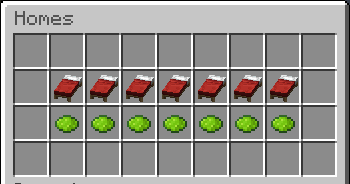
Stellar Homes 是一款轻量级且现代化的 Minecraft 家园管理插件,专为 Paper 服务器打造。玩家可以通过一个简易的箱子图形用户界面(GUI)来管理编号家园,在其中创建家园、传送至家园以及通过确认菜单删除家园。
该插件支持基于权限的家园数量限制、十六进制颜色格式、可配置的传送延迟、移动取消传送、操作栏通知、EssentialsX 家园导入功能,以及通过 menus.yml 完全自定义的 GUI 菜单。
服务器管理员可以自定义 GUI 标题、物品名称、物品描述、材质、槽位和菜单音效,而无需编辑插件代码。这使得 Stellar Homes 非常适合希望拥有简单但精致家园系统的生存、角色扮演(RPG)、多人生存(SMP)和社区服务器。
特性
- 使用编号家园槽位的 GUI 家园菜单
- 从 GUI 设置、传送至或删除家园
- 带有“确认”、“取消”和“返回”按钮的删除确认 GUI
- 可选的 /sethome 和 /delhome 命令用法
- 基于权限的最大家园数量限制,范围从 1 到 7 个家园
- 支持十六进制颜色的可配置消息
- 操作栏传送倒计时
- 可配置的传送延迟
- 玩家移动时取消传送
- 可通过 menus.yml 自定义 GUI 文本、描述、材质、槽位和音效
- 支持 EssentialsX 家园导入
- 用于重载、列出和删除玩家家园的管理员工具
命令
玩家命令
/home
打开家园 GUI。
/homes
打开家园 GUI。
/sethome [number]
在当前位置设置一个家园。如果未提供编号,插件将使用下一个可用的家园槽位。
/delhome <number>
删除选定的编号家园。
/importhomes
如果您已安装 EssentialsX 并拥有相应权限,则导入您现有的家园。
主命令
/stellarhomes help
显示插件帮助菜单。
/stellarhomes reload
重载 config.yml 和 menus.yml。
/stellarhomes import
从 EssentialsX 导入家园。
/stellarhomes delete <player> [number]
删除特定玩家的一个指定家园;如果未提供编号,则删除该玩家的所有家园。
/stellarhomes list <player>
列出某玩家保存的家园。
/stellarhomes 的别名:
/shome
/stellarhome
权限
基本访问权限
stellarhomes.member
允许基本访问 Stellar Homes 命令,并默认授予 2 个家园槽位。
最大家园数
- stellarhomes.home.1 – 访问 1 个家园槽位
- stellarhomes.home.2 – 访问 2 个家园槽位
- stellarhomes.home.3 – 访问 3 个家园槽位
- stellarhomes.home.4 – 访问 4 个家园槽位
- stellarhomes.home.5 – 访问 5 个家园槽位
- stellarhomes.home.6 – 访问 6 个家园槽位
- stellarhomes.home.7 – 访问 7 个家园槽位
插件会检查玩家拥有的最高 stellarhomes.home.<number> 权限。
导入/管理员权限
stellarhomes.import
允许从 EssentialsX 导入家园。
stellarhomes.admin
允许使用管理员功能,如重载、列出以及删除其他玩家的家园。
配置
config.yml 控制插件的一般设置,例如消息、前缀、传送延迟和移动取消功能。
menus.yml 控制 GUI,包括:
- 菜单标题
- 菜单大小
- 物品槽位
- 物品材质
- 物品名称
- 物品描述
- GUI 音效
- 音量与音调
编辑配置文件后,请使用:
/stellarhomes reload
或重启服务器。
Preview
Information
Stellar Homes is a lightweight and modern Minecraft home-management plugin built for Paper servers. Players can manage numbered homes through an easy chest GUI where they can create homes, teleport to homes, and delete homes with a confirmation menu.
The plugin supports permission-based home limits, hex color formatting, configurable teleport delay, movement-cancelled teleporting, action bar notifications, EssentialsX home importing, and fully customizable GUI menus through menus.yml.
Server owners can customize GUI titles, item names, item lores, materials, slots, and menu sounds without editing the plugin. This makes Stellar Homes a great fit for survival, RPG, SMP, and community servers that want a simple but polished homes system.
Features
GUI home menu using numbered home slots
Set, teleport to, and delete homes from the GUI
Delete confirmation GUI with Confirm, Cancel, and Back buttons
Optional /sethome and /delhome command usage
Permission-based max home limits from 1 to 7 homes
Configurable messages with hex color support
Action bar teleport countdown
Configurable teleport delay
Cancel teleport when the player moves
Customizable menus.yml for GUI text, lores, materials, slots, and sounds
EssentialsX home import support
Admin tools for reloading, listing, and deleting player homes
Commands
Player Commands
/home
Opens the homes GUI.
/homes
Opens the homes GUI.
/sethome [number]
Sets a home at your current location. If no number is provided, the plugin uses the next available home slot.
/delhome <number>
Deletes the selected numbered home.
/importhomes
Imports your existing homes from EssentialsX, if EssentialsX is installed and you have permission.
Main Command
/stellarhomes help
Shows the plugin help menu.
/stellarhomes reload
Reloads config.yml and menus.yml.
/stellarhomes import
Imports homes from EssentialsX.
/stellarhomes delete <player> [number]
Deletes one specific home from a player, or all homes if no number is provided.
/stellarhomes list <player>
Lists a player's saved homes.
Aliases for /stellarhomes:
/shome
/stellarhome
Permissions
Basic Access
stellarhomes.member
Allows basic access to Stellar Homes commands and gives 2 home slots by default.
Max Homes
- stellarhomes.home.1 – Access to 1 home slot
- stellarhomes.home.2 – Access to 2 home slots
- stellarhomes.home.3 – Access to 3 home slots
- stellarhomes.home.4 – Access to 4 home slots
- stellarhomes.home.5 – Access to 5 home slots
- stellarhomes.home.6 – Access to 6 home slots
- stellarhomes.home.7 – Access to 7 home slots
The plugin checks the highest stellarhomes.home.<number> permission a player has.
Import/Admin Permissions
stellarhomes.import
Allows importing homes from EssentialsX.
stellarhomes.admin
Allows admin features such as reload, list, and deleting other players' homes.
Configuration
config.yml controls general plugin settings such as messages, prefix, teleport delay, and movement cancellation.
menus.yml controls the GUI, including:
Menu titles
Menu sizes
Item slots
Item materials
Item names
Item lores
GUI sounds
Sound volume and pitch
After editing configuration files, use:
/stellarhomes reload
or restart the server.


 插件

 插件
 插件
 插件
 插件
 插件
评论 0
登录后参与评分
还没有评论,来抢沙发吧