一款简单却功能强大的插件,添加了一个可制作、完全可用的秒表。非常适合用于竞速、跑酷以及任何基于时间的服务器活动。
当持有秒表的玩家踩到特定方块时,秒表的计时器会自动开始和停止,让玩家的使用过程无缝衔接。
✨ 特性
- 自动计时: 站在钻石块上方的方块上时计时开始,站在绿宝石块上方时计时停止。
- 自定义素材: 拥有独特的物品模型、活跃/闲置状态的自定义纹理以及滴答声效(需要资源包)。
- 实时显示: 在操作栏中查看你的时间精确到毫秒的倒计时。
- 广播通知: 在可配置的半径范围内,向其他玩家广播玩家的开始时间和最终成绩。
- 损坏机制: 如果在激活状态下将秒表从主手移除,秒表会“损坏”,以此鼓励公平竞技。
? 使用方法
- 合成秒表。
- 在主手中持有它。
- 站在钻石块上方的方块上来开始计时。
- 站在绿宝石块上方的方块上来结束计时。你的成绩将在聊天框中宣布!
警告! 丢弃或从主手移动激活状态的秒表会导致其损坏。
⚙️ 安装
- 下载插件的
.jar 文件。
- 将其放入服务器的
plugins 文件夹中。
- 下载并安装配套的资源包(来自 releases 页面)。这是获取自定义纹理和音效所必需的。
- 重启服务器。
?️ 合成配方
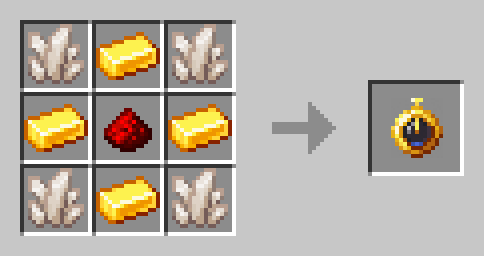
?️ 配置与管理
配置文件 (config.yml)
locale: 插件语言。指定与 lang 文件夹中的文件相对应的语言代码(例如 en、ru、uk)。
update-frequency-ticks: 计时器更新频率(以刻为单位),用于操作栏显示。数值越低,显示越流畅,但会略微增加负载。(20 刻 = 1 秒)。
message-distance: 半径(以方块为单位),在此范围内的其他玩家将看到关于秒表开始、结束或损坏的消息。
resource-pack-manager: 资源包的命名空间。通常为 minecraft。
命令
/stopwatch reload
重新加载插件的配置,包括语言文件。需要 stopwatch.admin 权限。
权限
stopwatch.admin: 授予使用 /stopwatch reload 命令的权限。默认情况下,该权限会赋予所有服务器操作员。
❤️ 特别感谢
特别感谢 Vahgard,他制作了原始的 DataPack!
A simple yet powerful plugin that adds a craftable, fully functional stopwatch. Perfect for races, parkour, and any time-based server events.
The stopwatch's timer starts and stops automatically when a player holding it steps on specific blocks, making it seamless for players to use.
✨ Features
- Automatic Timer: The timer starts when stepping above a Diamond Block and stops on an Emerald Block.
- Custom Assets: Features a unique item model, custom textures for active/idle states, and a ticking sound (Resource Pack required).
- Real-Time Display: See your time tick down to the millisecond in your action bar.
- Broadcasts: Announce player start times and final results to others within a configurable radius.
- Breaking Mechanic: The stopwatch “breaks” if removed from your main hand while active, encouraging fair play.
? How to Use
- Craft the stopwatch.
- Hold it in your main hand.
- Step on the block above a Diamond Block to start the timer.
- Step on the block above an Emerald Block to finish. Your result will be announced in chat!
Warning! Dropping or moving the active stopwatch from your main hand will break it.
⚙️ Installation
- Download the plugin's
.jar file.
- Place it into your server's
plugins folder.
- Download and install the accompanying resource pack (from releases) on your server. It is required for the custom textures and sounds.
- Restart your server.
?️ Crafting

?️ Configuration & Management
Configuration (config.yml)
locale: Plugin language. Specify the language code (e.g., en, ru, uk) that corresponds to a file in the lang folder.
update-frequency-ticks: Timer update frequency in the action bar (in ticks). A lower value provides a smoother display but slightly increases the load. (20 ticks = 1 second).
message-distance: The radius (in blocks) within which other players will see the start, finish, or break messages for the stopwatch.
resource-pack-manager: The namespace for the resource pack. This is typically minecraft.
Commands
/stopwatch reload
Reloads the plugin's configuration, including language files. Requires the stopwatch.admin permission.
Permissions
stopwatch.admin: Grants access to the /stopwatch reload command. It is given to all server operators by default.
❤️ Special Thanks
Special thanks to Vahgard, who made the original DataPack!
评论 0
登录后参与评分
还没有评论,来抢沙发吧
