? Synix: 终极 Minecraft-Discord 同步插件
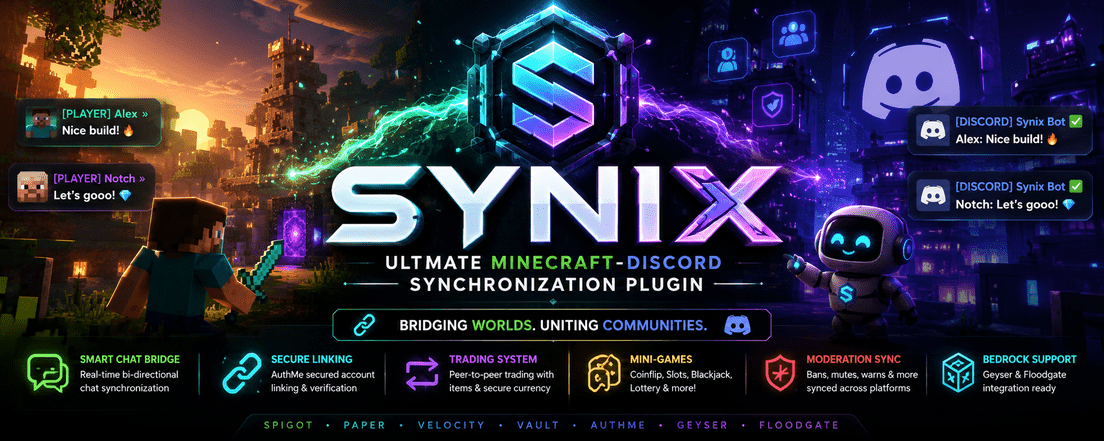
Synix 通过一个安全、功能丰富且高性能的嵌入式 JDA 机器人,将你的 Minecraft 服务器(Spigot/Paper)与 Discord 公会连接起来。体验无缝的聊天桥接、强大的游戏内和 Discord 管理、高级的物品/货币交易系统、由 AuthMe 保护的安全链接流程以及小游戏。
主要功能 = ? 集成经济小游戏、智能聊天桥接、? 交互式点对点交易
? 核心功能
- ?️ 智能聊天桥接:双向聊天,支持干净的 Markdown 格式、附件支持以及服务器状态更新。
- ? AuthMe 安全链接:通过 DM(私信)进行账户验证,包含动态验证码和直接的 AuthMe API 验证——不存储明文密码。
- ? 交互式点对点交易:通过私密 Discord DM 进行安全交易,支持物品交换(支持 NBT、离线库存)和使用 JDA Modals 进行的 Vault 货币安全转账。
- ? 集成经济小游戏:玩 Coinflip(抛硬币)、Coinflip(抛硬币)、Slots(老虎机)、Blackjack(21点)和 Lottery(彩票),支持 Vault 集成和动画插槽表情符号。
- ?️ 全面的管理功能:完整惩罚同步(
ban、tempban、mute、warn、kick、jail)并记录到 Discord。
- ?️ Geyser & Floodgate 兼容:内置基岩版玩家处理功能和独立的账户链接。
?️ 第 1 步:Discord 机器人设置
在安装插件之前,您必须在 Discord Developer Portal 注册您的机器人应用程序:
- 创建应用程序:
- 前往 Discord Developer Portal。
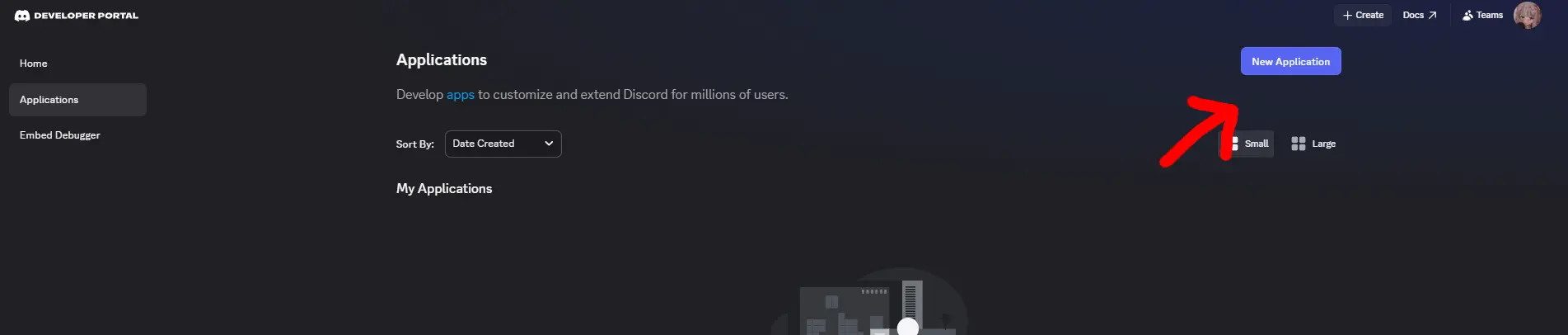
- 点击右上角的 New Application(新应用程序),为其命名(例如
MineSync Bot),并接受服务条款。
- 生成机器人令牌:
- 导航到左侧边栏中的 Bot(机器人)选项卡。
- 点击 Add Bot(添加机器人)并确认。
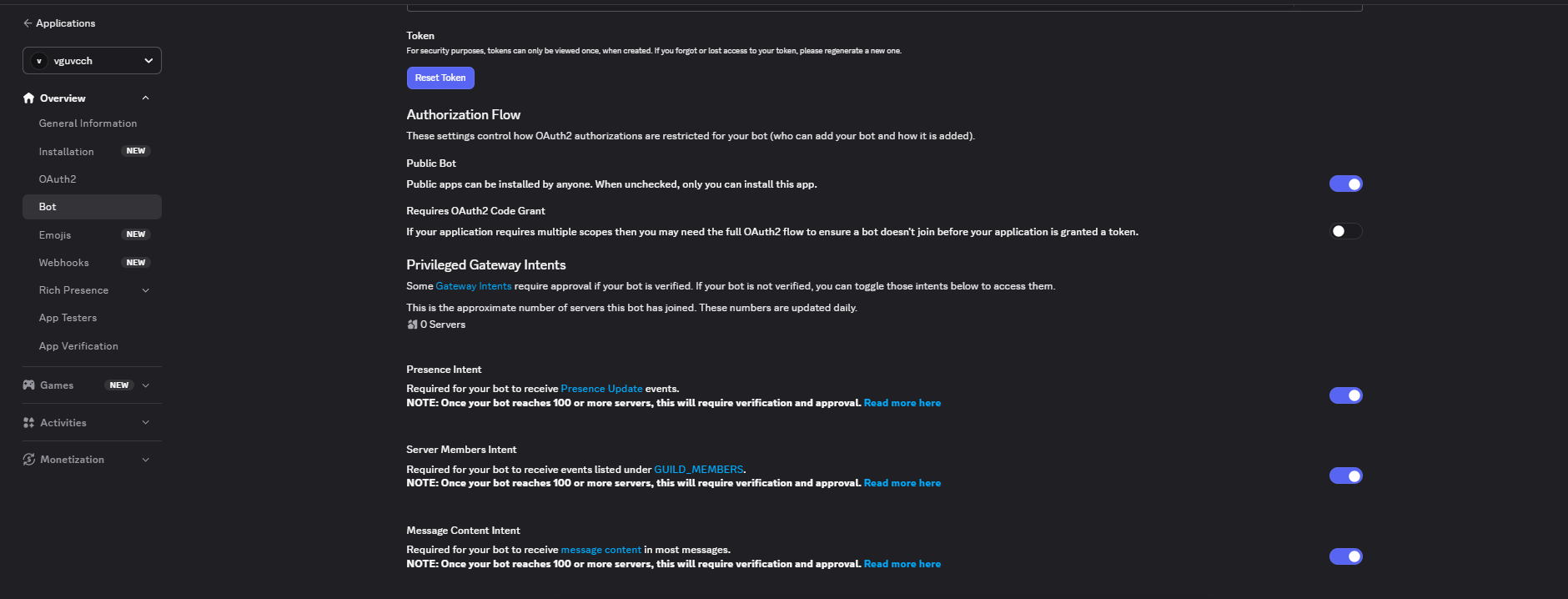
- 在 Token(令牌)下,点击 Reset Token(重置令牌)并复制生成的令牌。请保密!
- 启用网关意图 (Gateway Intents):
- 向下滚动到 Bot 页面底部的 Privileged Gateway Intents(特权网关意图)部分。
- 启用以下意图(命令、链接和桥接功能必需):
PRESENCE INTENT(在线状态意图)SERVER MEMBERS INTENT(服务器成员意图)MESSAGE CONTENT INTENT(消息内容意图)
- 点击 Save Changes(保存更改)。
- 生成邀请链接:
- 导航到 OAuth2 选项卡,然后选择 URL Generator(URL 生成器)。
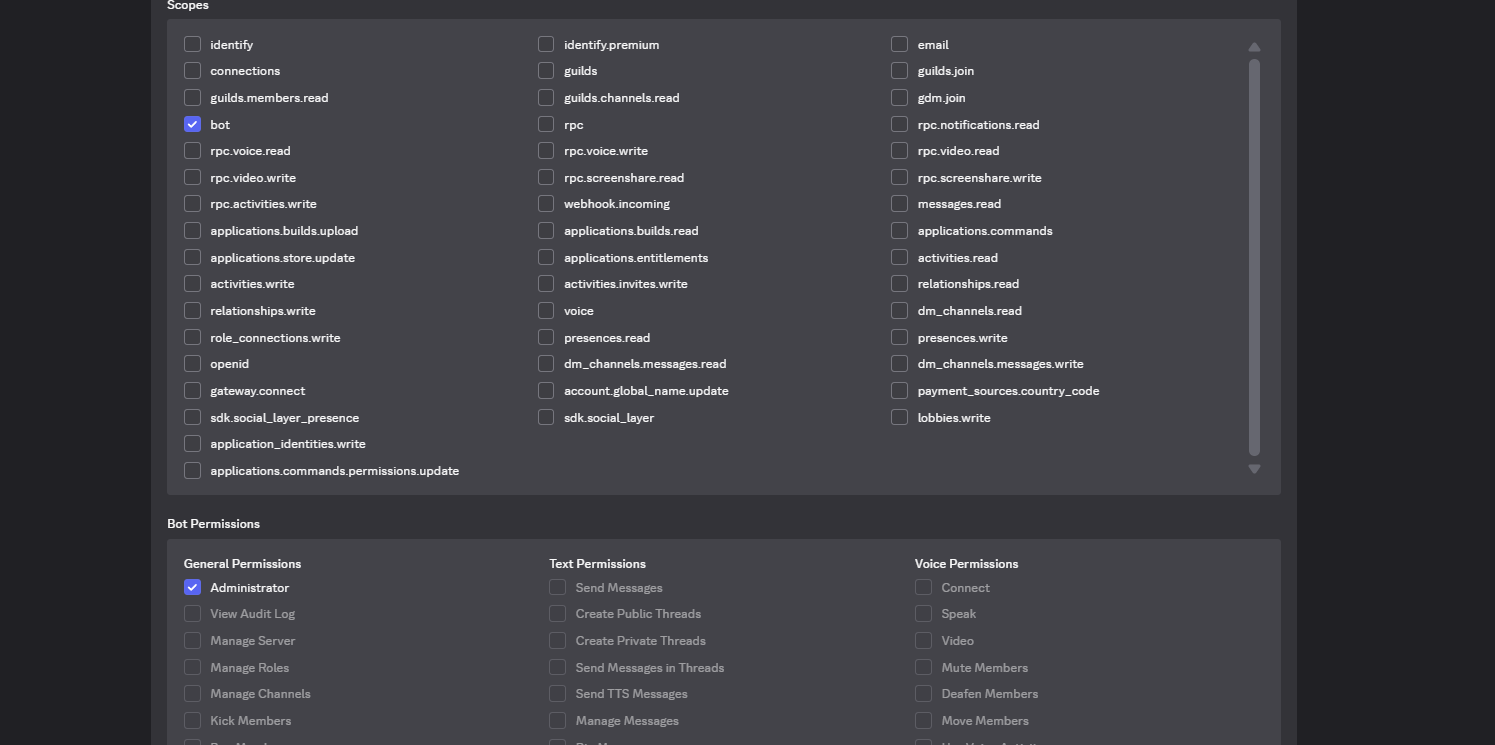
- 在 Scopes(范围)下,勾选:
botapplications.commands
- 在 Bot Permissions(机器人权限)下,勾选:
Manage Webhooks(如果启用了 webhook 格式化)Read Messages/View Channels(读取消息/查看频道)Send Messages(发送消息)Send Messages in Threads(在线程中发送消息)Create Public Threads(创建公开线程)Embed Links(嵌入链接)Attach Files(附加文件)Read Message History(读取消息历史)Use External Emojis(使用外部表情符号)Add Reactions(添加反应)Manage Messages(用于管理/清理)
- 复制底部的 URL 并在浏览器中打开,以将机器人邀请到您的 Discord 服务器。

? 第 2 步:安装
- 确保您拥有 Java 21+ 和 Paper/Spigot 1.20+ 服务器。
- 在您的
plugins/ 目录中安装以下必需的依赖插件:
- 下载或构建最新的
synix-0.1.0-SNAPSHOT.jar 并将其放入 plugins/ 目录。
- 启动服务器一次以生成默认配置文件,然后停止它。
⚙️ 第 3 步:配置指南
打开生成的 plugins/Synix/config.yml 并配置设置。以下是配置选项的完整说明:
bot:
  token: "YOUR_DISCORD_BOT_TOKEN_HERE"  # 填入从 Discord 门户复制的令牌
  prefix: "!"                           # 用于文本/传统命令的前缀(仅限公会频道)
  enabled: true                         # 启用/禁用整个 Discord 集成
  slash-commands: true                  # 注册现代 Discord 斜杠命令 (/link 等)
  status-text: "Watching the server"    # 机器人的播放/观看状态消息
  linked-role-id: "987654321012345678"  # (可选)自动分配给已链接玩家的角色的 ID

chat:
  channel-id: "123456789012345678"      # 用于 Minecraft <-> Discord 桥接的文本频道 ID
  mention-filter: true                  # 在 Minecraft 中将 Discord @提及替换为纯文本
  allow-attachments: true               # 当发送附件时通知 Minecraft 玩家
  minecraft-format: "&8[Discord]&r {user}: {message}" # Discord 消息在游戏内的外观
  discord-format: "**[{server}]** {user}: {message}"  # 游戏内聊天在 Discord 中的外观
  webhook-style-formatting: false       # 使用 webhook 在 Discord 中显示自定义玩家头像

economy:
  max-bet: 25000                        # 二十一点、掷硬币猜正反、老虎机等游戏中允许的最大下注额
  daily-reward: 1000                    # 通过 /daily 每日发放的金币数量
  enable-gambling: true                 # 切换赌博小游戏开关
  lottery-multiplier: 4.0               # 彩票的中奖倍率
  coinflip-multiplier: 1.95             # 掷硬币猜正反的中奖倍率
  slots-jackpot-multiplier: 6.0         # 击中老虎机大奖时的中奖倍率

logs:
  enabled: true                         # 为游戏内活动保留 SQLite/MySQL 审计日志
  send-to-discord: true                 # 将游戏日志(加入服务器、绑定账号、命令使用)直接发送至 Discord 日志频道
  send-ip: false                        # 是否在管理员日志中包含 IP 地址(安全风险)
  keep-days: 30                         # 自动清理超过 X 天的旧日志

database:
  type: sqlite                          # 数据库引擎:'sqlite'(本地文件)或 'mysql'(外部数据库)
  sqlite-file: "minesync.db"
  mysql:
    host: localhost
    port: 3306
    name: minesync
    username: root
    password: ""
    ssl: false

security:
  use-verification-code: true
  code-length: 5
  code-expiry-seconds: 300              # 绑定验证码的有效时长
  password-hash: bcrypt
  max-login-attempts: 5
  login-cooldown-seconds: 10
  lockout-seconds: 300
  session-duration-minutes: 30
  captcha-expiry-seconds: 300
  allow-bedrock: true                   # 允许 Bedrock 玩家通过 Geyser/Floodgate 进行绑定
  allow-java: true                      # 允许 Java 玩家进行绑定

auth:
  provider: authme                      # 账号验证引擎
  manage-minecraft-auth: false
  require-authme-for-linking: true      # 确保玩家在绑定前已在 AuthMe 注册并登录
  import-authme: false

staff:
  role-ids: ["888888888888888888"]      # 可执行管理员级别命令套件的角色 ID
  owner-role-ids: ["777777777777777777"]
  admin-role-ids: ["666666666666666666"]
  moderator-role-ids: ["555555555555555555"]
  log-channel-id: "444444444444444444"  # 发布管理操作和管理员日志的频道
  verification-channel-id: ""

moderation:
  sync-to-discord: true                 # 当 Minecraft 账号被封禁时,自动惩罚对应的 Discord 用户
  default-tempban-minutes: 60           # 临时封禁的默认回退时长

features:
  whitelist-discord-management: true    # 通过 /maintenance 切换服务器维护模式
  maintenance-whitelist-bypass-permission: "minesync.maintenance.bypass"
保存文件并 重启服务器 或运行 /synix reload 以应用更改!
? 步骤 4:账号绑定流程
为了验证玩家身份,Synix 采用了一种安全的双端验证系统,以防止未经授权的绑定并保护账号密码。

Java 版玩家
- 加入 Minecraft 服务器。
- 通过
/login <password> 使用 AuthMe 登录。
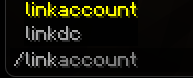
- 在游戏中输入
/link。屏幕上会打印出一个 5 位数的验证码(有效期 5 分钟)。
- 在 Discord 服务器中,使用
/link 或在公共公会频道中输入 !link。
- 机器人将发送一条包含动态验证码挑战的 私信 (DM)。
- 完成验证码挑战,并安全地输入你的 Minecraft 用户名、AuthMe 密码 和 5 位数验证码。
- 验证通过后,机器人将为你分配配置好的 已绑定角色 (Linked Role)!
Bedrock 版玩家 (Geyser/Floodgate)
- 通过 Geyser 加入服务器。
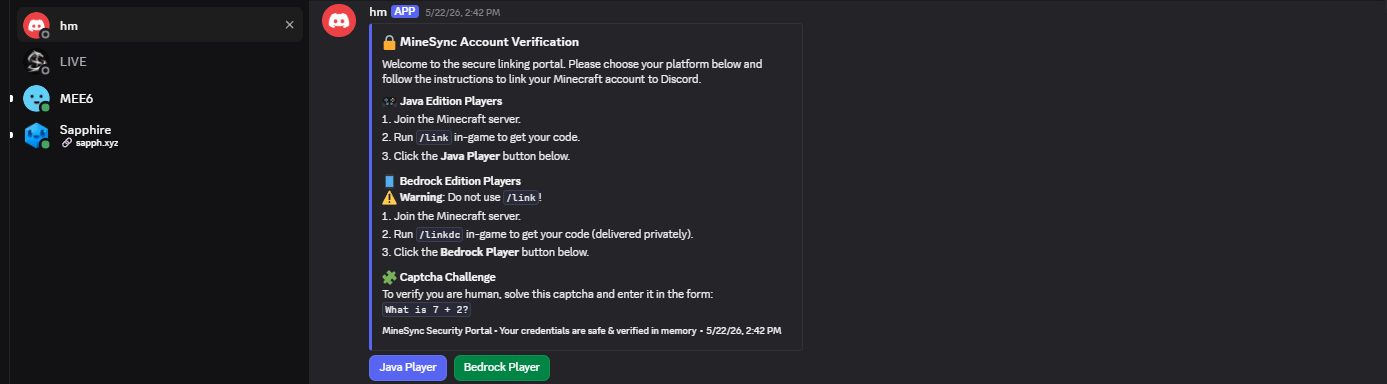
- 在游戏中输入
/linkdc(或 /link)获取你的验证码。
- 在 Discord 服务器上输入
/link,选择 Bedrock Player,完成验证码挑战并输入验证码即可完成绑定。如果使用 Floodgate 自动登录功能,Bedrock 玩家绑定时无需密码。
? 命令参考
Synix 提供了对应的 游戏内(斜杠) 命令和 Discord(斜杠/前缀) 命令。出于安全考虑,前缀命令在 Discord 私聊中不可用。
? 玩家命令
| Minecraft |
Discord |
描述 |
/link |
/link 或 !link |
启动账号绑定流程。 |
/unlink |
/unlink 或 !unlink |
解除 Discord 账号与 Minecraft 账号的关联。 |
/profile [player] |
/profile 或 !profile |
查看玩家个人资料卡片,展示 Minecraft 皮肤嵌入图。 |
/bal [player] |
/bal 或 !bal |
检查当前游戏内金币/经济余额。 |
/daily |
/daily 或 !daily |
领取每日金币奖励。 |
/serverstatus |
/serverstatus |
查看服务器 TPS、内存占用和在线时长。 |
/players |
/players |
列出所有在线玩家。 |
? 赌博与交易命令
| 命令 |
选项 |
描述 |
/coinflip |
<amount> <heads/tails> |
掷硬币猜正反,翻倍你的赌注! |
/blackjack |
<amount> |
与庄家进行动态二十一点游戏。 |
/slots |
<amount> |
转动老虎机,享受炫酷的动态表情符号! |
/lottery |
<amount> |
购买彩票,参与大奖抽取。 |
/trade |
[discord_user] [mc_username] |
发起基于私信 (DM) 的交互式交易会话。 |
/sell |
<item> <amount> |
直接从库存中将服务器物品出售换取金币。 |
?️ 管理员与管理命令
这些命令需要在 config.yml 中配置角色 ID 或拥有特定的 Minecraft OP 权限才能执行。
| Minecraft |
Discord |
所需权限 |
描述 |
/ban <player> <reason> |
/ban |
Moderator |
在游戏内永久封禁玩家,并同步至 Discord。 |
/tempban <player> <time> <reason> |
/tempban |
Moderator |
临时封禁玩家(例如 1d、12h)。 |
/mute <player> <time> <reason> |
/mute |
Moderator |
在 Minecraft 聊天中静音玩家。 |
/warn <player> <reason> |
/warn |
Moderator |
警告某位玩家。 |
/kick <player> <reason> |
/kick |
Moderator |
将玩家踢出服务器。 |
/maintenance <on/off> |
/maintenance |
Admin |
切换服务器的白名单模式。 |
/logmc <player> [event] |
/logmc |
Admin |
查询数据库日志以进行审计。 |
/eco give <player> <amount> |
/eco give |
Owner |
向玩家余额发放货币。 |
/giveaway <duration> <prize> |
/giveaway |
Staff |
启动一个互动式 Discord 抽奖活动。 |
? 动画老虎机的表情符号设置
为了让 /slots 或 !slots 游戏视觉效果更加惊艳,请将以下自定义表情符号添加到你的 Discord 服务器中。机器人将在转动时自动渲染这些表情:
8311skeletonjuggleheartsHappyblackfiredogeburger1AS_brow
? 故障排除
- 机器人在 Discord 私聊中没有响应:请确保在 Discord 开发者门户的机器人部分启用了 消息内容意图 (Message Content Intent) 和 服务器成员意图 (Server Members Intent)。同时检查用户是否启用了“允许来自服务器成员的直接消息”。
- 链接问题:在执行
/link 之前,请确保玩家已注册并登录到 AuthMe。
- 聊天桥接不起作用:验证
config.yml 中的 chat.channel-id 是否与你的 Discord 文本频道 ID 完全匹配。确保机器人在该频道拥有 发送消息 (Send Messages) 和 嵌入链接 (Embed Links) 权限。
? Synix: Ultimate Minecraft-Discord Synchronization Plugin
Synix bridges your Minecraft server (Spigot/Paper) and Discord guild with a secure, feature-rich, high-performance embedded JDA bot. Experience seamless chat bridging, robust in-game and Discord moderation, an advanced item/currency trading system, AuthMe-secured linking flows, and mini-games.
Main = ? Integrated Economy Games, Smart Chat Bridge, ? Interactive Peer-to-Peer Trading
? Key Features
- ?️ Smart Chat Bridge: Bi-directional chat with clean Markdown formatting, attachment support, and server status updates.
- ? AuthMe Secure Linking: Account verification via DM with dynamic Captchas and direct AuthMe API validation—no plaintext password storage.
- ? Interactive Peer-to-Peer Trading: Secure trades via private Discord DMs featuring item swaps (supporting NBT, offline inventories) and secure Vault currency transfers using JDA Modals.
- ? Integrated Economy Games: Play Coinflip, Coinflip, Slots, Blackjack, and Lottery with Vault integration and animated slot emojis.
- ?️ Comprehensive Moderation: Full punishment synchronizations (
ban, tempban, mute, warn, kick, jail) with Discord logs.
- ?️ Geyser & Floodgate Aware: Built-in Bedrock player handling and independent account linking.
?️ Step 1: Discord Bot Setup
Before installing the plugin, you must register your bot application on the Discord Developer Portal:
- Create Application:
- Go to Discord Developer Portal.
- Click New Application at the top right, name it (e.g.,
MineSync Bot), and accept the Terms of Service.
- Generate Bot Token:
- Navigate to the Bot tab on the left sidebar.
- Click Add Bot and confirm.
- Under Token, click Reset Token and copy the generated token. Keep this secret!
- Enable Gateway Intents:
- Scroll down on the Bot page to the Privileged Gateway Intents section.
- Enable the following intents (required for commands, linking, and bridging to function):
PRESENCE INTENTSERVER MEMBERS INTENTMESSAGE CONTENT INTENT
- Click Save Changes.
- Generate Invite Link:
- Navigate to the OAuth2 tab, then select URL Generator.
- Under Scopes, check:
botapplications.commands
- Under Bot Permissions, check:
Manage Webhooks (if webhook formatting is enabled)Read Messages/View ChannelsSend MessagesSend Messages in ThreadsCreate Public ThreadsEmbed LinksAttach FilesRead Message HistoryUse External EmojisAdd ReactionsManage Messages (for moderation/cleaning)
- Copy the URL at the bottom and open it in a browser to invite the bot to your Discord Server.
? Step 2: Installation
- Ensure you have Java 21+ and a Paper/Spigot 1.20+ server.
- Install the following required dependency plugins in your
plugins/ directory:
- Vault (along with an economy provider like EssentialsX)
- AuthMeReloaded (Highly recommended for secure player linking)
- Floodgate / Geyser (Optional, if you wish to support Bedrock players)
- Download or build the latest
synix-0.1.0-SNAPSHOT.jar and place it into the plugins/ directory.
- Start the server once to generate the default configuration files, then stop it.
⚙️ Step 3: Configuration Guide
Open the generated plugins/Synix/config.yml and configure the settings. Below is the full breakdown of the configuration options:
bot:
  token: "YOUR_DISCORD_BOT_TOKEN_HERE"  # Put the token copied from Discord Portal
  prefix: "!"                           # Prefix used for text/legacy commands (Guild only)
  enabled: true                         # Enable/Disable the entire Discord integration
  slash-commands: true                  # Register modern Discord Slash Commands (/link, etc.)
  status-text: "Watching the server"    # The bot's playing/watching status message
  linked-role-id: "987654321012345678"  # (Optional) Role automatically given to linked players

chat:
  channel-id: "123456789012345678"      # ID of the text channel for Minecraft <-> Discord bridging
  mention-filter: true                  # Replaces Discord @mentions with plain-text on Minecraft
  allow-attachments: true               # Notifies Minecraft players when attachments are sent
  minecraft-format: "&8[Discord]&r {user}: {message}" # In-game appearance of Discord messages
  discord-format: "**[{server}]** {user}: {message}"  # Discord appearance of in-game chat messages
  webhook-style-formatting: false       # Use webhooks to show custom player avatars in Discord

economy:
  max-bet: 25000                        # Maximum bet allowed in blackjack, coinflip, slots, etc.
  daily-reward: 1000                    # Coins awarded daily via /daily
  enable-gambling: true                 # Toggle gambling mini-games
  lottery-multiplier: 4.0               # Payout multiplier for the lottery
  coinflip-multiplier: 1.95             # Payout multiplier for coinflip
  slots-jackpot-multiplier: 6.0         # Payout multiplier for hitting a slots jackpot

logs:
  enabled: true                         # Keep SQLite/MySQL audit logs for in-game activities
  send-to-discord: true                 # Direct game logs (joins, linkings, commands) to Discord log channel
  send-ip: false                        # Whether to include IP addresses in admin logs (Security Risk)
  keep-days: 30                         # Auto-purge logs older than X days

database:
  type: sqlite                          # DB Engine: 'sqlite' (local file) or 'mysql' (external)
  sqlite-file: "minesync.db"
  mysql:
    host: localhost
    port: 3306
    name: minesync
    username: root
    password: ""
    ssl: false

security:
  use-verification-code: true
  code-length: 5
  code-expiry-seconds: 300              # Linking code validity duration
  password-hash: bcrypt
  max-login-attempts: 5
  login-cooldown-seconds: 10
  lockout-seconds: 300
  session-duration-minutes: 30
  captcha-expiry-seconds: 300
  allow-bedrock: true                   # Allow Bedrock players to link via Geyser/Floodgate
  allow-java: true                      # Allow Java players to link

auth:
  provider: authme                      # Account validation engine
  manage-minecraft-auth: false
  require-authme-for-linking: true      # Ensure players register & log into AuthMe before linking
  import-authme: false

staff:
  role-ids: ["888888888888888888"]      # Discord Role IDs that can run staff-level command suites
  owner-role-ids: ["777777777777777777"]
  admin-role-ids: ["666666666666666666"]
  moderator-role-ids: ["555555555555555555"]
  log-channel-id: "444444444444444444"  # Channel where moderation actions & admin logs are posted
  verification-channel-id: ""

moderation:
  sync-to-discord: true                 # Auto-punish Discord user when Minecraft account is banned
  default-tempban-minutes: 60           # Default fallback duration for tempbans

features:
  whitelist-discord-management: true    # Toggle server maintenance mode via /maintenance
  maintenance-whitelist-bypass-permission: "minesync.maintenance.bypass"
Save the file and restart your server or run /synix reload to apply!
? Step 4: The Account Linking Flow
To verify players, Synix utilizes a secure double-ended verification system that prevents unauthorized linking and protects account passwords.
Java Players
- Join the Minecraft server.
- Log in via AuthMe using
/login <password>.
- Type
/link in-game. A 5-digit verification code will print in-game (expires in 5 minutes).
- In the Discord Server, use
/link or type !link in a public guild channel.
- The bot will send you a Private Message (DM) containing a dynamic Captcha challenge.
- Complete the Captcha and enter your Minecraft Username, AuthMe Password, and 5-digit Code securely.
- Once verified, the bot grants you the configured Linked Role!
Bedrock Players (Geyser/Floodgate)
- Join the server via Geyser.
- Type
/linkdc (or /link) in-game to obtain your verification code.
- Use
/link on the Discord server, select Bedrock Player, complete the Captcha, and enter the code to finish. No password required for Bedrock linking if utilizing Floodgate autologin.
? Command Reference
Synix provides matching In-game (Slash) commands and Discord (Slash/Prefix) commands. Prefix commands do not work in Discord DMs for safety.
? Player Commands
| Minecraft |
Discord |
Description |
/link |
/link or !link |
Starts account linking flow. |
/unlink |
/unlink or !unlink |
Decouples Discord account from Minecraft account. |
/profile [player] |
/profile or !profile |
View player profile card featuring Minecraft skin embeds. |
/bal [player] |
/bal or !bal |
Checks current in-game coin/economy balance. |
/daily |
/daily or !daily |
Claims daily coin reward. |
/serverstatus |
/serverstatus |
Views server TPS, RAM usage, and online time. |
/players |
/players |
Lists all online players. |
? Gambling & Trade Commands
| Command |
Options |
Description |
/coinflip |
<amount> <heads/tails> |
Flip a coin to double your bet! |
/blackjack |
<amount> |
Play dynamic Blackjack against the dealer. |
/slots |
<amount> |
Spin the slots with stunning animated emojis! |
/lottery |
<amount> |
Purchase lottery tickets for a grand prize draw. |
/trade |
[discord_user] [mc_username] |
Initiates an interactive DM-based trade session. |
/sell |
<item> <amount> |
Sell server items directly from inventory for coins. |
?️ Admin & Moderation Commands
These commands require configured Role IDs in config.yml or specific Minecraft OP permissions.
| Minecraft |
Discord |
Role Required |
Description |
/ban <player> <reason> |
/ban |
Moderator |
Permabans player in-game + syncs to Discord. |
/tempban <player> <time> <reason> |
/tempban |
Moderator |
Tempbans player (e.g. 1d, 12h). |
/mute <player> <time> <reason> |
/mute |
Moderator |
Mutes player in Minecraft chat. |
/warn <player> <reason> |
/warn |
Moderator |
Warns a player. |
/kick <player> <reason> |
/kick |
Moderator |
Kicks player from the server. |
/maintenance <on/off> |
/maintenance |
Admin |
Toggles server whitelist mode. |
/logmc <player> [event] |
/logmc |
Admin |
Queries database logs for auditing. |
/eco give <player> <amount> |
/eco give |
Owner |
Grants currency to player balance. |
/giveaway <duration> <prize> |
/giveaway |
Staff |
Starts an interactive Discord giveaway. |
? Emoji Setup for Animated Slots
To make the /slots or !slots games visually stunning, add these custom emojis to your Discord Server. The bot will automatically render them during spins:
8311skeletonjuggleheartsHappyblackfiredogeburger1AS_brow
? Troubleshooting
- Bot isn't responding in Discord DMs: Ensure you have enabled Message Content Intent and Server Members Intent in the Discord Developer Portal under the bot section. Also check if the user has "Allow direct messages from server members" enabled.
- Linking issues: Make sure the player is registered and logged into AuthMe before executing
/link.
- Chat bridge not working: Verify that
chat.channel-id in your config.yml is an exact match for your Discord text channel ID. Ensure the bot has Send Messages and Embed Links permissions in that channel.


 插件

 插件
 插件
 插件
 插件
 插件
评论 0
登录后参与评分
还没有评论,来抢沙发吧