
TablePlays
TablePlays 是一款专为小型/私人服务器设计的插件,让玩家能够游玩各种桌面游戏!
默认配置不会自动向玩家下载资源包。请先进行配置!
功能
- 俄语翻译支持。
- 兼容 Minecraft 1.21 至 26.2(已在 1.21、1.21.1、1.21.4、1.21.11 和 26.2 上全面测试)。
- 易于使用的翻译系统,允许你将插件翻译为你自己的语言。
- 无需担心与原版兼容性的情况下更改资源包
- 轻松为游戏创建任何自定义物品(某种程度上)
- 支持服务端保存,允许你创建非常大的捆绑包
物品与合成
TablePlays 允许你创建自定义物品,但也包含一些默认物品:
点击展开
-
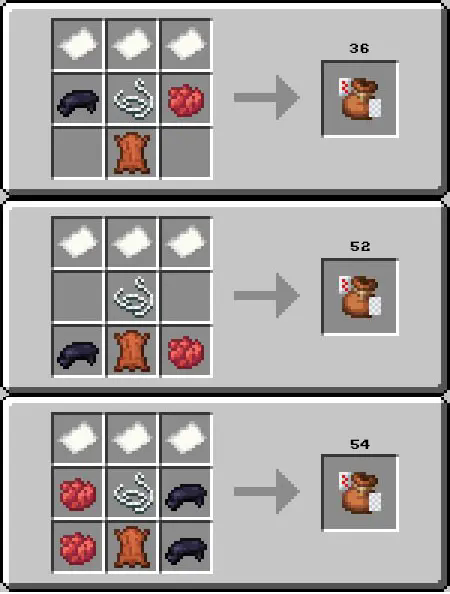
3 种不同规格的 36 张牌(排除 2-5)、52 张牌和 54 张牌(+2 大小王)的牌组
-
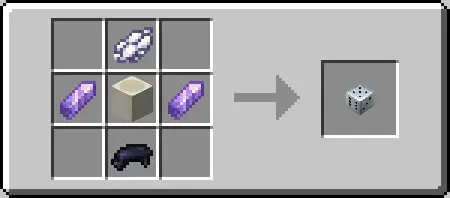
骰子
可堆叠至 4 个标准 D6 骰子。 -
-
-
-
-
-
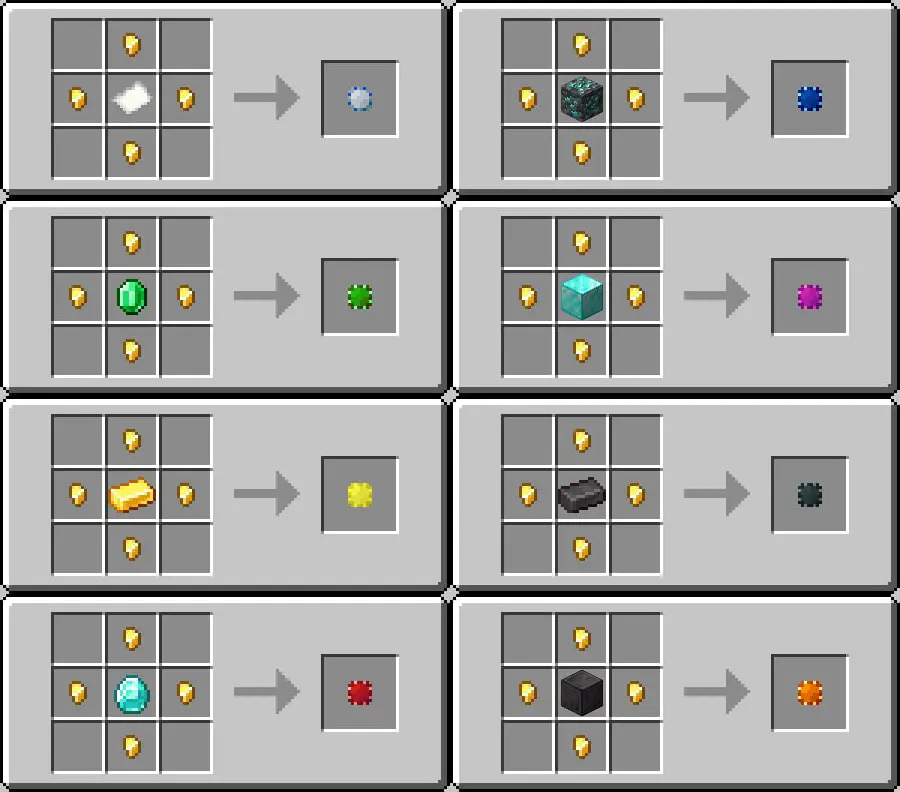
筹码 共有 8 种变体,所有筹码都可以还原为其原始材料,默认合成方式如下:
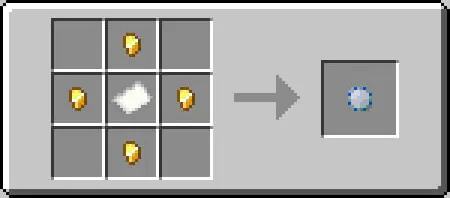
要将筹码还原为其原材料,你需要将其放入合成网格中,它将立即分解。你可以在下方看到所有 8 种变体:
所有筹码
-
筹码捆绑包
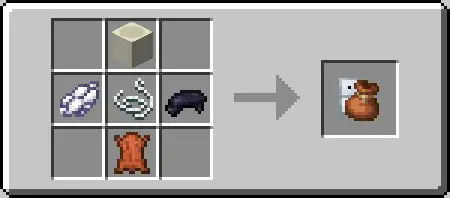
筹码捆绑包允许你将不同的筹码存储在一个物品中。 共有 9 种变体,默认合成方式如下:
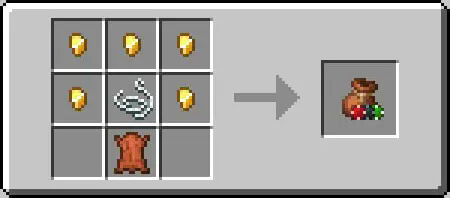
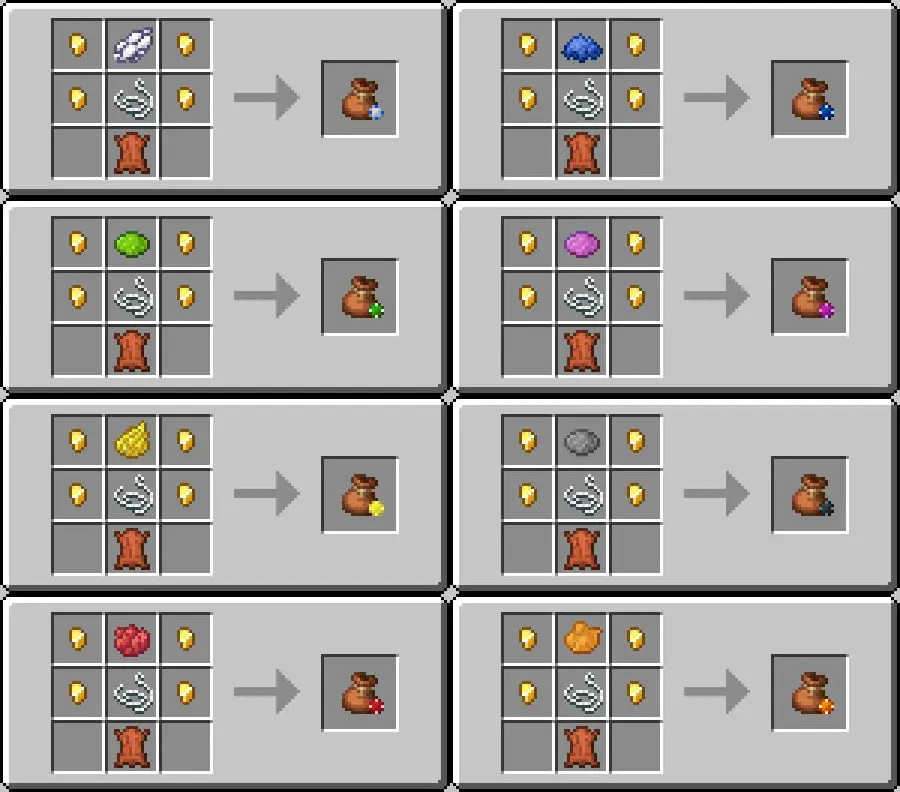
你可以将顶部的金粒替换为染料,以合成具有不同纹理的捆绑包:
筹码捆绑包
使用方法
点击展开
用法取决于具体物品,但一般来说,你可以预期以下操作:- 在主手持有物品时点击方块(或棋盘)以放置它
- 空手点击物品以拾取它
- 要从捆绑包中取出物品,应将其移至主手并点击空气或方块
- 要将物品放回捆绑包,应将捆绑包置于副手,物品置于主手。
再次强调,每个*物品都有特定的用法,因此这里我会列出一些例外情况:
- 手持筹码捆绑包时 Shift + 点击空气将隐藏卡牌点数,从而在不担心玩家作弊的情况下玩扑克等游戏。
- 手持筹码时 Shift + 点击方块或筹码以放置而不旋转,如果你想对齐它们。
- 在副手持有国际象棋棋子或跳棋时 Shift + 点击方块以将其放置在地面上,否则它们只能放置在棋盘上。
- 要拾取棋盘,你需要点击其碰撞箱的低部,或者直接点击底部。
- 如果你按住 Shift 并点击地面上的卡牌,可以翻转卡牌;或者如果你按住 Shift 并放置,可以将它们以旋转后的状态放置。
- 如果你按住 Shift,可以将捆绑包放置在地面上。
- 如果你按住 Shift 并放置,可以将跳棋转换为皇后。
安装与配置
点击展开
客户端 1. 下载与你版本匹配的资源包。 对于 Minecraft 1.21–1.21.3,使用 1.21.1 资源包;对于较新版本(例如 1.21.4),使用 1.21.4 资源包。 2. 将 ZIP 文件放入游戏的资源包文件夹中。 3. 在 Minecraft 设置中启用该资源包。注意: 每个想要自定义视觉效果的玩家都应该安装资源包。或者,你可以直接从服务器提供,以便玩家自动下载。
服务端
- 像安装其他插件一样下载并安装本插件。
- 如果需要,请配置插件:
当插件首次加载时,它会创建一个包含以下内容的 TablePlays 文件夹:
- saved.yml — 将数据存储于物品 NBT 之外。除非你清楚自己在做什么,否则请勿编辑此文件。
- config.yml — 带有详细注释的主配置文件。关键字段包括:
lang— 设置要使用的语言文件(默认为en)。items— 除非你清楚自己在做什么,否则不要触碰此项,这可能会导致一切崩溃。allow_files- 允许在服务器上保存数据,我推荐设置为true,但请警告,如果你拥有非常大的芯片包(96+ 个物品),此功能可能会导致卡顿。
- en.yml — 英语默认翻译文件。根据需要修改或添加新的翻译内容。
更改物品名称 如果你更改了翻译文本,物品不会自动更新其名称。要应用更改,请重启服务器或重新加载插件。现有物品会保留旧名称,而新生成的物品将使用更新后的文本。
资源包致谢
- fergust (Discord) — 大部分纹理和模型。
- m3vtg (Discord) — 原始资源包和数据包的组装。
- miniking1000 (me) — 使插件运行的技术更改,以及额外的纹理/模型更新。
许可协议
使用前请阅读许可协议,我对插件的合法使用有一些非常严格的条件,例如:
你的年龄平方 必须 大于 0 岁。
如果你只穿一只袜子,则不得使用本插件。
已知问题
- 与 Dynamic lights datapack 冲突
- 如果你安装了此数据包,所有物品将不会移动到其正确位置,而是停留在你的头部。要使插件正常工作,请删除该数据包。
TablePlays
TablePlays is a plugin designed for small/private servers that gives the playes the ability to play different tabletop games!
The default config does not automatically download resoruce pack to players. Configure it first!
Features
- Русский перевод.
- Compatible with Minecraft 1.21 up to 26.2 (fully tested on 1.21, 1.21.1, 1.21.4, 1.21.11 and 26.2).
- Easy to use translation system allowing you to translate the plugin to your language.
- Ability to change resouce pack without worrying about compatability with the original
- Easy creation of any custom items for your games (kinda)
- Support for server-side saving allowing you to create very big bundles
Items & Crafting
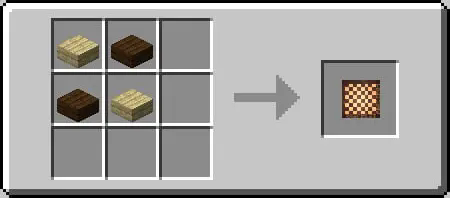
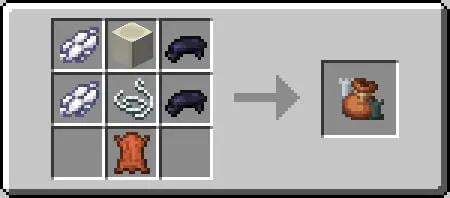
TablePlays allows you to create custom items, but also features some default ones:
Click!
-
3 different card decks of 36(2-5 excluded), 52 and 54(+2 jokers) cards
-
Dice
Stackable to 4 regular D6. -
-
-
-
-
-
Chips There are 8 variation of a chip, all of which may be uncrafted to its original material, the default craft is this:
To uncraft the chip to its materal you need to place it in the crafting grid, and it will decraft instantly. You can see all 8 variants below:
all chips
-
Chip bundles
Chip bundle allows you to store different chips in one item. There are 9 variation of a chip bundle, the default craft is this:
You can replace the top nugget with a dye to craft it with different texture:
chip bundles
How to use
Click!
The usage depends on the exact item, but in general you can expect the following:- Click on block(or board) with an item in the main hand to place it
- Click on item with empty hand, to pick it up
- To get item from a bundle you should take it to main hand and click air or block
- To put item back to bundle you should take the bundle to left hand an item to main hand.
And again, every* item have some specific usage, so I will go over some exceptions to this here:
- Shift + click on air with a card bundle in hand will hide the value of the card, allowing to play games as poker without worring about players cheating.
- Shift + click on block or chip with chip in hand to place it without rotating, if you want to align them.
- Shift + click on block with chess piece of checker in the left hand to place it on the ground, otherwise they are placeable only on the board.
- To puck up a board you need to click it low part of its hitbox, or just click at the bottom.
- You can flip cards if you hold shift and click them on the ground, or place them already rotated if you hold shift and place.
- You can place bundle on the gound if you hold shift.
- You can change checkers to queens if you hold shift and place.
Installation & Configuration
Click!
Client side 1. Download the matching resource pack for your version. For Minecraft 1.21–1.21.3, use the 1.21.1 pack; for newer versions (e.g. 1.21.4), use the 1.21.4 pack. 2. Place the ZIP file in your game’s resource packs folder. 3. Enable the resource pack in your Minecraft settings.Note: Every player who wants the custom visuals should install the resource pack. Alternatively, you can serve it directly from your server so that players download it automatically.
Server side
- Download and install the plugin as you would with any other.
- Configure the plugin if you want:
When the plugin is first loaded, it creates a TablePlays folder containing:
- saved.yml — Stores data outside of item NBT. Avoid editing this file unless you know what you’re doing.
- config.yml — Main configuration file with detailed comments. Key fields include:
lang— Sets the language file to use (default isen).items— Do not touch if unless you know what you are doing, this might break evrything.allow_files- Allows saving data on the server, I recommnedtrue, but please be warned that this feature may be used to produce lag if you have a very big chip bundles (96+ items).
- en.yml — Default translation file for English. Modify or add new translations as needed.
Changing Item Names Items won’t automatically update their names if you change translation text. To apply changes, restart the server or reload the plugin. Existing items keep their old names, while newly spawned items will use the updated text.
Resource pack credits
- fergust (Discord) — Most of the textures and models.
- m3vtg (Discord) — Original resource and data pack assembly.
- miniking1000 (me) — Technical changes to make the plugin, along with additional texture/model updates.
Licence
Please read the licence before using, I have some of the strictest condition for the legal use of the plugin such as:
Your age squared MUST be greater then 0 years.
You must not be using the plugin if you wear only 1 sock.
Known issues
- Confict with Dynamic lights datapack
- If you have this datapack installed all the items will not move to their position, but stay in your head, delete the datapack for the plugin to work

下载 TablePlays
需要联机服务器吗?
稳定流畅、一键部署,几分钟即可和朋友联机开服
最低仅需 8 元/月 即可畅快联机
下载 TablePlays
需要联机服务器吗?
稳定流畅、一键部署,几分钟即可和朋友联机开服
最低仅需 8 元/月 即可畅快联机
下载 TablePlays
需要联机服务器吗?
稳定流畅、一键部署,几分钟即可和朋友联机开服
最低仅需 8 元/月 即可畅快联机
下载 TablePlays
需要联机服务器吗?
稳定流畅、一键部署,几分钟即可和朋友联机开服
最低仅需 8 元/月 即可畅快联机
下载 TablePlays
需要联机服务器吗?
稳定流畅、一键部署,几分钟即可和朋友联机开服
最低仅需 8 元/月 即可畅快联机
下载 TablePlays
需要联机服务器吗?
稳定流畅、一键部署,几分钟即可和朋友联机开服
最低仅需 8 元/月 即可畅快联机
下载 TablePlays
需要联机服务器吗?
稳定流畅、一键部署,几分钟即可和朋友联机开服
最低仅需 8 元/月 即可畅快联机
自动加载资源包!
现在有一个功能,允许你无需手动下载即可将资源包自动加载到玩家。
目前提供 4 种模式:
- "manual"(手动)- 默认模式,像以前一样,玩家需要手动安装资源包。
- "auto"(自动)- 服务器会从我的服务器请求 更新后的 链接,然后将其发送给玩家(99% 的情况下是 Modrinth 文件的链接)。
- "external"(外部)- 你输入一个链接,玩家从中下载资源包。
- "self"(自建)- 服务器启动一个小型的 Web 服务器,在该机器上托管文件。IP、端口、路径和文件都可以配置。
关于这个资源的讨论、问题反馈与使用心得
还没有讨论,来发第一帖吧
你是这个资源的作者?登录后可认领此资源。
相似资源
 插件
自定义你的Minecraft头像!
 插件
重新定义服务器上的生物运输方式。使用高度可定制的口袋道具,安全地捕获、存储和释放任何实体。
 插件

使床在所有维度中爆炸的模组
 插件
为 Armor Poser 模组添加兼容性
 插件

SkyBlock、OneBlock、Boxed、SkyGrid、AcidIsland、CaveBlock、Poseidon、StrangerRealms——以及更多!这些只是由 BentoBox 支持的基于岛屿的游戏模式之一。来自原版 ASkyBlock 的作者。
 插件
专为 Velocity 打造的自制聊天插件,功能丰富——支持跨服群组/全局/私聊消息,并集成 LibertyBans 的禁言功能。
评论 0
登录后参与评分
还没有评论,来抢沙发吧