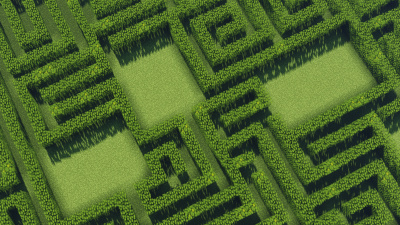
Tangled Maze 是一款让在 Minecraft 中建造迷宫变得超级简单的插件。拥有类似 WorldEdit 的法杖,你可以直观地选择想要创建迷宫的区域。你可以完全控制迷宫的形状和大小!
教程
v3.0 地下城更新:房间与战利品箱!
通过设置 /maze setting roomcount 和 /maze setting roomsize,你现在可以在你的迷宫中创建随机生成的房间!

你可以使用 /maze loot spawn 命令在整个迷宫(包括房间和死胡同)中生成战利品箱!这需要安装 "LootChest" 插件。
多样的工具
使用方形、圆形和三角形,你可以精确规划迷宫的外观。
地形适应
Tangled Maze 甚至可以在丘陵地形上生成迷宫。你不必局限于无聊的平地!
建筑设置 /maze setting
你可以精确决定墙壁和路径的尺寸。你可以随心所欲地建造巨大或微小的迷宫:
你还可以为迷宫添加屋顶,并更改地板使用的方块。
备份迷宫
使用 Tangled Maze 的高级版本,你可以将迷宫保存为文件,并在退出游戏或服务器重启后重新加载它们,继续编辑。
从控制台建造迷宫
你可以使用服务器控制台或命令方块来加载迷宫备份并从中重新生成。
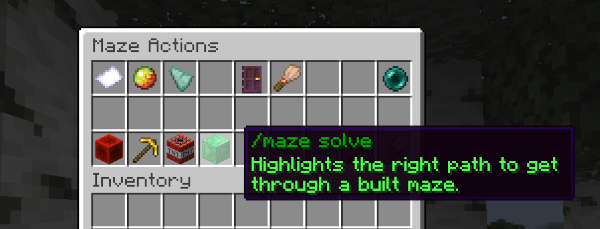
查看新的用户界面,只需单击即可运行命令。只需右键点击迷宫法杖:
命令
-
help <page> – 列出所有带有描述的命令
-
wand – 给予你一个迷宫法杖物品,用于选择将建造迷宫的区域
-
start – 将你选择的区域转换为红石块。此区域现在可以与其他形状组合,并通过点击红石边框来设置出口
-
add / cut – 从你的红石迷宫中添加或裁剪一个新的选定区域
-
tool <tool> - 设置迷宫法杖配合使用的工具
rect – 使用迷宫法杖选择的区域将形成矩形circle – 选择的区域将形成圆形triangle – 选择的区域将形成三角形brush – 在红石边框上左键和右键点击将在该位置扩展和缩小边框exit – 返回到通过点击红石边框设置出口的状态
-
setting <property> <integer> - 在建造迷宫之前配置墙壁和路径的尺寸
wallheight – 墙壁的高度(以方块为单位)wallwidth – 墙壁的厚度pathwidth – 路径的宽度roofwidth – 屋顶的厚度curliness – 路径转弯的概率(1 - 10)
-
build [-roof, -floor] <block>... - 使用你输入的方块建造迷宫。使用标志 -roof 或 -floor 为你的迷宫添加屋顶或地板。要多次使用某种方块,请在其前面添加倍数。元数据可以在方块名称后面的花括号中添加。要在游戏中查找方块的元数据,请按 F3 并阅读右上角关于你所聚焦的方块的信息
-
示例:/maze build 10*oak_log[axis=y] red_wool -floor
-
loot <spawn/respawn/remove> – 使用 "LootChest" 插件在迷宫中生成、重新生成或删除战利品箱。一次生成多个箱子,例如 /maze loot spawn 5*your_loot_chest_name。使用标志 -rooms、-deadends 或 -hallways 在迷宫的不同部分生成战利品。需要安装 "LootChest" 插件
-
unbuild [-floor, -roof] – 拆除你的迷宫或其一部分
-
reload – 重新加载配置文件或语言文件中所做的更改
-
teleport – 传送回你的平面图
-
undo – 撤销对红石迷宫的编辑
权限
- tangledmaze.build – 使用迷宫法杖和使用建造迷宫命令的权限
- tangledmaze.teleport – 传送到返回平面图的权限
- tangledmaze.reload – 重新加载配置文件或语言文件中更改的权限
配置
#sets the item for the maze wand
wand-item: golden_shovel
hover-clicking:
    #enables or disables hover clicking with the maze wand
    enabled: true
    #sets the maximum range for hover clicking
    range: 50
#sets the amount of blocks per tick that mazes will be built with
#set to -1 to let the plugin sync itself with the capacity of the server
blocks-placed-per-tick: -1
在 "language.yml" 文件中,你可以自由翻译/编辑 Tangled Maze 的消息。不应修改 materials yml 文件。
Tangled Maze is a plugin that makes building mazes in Minecraft super easy. With a wand like in WorldEdit, you can visibly select areas where you want to create a maze. You have full control over the shape and size of your mazes!
Tutorial
v3.0 Dungeons Update: Rooms & Loot Chests!
With the settings /maze setting roomcount and /maze setting roomsize you can now create randomly generated rooms in your mazes!
You can spawn loot chests all over your maze, in rooms & deadends with the /maze loot spawn command! This requires the plugin "LootChest" installed.
Variety of Tools
With squares, circles, and triangles you can plan exactly what your maze should look like.
Terrain Adaption
Tangled Maze can even generate mazes on hilly terrain. You don't have to stay on boring flat ground!
Build Settings /maze setting
You can decide exactly what dimensions you want walls and paths to have. You can go for huge or small mazes, just as you like:
You can also add roofs to your maze and change what blocks the floor will be made of.
Backing up mazes
With the premium version of Tangled Maze, you can back up your mazes as files and load them again after logging out of the game or after a server restart and continue editing them.
Building mazes from the console
You can use the server console or a command block to load a maze backup and regenerate them from there.
Checkout the new UI to run commands with a single click. Just right-click with the Maze Wand:
Commands
-
help <page> – lists all commands with descriptions
-
wand – gives you a maze wand item for selecting areas where your maze will be built
-
start – converts your selected area into redstone blocks. This area can now be combined with other shapes and exits for the maze can be set by clicking on the redstone border
-
add / cut – adds or cuts a new selected area from your redstone maze
-
tool <tool> - sets the tool your maze wand works with
rect – areas selected with the maze wand will form rectanglescircle – selected areas will form circlestriangle – selected areas will form trianglesbrush – left and right click on the redstone border will expand and shrink the border at that locationexit – goes back to setting exits by clicking on the redstone border
-
setting <property> <integer> - configures the dimensions of walls and paths before building a maze
wallheight – height of walls in blockswallwidth – thickness of wallspathwidth – how wide paths are going to beroofwidth – thickness of the roofcurliness – the chance for paths to make turns (1 - 10)
-
build [-roof, -floor] <block>... - builds your maze with the blocks you enter. Use the flag -roof or -floor to add a roof or a floor to your maze. To use a block more often, add a multiplier in front of it. Metadata can be added in curly brackets behind the block name. To look up a block's metadata in-game, press F3 and read at the top right corner about the block you focus on
-
Example: /maze build 10*oak_log[axis=y] red_wool -floor
-
loot <spawn/respawn/remove> – spawn, respawn or remove loot chests in a maze using the "LootChest" plugin. Spawn multiple chests at once, e.g., /maze loot spawn 5*your_loot_chest_name. Use the flags -rooms, -deadends or -hallways to spawn loot in different parts of the maze. Requires "LootChest" plugin installed
-
unbuild [-floor, -roof] – unbuilds your maze or a part of it
-
reload – reloads changes made in the config or the language file
-
teleport – teleports you back to your floor plan
-
undo – undoes the edit to your redstone maze
Permissions
- tangledmaze.build – permission to use the maze wand and use commands for building mazes
- tangledmaze.teleport – permission to teleport to get back to your floor plan
- tangledmaze.reload – permission to reload changes in config or language file
Config
#sets the item for the maze wand
wand-item: golden_shovel
hover-clicking:
    #enables or disables hover clicking with the maze wand
    enabled: true
    #sets the maximum range for hover clicking
    range: 50
#sets the amount of blocks per tick that mazes will be built with
#set to -1 to let the plugin sync itself with the capacity of the server
blocks-placed-per-tick: -1
In the file "language.yml" you are free to translate/edit the messages of Tangled Maze. The materials yml should not be modified.


 插件
 插件
 插件

 插件

 插件
 插件
评论 0
登录后参与评分
还没有评论,来抢沙发吧